Is Nextcloud Still the Go-To Google Drive Alternative? A Deep Dive into Self-Hosted Options
Migrating from Google to self-hosted: photos are easy, real-time office collaboration remains the hardest gap to close.
After successfully migrating Google Photos to Immich, one user hit a wall trying to replace Google Drive and Docs with Nextcloud. The root issue: Nextcloud lacks a built-in document editor and needs OnlyOffice or Collabora Online to approach Google Docs-level collaboration, with mobile experience and real-time co-editing still lagging behind. The advice is to migrate in modules — storage and photos are ready, but collaborative office work requires realistic expectations and early mobile testing.
Migrating Away from Google Drive: Where Does It Hurt?
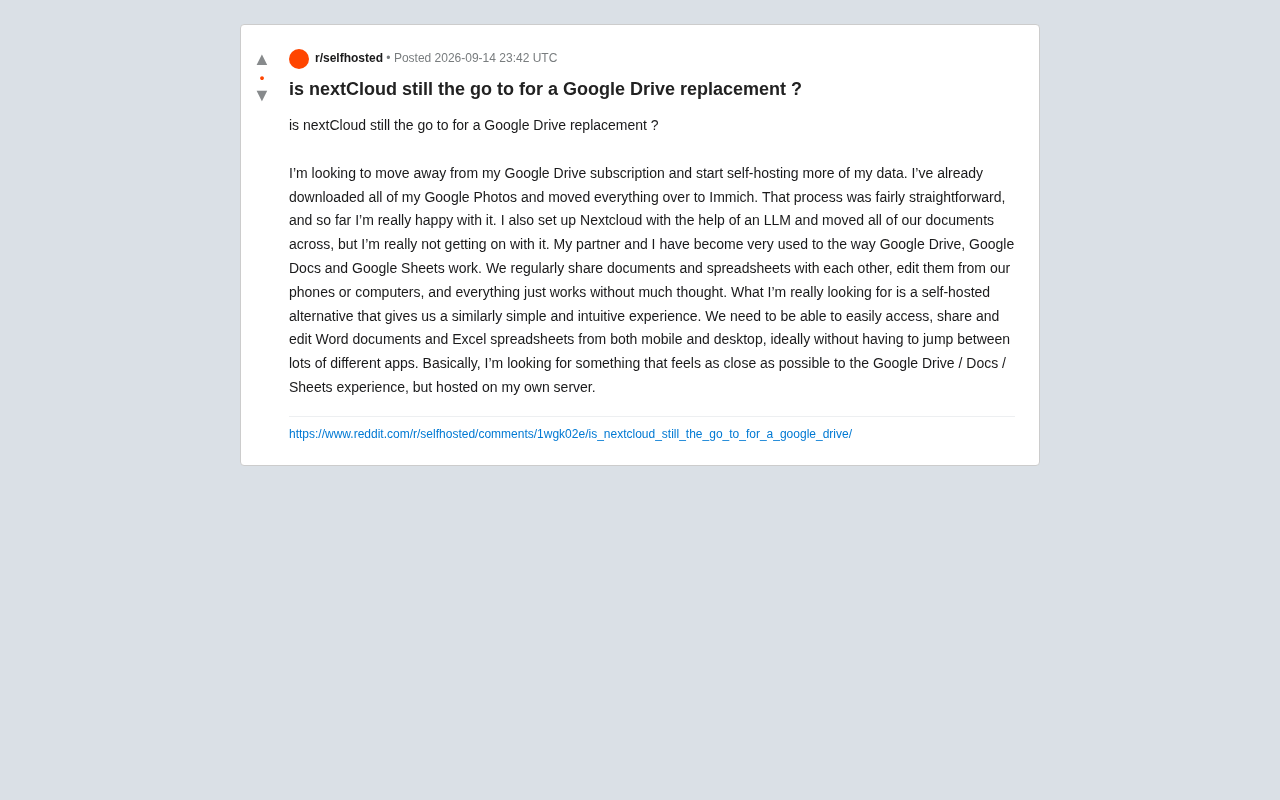
More and more users are rethinking their dependence on cloud services and trying to move their data off platforms like Google and Dropbox onto their own servers. One Reddit user shared a candid account of their migration journey: they'd exported all their Google Photos and moved everything to Immich — a smooth process they were genuinely happy with. But when they tried to replace Google Drive, Docs, and Sheets with Nextcloud, the problems started piling up.
The core tension was collaboration. They and their partner had grown accustomed to the Google ecosystem: sharing documents and spreadsheets on the fly, editing from their phone or laptop at any moment, everything seamlessly connected with almost zero friction. After setting up Nextcloud with the help of an LLM and migrating all their files over, the day-to-day experience just didn't feel right. What they really wanted was a self-hosted setup that came as close as possible to Google Drive/Docs/Sheets — easy access, sharing, and editing of Word and Excel files on both mobile and desktop, without juggling multiple apps.
This is a very relatable frustration. It exposes a persistent reality in the self-hosting world: syncing storage is easy; collaborative office work is hard.
What Nextcloud Is — and Where It Falls Short
Nextcloud is, at its core, a full-featured self-hosted collaboration platform, with file storage and sync as one of its central capabilities. It can absolutely replace the "cloud storage" part of Google Drive — uploading, downloading, syncing, sharing links, and managing permissions are all well-implemented.
The problem lies squarely in real-time collaborative editing. Nextcloud doesn't ship with a mature online document editor out of the box. You typically need to integrate one of the following:
- Collabora Online: Built on a LibreOffice engine, with solid compatibility for Office formats (docx/xlsx). Currently the more mainstream choice.
- OnlyOffice: Closer to the Microsoft Office look and feel, with generally better fidelity when rendering Word and Excel files. Many users find its collaborative editing experience closer to Google Docs.
When the original poster said Nextcloud felt unusable, it was likely because the default install didn't include a smooth online editor — or the integrated editor performed poorly on mobile. This isn't a fundamental limitation of Nextcloud; it just requires the right configuration and additional components to get close to the Google experience.
Mobile and Collaboration: The Critical Weak Spots
For the high-frequency use case of "quickly editing and sharing something from your phone," Google's ecosystem is nearly unmatched after years of refinement. Self-hosted alternatives still lag behind in mobile app maturity, real-time sync reliability, and conflict resolution during simultaneous multi-user edits. This is a reality you have to confront honestly when choosing an alternative.
Alternative Approaches Worth Considering
For this user's specific needs — online collaboration close to Google Docs/Sheets, self-hosted — a few directions are worth exploring:
Option 1: Nextcloud + OnlyOffice
If you don't want to abandon Nextcloud entirely, the most direct improvement is swapping in OnlyOffice as the online editor. Its compatibility with Office documents and overall editing experience typically outperforms the default setup, and it handles real-time multi-user collaboration reasonably well. Many community users report that this combination is what finally makes Nextcloud's office experience feel alive.
Option 2: Deploy OnlyOffice or Collabora Standalone
If Nextcloud feels too bloated overall, you can decouple document collaboration from file storage and deploy an OnlyOffice document server on its own — focusing purely on solving the "editing Word and Excel files" problem.
Option 3: Accept a Hybrid Approach
Here's an honest truth worth stating: fully replicating the seamless experience of the Google ecosystem remains extremely difficult in the self-hosted world. Photo management has excellent projects like Immich, but in the office collaboration space, the gap between open-source solutions and commercial giants is still significant. A pragmatic approach is to self-host sensitive data and photos, while keeping high-frequency collaborative documents on a commercial service with better UX for now, and migrating gradually over time.
The Self-Hosting Trade-Off: Convenience vs. Control
This user's experience is essentially the classic dilemma the self-hosting community debates over and over: How much convenience are you willing to give up for data sovereignty?
The Immich migration went smoothly because photo management has relatively simple core requirements — storage, browsing, backup, deduplication. But Google Drive/Docs/Sheets derives its value not just from storage, but from the vast collaboration network behind it, its real-time capabilities, and its cross-platform consistency. These are the result of years of engineering investment that open-source solutions simply can't fully replicate in the short term.
For anyone planning to go down this path, here's what I'd suggest:
- Migrate in modules — don't expect to replace the entire Google ecosystem in one shot;
- Photos, backups, and file sync — self-hosted solutions are mature enough for these;
- Real-time collaborative office work is the hardest part to migrate right now. Try Nextcloud + OnlyOffice first, and mentally prepare for some experience gaps;
- Test mobile UX early — this is often the deciding factor in whether family members will actually get on board.
Conclusion
Back to the original question: is Nextcloud still the top choice for replacing Google Drive? The answer is "still the mainstream option — but it needs to be configured correctly." It's more than capable of replacing cloud storage functionality, but to get anywhere close to Google Docs-level collaboration, you need to pair it with OnlyOffice or Collabora, and accept some compromises on the mobile side. For users who genuinely care about data ownership, self-hosting is worth the investment. But for workflows that depend heavily on seamless collaboration, setting realistic expectations matters far more than rushing into a migration.
Related articles

LLM Application Development: A High-Paying Career Guide for Ordinary People
LLM application development offers fresh graduates up to 35K/month, with SP offers reaching 600K. This article explains the core skills, how to break in, and how ordinary people can seize AI opportunities through learning by doing.

Say Goodbye to AI Influencer Faces: A Complete Guide to Creating Visual Assets for AI Comic Dramas from Scratch
Bilibili creator shares a full workflow for zero-basics AI comic drama visual assets: use Doubao Work skills with script-first, visual references, and real-person texture to escape AI influencer faces, then lock character and scene consistency with asset sheet layouts, weapon detail images, scene nine-grids, and cinematic color palettes.

The AI Production Pipeline Behind Great Videos: From Research to Agent Validation
AI video production isn't just a model race. This article breaks down a transferable four-step pipeline: researching professional workflows, organizing a skill checklist, configuring agents, and experimental validation—and explains how general-purpose LLMs like DeepSeek can replace paid tools to run the entire process.