isolate.video Review: Turn Screen Recordings into Product Marketing Videos in One Click

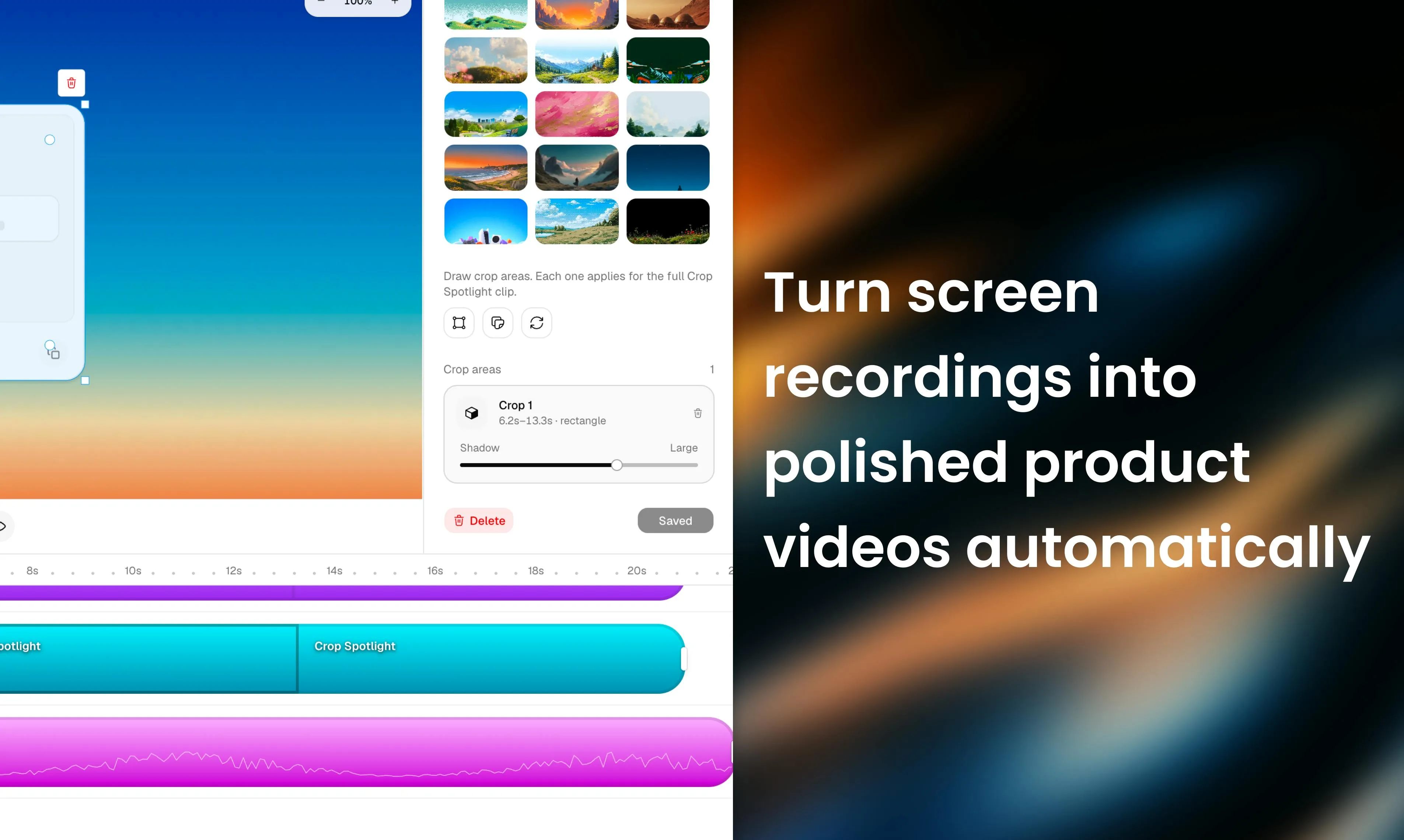
isolate.video uses AI motion zoom, music, and spotlight effects to turn screen recordings into polished product videos.
isolate.video is an end-to-end screen-recording-to-product-video tool built by an indie developer, recently reaching #8 on Product Hunt. Its three core features — auto motion zoom driven by cursor interactions, AI-matched background music, and spotlight highlighting — are designed for SaaS founders and indie developers who need to ship demo videos frequently but lack editing skills. The tool's limitations lie in its dependence on algorithmic accuracy and the risk of output homogeneity at scale.
In an era where social media dominates attention, product demo videos have become a marketing essential. Yet between a raw screen recording and a polished, eye-catching product clip lies a mountain of tedious post-production work. isolate.video — which recently landed at #8 on Product Hunt — is trying to bridge that gap through automation.
What is isolate.video: The Core Value Proposition in One Line
isolate.video has a crystal-clear positioning: transform screen recordings into polished product videos. Built by indie developer Vignesh Warar, it earned 86 upvotes and 4 comments on Product Hunt, and is categorized under design tools, social media, and marketing.
For SaaS founders, indie developers, and product managers, this tool addresses a frequent and very real pain point — how to quickly produce high-quality demo videos suitable for platforms like X (Twitter), LinkedIn, and Product Hunt, without any professional video editing skills.
isolate.video's Three Core Features Explained
Motion Zoom
The product's most impressive capability is its automated motion zoom effect. Traditional screen recordings tend to be static and flat, making it hard for viewers to focus on key interactions. isolate.video automatically detects critical interaction points in the recording — such as mouse clicks and input areas — and applies smooth zoom-in and zoom-out animations at those moments.
This effect is common in professional product demo videos, but achieving it traditionally requires manually adjusting keyframes in tools like After Effects or ScreenFlow. Automating this process dramatically lowers the barrier to entry and saves considerable time.
Background: What is Keyframe Animation? Keyframe animation is the foundational technique for creating camera movement in traditional video post-production. Editors manually mark several "key moments" on a timeline, specifying parameters like position and zoom level, and the software automatically interpolates transitions between keyframes. In tools like After Effects, this process has a steep learning curve — a 30-second demo video might require dozens of precisely tuned keyframes, taking far longer than the recording itself. isolate.video's automated approach essentially replaces this manual annotation process with computer vision algorithms — by detecting cursor paths, click events, and UI element positions, the system automatically infers where to zoom and by how much, then generates the corresponding keyframe data. This is precisely why the quality of the output is heavily dependent on algorithmic accuracy.
AI Music
Background music plays a major role in how a video feels, but copyright issues and track selection can be a headache. isolate.video includes a built-in AI music generation feature that automatically matches background music to the video's pacing — eliminating copyright concerns and saving the time spent auditioning tracks from stock libraries.
Spotlight Effects
The third feature is spotlight highlighting, which uses localized light-and-shadow contrast to direct viewers' attention toward the key element being demonstrated at any given moment. This complements the motion zoom — one handles spatial focus, the other guides visual attention.
Why isolate.video Is Worth Watching
Riding the "AI + Content Automation" Wave
isolate.video belongs to a category of tools that has surged in the past two years: using AI to automate creative work that previously required professional skills. Competing products like Screen Studio, Tella, and Descript are all vying for this market, but isolate.video bundles "auto motion zoom + AI music + spotlight" into a single end-to-end pipeline, reducing the complexity of cobbling together multiple tools.
Competitor Landscape Screen Studio, Tella, and Descript represent three distinct approaches in this space. Screen Studio focuses on beautiful pre-recording settings (auto rounded corners, shadows, device frames), emphasizing "beautification at the moment of recording." Tella combines webcam picture-in-picture with screen recording, targeting creators who need to appear on camera. Descript excels at audio/video transcription and text-based editing, making it better suited for scenarios requiring narration editing. isolate.video targets the "dynamic motion zoom automation" segment where all three are relatively weak — a clear differentiated position, though it also means its core moat is almost entirely dependent on the quality of its motion zoom algorithm.
The Indie Developer Philosophy
As a solo-built product, isolate.video embodies the "small but refined" philosophy common among today's indie developers — rather than building a sprawling video editor, it focuses on one specific use case: turning screen recordings into product videos, and making that single workflow feel effortless. This kind of vertical focus tends to build strong word-of-mouth within a specific audience.
Potential Limitations and Usage Recommendations
Despite its sharp positioning, this type of automation tool has inherent constraints. The intelligence of the auto-zoom is the make-or-break factor: if the algorithm misidentifies key regions, the result can feel disorienting, and users will still need to make manual adjustments. Additionally, the variety of AI music styles and the degree of customization available for spotlight effects will both influence how distinct the final output looks — when everyone uses the same tool, videos can start to look alike.
For professional teams who demand granular control, isolate.video may serve only as a quick-draft assistant. But for indie developers and small teams under time pressure and without editing resources, the "record and you're done" experience offers genuine appeal.
Summary: Who is isolate.video For?
isolate.video is a textbook example of what the AI content creation wave looks like in practice: hand off the repetitive labor of professional video post-production to algorithms, so creators can stay focused on showcasing their product. As marketing content becomes increasingly video-first, the value of tools like this will only grow. Whether it can stand out in a competitive field ultimately comes down to how well the automation is refined in practice and how consistently the user experience improves over time.
Related articles

LLM Application Development: A High-Paying Career Guide for Ordinary People
LLM application development offers fresh graduates up to 35K/month, with SP offers reaching 600K. This article explains the core skills, how to break in, and how ordinary people can seize AI opportunities through learning by doing.

Say Goodbye to AI Influencer Faces: A Complete Guide to Creating Visual Assets for AI Comic Dramas from Scratch
Bilibili creator shares a full workflow for zero-basics AI comic drama visual assets: use Doubao Work skills with script-first, visual references, and real-person texture to escape AI influencer faces, then lock character and scene consistency with asset sheet layouts, weapon detail images, scene nine-grids, and cinematic color palettes.

The AI Production Pipeline Behind Great Videos: From Research to Agent Validation
AI video production isn't just a model race. This article breaks down a transferable four-step pipeline: researching professional workflows, organizing a skill checklist, configuring agents, and experimental validation—and explains how general-purpose LLMs like DeepSeek can replace paid tools to run the entire process.