JS Reverse Engineering: Locating TikTok's a_bogus Encrypted Parameter in Practice

Locate TikTok's obfuscated a_bogus signature using call stack tracing and Chrome DevTools breakpoints.
Using TikTok's paginated API signature parameter a_bogus as a case study, this article walks through the full JS reverse engineering location workflow. Because the code is obfuscated, keyword search fails — the correct approach is to use path-filtered XHR breakpoints to trace the call stack frame by frame. Always inspect the XHR object rather than the string URL, since the object holds the latest state. The article also exposes a classic debugger trap: because JS objects are reference types, the Scope panel always shows current memory state, making a_bogus appear in frames before it was generated and misleading newcomers about the true generation point. Logpoints and conditional assignments help export the value to a global variable, completing the full locate-and-extract loop.
What Makes TikTok's a_bogus So Tricky
Every paginated request from TikTok's web client carries a query parameter called a_bogus. The value is long, changes with request context, and is not a random string — it's a signature computed locally by frontend JavaScript that the server validates using the same algorithm. Compared to some of its sibling fields, a_bogus is the one that really trips up beginners: it doesn't live in a Cookie or a request header, but gets spliced into the URL's query string before the request is even sent.
The scope of this topic is well-defined — there are only three things to do: locate where the value is generated, analyze the generation process, and extract the correct value. Environment patching, initialization, and prototype chains are topics for a later stage.
Step One: Pin Down the Interface in the Network Panel
Open DevTools with F12, switch to the Network panel, scroll down to trigger pagination, and a new request will appear in the list. To identify the right request, look at the response: expand it, and if you see the list data you're after, that XHR is your entry point. When people ask "how do I know this is the right interface," the answer is simply: look at the response, don't guess.
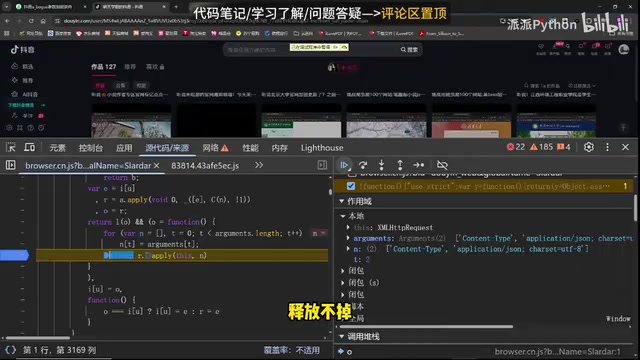
Now inspect what the request carries. Among the standard query parameters, there's a long string of seemingly meaningless characters — that's the part you need to reverse. The client sends it to the server for validation, and that's the fundamental reason JS reverse engineering is unavoidable here.
When Keyword Search Fails, Follow the Call Stack
The easiest way to locate the parameter is to do a global search for the string a_bogus. Trying this reveals nothing. After bundling and minification, the code is obfuscated — field names are assembled at runtime, so static search yields no results.
The alternative is call stack tracing. In the Sources panel, the call stack for this request shows a long chain of frames. Setting a breakpoint on the first frame causes a problem: the page gets paused before pagination is even triggered, because this URL path is shared by many requests. The fix is to filter by path — write the target interface's path as a breakpoint condition so it only pauses on a match.
What to Watch While Following the Stack
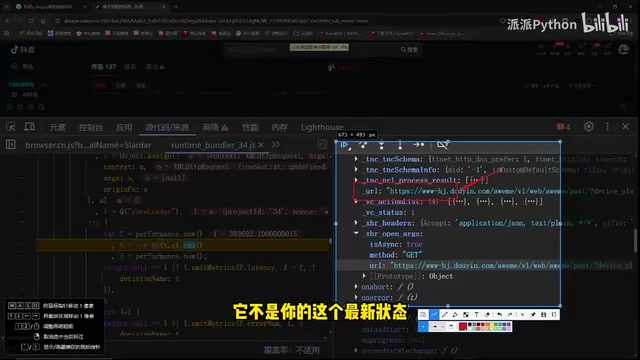
Walking up through the call frames, local variables in each frame reveal intermediate state. There's a subtle mistake to avoid here: don't focus solely on the string form of the URL — it may not reflect the latest state. The true latest state is in the XHR object itself (the payload, the arguments passed to open), because later functions are mutating the same request object by reference.
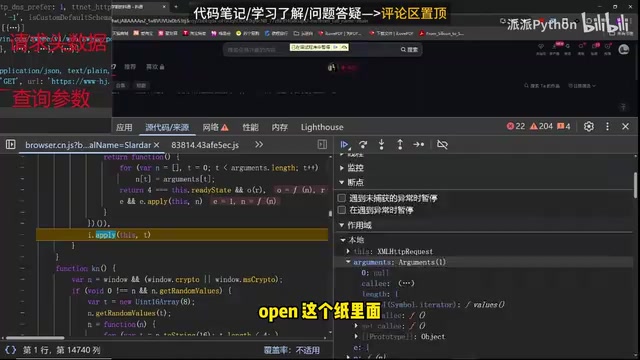
A good analogy: you lend a book to a classmate, who passes it on to someone else. Your copy is already stale — the latest state is in the object itself. So when tracing the stack, prioritize the XHR object over the string URL.
JS obfuscation is a common anti-scraping technique. Build tools like Webpack compress variable names to single letters, split and concatenate strings, and rewrite property access as array index lookups — causing key identifiers to completely vanish from static files. Field names like a_bogus are often accessed at runtime via patterns like obj[arr[42]], where arr[42] is where the string is actually stored, and arr itself may have been initialized through shift operations or encryption. This is why searching for the literal string finds nothing — it simply doesn't exist in the source. Call stack tracing bypasses the limitations of static analysis: it doesn't care what the code looks like, only which functions were actually executed in the browser for this request. No matter how heavy the obfuscation, it can't hide the signature's generation entry point from runtime behavior.
Breakpoint Strategy: XHR Breakpoints and Logpoints
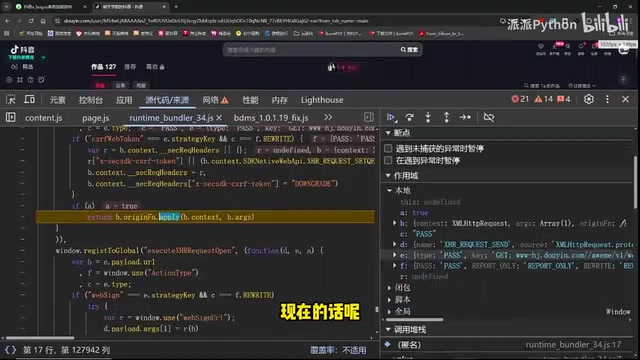
Tracing up the stack eventually leads to a JS file called bdms. It calls a method with a pattern roughly like: mount a function onto an object, pass arguments in, and the result lands in another variable. Think of it as writing d and e into n — the final output lives in the result variable and the parameter variable, so those are the two values to watch.
The recommendation here is to use a logpoint rather than a regular breakpoint: write a log expression in the condition field, print the parameter and result values with a fixed prefix for easy filtering.
After refreshing, the console will flood with output. When it pauses, you'll see a_bogus appear in the variables — that's the exact moment of creation. Going further, you can add a conditional check: if a field's name is a_bogus, assign it to a global variable so you can call it directly from the console later. At this point, the generation location is locked down.
Chrome DevTools offers two breakpoint types that are especially relevant here. Conditional Breakpoints: right-click a line number and choose "Add conditional breakpoint" — execution only pauses when the expression is truthy, ideal for intercepting only the target request in a frequently-called function. Logpoints: right-click a line number and choose "Add logpoint" — when that line executes, the expression's value is printed to the Console without pausing the page. This is highly efficient when you want to observe data flow without interrupting normal page behavior. The typical combined pattern: use a conditional breakpoint to lock onto the target frame, then switch to a logpoint to batch-collect intermediate variables, avoiding the timeout or state loss that comes from repeatedly stepping through manually.
The Debugger Illusion: Why Earlier Stack Frames Already Show the Value
This is the most valuable insight in the whole walkthrough.
Halfway through tracing, if you set a breakpoint at an earlier position and expand the scope, you might find a_bogus already present — even though execution hasn't reached the generation line yet. This leads to thinking you've found the wrong location and wasting time searching backward.
The cause is a property of the debugger itself. In JavaScript, request objects are reference types. After a_bogus is generated, the code doesn't destroy the object — it writes the value into the request object or updates the URL. Every subsequent stack frame is operating on the same object, pointing to the same memory. The debugger's sidebar shows the variable's value at the moment the breakpoint paused, not at the moment that particular frame was executing. So no matter which frame you click in the call stack, as long as it holds a reference to the same object, you'll see the final state — complete with a_bogus.
The verification method is simple: move the breakpoint to before what you believe is the generation point, refresh, expand the scope, and if the value isn't there, the location is wrong. A more rigorous approach is to add a condition so the breakpoint only fires when the URL matches the target interface, then check whether the parameter exists in scope.
This pitfall is especially unfriendly to beginners, because it causes you to dig around in a place where the generation logic simply doesn't exist.
Understanding this phenomenon requires distinguishing between value types and reference types. In JavaScript, primitive values (strings, numbers) are copied on assignment and are independent of each other. Objects and arrays are reference types — assignment only copies a pointer to the same block of memory. The XHR object is a reference type: when function A passes it to function B, which passes it to function C, all three operate on the same object. The debugger's Scope panel shows the state of that object at the current moment in memory, not a snapshot of when that particular frame finished executing. So regardless of which layer of the call stack you click, if that layer holds a reference to the object, you'll see the latest state — including the a_bogus that was written in after the entire call chain completed. This behavior is a known "live binding" feature in Chrome DevTools, not a bug, but it's extremely easy for reverse engineering newcomers to misread as "the signature was generated earlier in the stack."
Building a Learning Path
Putting together a structured, zero-to-proficiency learning path for web scraping and reverse engineering takes months of iteration and input from practitioners. A well-organized roadmap — broken down by phase with guidance on what to learn, how to learn it, how long to spend, and what level to reach — can save enormous amounts of trial-and-error time for beginners, whether they're students new to Python or professionals looking to transition into this field. That said, a roadmap by itself doesn't build skills. Working through one complete case like a_bogus end-to-end is worth more than reading ten outlines.
This walkthrough covers only the location and stack-tracing stages. Environment patching, initialization configuration, and prototype chain topics are left for later.
A Note on Compliance
JS reverse engineering is a standard skill in web scraping, API debugging, and frontend security analysis. In practice, it's important to respect the target site's robots.txt and terms of service, keep request rates reasonable, and comply with applicable laws on personal information protection and data security. Using these techniques for learning and authorized testing is fine. Using them to bypass access controls or mass-scrape protected data carries real legal risk.
Related articles

Random Pruning of the DPO Computation Graph: 1.4x Training Speedup and Lower Peak Memory
DPO training too slow and memory-hungry? This paper proposes a random pruning framework for the DPO computation graph, sampling independently across position, sequence, and branch dimensions; branch pruning achieves a 1.426x step-time speedup and cuts training time by about 30%, with in-depth attribution of memory and time gains.

Why Does JEPA Underperform MLM in Longitudinal EHR Representation Learning?
New study compares JEPA and MLM for longitudinal EHR representation learning on MIMIC-IV: three JEPA variants train stably without collapse but underperform MLM; target size, not heterogeneity, drives prediction error.

Transfer Learning + Visible Light Communication: A New Approach to Energy-Efficient Indoor Positioning
A study proposes a transfer learning-based visible light communication indoor positioning method, achieving 47% accuracy improvement on the BOSCH factory dataset, 67.5% model efficiency under high noise, and introducing the ME composite metric for energy-efficient positioning in energy-constrained industrial IoT scenarios.