Kane CLI: Run End-to-End Tests in Your Terminal Using Natural Language

Kane CLI replaces brittle selectors with natural language to run E2E tests in real Chrome browsers.
Kane CLI is an agentic quality verification tool that allows developers and AI coding agents to describe end-to-end test scenarios in plain natural language. It executes tests in a real Chrome browser, returns pass/fail results with shareable proof, and requires no selectors or complex test scripts. With a local-first design and support for both browser and mobile testing, it aims to solve the fragile test maintenance problem while enabling AI-generated code to self-verify.
When Tests No Longer Need Selectors
For any developer who has written end-to-end tests, the most painful part is often not the logic itself, but those fragile selectors—one CSS class name change or DOM restructure, and the entire test suite breaks. Kane CLI aims to solve exactly this age-old problem: it's an "agentic quality verifier" designed for developers and AI coding agents, built on the core philosophy of describing test intent in natural language and letting AI handle the rest.
According to its Product Hunt listing, you simply describe a test scenario in plain human language, and Kane CLI executes it in a real Chrome browser, returning a pass or fail result along with shareable verification evidence. The entire process requires no selectors and no complex test script maintenance.
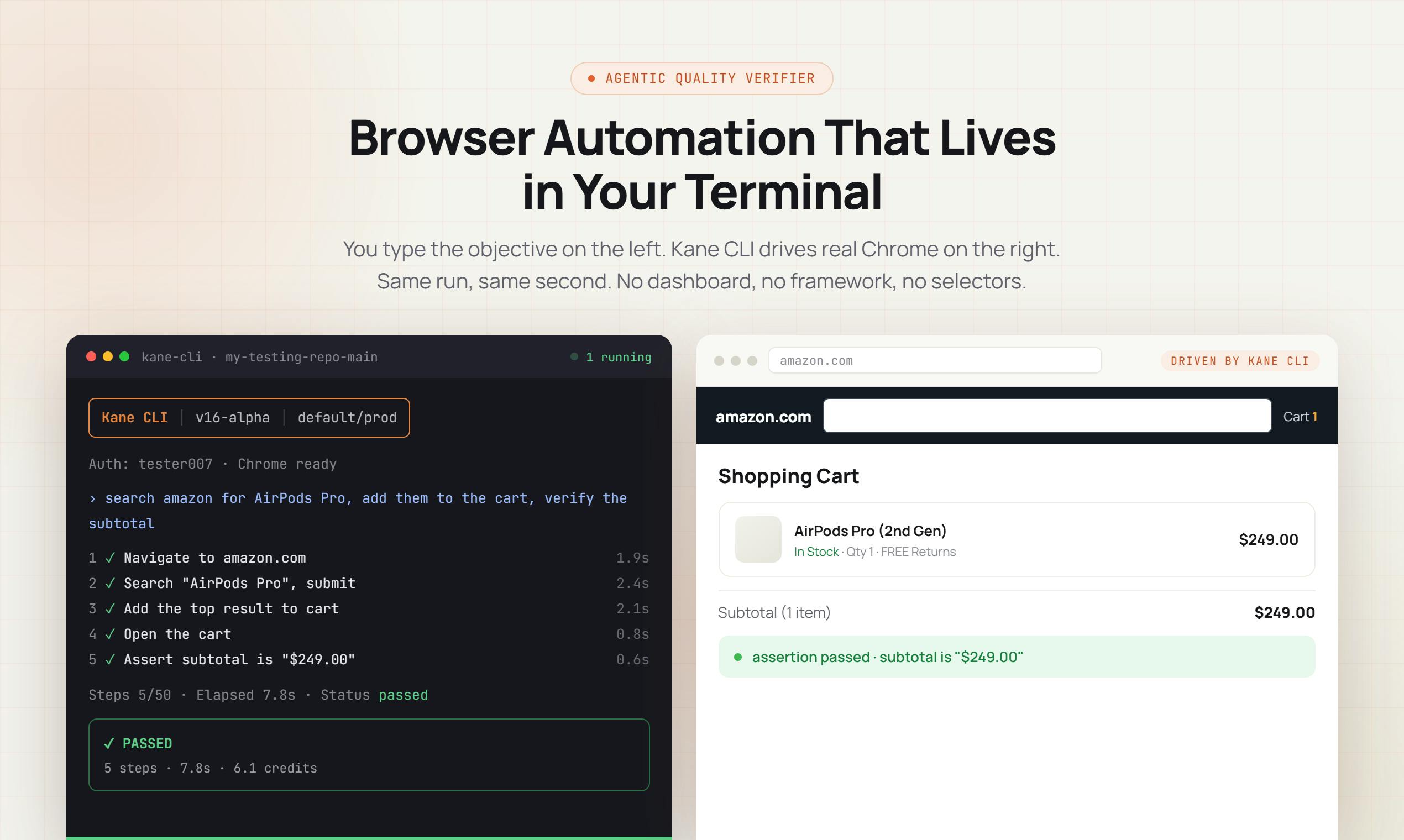
The product received 209 upvotes and 23 comments on Product Hunt, reaching the #1 spot for the day across the SaaS, Developer Tools, and Artificial Intelligence categories—demonstrating strong community interest in natural language testing tools.
What Pain Points Does Kane CLI Actually Solve?
From "Writing Tests" to "Describing Tests"
Traditional automation testing frameworks (like Selenium, Playwright, and Cypress) require developers to precisely locate page elements and write assertion logic. This creates two ongoing costs: writing cost and maintenance cost. When interfaces iterate frequently, maintaining test code often becomes more burdensome than maintaining business logic.
To understand the severity of this pain point, it helps to know the historical context of these frameworks. Selenium was born in 2004 as one of the earliest browser automation tools, controlling browsers via the WebDriver protocol. Playwright was released by Microsoft in 2020, supporting multi-browser parallel testing with modern features like auto-waiting and network interception. Cypress is known for its developer experience, running test code directly within the browser. What all three have in common is the requirement for developers to precisely specify page elements through CSS selectors, XPath, or other locator strategies. In real-world projects, a moderately complex web application might need to maintain hundreds or even thousands of selectors, and any UI refactoring could cause widespread test failures—a phenomenon the industry calls the "flaky tests" problem.
Kane CLI's approach is to transform natural language descriptions like "click the login button, enter username and password, verify redirect to the homepage" into executable browser actions. Behind this lies the current capability of large language models to understand page semantics—AI can "see" which element is the login button without the developer needing to specify the button's ID or XPath.
Specifically, modern multimodal large language models (such as GPT-4V, Claude, etc.) can not only process text but also understand a page's visual layout, DOM structure, and interaction logic. This capability is typically achieved through two approaches: first, providing the page's Accessibility Tree as structured input so the model understands the roles and hierarchical relationships of page elements; second, identifying UI components through visual analysis of screenshots. Compared to traditional selector matching, this semantic understanding approach more closely resembles how humans use web pages—users never care what a button's CSS class name is, they only care about "that blue login button."
Positioning for AI Coding Agents
Here's a notable detail: Kane CLI isn't just for human developers—it explicitly lists AI coding agents as target users. This positioning is forward-thinking. As AI programming tools like Cursor, Claude Code, and GitHub Copilot become mainstream, AI-generated code scenarios are increasingly common, but "how AI self-verifies after writing code" has remained a weak link.
AI coding agents represent one of the most active tracks in developer tools during 2024-2025. Cursor achieves context-aware code generation and editing through integrated AI; Claude Code, Anthropic's command-line programming assistant, can complete complex multi-file programming tasks directly in the terminal; GitHub Copilot has evolved from initial code completion to a programming agent supporting multi-turn conversations. However, quality verification of code generated by these tools still heavily depends on human review. The key industry challenge is: when AI can generate hundreds of lines of code in minutes, the manual review bottleneck becomes the rate-limiting step of the entire workflow. The absence of an automated verification layer prevents the full productivity benefits of "AI-written code" from being realized.
Kane CLI provides a natural language verification interface that can theoretically be invoked by AI agents—after an AI finishes writing a feature, it describes the expected behavior in natural language and hands it to Kane CLI for real browser verification, creating a "generate—verify" closed loop. This has practical significance for building more reliable autonomous programming workflows.
Kane CLI's Key Design Choices
Local-First and Real Browser Execution
Kane CLI emphasizes two technical characteristics: local-first and real Chrome browser execution.
Local-first means tests primarily run on the developer's own machine, which benefits both data privacy and execution speed—especially for test scenarios involving internal systems or sensitive data, where page content doesn't need to be uploaded to the cloud. Local-first is a software design philosophy that prioritizes data and computation on the user's local device rather than relying on cloud services. In the testing tool context, this means the tested application's page content, user interaction data, and test results never need to leave the developer's machine. This design is particularly important in enterprise applications—many internal systems contain sensitive business data or are behind VPN protection, and sending this content to third-party cloud services poses compliance risks. Additionally, local execution avoids the impact of network latency on test speed, enabling developers to get rapid feedback during coding. However, local-first doesn't mean completely offline—the AI model's inference may still require cloud API calls, but the rendering and interaction control of the tested page stays local.
Executing in a real Chrome browser (rather than a simulated environment or simplified headless rendering) ensures test results are consistent with actual user experience. Many frontend bugs appear specifically in real rendering environments and are difficult to reproduce in simulated ones. It's worth understanding that a headless browser is a browser instance without a graphical interface, commonly used for automated testing and server-side rendering. While Chrome's headless mode uses the same Blink rendering engine, its behavior can subtly differ from headed mode in certain scenarios, such as font rendering, GPU-accelerated CSS effects, and certain browser extension behaviors. More importantly, some anti-bot mechanisms and modern web applications detect headless environments and alter their behavior. Kane CLI's choice to execute tests in a real Chrome browser ensures the testing environment is completely identical to the end user's environment, which is particularly critical for visual regression testing and complex interaction scenario verification.
Shareable Verification Evidence
Another notable detail is "shareable proof." After a test runs, it doesn't just return a pass/fail boolean—it generates shareable verification records. This is valuable in team collaboration and CI/CD workflows—when a test fails, developers can intuitively see at which step and in what state the AI determined failure, rather than facing a wall of obscure stack traces.
Opportunities and Challenges of Natural Language Testing
The Potential of Natural Language Testing
Kane CLI represents a direction in testing tool evolution: lowering the barrier to writing tests and decoupling test intent from implementation. If AI can reliably understand natural language and execute stably, then product managers, QA, and even non-technical staff could participate in writing tests, potentially dramatically improving test coverage. It also supports both browser and mobile app testing, offering fairly broad coverage.
Areas That Warrant Careful Consideration
However, natural language-driven testing also faces inherent challenges that any AI testing tool needs to refine over time:
- Determinism: AI's understanding of the same description may fluctuate, and ensuring test result reproducibility is the core challenge for such tools. In traditional testing frameworks, given the same inputs and environment, test results are completely deterministic—a selector either matches an element or it doesn't. But when AI enters the test execution chain, the randomness of large language models (temperature parameter) and subtle differences in context understanding may cause the same test description to produce different execution paths at different times. For example, "click the submit button" might lead to uncertainty in AI's choice when multiple buttons exist on a page. Common strategies to address this include: setting temperature to 0 to reduce randomness, caching and anchoring AI's decision process, and introducing verification retry mechanisms to distinguish "genuine failures" from "AI interpretation deviations."
- Boundaries of ambiguous descriptions: Natural language inherently carries ambiguity—what exactly counts as "verify login success"? Tools need to find a balance between flexibility and precision.
- Cost and speed: Calling large models to understand pages may be slower and more resource-intensive than traditional selector matching, and performance in large-scale test suites remains to be observed.
Kane CLI adopts a "start for free" strategy that lowers the barrier to experimentation. For teams looking to explore AI-assisted testing, it's worth trying. Whether it can become a permanent fixture in developer workflows still needs to be validated through sustained use in real projects, proving its stability and reliability.
Conclusion
From Selenium to Playwright, testing tools have always pursued "less boilerplate code and greater stability." Kane CLI pushes this pursuit to a new level—replacing selectors with natural language and script logic with AI agents. It's both an efficiency tool for human developers and a piece of the "self-verification" infrastructure puzzle for the AI programming era. In a world where AI-generated code is increasingly prevalent, the question of how machine-written code can be reliably verified by machines is one that Kane CLI offers a compelling answer to.
Related articles

Gaussian Process Bandit Optimization: Exploration Strategies and Inference Regret Guarantees
Cumulative regret guarantees in Bayesian optimization fail to reflect final recommendation quality. This article examines a new study that provides inference regret guarantees for Gaussian process bandit optimization through exploration query strategies and fill distance analysis, validated on hyperparameter optimization and control tasks.

The Most Detailed Codex Guide on Bilibili: From Installation to Real-World Practice
The most detailed Codex guide on Bilibili: from app store installation to daily work mode configuration, with a real coffee shop project demonstrating file organization, data extraction, dashboard creation, and other practical tasks. Learn to use Plan Mode and desktop pets to leverage Codex efficiently.

Appearance Compensation in Volume Rendering: Why RGB Accuracy Cannot Guarantee Density Correctness
Volume rendering research reveals that volumetric data perfectly reproducing external RGB views may still contain density errors: appearance compensation can double central density and keep external rays unchanged even when L2 error exceeds 14.52%. Density recovery depends on appearance capacity, spatial resolution, and measurement design.