Kapshot: Screen Recordings That Edit Themselves — Auto Zoom, Cursor Polish, and Smart Framing

Kapshot automates zoom, framing, and cursor polish at record time so no editing is needed.
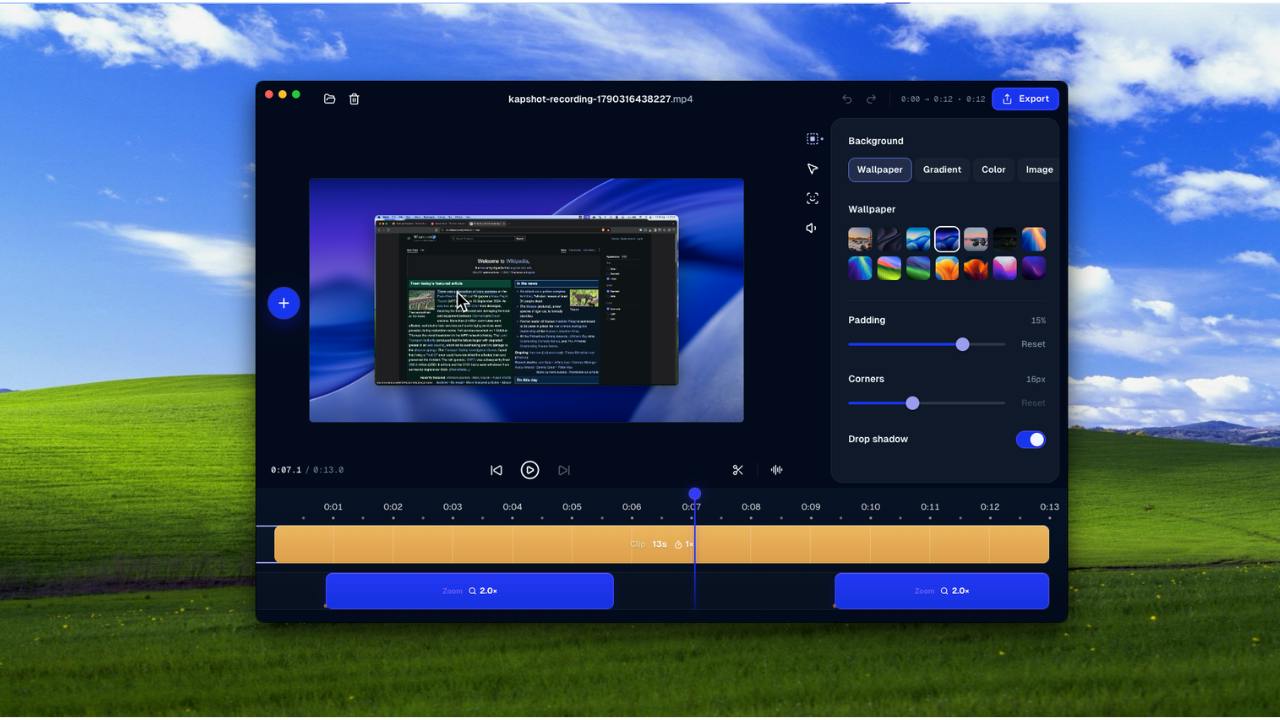
Kapshot is a screen recording tool that automatically handles three traditionally manual post-production tasks during capture: smart zoom (focusing on interaction points), cursor smoothing (making mouse movement look natural), and auto framing (eliminating per-shot crop adjustments). It targets founders, developers, and teams who regularly produce product demos or tutorials but find editing a time-consuming distraction from their core work. Competing in the same space as Screen Studio and Loom, Kapshot's real test lies in how accurately its algorithms detect intent — a misjudged focal point can mean more rework, not less. The product currently has 76 upvotes on Product Hunt.
Solving "Editing Anxiety" with Screen Recording
Anyone who has made product demos, tutorials, or feature walkthrough videos knows the drill: record your screen, then open an editing app to add zoom-ins, clean up the mouse trail, and manually adjust the framing frame by frame. That post-production work often takes several times longer than the recording itself. Kapshot, a new arrival on Product Hunt, aims to cut out that entire phase — moving the "polish" step from post-production into the recording process itself.
The tool's positioning is refreshingly direct. Its tagline — "Screen recordings that look like you edited them" — captures the core promise: finished output the moment you stop recording, no editing required. It currently has 76 upvotes and 9 comments on Product Hunt, ranking 17th on the day's leaderboard, categorized under Productivity and Video.
What the Automation Actually Does
Kapshot's value is concentrated in three automated capabilities — precisely the three areas where traditional screen recording post-production is most time-consuming.
Auto Zoom
When demonstrating a button click or form input, viewers need the frame to focus on the action area. The manual approach means adding keyframe zooms segment by segment. Kapshot claims to automatically detect interaction points during recording and apply zoom effects in real time, shifting the visual focus as actions unfold.
Keyframe zooming in video editing means setting multiple parameter values (such as zoom level or position) at specific points on the timeline, with the player automatically interpolating transitions between them. Doing this manually requires an editor to identify each interaction timestamp, set in and out keyframes, and tune easing curves so the zoom feels natural. A ten-minute walkthrough can involve dozens of zoom nodes — a significant time investment. Kapshot's auto zoom essentially replaces manual annotation with real-time interaction detection (mouse clicks, keyboard input), then applies preset zoom parameters to the corresponding segments, eliminating that repetitive work entirely.
Cursor Fix
The raw mouse cursor in screen recordings is often small and jittery, which feels awkward to watch. Kapshot smooths out the cursor's movement and makes it easier to follow — a detail that's one of the biggest contributors to that "looks like it was edited" quality.
Auto Framing
The tool also automatically frames each interaction, removing the need to manually adjust the crop or composition for every shot.
Combined, these three features essentially encode a video editor's standard workflow into a real-time algorithm — trading one recording session for a finished output.
Who It's For and What Pain It Solves
Kapshot's target user is easy to picture: someone who needs to produce "presentable" video content frequently but doesn't want — or doesn't have the bandwidth — to spend time editing. That includes founders making product demos, developers recording software tutorials, teams creating training materials, and content creators.
For these users, editing isn't the core job, but it's an unavoidable hurdle before publishing. A five-minute tutorial can easily require half an hour or more of post-production. Kapshot's "zero editing" approach is fundamentally about using automation to lower the marginal cost of content production — the more you record, the more post-production time you save.
Seen this way, Kapshot competes in the same space as tools like Screen Studio and Loom, which have both become popular in recent years. The shared premise of this category is that the competitive battleground has shifted from "can it record?" to "how good does the output look, and how little effort does it take?" The tools that make post-production automation smarter and more aligned with real viewing experiences will be the ones that carve out lasting positions in this high-frequency, high-need space.
Screen Studio emerged around 2022 as a macOS screen recorder known for its built-in window zoom animations, background beautification, and auto-focus effects — all aimed at producing high-quality demo videos in a single take. Loom, by contrast, focuses more on async video communication, letting users quickly record and share clips with teammates, with basic editing and chapter annotation features. Both tools' popularity validates the market demand for "less post-production," and also signals how competitive this space has become. For Kapshot to differentiate, it will need a clear edge in automation accuracy or a specific vertical (like SaaS product demos) — otherwise it risks being perceived as a feature-overlapping follower.
A Grounded Assessment
One caveat worth noting: the information available right now is largely self-reported by the product. The accuracy of the auto zoom detection, the naturalness of the cursor smoothing, and how well the framing holds up in complex scenarios all require hands-on testing to verify. The longstanding problem with automated post-production is "guessing wrong" — when the algorithm's focal point doesn't match the creator's intent, it can actually create more rework rather than less. The real barrier for tools like this almost always comes down to how smart the detection logic is.
For teams evaluating whether to adopt a tool like this, two things are worth checking: first, how flexible is the export quality and format support; second, can the automatic effects be manually adjusted after the fact. If a fully automatic system leaves no room for human intervention, edge cases become painful to deal with.
Overall, Kapshot is addressing a genuine pain point, and its product philosophy aligns with the direction screen recording tools are heading — prioritizing output quality over manual effort. Whether it can deliver on the "finished the moment you stop recording" promise ultimately depends on how well its automation holds up in real-world workflows.
Related articles

Gaussian Process Bandit Optimization: Exploration Strategies and Inference Regret Guarantees
Cumulative regret guarantees in Bayesian optimization fail to reflect final recommendation quality. This article examines a new study that provides inference regret guarantees for Gaussian process bandit optimization through exploration query strategies and fill distance analysis, validated on hyperparameter optimization and control tasks.

The Most Detailed Codex Guide on Bilibili: From Installation to Real-World Practice
The most detailed Codex guide on Bilibili: from app store installation to daily work mode configuration, with a real coffee shop project demonstrating file organization, data extraction, dashboard creation, and other practical tasks. Learn to use Plan Mode and desktop pets to leverage Codex efficiently.

Appearance Compensation in Volume Rendering: Why RGB Accuracy Cannot Guarantee Density Correctness
Volume rendering research reveals that volumetric data perfectly reproducing external RGB views may still contain density errors: appearance compensation can double central density and keep external rays unchanged even when L2 error exceeds 14.52%. Density recovery depends on appearance capacity, spatial resolution, and measurement design.