Knuff App Review: The Lightweight Family Connection App That Uses 'Check-In Bubbles' to Keep Loved Ones Safe
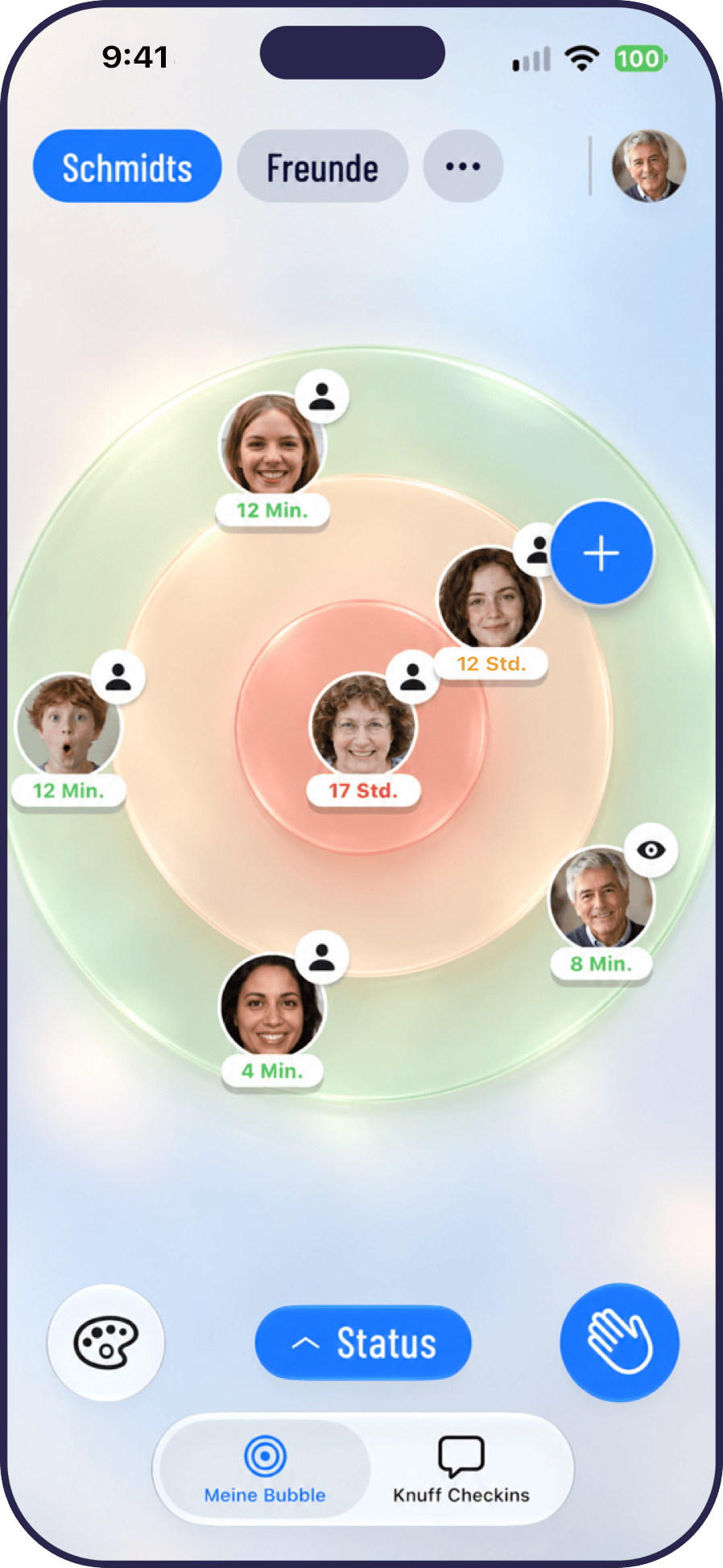
Knuff replaces group chat noise with a single check-in tap to keep families quietly connected.
Knuff App is a family check-in tool on Product Hunt built around one minimalist interaction — a tap to say "I'm okay" — organized into shared "bubbles" rather than noisy group chats. It targets all age groups with an especially low barrier for older users. Using a freemium model on both iOS and Android, its key differentiator from competitors like Life360 is agency: users proactively share their status rather than being passively tracked. It launched with 73 Product Hunt upvotes — promising resonance, but not yet a viral hit.
In an age of messaging app overload, staying genuinely connected with family has paradoxically become harder. Group chats are flooded with forwarded links and memes, drowning out the simple question: "How are Mom and Dad doing today?" Knuff App, which launched on Product Hunt, was built precisely for this pain point — redefining everyday family care through one simple action: the check-in.

An "Anti-Social" Family Connection App
Knuff has a crystal-clear positioning: it's a family check-in app built around one core promise — "know your people are okay." Rather than becoming yet another message-bombing social platform, it strips functionality down to its most fundamental need: confirming that family members are alright.
The product's central concept is the "bubble." You pull the people who matter most into a shared bubble, and everyone checks in with each other through quick, low-friction interactions. This design deliberately sidesteps the information overload of traditional chat tools, making the small act of "I'm fine, how about you?" feel light and efficient. No matter where life takes your family members, the bubble keeps that sense of care intact.
According to Product Hunt data, Knuff launched with 73 upvotes and 3 comments, landing at #16 on the day's leaderboard. That's a solid-if-unspectacular result in the competitive family app category — enough to show the concept resonates, but not yet a breakout moment.
Use Cases: Lightweight Care Across Generations
Knuff officially positions itself for "families and friend groups of all ages." This framing is telling — it aims to serve both parents worried about their children's safety and adult children keeping tabs on aging parents from afar.
The real challenge for this type of product lies in bridging the generational usability gap. Younger users are comfortable navigating complex apps, while older adults often feel overwhelmed by feature-heavy interfaces. By reducing interaction to a single "check-in" gesture, Knuff lowers the barrier for older users significantly. For families who don't want to video call every day but still want to feel connected, a quick tap might be all it takes to send the reassuring signal: "I'm okay."
That said, this minimalist design is a double-edged sword. A check-in is inherently low-information. Whether it will eventually feel like going through the motions — rote clock-punching rather than genuine emotional warmth — is a question this type of product will need to keep answering over time.
Business Model: Free Core + Paid Add-Ons
Knuff uses the standard freemium model: core features free, optional paid add-ons available. The app is live on both iOS and Android.
This approach makes sense for a family utility tool. Free basic check-ins allow rapid user base growth — after all, a scenario where one person pays and the whole family benefits isn't common in this category. Every member of the bubble needs to be able to join with zero friction, or the whole thing falls apart. Paid features likely include richer check-in formats, location sharing, history logs, or multi-bubble management.
The team behind the product includes Till Schadde and several other Makers, indicating this is an organized team effort rather than a solo side project — which bodes well for sustained iteration and long-term product development.
Freemium is one of the most dominant monetization strategies in mobile apps. The logic is simple: use free core features to build a large user base, then convert active users through high-value paid features. For family utility apps, this model faces unique challenges: usage frequency and willingness to pay vary enormously across family members, and product value is deeply tied to network effects — the more people in the circle, and the more active they are, the more valuable the app becomes. This means the placement of the paywall is critical. Lock the core experience behind a paywall too early, and family circles never form — leaving the product stuck in a cold-start trap. Successful family-oriented freemium products (like Cozi Family Calendar) typically make the free tier genuinely "good enough," reserving paid tiers for ad-free experiences or advanced collaboration features rather than restricting basic connectivity.
Market Positioning and Competitive Landscape
Knuff isn't entering an empty market. From location-tracking apps like Life360 to the location-sharing features baked into general messaging tools, the "family safety and connection" space is already crowded. Knuff's differentiation lies in deliberately de-emphasizing "surveillance" in favor of the emotional quality of proactive check-ins.
Apps like Life360 are frequently criticized for feeling like digital surveillance, which can breed friction and distrust between parents and children. Knuff's check-in mechanic returns agency to the individual — I'm actively telling you I'm okay, rather than you can see where I am at any time. That subtle but meaningful distinction could be a genuine selling point as privacy awareness continues to grow.
Of course, it's too early to judge whether Knuff can break through in a crowded space. Its core strengths are conceptual clarity and restrained design, but its moat isn't yet obvious. The check-in feature itself is easy to replicate. What will ultimately determine success is the quality of the user experience and whether the app can build a stable, lasting habit.
Life360 is one of the largest family location-sharing apps in the world, with monthly active users that at one point exceeded 33 million. Its core feature is real-time GPS tracking — family members can see each other's location, driving behavior, and even phone battery level. This "always-on transparency" has sparked ongoing privacy controversies. Research and media reports have found that teenage users deliberately leave their phones behind to evade tracking, which actually deepens distrust rather than alleviating it. Life360 has also been reported to have sold precise user location data to data brokers, amplifying public concern about its business model. This backdrop gives the "active check-in vs. passive tracking" product philosophy new market relevance — user autonomy and privacy boundaries are increasingly becoming the central battleground for differentiation in the family connection category.
Final Thoughts
Knuff App represents a product philosophy worth paying attention to: in an age of information overload, doing less is itself a form of rare value. It doesn't want more of your time — it just wants to let family members maintain that "I know you're okay" sense of reassurance at the lowest possible cost.
For users buried under group chat notifications who nonetheless genuinely care about their families, Knuff might offer a refreshingly clean alternative. Whether it can turn this simple idea into a sustainable business still requires time and market validation. But at the very least, it's asking a good question: what kind of connection do we actually need with the people who matter most to us?
Related articles

WorkBuddy Step-by-Step Tutorial: Get an Automated Workflow Running in Half an Hour
A step-by-step breakdown of the WorkBuddy automated workflow: why most people only use it as a chat app, how the 27-anchor course and 12 templates help beginners get up and running in half an hour, plus notes on usage boundaries.

The Truth About Free Claude Code: Three Legitimate Paths and One Scam
Is free Claude Code possible? We break down the real cost of Pro and Max (with exchange rates and taxes), how community free methods work and their privacy trade-offs, plus fake installers and phishing traps—and three legitimate free paths.
Codex Cloud Mode Explained: Environment Setup and Use Cases
This article explains how Codex cloud mode works, environment setup steps, and use cases, including how to create environments, connect GitHub repositories, set scheduled tasks, and compare cloud vs. local mode.