Kokonut UI: Letting AI Agents Call Open-Source UI Components Directly

Kokonut UI is an MIT-licensed React component library for coding agents, invoked directly via MCP.
Kokonut UI is an MIT-licensed React component library with 100+ components, designed not as a traditional UI framework but to let coding agents understand, retrieve, and install components. Docs are also offered in Markdown and connect via MCP to Claude Code, Cursor, VS Code, or Codex, so developers can describe needs in natural language and let agents find, install, and modify components. This update adds 65 and rebuilds 34, focused on tool calls, approvals, diff review, and citations in AI chat. The article notes controllability concerns like code style consistency and version conflicts that still need review.
Title
Kokonut UI: Letting AI Agents Call Open-Source UI Components Directly
Meta Description
Kokonut UI is an MIT-licensed React component library with 100+ components that lets coding agents like Claude Code and Cursor find, install, and modify components directly via MCP. This release adds 65 components, focused on tool calls, approvals, and diff review in AI chat.
Article Content
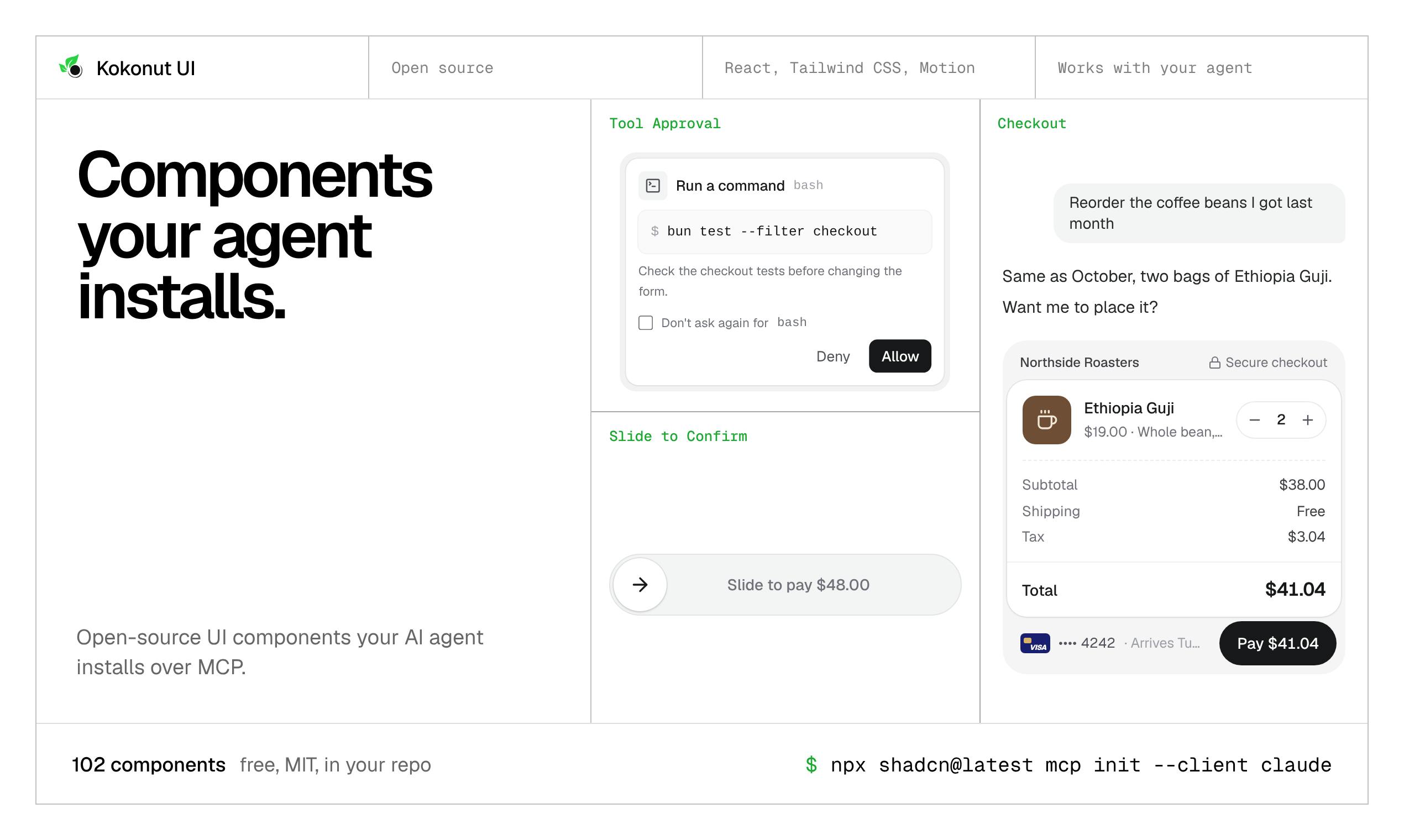
When building AI chat interfaces, developers often need to manually implement interactive components such as tool calls, approval cards, and diff comparisons—which is both time-consuming and prone to drifting from design guidelines. Kokonut UI, ranked #12 on Product Hunt, aims to solve this problem: it's an MIT-licensed React component library with over 100 components, designed specifically for coding agents, and allows them to be invoked directly in Claude Code, Cursor, VS Code, or Codex via the MCP protocol.
A Component Library Built for Agents
Kokonut UI's core positioning isn't a traditional UI framework, but rather one that enables coding agents to understand, retrieve, and install components. Every documentation page is also provided in Markdown format, so agents can read component descriptions directly without parsing complex web page structures. Once connected via MCP (Model Context Protocol), developers simply describe their needs in natural language—for example, "add a tool approval card to the chat"—and the agent automatically finds the corresponding component, completes the installation, and modifies the code in the repository.
This workflow transforms the component library from "humans reading docs" into "agents consuming directly," lowering the barrier to introducing high-quality UI in AI-assisted programming.
MCP (Model Context Protocol) is a protocol proposed and open-sourced by Anthropic to standardize how AI models interact with external tools and data sources. Simply put, it defines a universal interface for "how AI discovers and invokes external capabilities": tool providers expose invocable capabilities (such as reading files, retrieving components, executing commands) in the form of an MCP Server, while MCP Clients (such as Claude Code, Cursor, and other coding environments) forward calls when the model requests them and return the results. Compared to traditional function calling, MCP's advantage lies in cross-tool reuse and composability—the same MCP Server can be consumed by different AI clients without needing separate adapters for each tool. In Kokonut UI's case, it serves exactly this role as a Server: agents query the component catalog, read Markdown docs, and trigger installations via MCP, thereby delegating the task of "consulting documentation"—originally done by humans—to the model for automatic execution.
The "coding agents" mentioned in the article typically refer to AI programming assistants with file read/write, command execution, and multi-step planning capabilities, such as Claude Code, Cursor's Agent mode, Copilot Agent in VS Code, and OpenAI's Codex. Their fundamental difference from traditional code completion lies in autonomy: they can independently break down tasks, explore project structure, modify multiple files, and verify results, rather than merely continuing code based on cursor context. The effectiveness of such agents depends heavily on the quality of external resources they can access—if a component library only provides web documentation intended for human reading, agents often need to parse large amounts of HTML structure and can easily miss key information or make misjudgments. Therefore, providing machine-readable Markdown docs and structured component metadata is a prerequisite for agents to reliably consume third-party resources, which is the practical meaning behind Kokonut UI's emphasis on being "designed for agents."
This Update: Focused on AI Chat Scenarios
This version adds 65 components and rebuilds 34, with emphasis on interaction components related to AI chat. Components like tool calls, tool approval, diff review, and citations are all high-frequency elements when building agent chat interfaces. Previously, developers had to assemble these parts themselves or build them from scratch; now there are standard building blocks available to invoke directly.
The rebuilt 34 components mean existing parts have undergone adjustments in code quality or API design—projects already using the library should watch for changes when upgrading.
The recurring "tool calls" term in the article is a core mechanism in LLM applications: instead of directly producing text, the model outputs a structured invocation request (such as a function name and parameters) during its response, which the host program actually executes and then passes the result back to the model, which continues reasoning based on it. This is the foundation that enables chatbots to query databases, call APIs, or manipulate files. A series of UI requirements arise around tool calls: approval cards before invocation (letting users confirm whether to execute sensitive operations), status indicators during execution, result display after execution, and diff review for code-modifying tools. These components differ greatly in visuals and interaction but are highly repetitive in structure—precisely the area where a component library can significantly reduce costs. Meanwhile, the "citations" component is used to indicate the sources the model's answer is based on, a common practice for improving credibility.
MCP Integration and Workflow Impact
MCP is key to Kokonut UI's collaboration with agents. It allows agents not only to generate code, but also to proactively find and integrate external component resources. For teams using Cursor or Claude Code, this pattern reduces the loop of "describe component needs—search—copy-paste—adjust styles." Components are released under the MIT license, allowing free modification and commercial use, further lowering adoption friction.
However, agents automatically modifying repositories also raises controllability concerns: whether the installed component's code style matches the project, and how to resolve version conflicts, still require developer review.
Use Cases and Considerations
Kokonut UI is suitable for teams building AI chat products who are already using MCP-compatible coding tools. If you use React heavily and want to quickly build prototypes for tool calls, approval flows, and similar interfaces, this component set can significantly shorten initial development time.
It's worth noting that the library is positioned more toward agent consumption, and the documentation experience under traditional manual development workflows may not be a top optimization priority. Additionally, this update focuses mainly on AI chat components, so coverage of other UI component types should be evaluated against project needs. As an open-source project, its long-term maintenance cadence and community ecosystem are also factors to consider when selecting it.
One-line Summary
Kokonut UI is an MIT-licensed React component library for coding agents, invoked directly via MCP.
Paragraph Summary
Kokonut UI is an MIT-licensed React component library with over 100 components. Rather than a traditional UI framework, it's positioned to let coding agents understand, retrieve, and install components. Its documentation pages are also provided in Markdown format, and it connects to Claude Code, Cursor, VS Code, or Codex via the MCP protocol, so developers can describe needs in natural language and let the agent automatically find components, complete installation, and modify repository code. This update adds 65 components and rebuilds 34, focusing on high-frequency interaction components in AI chat scenarios such as tool calls, tool approvals, diff review, and citations. The article also notes that agents automatically modifying repositories raises controllability issues like code style consistency and version conflicts that still require developer review, and that the library's documentation experience for traditional manual development workflows isn't a top optimization priority.
Related articles

Anthropic's IPO: Is a $1.4 Trillion Valuation AI's Future or the Peak of a Bubble?
Anthropic is about to list on Nasdaq with a valuation of up to $1.4 trillion, potentially raising over $60 billion to become the second-largest IPO in history. This article breaks down its revenue, the truth behind its hundred-billion-dollar book loss, compute costs, control design, and lock-up pressure, and analyzes the IPO's chain effects on the AI sector.

Anthropic Races Toward Nasdaq: Ticker ANT, Can a Trillion-Dollar Valuation Hold?
Anthropic files its S1 for a Nasdaq IPO under ticker ANT, led by Goldman Sachs and Morgan Stanley. We break down revenue, massive compute lease commitments, founder voting control, and the valuation debate.

How Anthropic Uses a Four-Layer Narrative to Prop Up a $2 Trillion Valuation
Anthropic's estimated $2 trillion valuation: a breakdown of its positioning theory and four-layer narrative — civilization-level fear, identity, product, and business — and how founder essays, technical docs, and opinion leaders support the AI safety guardian valuation story.