LangChain for Beginners: Four Key Pain Points and When to Use It

LangChain is an app dev framework that fills LLM gaps in tools, memory, and workflows—use it as needed.
Based on a Bilibili LangChain tutorial, this article clarifies that LangChain is not an LLM but an application development framework that equips LLMs with tools, memory, and workflow orchestration. It precisely fills four major LLM weaknesses: outdated knowledge, lack of private data understanding, inability to call external tools, and context loss in long conversations. After comparing native calls across stability, capability scope, and use cases, it lists six scenarios where LangChain is worth adopting and three lightweight scenarios where it isn't. The core takeaway: use native APIs for simple tasks; only adopt LangChain for formal, complex production projects.
When you call LLM APIs directly, outputs drifting off-topic, messy formatting, and long conversations losing context are walls almost every developer runs into. This LangChain tutorial from Bilibili breaks the problem down clearly: LangChain is not an LLM—it's a development framework that connects the "smart brain" to tools, memory, and process control. Based on that tutorial, this article covers its core value, its capability boundaries, and when you should and shouldn't use it.
What LangChain Actually Is: Giving LLMs Hands, Feet, and Memory
The tutorial offers a fitting metaphor: an LLM is like a smart brain, but it can't call external tools to complete complex tasks, and it doesn't conveniently manage context memory. LangChain plays the role of "connector + orchestrator"—helping the model connect to external tools, plan execution steps, and manage context and conversation information, essentially giving the model the ability to act and remember.
In terms of positioning, it targets application development rather than the model itself: upgrading simple model calls into composable, controllable, extensible enterprise-grade AI application systems. Understanding this is crucial because it determines all subsequent decisions about adoption—what you're buying isn't a stronger model, but an engineering shell that lets the model work reliably.
Why LangChain Took Off: Precisely Targeting the Four Key LLM Weaknesses
The tutorial summarizes LangChain's value as filling in four "fatal weaknesses," which is the core reason for its popularity.
Outdated Knowledge and Blind Spots on Private Data
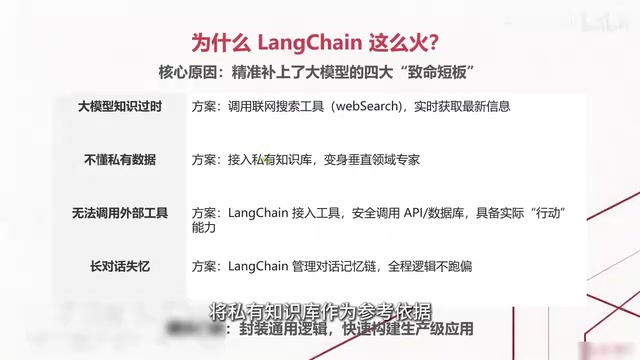
LLM training data has a cutoff date, so it knows nothing about recently released news or new tech stacks; at the same time, it only understands general knowledge and doesn't understand internal company materials or vertical-domain expertise. LangChain can, on one hand, retrieve the latest information in real time by calling web search tools, and on the other hand, connect to private knowledge bases, combining RAG (Retrieval-Augmented Generation) to use private materials as reference before generating content—turning a general-purpose model into a vertical-domain expert.
RAG (Retrieval-Augmented Generation) is a technical paradigm that lets LLMs "look things up" before generating an answer. Its basic workflow: split private documents, vectorize them, and store them in a vector database; when a user asks a question, first convert the question into a vector using the same model, retrieve the most relevant text chunks from the database; then splice these chunks as context into the prompt so the model answers based on the retrieved content. Compared with fine-tuning, RAG doesn't require retraining the model—updating knowledge only means updating the document library, with low cost and traceability, making it the preferred approach for enterprises to integrate private data. Its limitation is that performance depends heavily on retrieval quality—chunking granularity, embedding model, and recall count all affect the accuracy of the final answer.
Can't Call Tools and Loses Context in Long Conversations
LLMs themselves can't safely call Web APIs or operate databases, and LangChain fills in this layer of "action capability." And in long conversations, models easily forget previous chat information; LangChain manages contextual conversation information so the AI remembers prior content, making logic less likely to drift when executing long tasks.
Tool Calling / Function Calling is a standardized mechanism for LLMs to interact with the outside world. Developers declare available tools with structured descriptions (name, function, parameter schema); the model decides during the conversation whether to call, which one to call, and what parameters to pass, outputting the call intent in a structured format; the framework handles actual execution and passes results back to the model, which integrates them and continues generating. LangChain wraps this: unifying tool-calling interfaces across different model vendors, managing multi-round "think—call—observe" loops, and handling call failures and retries. This is also the foundation for Agents to autonomously complete multi-step tasks—the model no longer just "talks," it can "do."
Native Calls vs LangChain: Differences Across Three Dimensions
The tutorial uses a comparison table to clarify the difference between the two approaches, which can be understood across three dimensions.
Stability: Direct native calls to the model easily drift off-topic and produce messy formatting; if the model times out, it directly errors out and the whole process crashes. With LangChain's control, generated content is more precise and formatting more regular, and failed calls can be automatically retried.
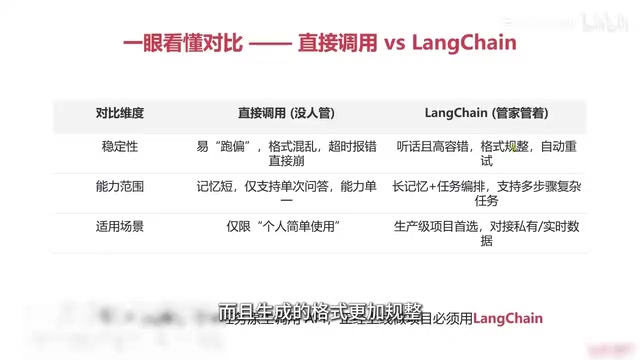
Capability scope: Native calls have only short memory, support only single-turn Q&A, and have limited capabilities; LangChain supports long memory plus multi-task orchestration and can complete multi-step complex tasks.
Use cases: Native calls are limited to simple personal use; when building production-grade projects that need to go live, or needing to connect to private data or query real-time web data, LangChain is needed.
In one sentence, the tutorial's view: for simple tasks, just call the native API; to build a project that goes live, you need LangChain to manage the model.
Multi-task orchestration refers to stringing multiple model calls, tool calls, and logical judgments into a controllable execution chain. Native calls are a linear "question-answer" mode; orchestration allows defining sequential chains (the previous step's output as the next step's input), conditional branches (deciding the direction based on intermediate results), parallel execution, and loop retries. LangChain makes these processes declarative through abstractions like Chain and Runnable, so developers can compose complex workflows without writing lots of glue code, while gaining unified logging, callbacks, and error handling. The stronger the orchestration capability, the more important the system's maintainability and observability—which is one reason production-grade projects tend to use frameworks.
When You Must Use LangChain: Six Decision Signals
The tutorial lists six scenarios where "if you hit one, you should use it"—in effect, six requirement signals:
- You need to ensure stable output that doesn't drift. For fixed scenarios like generating interview questions or study plans, native generation is too random and needs framework constraints.
- You need to prevent call errors or crashes. Production-grade tools facing external users need higher fault tolerance, and LangChain can help here.
- You need to complete complex tasks in steps. First analyze the user's question, then make a plan, and finally check whether the plan meets requirements—such multi-step processes can't be done with a single call and must be split and executed step by step through orchestration.
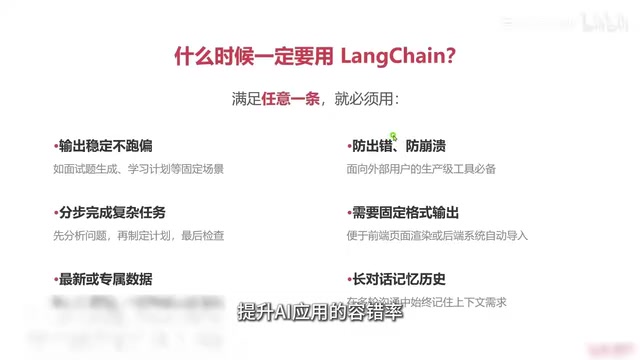
- You need a fixed output format. Native output formats are messy; LangChain can force the model to output in a specified format, making it easy for frontend rendering or automatic import into backend systems.
- You need to query the latest web data or private databases. Connect to real-time information sources or internal company knowledge bases so generated content has references.
- Long conversations need to remember history. Keeping context intact across multiple rounds of communication is a LangChain strength.
When You Don't Need It: Three Lighter Options
The tutorial also clarifies scenarios where LangChain isn't needed—calling the native API directly is simpler:
- Temporary one-off chats: one-time, use-and-discard questions can be satisfied with native calls.
- Lightweight script tools for personal use: for example, writing a small script for text translation or content extraction and summarization, which doesn't need complex memory or long conversations.
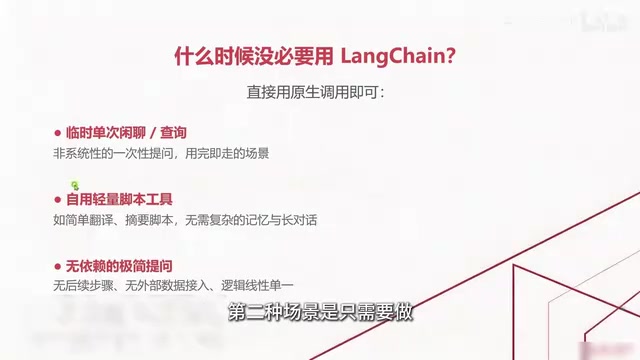
- Simple questions with single-step logic: no follow-up steps and no need to connect external data; native calls mean less code and lighter weight.
This "reverse checklist" is especially valuable for beginners—many people tend to introduce frameworks too early for simple needs, which instead increases maintenance costs.
Summary and Next Steps
The core conclusion of this tutorial can be summarized as: LangChain is an application development framework for LLMs, whose core role is to fill in model weaknesses so AI can truly get work done; its popularity comes from solving four key pain points—outdated knowledge, not understanding private data, inability to call external tools, and losing context in long conversations. Use native APIs for simple scenarios; only adopt LangChain for formal, stable, complex AI projects. The tutorial previews that the next section will break down LangChain's core workflow, including the specific roles of models, prompts, and tools, to prepare for developing Agent systems later.
One-line Summary
LangChain is an application development framework that fills LLM gaps in tools, memory, and workflows—use it as needed.
Paragraph Summary
Based on a Bilibili LangChain tutorial, the article clarifies LangChain's positioning: it's not an LLM, but an application development framework that equips LLMs with tools, memory, and workflow orchestration. Its popularity stems from precisely filling four major LLM weaknesses—outdated knowledge, lack of private data understanding, inability to call external tools, and context loss in long conversations. After comparing native calls across stability, capability scope, and use cases, the article gives six scenarios where LangChain is worth adopting (stable output, crash prevention, multi-step tasks, fixed formats, external data queries, long-conversation memory) and three lightweight scenarios where it isn't needed (temporary one-off chats, personal scripts, single-step questions). The core conclusion: use native APIs for simple tasks; only adopt LangChain for formal, complex production-grade projects.
Related articles

AI Tools Quietly Altering Settings: Postman Silently Installs Plugin, Codex Sharing Option Auto-Resets
AI Daily reports: Postman silently installs a Mac plugin and self-approves startup hooks, logged as auto-existing upgrade; Hacker News developers say Codex data-sharing opt-out flips back. Plus Simon Willison's raw float weight experiment with QEN 3.8-27B.

AI Learns to Rewrite AI: MIT's "Weightspace Programming" Redraws the Path to Recursive Self-Improvement
MIT team proposes weightspace programming: GPT-6 Astra reads and edits AI model weights directly. Math scores jump several-fold, hand-written networks beat trained models. Eight experiments analyzed, plus Anthropic's same-day warning and the real boundaries of recursive self-improvement.

Running Qwen 3.8 on a Laptop to Read Raw Weights: 46 Minutes Per Answer
Simon Willison reproduced weight space programming with Qwen 3.8 27B on a laptop: a 17GB model file, 46 minutes per answer, 43,506 reasoning tokens, Pong over an hour, Freeway failed. Suited for interpretability researchers.