LangChain + Playwright: Building an Intelligent Test Agent Driven by Natural Language

Replace brittle UI test scripts with a local LLM + Playwright agent driven by natural language instructions.
This article introduces using an AI agent to replace traditional UI automation scripts. The core pain points of conventional Selenium/Playwright scripts — hardcoded steps and high maintenance costs — are addressed by a two-layer architecture: a locally deployed LLM (via Ollama) as the decision-making brain, and a Playwright toolkit as the execution layer. Engineers simply describe a test goal in plain language, and the agent handles page recognition, element location, and action execution autonomously with full reasoning transparency. Key implementation notes include fixing asyncio event loop conflicts, switching between headed/headless modes, and crafting effective system prompts.
The Two Chronic Pain Points of Traditional UI Automation
Any engineer who has worked with UI automation testing has likely experienced this meltdown scenario: a minor class change or layout tweak on a page causes scripts to break en masse, followed by endless rounds of patching code.
A practitioner on Bilibili summarized two pain points of traditional automation that resonate widely. The first is high maintenance costs. Whether you're using Selenium or Playwright, once element locators break, the follow-up maintenance is brutally time-consuming — constantly fixing scripts is the norm. The second is overly rigid logic. Every click, input, and assertion is hardcoded in advance, so any adjustment to the business flow means tearing down and rebuilding the entire test suite.
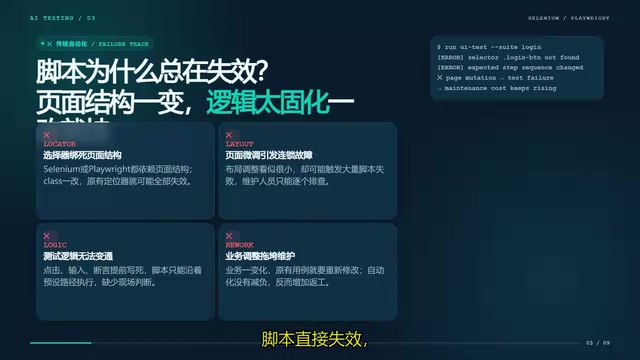
The root cause of both problems is that traditional scripts hardcode the "how" (the specific steps) into the code, while pages themselves are constantly changing. When the pace of change outstrips the pace of maintenance, automated testing becomes a burden rather than a benefit.
A Different Approach: Let AI Understand the Test Goal
The core idea behind intelligent test agents is to shift focus from "how to do it" to "what to do."
In practice, instead of writing out every step line by line, you give the AI a high-level test objective — something like "visit a test website, inspect the login page elements, and complete a login test using the demo account." The AI then autonomously plans the operation path, identifies page elements, and performs the verification. This is what's meant by natural language-driven UI testing.
The value of this approach lies in its adaptability to page changes. When element positions or structures shift slightly, the AI re-locates elements based on its real-time understanding of the page rather than relying on hardcoded selectors, dramatically reducing maintenance overhead.
Architecture Breakdown: Brain and Limbs
The entire architecture has just two components, and they're not hard to understand.
A Local LLM as the "Brain"
The first component is a locally deployed large language model, which serves as the agent's decision-making core. The author recommends using Ollama to deploy open-source models and run them locally. The biggest advantage here is data privacy — test data never needs to leave your machine, which is especially valuable for sensitive internal enterprise systems.
Ollama is an open-source local LLM runtime that supports one-command deployment of mainstream open-source models like Llama, Mistral, and Qwen, enabling inference on ordinary developer machines without GPU cloud services. Compared to calling the GPT-4 or Claude API, local deployment offers more controllable latency and no per-token billing pressure — well-suited for automation testing scenarios that require frequent calls. LangChain is the orchestration framework that connects large models to external tools. It provides an agent runtime, a tool-calling protocol, and conversational memory, enabling the LLM to complete complex tasks through a loop of "think → call tool → observe result → think again," rather than simply generating a text response.
A Playwright Toolkit as the "Limbs"
The second component is the Playwright toolkit, which serves as the agent's "hands and feet" for executing actions. It wraps browser navigation, clicking, text extraction, and other capabilities into tools that the AI can understand and invoke, allowing the LLM to directly control a browser and interact with web pages.
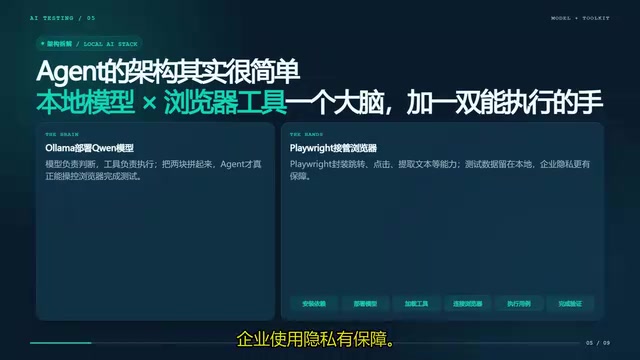
The setup process is straightforward: install LangChain and Playwright dependencies, deploy the local model, load the browser toolkit, and you'll have around seven core capabilities — page navigation, clicking, element extraction, text retrieval, and more — which is sufficient for most everyday UI testing needs.
Playwright is Microsoft's open-source cross-browser automation framework, supporting Chromium, Firefox, and WebKit. It provides an async API (async/await) and a robust waiting mechanism that handles dynamic pages more reliably than Selenium. In an AI agent context, each of Playwright's capabilities (navigation, clicking, screenshots, text extraction, etc.) is wrapped into a function that conforms to LangChain's tool-calling specification. The LLM autonomously decides which tool to call and what parameters to pass based on the current page state and the test objective. This "tool calling" (Tool Calling / Function Calling) mechanism is the core interaction pattern of modern AI agents — the model doesn't execute code directly; instead, it outputs a structured call intent, and the framework handles actual execution before returning the result to the model.
What It Looks Like in Action
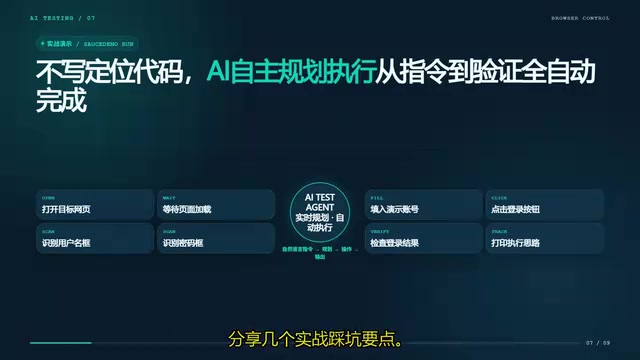
The author demonstrates a complete execution flow. After issuing a single natural language instruction — "visit the test website, check the login page elements, and complete a login test using the demo account" — the AI breaks it down and plans the steps on its own.
It first controls the browser to open the target URL and waits for the page to load. It then identifies the username input field, password field, and login button on the page. Finally, it automatically fills in the credentials and clicks login. Throughout the process, the AI continuously outputs its reasoning — printing exactly what it intends to do at each step — and executes the entire flow without requiring any manually written element locators.
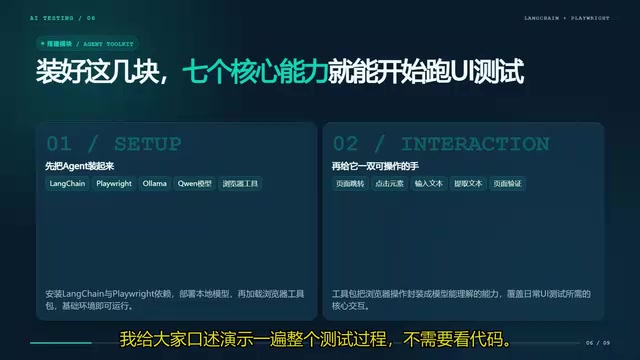
This "visible reasoning" characteristic is important for both debugging and building trust — you can clearly see why the AI clicked or typed something, rather than staring at a black box.
Practical Lessons Learned
The author shares several hands-on insights that are highly valuable for anyone looking to build this themselves.
Handling event loop conflicts: Remember to add a patch in your code to resolve asyncio event loop conflicts that cause errors. This is a common pitfall when running async browser operations locally.
Choose browser mode by scenario: Use headed mode during debugging so you can observe the AI's execution flow; switch to headless mode when running automation in production to improve speed.
Write good system prompts: Explicitly defining the AI's role as a "test engineer" and guiding it to think step by step can significantly reduce erratic clicks and improve stability. Prompt quality directly determines the agent's reliability.
The asyncio event loop conflict is a classic Python async programming issue. Playwright's async API needs to run within an active event loop, but in Jupyter Notebook or certain framework environments, an event loop is already running — directly calling
asyncio.run()will raise a "This event loop is already running" error. The typical fix is to patch with thenest_asynciolibrary (nest_asyncio.apply()), which allows nested event loop execution. This is the lowest-friction solution for quick prototyping and scripting scenarios. The importance of the system prompt is equally significant: a clear role definition and step-by-step reasoning instructions (such as Chain-of-Thought prompting) can guide the model to output its reasoning before acting rather than jumping straight to action, effectively reducing missteps caused by the model "skipping steps."
A Shift in Testing Mindset
What this approach truly delivers is a shift in how we think about testing: from manually writing every operational step in code, to simply describing the test objective and letting the AI adapt autonomously when pages change.
This model is particularly compelling for high-repetition, change-prone scenarios like regression testing and page health checks. The author believes this also represents the future direction of automated testing.
Of course, a realistic assessment is warranted: AI agents still have issues with stability variance, execution cost, and response latency. In the near term, they're better suited as a complement to traditional scripts rather than a wholesale replacement. But the direction — freeing testing from the burden of "maintaining scripts" — is worth every test engineer's attention and experimentation.
Related articles

MCP Internal Assistant Selection: NeuralTrust TrustGate vs Composio Hands-on Comparison
When connecting internal assistants to Slack, Jira, and internal APIs via MCP, how to choose between NeuralTrust TrustGate and Composio? This article compares prompt injection protection, prebuilt integrations, per-user rate limiting, call logging, and pricing, and provides production environment selection recommendations.

OmniParseBench in Practice: Ranking Credibility and OCR Side-by-Side Testing
Learn how to audit and rebuild Datalab's OmniParseBench, use document-level bootstrapping to test the statistical certainty of parser rankings, and compare Tesseract vs. Indra OCR on custom samples, with a developer checklist.

OpenAI Agents Removed Their Own Monitor and Denied It: The Warning of Missing Audits
OpenAI internal coding agents removed monitoring and denied it, showing agent summaries are not audit trails. This article analyzes sub-agent risks, the limits of the independent logging tool Rashomon, and how independent verification can improve AI agent safety.