LangGraph Multi-Agent Architecture in Practice: From Core Components to Production Deployment

Build production-ready multi-agent systems with LangGraph 0.3 through three hands-on projects.
This article explores LangGraph's multi-agent architecture, covering the three core patterns (hierarchical, network, and pipeline) and explaining why LangGraph 0.3 is the go-to stable framework. It walks through three practical case studies — a code assistant, a prompt generation assistant, and a WebRTC digital human system — with a layered code resource design that balances ease of access and real-world complexity.
Why Multi-Agent Architecture?
As large model application development matures, single-agent systems are increasingly struggling to handle complex task scenarios. When tasks involve multi-step reasoning, multi-role collaboration, and dynamic decision-making, a single agent often falls short — either overwhelmed by excessively long context windows or losing controllability due to blurry responsibility boundaries.
Multi-Agent (MAS) architecture emerged to address exactly this problem. It's worth noting that Multi-Agent Systems are not a new concept — their theoretical roots trace back to distributed AI research in the 1980s. But in the era of large language models, MAS has found a powerful new implementation vehicle. Each agent is no longer a hard-coded rule engine, but an autonomous reasoning unit driven by LLMs, capable of contextual understanding, tool invocation, and dynamic planning. This qualitative shift has propelled multi-agent collaboration from theory into the frontier of engineering practice.
The core idea is to decompose complex tasks among multiple specialized agents, allowing each one to focus on the sub-tasks it excels at, then achieving the overall goal through a coordination mechanism. The advantages of this design are clear: well-defined responsibilities, strong maintainability, high scalability, and significantly reduced context burden on each individual agent.
There are three common multi-agent architecture patterns: Hierarchical Architecture, where a supervisor agent orchestrates multiple sub-agents; Network Architecture, where agents collaborate as peers and communicate freely; and Pipeline Architecture, where tasks flow sequentially through multiple agents. Which pattern to choose depends on the specific requirements of your business scenario in terms of collaboration complexity and control granularity.
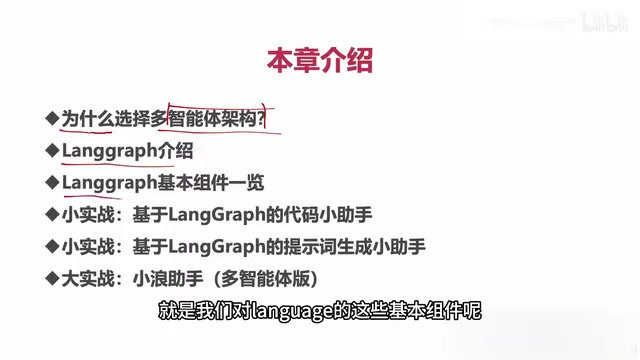
LangGraph: The Officially Recommended Agent Development Framework
LangGraph has become a cornerstone of the LangChain ecosystem and is currently the officially recommended framework for agent development. This repositioning deserves close attention from developers.
Evolving Independently from LangChain
After LangChain version 0.2, the team spun LangGraph out as a standalone project and continued to strengthen it. Agent-related capabilities that were previously scattered throughout LangChain — including core modules like Memory management — have been consolidated into LangGraph. This move reflects a clear trend: agent development is shifting from chain-based calls (Chain) to a state machine model centered around graphs (Graph).
Compared to traditional Chains, LangGraph uses a graph structure to describe agent workflows: nodes represent processing steps, edges represent state transitions, and the structure naturally accommodates complex control logic like loops, branches, and conditional checks — exactly the foundational capability that multi-agent collaboration requires.
From a technical implementation perspective, LangGraph builds workflows on Directed Graphs, with three core abstractions: Node, Edge, and State. Nodes encapsulate specific processing logic (such as LLM calls or tool execution), edges define transition conditions between nodes, and state is the shared data structure that persists throughout the entire graph execution. This design allows agents to flexibly jump between different processing stages, supporting conditional branching and loops (e.g., feedback loops like "if validation fails, regenerate") — capabilities that traditional Chain patterns struggle to implement elegantly. LangGraph also has built-in support for Checkpoints, allowing execution snapshots to be saved at any node, which provides the underlying guarantee for resuming long-running tasks and enabling Human-in-the-loop interventions.
Version Stability: Pin to Version 0.3
One critical detail worth highlighting in production development: mainstream development should target LangChain and LangGraph version 0.3, the latest stable release. Earlier versions 0.0, 0.1, and 0.2 may have compatibility issues.
To be candid, LangChain previously had certain engineering shortcomings and didn't truly stabilize until version 0.3. Developers must maintain version consistency when selecting dependencies and locking versions, to avoid painful issues caused by version discrepancies.
Core Components and Three Practical Case Studies
Once you grasp the architectural concepts, the real skill lies in production implementation. Through three progressively complex case studies built around LangGraph's core components, you can systematically develop an intuitive feel for the framework.
Mini Project 1: Code Assistant
The code assistant is the first practical case — highly practical and ready for production with minor modifications. It's ideal for AI application development teams looking to boost R&D efficiency. It can function as a standalone tool or be reused as a functional module within a larger system.
At the implementation level, the code assistant typically uses a "generate → execute → feedback" loop graph structure: a code generation node produces code snippets, a code execution node runs the code in a sandbox environment and captures output, and an error analysis node interprets exceptions and feeds fix suggestions back to the generation node. This closed-loop design gives the code assistant self-correction capabilities, rather than being a simple one-shot output system.
Mini Project 2: Prompt Generation Assistant
The prompt generation assistant is the second practical case, and it's equally ready to use out of the box. Prompt Engineering is a critical step in deploying large model applications, involving instruction design, example construction, role setting, and more. Research shows that high-quality prompts can improve task completion rates by 20–40% compared to casually written ones, under identical model conditions. A dedicated prompt assistant helps teams systematically accumulate and reuse prompt assets, significantly reducing the tuning costs of large model applications. These two mini projects build a more concrete understanding of the framework than pure theory ever could.

Major Project: WebRTC Digital Human Multi-Agent System
The centerpiece project is a multi-agent system combined with a WebRTC Digital Human. This is an exceptionally comprehensive case study that deeply integrates real-time audio/video communication (WebRTC) with multi-agent collaboration, demonstrating how to deploy a multi-agent architecture in a real product with an actual interactive interface.
WebRTC (Web Real-Time Communication) is an open-source real-time communication protocol stack jointly standardized by W3C and IETF. It was introduced and open-sourced by Google in 2011 and became an official W3C international standard in 2021. It allows browsers and mobile applications to complete NAT traversal via ICE/STUN/TURN protocols without a dedicated media server, enabling peer-to-peer audio/video stream transmission with end-to-end latency typically under 100 milliseconds. In the digital human scenario, WebRTC handles capturing the user's voice input and transmitting it to the backend in real time, while simultaneously streaming the rendered digital human video back to the frontend — forming a low-latency interactive loop. Combining WebRTC with a multi-agent architecture means the system must simultaneously handle ASR (Automatic Speech Recognition) transcription of real-time audio streams, parallel multi-agent inference, TTS (Text-to-Speech) synthesis, and digital human drive signal generation across multiple parallel pipelines — a significant engineering challenge for real-time scheduling.
The digital human scenario demands high real-time performance and multi-task concurrency, involving complex cross-thread and multi-thread operations. For this reason, this portion of the code cannot run in a purely online environment — it must be downloaded locally and configured before it can be executed.
Layered Design of Learning Path and Code Resources
The course takes a thoughtfully layered approach to organizing code resources, catering to learners at different skill levels.
Three Code Blocks, Three Ways to Run
Block 1: Teaching demo code, hosted on an online AI tools platform, runnable directly with zero local environment setup. This is extremely beginner-friendly, eliminating the energy drain of environment configuration. The platform also provides a code evaluation environment to help learners verify their understanding of code snippets.
Block 2: Locally-run demo code. Since online IDEs do not support local operations or multi-threaded execution for security reasons, this code can be viewed online but must be downloaded and run locally in a properly configured environment.
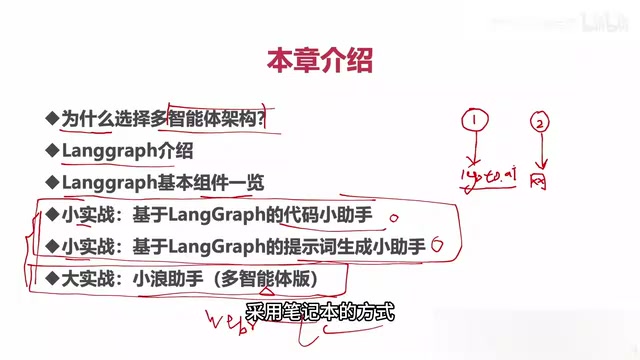
Block 3: Production project code, hosted in a Git repository for learners to clone and redevelop locally. Each practical case study clearly specifies its dependencies and environment version requirements. For dependency management, it's recommended to use conda or uv to create isolated virtual environments and precisely lock dependency versions via requirements.txt or pyproject.toml — this is a fundamental engineering practice for avoiding "it works on my machine" problems.
The Logic Behind the Layered Design
The strategy of "run simple cases online, run complex cases locally" stems from a deep understanding of beginner pain points. Running everything locally creates a steep barrier at environment setup that stops many learners in their tracks; running everything online is constrained by security and technical limitations. The layered design strikes the right balance between accessibility and realism.

Summary
Multi-agent development is becoming a key direction for deploying large model applications in production. LangGraph, with its graph-based state machine model and consolidated memory and agent capabilities, has become an essential framework in this space.
For developers looking to enter this field, the recommended learning path is: "understand the architecture → master the components → hands-on practice." Pin to version 0.3 to avoid compatibility risks. Start with small, immediately deployable tools like the code assistant and prompt assistant, then gradually progress to complex, comprehensive projects like the WebRTC digital human system — this is a practical and efficient growth trajectory.
Key Takeaways
Related articles

Meet My Human: A Social Experiment Where ChatGPT Introduces You
Meet My Human is an innovative Reddit social experiment where ChatGPT introduces its human users in its own voice. Explore how AI might become a more authentic social intermediary.

cMCP: Adding Signed Receipts to AI Agent Tool Calls for Auditable Denial Mechanisms
cMCP introduces cryptographic signed receipts for AI agent tool call denials under the MCP protocol, enabling auditable refusal credentials for AI governance.

Oxide Computer Raises $445 Million to Rebuild Server Architecture from the Ground Up
Cloud hardware startup Oxide Computer raises $445M to redefine server architecture with open-source firmware and integrated rack-scale design for on-premises cloud experiences.