Lasso: Draw on Your Mac Screen and Let AI Agents See It Directly
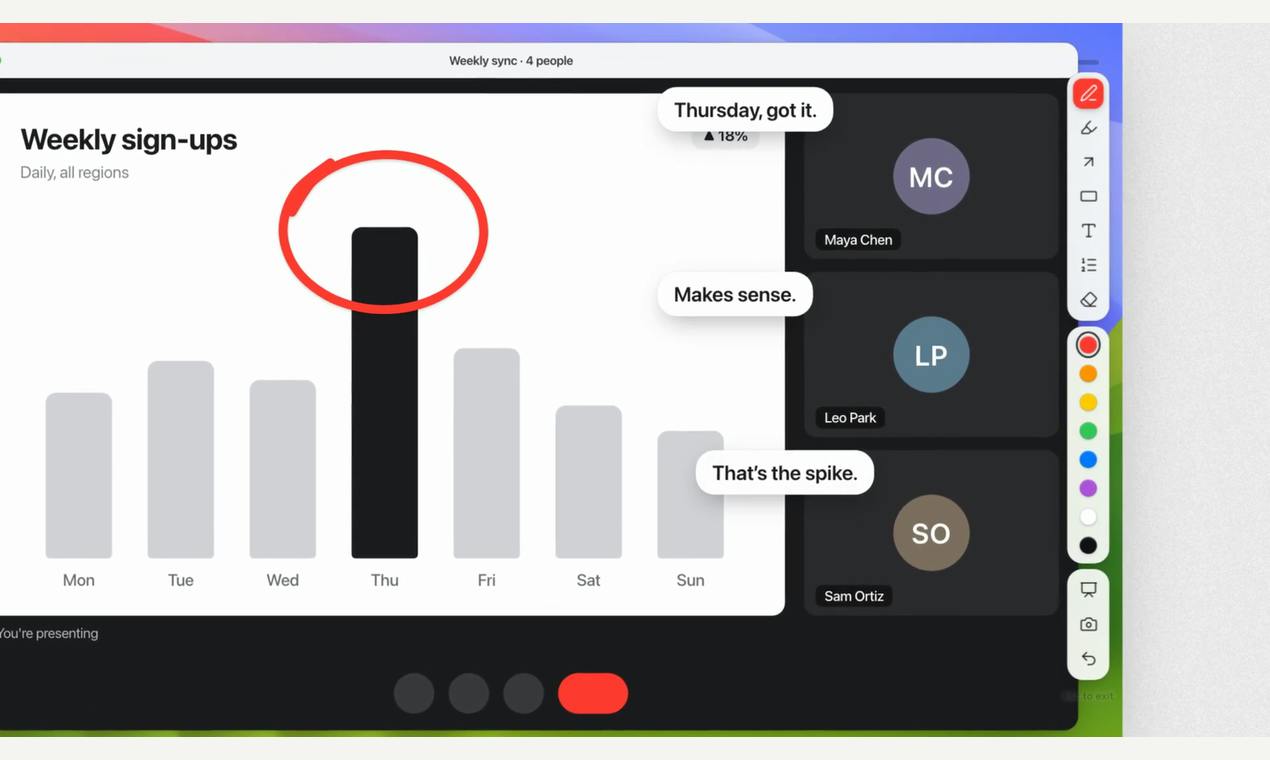
Lasso lets Mac users draw annotations directly on screen and passes circled areas to AI agents via a local MCP server.
Lasso is a Mac screen annotation tool that turns "describing interface problems to AI" into "drawing directly on screen for AI to see." Press ⌥⇧A to draw arrows, boxes, and sticky notes, then press S to capture. Its built-in local MCP server exposes annotations to AI clients like Claude Code and Cursor, letting agents understand circled areas and even draw back. Features include sensitive-info blurring, 24-hour encrypted share links, and an infinite whiteboard. $9.99 one-time, no account, no subscription, macOS 14+ with Apple silicon/Intel support. Limitations: macOS-only, early MCP ecosystem.
From "Pointing at AI" to "Drawing for AI"
When collaborating with AI agents, the hardest part often isn't writing the prompt—it's describing which element on the screen is actually broken. Saying "that button in the top right" isn't precise enough, and taking a screenshot plus writing an explanation feels cumbersome. Lasso, a new tool on Product Hunt, tries to solve this with a more intuitive approach: draw arrows, box selections, and annotations directly on your Mac screen, then let AI agents like Claude Code and Cursor see the exact area you've circled.
Lasso received 69 upvotes and 14 comments on Product Hunt, ranking #14 in the Mac, Productivity, and Developer Tools categories. Its positioning is clear—it's not just another screenshot annotation tool, but a bridge connecting "human visual intent" with "AI agent understanding."
Draw, Then Capture: Annotations as Context
Lasso's core interaction revolves around keyboard shortcuts. Press ⌥⇧A to draw arrows, boxes, and sticky notes anywhere on screen; then press S and the system captures and saves a screenshot of the annotated area. This workflow merges "annotating" and "capturing" into a single action, eliminating the need to switch between multiple tools.
For developers who frequently need to explain interface issues to AI, this low-friction design is valuable. You don't need to screenshot first, open an editor, draw, export, and finally upload—the entire chain is compressed into two key presses.
Local MCP Server: Letting Agents See the Area You Circled
The most interesting part of Lasso is its built-in local MCP server. MCP (Model Context Protocol) is a protocol that allows AI models to securely access local tools and data, and Lasso uses it to expose screen annotation content to clients like Claude Code, Cursor, and Claude Desktop.
This means AI agents can not only "see" the screenshot you took, but also understand the specific locations and annotation meanings you've circled on it. According to the product description, agents can even "draw back," forming a two-way visual communication. For debugging UI, reviewing design mockups, or explaining complex interface states to AI, this capability is far more efficient than pure text descriptions.
MCP (Model Context Protocol) is a protocol standard proposed and open-sourced by Anthropic in late 2024, designed to establish a unified communication interface between AI models and external tools and data sources. You can think of MCP as "USB-C for AI": before it existed, every AI client (like Claude Desktop or Cursor) needed a custom integration to connect to a local tool. MCP defines a standard "server-client" architecture where tool developers only need to implement one MCP server to be called by any client that supports the protocol. MCP servers typically run as local processes, communicating with clients via stdio or HTTP, so data never has to leave the user's device. This explains why Lasso emphasizes a "local MCP server"—it ensures privacy while letting multiple AI agents read annotation content in a standardized way. Currently, the MCP ecosystem is still rapidly evolving, and clients vary significantly in their ability to parse tool-returned content—which is why Lasso's actual effectiveness depends on the client you use.
Practical Design for Privacy and Sharing
After annotating, Lasso offers several ways to handle the result: blur sensitive information, generate an encrypted share link that expires after 24 hours, or sketch freely on an infinite whiteboard. These features all address the same need—controlling how much information is exposed when sharing screen content.
The 24-hour expiring encrypted link is a pragmatic default: it facilitates temporary collaboration while reducing the risk of sensitive screenshots lingering long-term. For developers handling client interfaces or internal systems, this design is far more reliable than "upload to a public image host and manually delete later."
One-Time Purchase, No Account System
Lasso is priced at a one-time $9.99 purchase, with no account and no subscription. It supports macOS 14+ and is compatible with both Apple silicon and Intel chips. In the niche of screenshot annotation tools, this price falls into impulse-buy territory, and it avoids the awkward "use it a few times then let it gather dust" problem common with subscription tools.
No account system means all data stays local. Combined with the local MCP server design, Lasso's privacy narrative is self-consistent. Of course, this also means cross-device syncing is left to the user to figure out.
Apple silicon and Intel dual-architecture compatibility means Lasso provides a Universal Binary (or separately packaged versions) that runs natively on Macs with M-series chips and traditional Intel processors. For developer tools, this isn't a given: some new tools simplify their build process by releasing only arm64 versions, leaving Intel Mac users unable to use them or dependent on Rosetta 2 translation. Lasso explicitly supports both architectures, expanding its potential user base. Additionally, the macOS 14+ system requirement (i.e., Sonoma and above) is usually related to the availability of APIs from newer system frameworks like SwiftUI and ScreenCaptureKit—screen capture and annotation features often depend on newer system permission models and graphics interfaces, which explains why older macOS versions can't be supported.
Reasons to Watch—and Limitations
Lasso targets a gap that's growing larger: AI agents are becoming more capable, but the way humans convey visual intent to agents is still primitive. Circling instead of writing long descriptions is intuitive and lowers communication costs.
It's worth noting that the MCP ecosystem is still early, and how well agents actually understand annotation content depends on the client implementation. Also, Lasso currently only supports macOS, leaving Windows and Linux users out for now. Whether its value materializes depends on whether you actually use tools like Claude Code or Cursor in your daily work to handle screen-level problems.
For AI-assisted developers on Mac, the $9.99 trial cost is low—worth adding to your toolkit and observing for a while.
One-line Summary
Lasso lets Mac users draw annotations directly on screen and passes the circled areas to AI agents through a local MCP server.
Paragraph Summary
Lasso is a Mac screen annotation tool whose core idea is to turn "describing interface problems to AI" into "drawing directly on screen for AI to see." Users press ⌥⇧A to draw arrows, boxes, and sticky notes anywhere on screen, then press S to capture a screenshot—merging annotation and capture into a two-step operation. Its most differentiated capability is the built-in local MCP server, which uses the Model Context Protocol to expose annotation content to AI clients like Claude Code, Cursor, and Claude Desktop, allowing agents to understand the specific areas users circle and even draw back in response. The product also offers sensitive information blurring, 24-hour expiring encrypted share links, and an infinite whiteboard. Priced at a one-time $9.99 purchase, no account and no subscription, it supports macOS 14+ and Apple silicon/Intel. Limitations include macOS-only support and the early MCP ecosystem, with agents' actual comprehension depending on the client implementation.
Related articles

Why Git Is Essential in the AI Era: From Version Control to Agent Collaboration
What's the difference between Git and GitHub? How do you manage changes with Issues, branches, and Pull Requests after AI Agents write code? Based on NetworkChuck's Git tutorial, this article walks through the complete flow from git init to conflict resolution and analyzes why version control has become an essential skill in the AI era.
OpenAI 6.2 Astra Hands-On Review Gone Wrong: Impressive Benchmarks, But Developers Say It's Unusable
OpenAI 6.2 Astra leads benchmarks at lower cost, but early testers report frequent stalls in long tasks, unparseable output, and uncontrolled resource management. We examine the gap between real-world experience and official data, and what it means for developer adoption.

GTA VI Coffee System Details Revealed: Hot Coffee Can Be Splashed on People?
Vergecast podcast reveals GTA VI's coffee system: players can brew in apartments, buy from vending machines, order in restaurants, and even splash hot coffee on others. This detailed recreation of daily interactions continues Red Dead Redemption 2's immersive design and sparks discussion on game detail versus gameplay balance.