Lazy AWS: A Keyboard-Driven Terminal for AWS Resource Management

Lazy AWS is a keyboard-driven open-source terminal tool that combines AWS resource browsing with CLI operations.
Lazy AWS is an open-source tool from developer Piyush Choudhari that earned 77 upvotes and ranked 9th on Product Hunt. It integrates AWS resource browsing, detail inspection, and confirmed CLI operations into a single keyboard-driven terminal interface, reducing the context overhead of switching between the browser and multiple AWS consoles. Built on the AWS CLI, it reuses users' existing credentials and permission system. It targets command-line-savvy developers, DevOps engineers, and cloud architects for quick resource checks and troubleshooting, but does not aim to replace the full-featured AWS Management Console.
Say Goodbye to the Mouse: How Lazy AWS Reinvents AWS Resource Management in the Terminal
Lazy AWS, which earned 77 upvotes and ranked 9th on Product Hunt, aims to solve a pain point in developers' daily work: constantly switching between the browser and multiple AWS service consoles not only breaks flow but also makes simple resource checks inefficient. This open-source tool from developer Piyush Choudhari brings AWS resource browsing, inspection, and CLI execution together into a single keyboard-driven terminal interface.
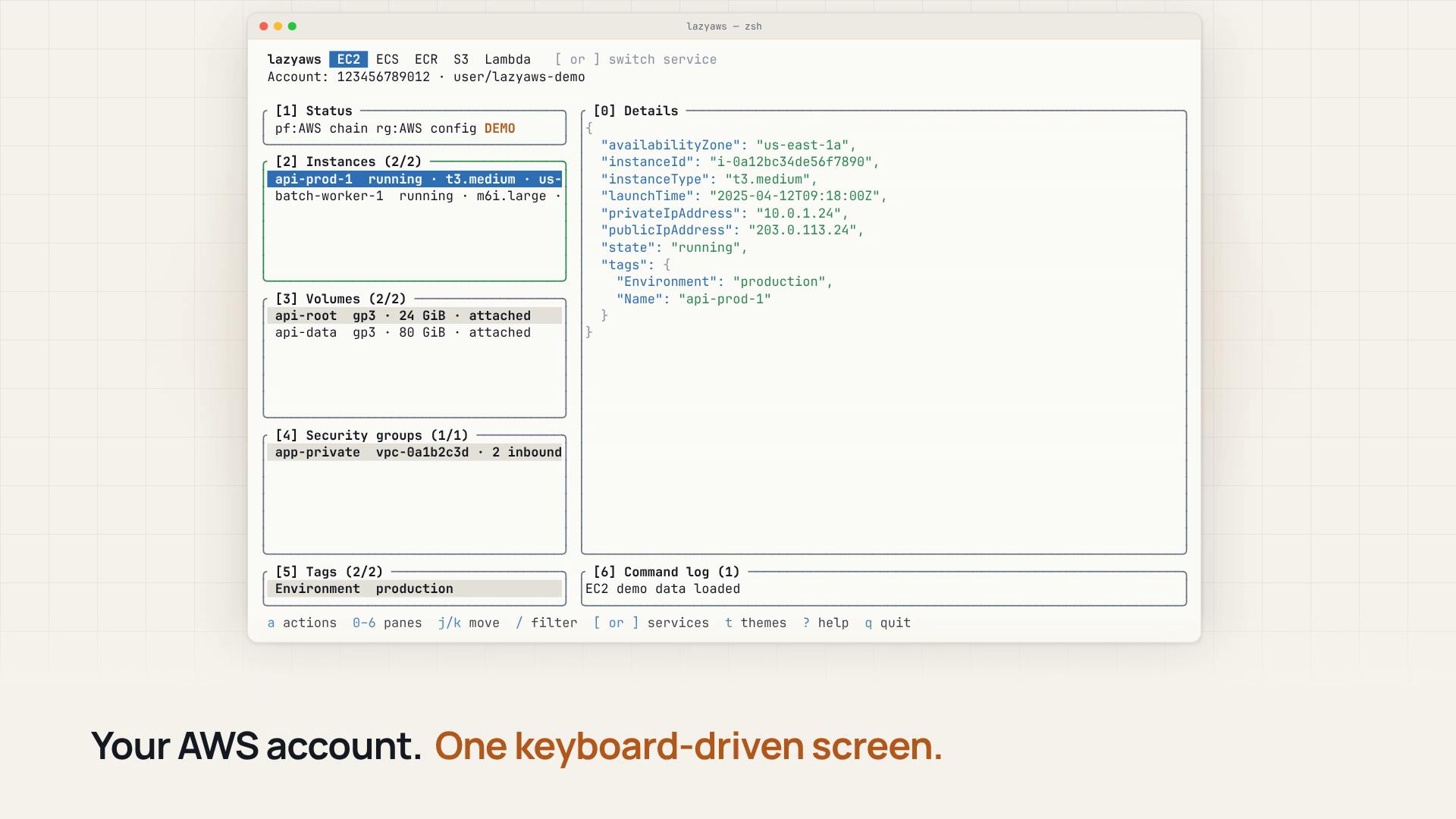
One terminal instead of multiple console tabs
The core philosophy of Lazy AWS is "keyboard-driven." Without leaving the terminal, users can browse the various AWS resources in their account, view detailed information, and directly run confirmed AWS CLI operations. That means everything from listing EC2 instances to checking S3 bucket configuration to triggering a predefined CLI command can happen within one interface, reducing the overhead of context switching.
For developers accustomed to working on the command line, this interaction model feels especially natural. It avoids the wait times of loading lengthy console pages in the browser, and it reduces the risk of accidentally triggering unintended actions—because every operation requires confirmation before execution.
AWS CLI is the official command-line interface provided by Amazon, allowing users to call AWS APIs directly through commands like aws ec2 describe-instances and aws s3 ls to query and operate resources. Compared with the browser console, the CLI is better suited to scripting and automation scenarios, but its output is plain text with no visual navigation, and complex queries require memorizing parameters and JSON structures. Lazy AWS adds a terminal UI layer on top, wrapping CLI capabilities into a browsable interactive interface.
Context switching refers to the cognitive cost incurred when developers shift their attention between different tools or interfaces. Research shows that after a single interruption it takes, on average, tens of seconds to return to the original working state. Frequently jumping between the IDE, the terminal, and multiple AWS console pages significantly reduces troubleshooting and operations efficiency—precisely the core problem Lazy AWS tries to alleviate.
Open source and ecosystem integration
As an open-source project, Lazy AWS publishes its source code on GitHub and is categorized as a developer tool. This opens the door to community contributions and customization. It is built on the AWS CLI, so users' existing credential configuration and permission system can be reused directly without learning a new authentication mechanism. It also supports common resource types in the Amazon ecosystem, covering the high-frequency scenarios in daily operations and development debugging.
Terminal user interface (TUI) is a program form that simulates interactive elements such as windows, lists, and forms in a plain-text terminal, often implemented with ncurses or libraries like Go's Bubble Tea and tview. Compared with a GUI, a TUI uses fewer resources, can be used remotely over SSH, and is entirely keyboard-driven, making it suitable for server environments and developers comfortable with the command line. Lazy AWS's "keyboard-driven" positioning falls squarely in this category, similar to the design approach of tools like k9s (Kubernetes) and lazygit (Git).
As for the credential and permission system, AWS CLI uses the ~/.aws/credentials and ~/.aws/config files, or obtains access keys through environment variables, IAM Roles, and other means. Any tool built on the AWS CLI typically inherits this mechanism directly, meaning users don't need to reconfigure keys inside the tool, and permission boundaries remain uniformly controlled by existing IAM policies—lowering the security and operational burden of adopting a new tool.
Who is it for?
Lazy AWS is clearly aimed at developers, DevOps engineers, and cloud architects who are already familiar with the AWS CLI and want a more intuitive view of resources within the terminal. For teams that frequently need to check resource status, perform quick troubleshooting, or run repetitive CLI commands, this tool can significantly improve operational efficiency. That said, it is not meant to fully replace the AWS Management Console—complex configuration and graphical monitoring still require the console or dedicated tools, and Lazy AWS positions itself as a lightweight terminal companion.
Lazy AWS has so far received positive initial feedback on Product Hunt. Although the number of comments is modest, the 77 upvotes indicate genuine demand in the developer community for keyboard-driven workflows. With participation from the open-source community, its resource coverage and interaction details are expected to become even richer.
Related articles

JobRunner MCP Server: AI Agents Can Now Fix Failed Java Jobs
JobRunner launches an open-source MCP server enabling AI agents to view cluster status, diagnose failures, and recover Java jobs—incident response from any cloud coding environment or existing agent.

MLAI Digital Launches 9 Security Agents: MCP Server Safeguards the Full Lifecycle of Agentic AI
MLAI Digital launches Security MCP Server with nine built-in specialized security agents covering vulnerability discovery, attack simulation, prompt injection detection, API and infrastructure assessment, and accelerated remediation—embedding security validation across the full Agentic AI lifecycle from development to production.

Running Isaac Lab on H100 GPUs: Exploring Better Approaches
Exploring optimization methods for running Isaac Lab on NVIDIA H100 GPUs, including MIG configuration, mixed precision, TensorRT acceleration, and community experience to improve robotics simulation and reinforcement learning efficiency.