LeadRadar: Replace an Afternoon of Google Maps Prospecting with an AI Agent

Open-source AI agent LeadRadar automates Google Maps prospecting, outputting scored leads and email drafts.
LeadRadar, an open-source AI challenge project, automates Google Maps client hunting for freelancers. Enter a profession and city, and it runs a SerpApi Maps query, scores each business 0-100, and drafts a personalized outreach email for the top lead. Its key design splits fact extraction from model judgment with 75/25 weighted scoring, and uses code checks to compensate for a 7B model's weaknesses.
Freelancers' client-hunting process often begins with a long scroll through Google Maps. You flip through each business to check whether it has a website, whether anyone responds to its reviews, paste everything into a spreadsheet, and finally write an email saying "I happened to come across your business" — when the truth is you may have already scrolled past four hundred listings. LeadRadar, submitted by developer mudit-palvadi in the second week of the Hacktoberfest open-source AI challenge, takes aim squarely at that pain point: an AI agent that automatically reads Google Maps, scores local businesses, and drafts outreach emails.
What LeadRadar Is
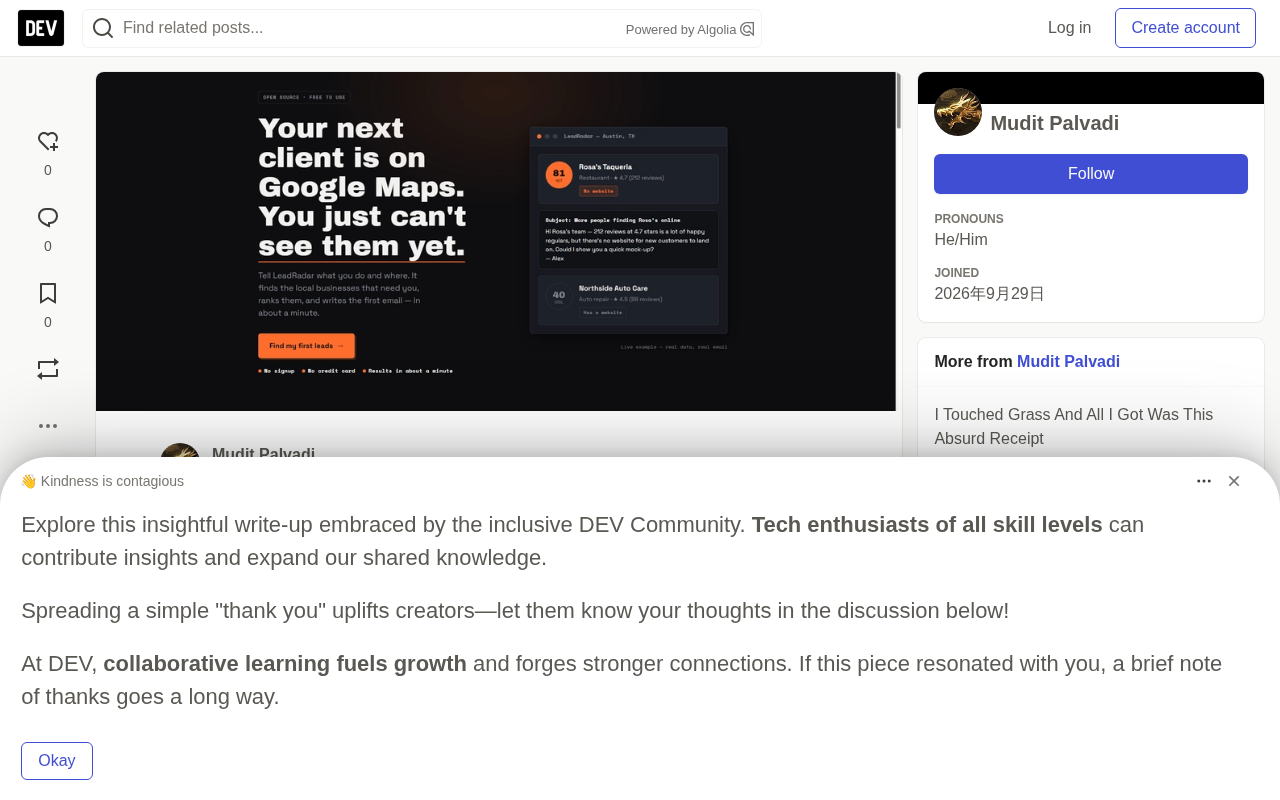
LeadRadar's input is extremely simple: what you do for a living, which city you're in, your name, and how many leads you want. Enter "graphic designer in Austin, TX," for example, and the agent searches on its own, scores each result, returns a ranked list of leads, and prepares an email for the top-ranked one. Swap the profession for "content writer" or "web developer" and the flow is identical — the profession only changes what the agent looks for, not how it thinks.
The system is made up of four modules:
- Search layer: concatenates your profession and city into a single Google Maps query, executed via SerpApi.
- Scoring layer: assigns each business a score from 0 to 100. Most of the score comes from facts directly verifiable in the search results, such as whether there's a website or whether the rating is quietly dragging the business down.
- Email layer: drafts a short, personalized email for the top leads, signed with your name.
- Temporal workflow: splits search, scoring, and email-writing into independent steps with retries, so a single rate limit doesn't scrap the entire scan.
The tech stack is deliberately conservative: Express for the API, MongoDB Atlas for storage, the allam-2-7b model on Groq's free tier (with Ollama as a local fallback), and SerpApi for search. The whole thing deploys on a single Render service, is MIT-licensed, and ships with 68 tests.
SerpApi is a third-party search-data API service that scrapes and structures results from Google, Google Maps, Bing, and others into JSON, so developers don't have to maintain their own crawlers and proxy pools. For a project like LeadRadar, it solves the problem of "how to programmatically and reliably fetch Google Maps business info (name, address, phone, website, rating, review count, category)." The free tier is limited, typically used for prototyping and low-frequency calls, and production use requires paid scaling.
Temporal is an open-source workflow orchestration engine whose core value is splitting a multi-step piece of business logic into independently persistable, retryable, observable activities. It records the execution state of each step, so when a step fails due to rate limiting or a network error, only that step reruns instead of the whole flow starting over. LeadRadar uses it to wrap the "search — score — write" three-stage flow precisely to avoid a single SerpApi rate limit invalidating an entire scan.
Demo and Experience
The scan form asks only four things: your profession, your location, your name, and how many leads you want. After submitting, each step in the UI lights up as the workflow completes it.
Results come back as a sorted list, with the triggering signals listed next to each score so you can see why a business landed where it did. The top-ranked lead already comes with a written outreach email, and it works fine on mobile — which matters if you're checking leads between calls.
The service runs on Render's free tier, and the first visit after a cold start takes about a minute. The whole project is open-sourced on GitHub under the MIT license.
Three Key Design Decisions
The agent writes the query for you, not the other way around
You never compose the search terms yourself. After you enter "graphic designer," the agent first asks the model: which local businesses would hire someone like this? It then assembles the answers into a Maps query such as "coffee shop OR bakery OR restaurant OR bar OR food truck OR real estate agent OR gym OR salon ... in Austin, TX." A single SerpApi Google Maps call returns names, addresses, phone numbers, websites, ratings, review counts, and categories.
Two pitfalls surfaced here. The first was that the prompt only understood one profession. When the author's designer friend ran a scan, the agent recommended toy stores, pet shops, car washes, and bookstores (bookstores even appeared twice) — real businesses, sure, but none of them waiting for a designer. The cause was that the prompt contained only a single web-design example, and the model didn't generalize at all. The author ran the diagnostic script three times, saw the same wrong list, then rewrote the prompt to include cross-profession examples and sharpened the question: which businesses have owners who would pay out of their own pocket? He also added deduplication and made the profession filter recognize borderline matches like "design studio" against "graphic designer." After the fix, the same script returned coffee shops, bakeries, food trucks, and one gallery, and a real Austin scan produced 15 businesses the author would genuinely be willing to email.
The second pitfall was that SerpApi occasionally returns a record that isn't a business at all, most commonly just the city name with no real title. A lead called "Austin" invites the model to fabricate details, so isUsableResult() drops such rows before they enter the list. The author's most recent scan log read "dropped 1 unusable result" — exactly one awkward email avoided.
Facts come from search; only opinions go to the model
The first version of the scorer trusted the model completely, and the result was that it answered 70 points for every single lead, regardless of whether the business had a website. A score that never changes isn't a score — it's decoration.
So the division of labor was drawn strictly: detectSignals() reads the raw SerpApi record and derives verifiable facts — no website is a strong buying signal for any profession, and a low rating with a high review count is another. The model returns only a number and a one-line rationale, and the final score is a weighted blend:
// src/workflow/activities.ts
let base = 30;
if (has('no_website')) base += 55;
if (has('bad_reviews_no_response')) base += 15;

const blended = base * 0.75 + clamp(modelScore, 0, 100) * 0.25;
75% of the score is arithmetic anyone can read, and the model only gets a quarter of the vote — enough to break ties, not enough to pretend it saw things it didn't.
Signals and scoring are the key abstraction here. detectSignals() doesn't judge; it extracts: whether a given business record has a website link, what combination range its rating and review count fall into, whether it shows patterns like "high rating but no review replies," and outputs a set of boolean or discrete labels. The actual scoring logic maps those labels to fixed weights — for example, "no website" gets +55 because, for any freelancer, a business without even a website is more likely to be a prospect not yet covered by outreach. This separation of "fact extraction" from "value judgment" makes the source of each score traceable and auditable: every number maps back to something in the original search record, rather than being the model's black-box intuition.
Emails have to survive a 7B model
The prompt asks the model to sign its name and not to comment on things it has never seen, but the model cheerfully does so anyway. So the checks live in code: ensureSignOff() inspects the end of the draft and adds your name if the model forgot to sign (which it often does); cleanEmailBody() strips out sentences where the model "confesses" it hasn't checked the website, as well as the explicitly banned "I hope this email finds you well" that it writes anyway; and pitchGuidance() prevents a graphic designer from proposing to build a website for a client in the email — that kind of content makes outreach look generated at a glance.
The rule the author landed on: if you can fix it with code that checks the output, don't fight the model in the prompt.
7B model refers to a small language model with roughly 7 billion parameters, such as the allam-2-7b mentioned in the article. Compared to GPT-4-class models, it is noticeably weaker at instruction following, long-context reasoning, and "knowing what it doesn't know," and it readily hallucinates or ignores negative constraints (for example, writing a sentence it was explicitly told not to write). In engineering practice, therefore, the reliable strategy isn't to keep polishing the prompt to "persuade" the model, but to add a deterministic layer of code validation after the output: checking the sign-off, filtering prohibited phrasing, and correcting suggestions that don't match the profession. This is the real-world basis behind the rule "if you can fix it with code checks, don't fight the model in the prompt."
Why Open Source Matters Here
Client-hunting tools are usually sold back to the very people who need them most. For years, the options for lead discovery have been either monthly databases you can't afford or scrapers repackaged as a service. The libraries the author actually built with are free and readable.
Google Maps as a lead source isn't a new idea — there are already several similar open-source projects in the community. What open source changes is the reasoning process: anyone can read why a bakery ranks above a boutique, challenge the weights, or submit a pull request. A "black-box lead list you can only buy" and a "readable lead list" are not the same product.
Feedback from Two Real Users
Before launch, the author handed LeadRadar to two friends who actually freelance.
The web developer ran a scan, and what surprised him most was the speed. He picked a lead, sent the email the agent had drafted, and came back saying there was no conversion — though a single email barely ever converts. But what he really said was that he liked the app, would definitely use it again, and that he now had a candidate list he didn't have before, produced in about a minute.
The graphic designer had the opposite result. The app couldn't find good leads for his profession, and he said straight out that it looked optimized for other skills. He was right, and he was blunt about it — and that was the most useful part. That one complaint pushed the author toward the diagnostic script and the prompt rewrite. After the fix, scans for his profession returned coffee shops, bakeries, and event venues instead of toy stores.
Neither paid, and the author didn't ask. The only "vote" so far is the developer's promise to come back and keep using it — which is more convincing than any demo the author could record himself.
The author came away with two lessons: speed impresses developers more than any feature, because the thing they're comparing against is their own afternoon of scrolling Google Maps; and the claim "works for all freelance professions" is only honest if it holds up for every profession a real person has tested. Two professions tested so far, and the claim is still smaller than the author's ambition — he'd rather say it out loud than bury it in a footnote.
What It Still Can't Do
- Scores are only meaningful when compared within a single scan. An 81 in Austin doesn't mean your city would give an 81.
- The emails are just drafts. Read them yourself before sending — your name is on them.
If you want to try it on your phone, open the Render URL in your browser; the cold start takes about a minute. And if your profession returns leads as absurd as the author's friend ran into, open an issue on GitHub and tell him — that's exactly how it gets better.
One-line Summary
Open-source AI agent LeadRadar automates Google Maps prospecting, outputting scored leads and email drafts.
Paragraph Summary
LeadRadar is a project submitted by developer mudit-palvadi to the Hacktoberfest open-source AI challenge, using an AI agent to spare freelancers the long process of scrolling Google Maps for clients. You enter a profession and city; the system runs a Maps query via SerpApi, scores each business from 0 to 100, and drafts a personalized outreach email for the top-ranked lead. Its core design entrusts fact extraction to the search record and opinion judgments to the model, with scoring weighted 75/25; both the prompt and the code layer add constraints to compensate for the 7B model's weaknesses. Testing by two real users exposed profession-fit gaps and confirmed speed as the core advantage. The project is open-sourced under the MIT license.
Related articles

macOS Is No Longer UNIX: Apple Didn't Renew Certification, But the Technology Is Unchanged
Apple did not renew macOS's UNIX certification, and the Open Group has removed Apple's entry. This article analyzes the technical reality behind the expiration, Apple's possible intentions, and the practical impact on developers.

Building Stateful Multi-Agent Systems with Azure Cosmos DB
Based on the official Azure Cosmos DB tutorial, this article explains how to use the Agent Memory Toolkit to add shared persistent memory to a multi-agent travel planner, covering short-term, long-term, episodic, and semantic memory plus cross-session state continuity.

Production AI Agent Operations: A Three-Step Framework for Observing, Evaluating, and Optimizing
Azure Cosmos DB team proposes a three-step framework for production AI Agent operations: observe trace tracking, evaluate with LLM as a judge and regression testing, optimize cost across RU, retrieval, memory, and LLM layers.