LibTV Hands-On: A Full Breakdown of How an AI Agent Produces an Animated Short in One Day
LibTV's AI Agent lets one person produce an animated short in a single day — here's the full workflow breakdown.
This article provides a hands-on breakdown of LibTV's AI Agent for animation production. It covers the complete workflow from script creation through choice-based creative communication, storyboard generation, and final video compositing — all within a single canvas. Key features include a reusable Skill library, dual editing modes (node workflow and story board), and character consistency via reference uploads, dramatically lowering the barrier to animated content creation.
One Person, One Day — Worth Twenty People Working for a Year?
Producing a cinema-quality animated short used to be a heavy-asset, labor-intensive endeavor. The traditional animation pipeline typically spans three major phases: pre-production (screenplay, concept design, storyboarding), production (character modeling, rigging, animation, texturing, lighting), and post-production (VFX compositing, color grading, editing, sound mixing, rendering). A 3–5 minute cinematic animated short usually requires collaboration among over a dozen specialists — concept artists, 3D modelers, riggers, animators, VFX artists, lighting artists, render TDs, compositors, and editors — with production timelines ranging from six months to a year and budgets easily reaching hundreds of thousands or even millions of dollars.
In this traditional pipeline, every stage demands specialized software and deep technical expertise. Character modeling, for example, typically uses Maya, ZBrush, or Blender, and modelers must master topology optimization to ensure natural deformation during animation. Rigging requires understanding human kinematics, setting up IK/FK switches, facial controllers, and other complex systems. In the rendering stage, renderers like Arnold and RenderMan can take several hours per frame — a 5-minute short at 24fps means 7,200 frames, making render farm compute costs substantial. The high costs and long timelines have kept the vast majority of ordinary creators locked out.
Now, with AI Agents, a single person can achieve roughly 70–80% of a finished film's quality in just one day. An AI Agent refers to an artificial intelligence system with autonomous perception, decision-making, and execution capabilities. Unlike traditional single-turn Q&A AI, an Agent can understand complex goals, automatically decompose task chains, invoke multiple tools, and iterate continuously until the final objective is met. From a technical architecture perspective, the core of an AI Agent typically includes: a Large Language Model (LLM) serving as the reasoning and decision-making hub, Tool Use/Function Calling interfaces for interacting with external systems, a Memory system to maintain contextual coherence, and a Planning module for task decomposition. The ReAct (Reasoning + Acting) paradigm is the current mainstream Agent implementation framework — at each step, the model first reasons and thinks, then decides what action to take, observes the result, and enters the next iteration cycle. This isn't simple "AI assistance" — it's packaging the workflows of a director, storyboard artist, VFX artist, and editor into a single chat window. This article uses LibTV's Agent feature as an example to break down how ordinary people can leverage AI tools to produce visually appealing and engaging animated shorts.
When people say the era of "celebrity production crews" is over, they're pointing to a more fundamental shift: the barrier to content production is moving from "team collaboration capability" to "aesthetic judgment." You don't need to know how to direct — you just need to know what you want.
LibTV Agent Workflow: From Conversation to Storyboard Generation
On the right side of LibTV's canvas, you'll find the Agent's chat window. Upon opening it, a settings panel automatically appears where you can choose between manual and automatic modes. The advantage of automatic mode is that you don't need to confirm every step — the Agent delivers results directly, and you only need to judge "good" or "not good."
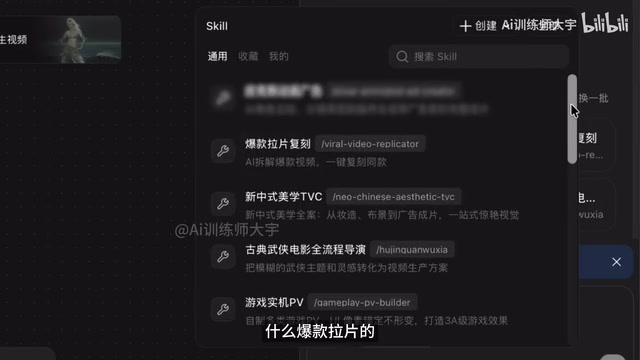
The real key lies in the Skill library. At its core, the Skill library is a collection of carefully tuned and validated structured Prompt templates. Prompt Engineering is a core technical methodology in current AI applications, referring to the practice of precisely designing input prompts to guide large language models and generative models toward high-quality outputs. Excellent prompt engineering isn't just about "describing what you want" — it also involves understanding the model's attention mechanism. For instance, keyword ordering affects weight distribution, Negative Prompts can exclude unwanted elements, and specific sentence structures can trigger different generation modes within the model. A good Skill preset doesn't just contain style descriptions — it encapsulates camera language rules, narrative rhythm, visual aesthetic parameters, and other multidimensional instructions, essentially encoding a senior creator's tacit experience into an executable, standardized recipe. The system comes with a batch of quality Skill presets, such as "Viral Film Analysis," "Aesthetics at Heart," and "Slapstick Comedy" style templates. If none of the presets fit, clicking the "All" button reveals over a hundred Skills categorized by direction, covering a wide range of common and niche creative needs.
After selecting a style Skill (e.g., "Cinematic Fight VFX"), go back to the chat window and feed the Agent your prepared story script. If you don't have a ready-made script, just providing a rough direction works too — the Agent will co-develop the narrative structure with you through a "Q&A" multiple-choice format, gradually crystallizing the vague ideas in your head.
Choice-Based Creative Communication
You might not have noticed the Agent's interaction design. Each question it poses is different, and you only need to answer through single-select or multi-select options. If none of the given options satisfy you, you can type a custom response under "Other." This design reduces the mental burden of creative communication — you don't have to conceive from scratch but instead make judgments and trade-offs among AI-provided options. From a cognitive science perspective, "choosing" requires far less cognitive load than "creating," similar to the "recognition over recall" principle in user experience design (originating from Jakob Nielsen's Ten Usability Heuristics). It lets creators focus their limited attention on aesthetic judgment rather than organizing expression. Psychological research shows that when evaluating and deciding among options, the brain primarily engages Recognition Memory, whereas conceiving from scratch requires Recall Memory and the executive control functions of working memory — the latter consuming significantly more cognitive resources.

Additionally, the "Upload Reference" feature lets you specify existing character designs to ensure character consistency across different storyboard panels. Character Consistency is one of the most challenging technical problems in AI video generation — because Diffusion Models introduce randomness with each generation, the same character can easily exhibit facial feature drift, clothing detail changes, and other inconsistencies across different frames. The underlying technology of current AI video generation is primarily based on diffusion models, which generate content by learning the reverse process of gradually recovering clear images from noise, with video generation adding temporal consistency constraints on top of this. Current mainstream solutions for character consistency include IP-Adapter (injecting reference features through image prompts by fusing CLIP features of reference images with text features in cross-attention layers), LoRA fine-tuning (Low-Rank Adaptation, training small adapter models for specific characters — requiring only a few reference images and tens of minutes of training to achieve highly consistent character representation), and Reference Attention (continuously referencing the self-attention feature maps of a baseline image during generation to ensure every frame is anchored to the same visual identity). LibTV's approach of uploading reference images to anchor character appearance essentially leverages these image-conditional control technologies. When you're unsatisfied with a generated image, you can select it on the infinite canvas and directly modify the prompt, or have the Agent help adjust it. This "generate–review–modify" loop is essentially moving the traditional storyboard review process into a chat window.
Two Editing Modes: Node Workflow vs. Story Board
LibTV's canvas area offers two editing modes — this is what distinguishes it from purely conversational AI tools.
The first is the familiar node-based workflow format. Node-based Workflows originated in professional VFX and 3D production, with software like Houdini, Nuke, and Blender having long adopted this paradigm. The core concept is decomposing complex processes into individual functional units (nodes), using visual connections to define data flow and processing logic — essentially a visual programming language. The advantages of this paradigm include: each node is an independently adjustable parameter space, so modifying any single step won't break the overall process; meanwhile, the connections between nodes make data flow visible, allowing creators to clearly trace the complete transformation path from input to output. In AI creative tools, ComfyUI pioneered this mode for Stable Diffusion workflows, enabling users to freely combine text-to-image, image-to-image, ControlNet, upscaling, and other modules, spawning a wealth of community-shared complex workflow solutions. In LibTV's infinite canvas, you can freely drag and drop modules, arrange positions, and invoke reference materials through node connection lines. This mode offers high operational freedom and is suitable for advanced users familiar with workflow logic.
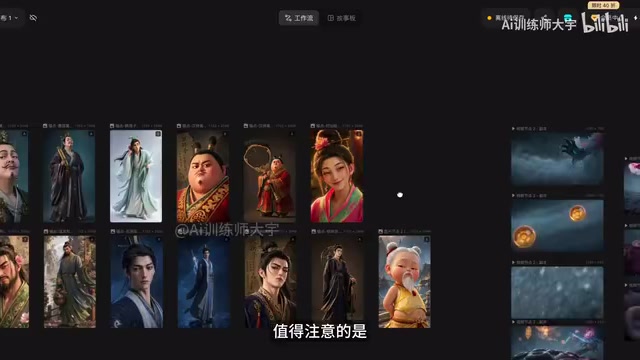
The Infinite Canvas itself is a popular interaction paradigm in recent creative tools, initially popularized by collaboration tools like Figma and Miro. Its core advantage is breaking the spatial constraints of linear documents, allowing creators to freely organize information on a 2D plane and establish non-linear visual associations. In AI creative scenarios, the infinite canvas is particularly well-suited for managing the large volume of candidate materials produced by generative AI — creators can spread out all options like a physical workbench for comparison and selection.
The second is the Story Board format. It organizes key elements — character, scene, prop, and other asset images and videos — into modular categories for clear visibility. The upper-left corner allows quick switching between asset categories like characters, scenes, and props, making material lookup and prompt modification more intuitive. The Story Board design draws inspiration from the traditional storyboard used in film production — a series of static images arranged sequentially to preview the visual narrative of an entire film. Disney Studios pioneered this method in the 1930s, and it remains a standard process in Hollywood pre-production to this day. LibTV digitizes this classic methodology while integrating AI generation capabilities, enabling each storyboard panel to be modified and regenerated in real time. If you don't feel like thinking, simply click the bubble icon to pull assets into the chat window and let the Agent handle the rest.
The two modes are interoperable, and you can switch between them at any time during production. This design — where "professional flexibility" coexists with "foolproof ease of use" — effectively serves different tiers of users from beginners to experienced creators.
Skill Accumulation: Turning Creative Experience into Reusable Assets
This is the most imaginative aspect of the entire tool. Every chat session can be recorded and converted into your own exclusive Skill — just click "Create" in the Skill library and select the first option to save it. Next time you're making a similar type of short, find it under "My Skills" and invoke it again.

You can also create a completely custom Skill by filling in the corresponding information according to the form prompts, or even upload local Skills. This means a creator's experience and methodology is no longer one-time-use — it can be accumulated as reusable, shareable assets.
From a product logic perspective, this is the key design that turns "personal creative know-how" into assets. Transforming personal creative experience into reusable assets is an important business model currently taking shape in the AI content ecosystem. Similar precedents include LoRA model trading on Civitai (the platform already hosts over 100,000 community-trained models for download and trading), Prompt sharing in the Midjourney community, and various AI workflow template marketplaces. In the field of knowledge management, this trend echoes the SECI model proposed by Nonaka — the spiral process of knowledge conversion between Tacit and Explicit forms. When creative methodologies can be encoded, stored, and circulated, they transform from personal tacit knowledge into explicit digital assets, completing the critical leap from "internalization" to "externalization." Once a viral style is validated as effective, it can be reused repeatedly or even traded. This trend is giving rise to a new form of the creator economy — creators monetize not only through their works but also through their "creative methods" themselves. This aligns with the Web3-era concept of "Composability": each creator's Skill is a "LEGO brick" that others can invoke and combine, causing the entire ecosystem's creative capacity to grow exponentially rather than linearly. This plants the seeds for a much longer-term future in the AI content ecosystem.
The Final Step: Video Compositing and Finished Output
Once you have all your materials, double-click on a blank area of the canvas to find the "Video Compositing" option, connect all the required asset frames to the module via wires, and open video compositing to begin editing. The video compositing stage technically involves multiple sub-processes: timeline arrangement of materials, transition effect generation, audio-video synchronization, and final encoding output. Traditional Non-Linear Editing (NLE) software like Premiere Pro and DaVinci Resolve requires creators to handle these steps manually, whereas in an AI-assisted workflow, the Agent can automatically suggest edit points based on narrative rhythm, match transition styles, and even generate music tempo references. At this point, a complete pipeline from script, storyboard, and characters to finished film is accomplished entirely within a single canvas.
Conclusion: When Barriers Disappear, Competition Returns to Creativity Itself
Looking at this workflow, the AI Agent's transformation of animation creation isn't really about "generation" per se — it's about consolidating complex multi-role collaboration into a unified, conversation-driven workflow. Character consistency, storyboard planning, asset management, editing and compositing — these steps that were once scattered across different roles and software — are now compressed into a scope manageable by a single person.
Of course, "70–80% quality" means there's still a gap from truly professional finished films. The final 20–30% is often what determines success or failure — including precise animation timing, subtle facial performance, physical simulation realism, and the exact synchronization of sound effects with visuals. This "last mile" quality gap is precisely where current AI generation technology hits its capability boundary, and where professional animators and directors remain irreplaceable. But for the vast majority of content creators, the order-of-magnitude reduction in cost and timeline is already enough to change the rules of the game. When technical barriers disappear, the real competition returns to its most fundamental source — creativity and aesthetics.
Related articles

Democrats Propose Taxing AI Companies to Create Jobs: Proposal Analysis and Controversy
U.S. Democrats propose taxing AI companies to fund job creation. This article analyzes the proposal's logic, challenges in defining taxable entities, innovation-regulation balance, and broader AI-era redistribution debates.

Why I Refuse to Read AI-Written Fiction: A Reflection on the Authenticity Crisis and the Essence of Reading
When AI can convincingly mimic human writing, why should we care who's behind the words? Exploring the deeper logic of refusing to read LLM fiction, from the essence of reading to the authenticity crisis.

GPT-2 + Seedance 2.5 Real-World Test: Where Are the Limits of AI Dark Fantasy Combat Filmmaking?
A creator uses GPT-2 with Seedance 2.5 to stress-test AI filmmaking through dark fantasy combat scenes, evaluating character consistency, camera movement, visual continuity, and dynamic action.