LinkFlick: The Menu Bar Tool That Instantly Switches Your Magic Keyboard & Mouse Between Multiple Macs
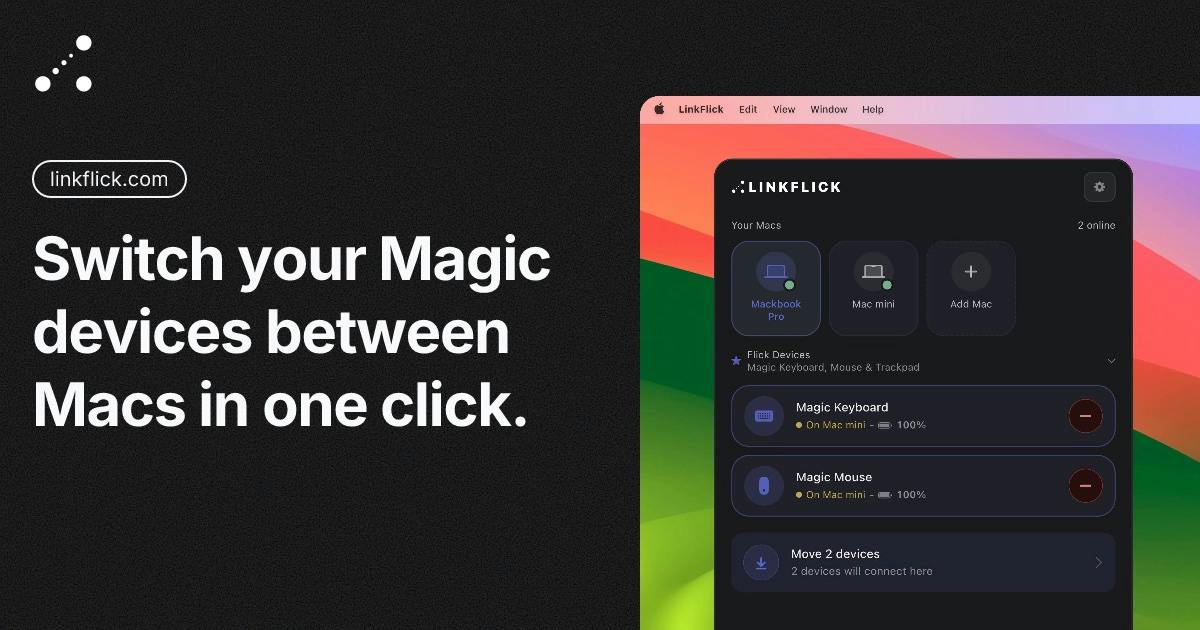
LinkFlick lets you switch Magic Keyboard and Mouse between multiple Macs with one keystroke — no shared Apple ID required.
LinkFlick is a macOS menu bar utility by indie developer Roman Abramenko, built for users who work across multiple Macs with different Apple IDs. Since Apple's Universal Control requires a shared account, personal and work device combos are left out. LinkFlick works around this by automating Bluetooth pairing switches, letting users move their Magic Keyboard and Mouse to another Mac with a custom shortcut or a Siri voice command. It also alerts you when Magic Mouse battery runs low. With 66 upvotes on Product Hunt, it's a focused, no-frills tool that fills a gap Apple's ecosystem leaves behind.
Anyone who regularly works across multiple Macs has almost certainly run into this frustration: every time you switch machines, you have to re-pair your Magic Keyboard and Magic Mouse all over again. Apple's own Universal Control was supposed to solve this problem — but it comes with one hard requirement: all devices must be signed into the same Apple ID. For users whose personal MacBook and work MacBook live under different accounts, that solution is dead on arrival.
A small tool called LinkFlick, which appeared on Product Hunt, was built specifically for this pain point. Created by indie developer Roman Abramenko, it earned 66 upvotes and landed at #16 on its launch day, categorized under Mac, Productivity, and Menu Bar Apps.
What Problem Does It Actually Solve?
The developer's motivation is refreshingly straightforward: he was tired of re-pairing his keyboard and mouse every time he moved between his personal MacBook and work MacBook. Since the two machines use different Apple IDs, Universal Control was simply not an option.
This is a real use case that mainstream solutions tend to overlook. Apple's ecosystem is built around the assumption of "one person, one account, multiple devices" — but in reality, countless users have work machines managed by their employers, signed into corporate accounts that are inherently isolated from personal devices. In this cross-account environment, repeatedly re-pairing Bluetooth peripherals becomes an inefficient ritual you repeat several times a day.
Rather than trying to replicate Universal Control's technical approach, LinkFlick goes back to basics — it directly "flicks" the pairing connection between devices over Bluetooth. In other words, it automates the pairing switch itself, rather than doing any kind of screen sharing or input bridging.
It's worth understanding the distinction between Bluetooth "pairing" and "connecting," as it clarifies where LinkFlick fits technically. Pairing is the one-time process of establishing a trusted relationship — devices exchange keys and record each other's identity. Connection is the actual active link that happens each time, building on an existing pairing. Magic Keyboards and Magic Mice can remember pairings with multiple devices, but can only maintain an active connection to one host at a time. Without a helper tool, switching hosts means manually "forgetting" the device and re-pairing on the target machine, or holding down the keyboard's power button to enter pairing mode — a clunky, physically-dependent process. LinkFlick's core job is to automate the "disconnect from current host, switch active connection to another" flow within the already-paired device list, compressing multiple manual steps into a single keystroke.
Two Ways to Trigger: Keyboard Shortcut and Siri
Based on the product description, LinkFlick offers two ways to trigger a switch. The first is a customizable keyboard shortcut — one press moves the keyboard and mouse from one Mac to the other. The second is a voice command: just tell Siri "flick devices" and it's done.
It lives in the menu bar as a persistent background app, which fits the standard design logic for lightweight utilities — no Dock presence, just there when you need it. The customizable shortcut is a nice touch that accommodates different users' key preferences.
One small but thoughtful detail: LinkFlick proactively alerts you when your Magic Mouse battery is running low. Given that the Magic Mouse is already infamous for its charging port placement, an early warning that prevents the "suddenly dead in the middle of work, now I have to flip it upside down to charge" moment is genuinely appreciated.
A Menu Bar App is a specific type of macOS application that runs without a Dock icon, instead living as a small icon in the top-right area of the screen's menu bar. This format is ideal for lightweight tools that need to "always run in the background but only get called occasionally" — clipboard managers, screenshot tools, system monitors, and the like. Users click the menu bar icon to bring up a control panel without interrupting their current window focus. For a switching tool like LinkFlick, the menu bar format means it can run silently on both Macs simultaneously, always ready to receive a trigger command, without occupying the app switcher or taking up any screen real estate.
An Indie Developer's Honest Self-Assessment
Worth noting is how the developer describes the product's current state. He openly admits LinkFlick is "still rough around the edges," but emphasizes: "it works, and I made it myself."
This kind of candor is common among indie developers, and it's part of what makes these tools valuable — they're not trying to serve everyone's needs, but to precisely solve a problem the author actually experienced, while helping the small group of people who share that same frustration. 66 upvotes isn't a viral hit, but for a tightly scoped niche tool, it's solid evidence that there really is a crowd of users left behind by Universal Control.
Who Should Use It?
If you check the following boxes, LinkFlick is worth trying: you regularly switch between two or more Macs; those Macs use different Apple IDs (like personal and work devices); and you use Bluetooth peripherals like a Magic Keyboard or Magic Mouse, rather than wired or third-party wireless devices with USB receivers.
On the flip side, if all your devices share the same Apple ID, Apple's native Universal Control already handles most scenarios — and does more, like letting you drag files across devices. You probably don't need an extra tool.
From a product design standpoint, LinkFlick is a textbook "scratch your own itch" project — real need, specific scenario, restrained implementation. It won't become a must-have productivity app for everyone, but for that group of Mac users stuck in cross-account limbo, a small tool that switches your keyboard and mouse in seconds fills exactly the gap Apple's official solution left behind.
Apple's Universal Control launched officially in 2022, letting users control multiple Macs or iPads with a single keyboard and mouse — the cursor can literally glide across screen edges to adjacent devices, with support for cross-device file dragging and copy-paste. It relies on shared Apple ID login and the same local network, and is essentially an input signal bridging technology: the peripherals are physically connected to one device, with signals relayed in real time over the network to other devices, without any Bluetooth reconnection happening on the hardware side. This is fundamentally different from LinkFlick's approach: LinkFlick actually transfers Bluetooth "ownership" from one Mac to another — once the switch is complete, both machines operate independently with no ongoing network dependency. The two solutions suit different scenarios, and the core difference comes down to whether your devices exist within the same account ecosystem.
Related articles

Lightpanda: A Headless Browser Built for AI and Automation
Lightpanda is a headless browser built from scratch in Zig for AI and automation, with 37,852 GitHub stars. This analysis covers its technical approach, design choices, and use cases.

From Will Smith Eating Spaghetti to AI Short Films: The Astonishing Pace of AI Video Evolution
Tracing AI video's evolution: from Runway's 2019 short film *The Orange* to the Will Smith spaghetti video, a Twitter comparison reveals the astonishing pace of technological progress in just a few years.

Opus 4.6 Chat Experience: Why Do Older Models Feel More "Human"?
A Reddit user shares a late-night chat with Opus 4.6, noting older models feel more personable. We analyze the causes of model personality differences and the balance between capability and experience.