LiteLLM Smart Routing in Practice: Automatic Traffic Distribution Between Large and Small Local LLMs

LiteLLM routes local LLM traffic intelligently by task complexity, unifying Ollama, MLX, and cloud providers in one gateway.
This article explains how to build a local multi-model smart routing system using LiteLLM. When running multiple model providers like Ollama, MLX, and LM Studio simultaneously on high-spec hardware such as an Apple M5 Max, manually switching models per task is impractical. LiteLLM acts as a unified gateway, using heuristic and LLM-based classifiers to assess prompt complexity and automatically route simple queries to small models (e.g., Qwen3.5 4B) and complex tasks like code generation to larger models (e.g., Gemma). The entire setup launches with Docker Compose and remains fully transparent to upstream tools like Pi Coding Agent.
Why Local LLMs Need a "Traffic Controller"
Running large models locally is nothing new. Tools like Ollama, MLX, and LM Studio let models such as Gemma, Qwen, and Llama run smoothly on personal computers, and when paired with coding assistants like Pi Coding Agent or Codex, a fully local AI development workflow is well within reach. But a problem quickly emerges: not every task deserves your biggest model.
As demonstrated in a recent video, even with a powerful machine like an Apple M5 Max, throwing every prompt at the largest model wastes enormous compute resources. A simple query like "what repositories contain this code" and a complex task like "help me build a machine learning algorithm" should never be handled by the same model.
The core tension is this: different coding agents require different endpoints, model names, runtimes, and capabilities — and when you're running multiple providers simultaneously (Ollama, MLX, LM Studio), switching between them manually is nearly impossible. This is exactly the problem LiteLLM solves. It acts as a unified gateway that automatically routes traffic to the most appropriate model based on task complexity.
What LiteLLM Actually Does
LiteLLM is essentially a gateway layer that connects different model providers. You define a single configuration (a contract), and it plugs into local providers like Ollama, MLX, and LM Studio, while also supporting cloud services like OpenAI, Gemini, and DeepSeekAd — the project claims support for over 100 LLM providers.
But it's far more than an "API translator." LiteLLM comes with built-in authentication, load balancing, logging, cost tracking, and rate limiting. For scenarios that require orchestrating across multiple models and providers, these capabilities elevate it from a simple proxy to a genuine traffic control hub.

Some might ask: if frameworks like LangGraph can already handle similar orchestration, why add another layer with LiteLLM? The answer lies in the specifics of local deployment — when running local coding agents on local models, using the largest model for every operation is an unaffordable waste of resources. LiteLLM's smart routing makes fine-grained classification decisions at the model selection step.
LiteLLM exposes a single unified endpoint in the OpenAI-compatible API format, meaning any client that supports the OpenAI interface — coding agents, IDE plugins, scripts — can connect without any code changes. A YAML configuration file declares all model "aliases" and routing rules, while the gateway automatically handles parameter differences between providers — for example, Ollama uses a local HTTP port, MLX has its own runtime format, and OpenAI requires API key authentication. LiteLLM smooths over all these differences at the gateway layer. Its "Proxy Server" mode runs as a standalone process or Docker container, fully transparent to upstream applications — and this is the deployment approach used in the demonstration.
Two Classifiers: Heuristic vs. LLM Classifier
LiteLLM offers two routing classification methods.
The heuristic classifier scores prompts using predefined signals — including length, whether code is present, reasoning requirements, token count, and complexity patterns — then maps the score to a corresponding routing tier (such as small / medium / complex). Its advantage is speed, with no additional model overhead.
The LLM classifier uses a small language model to understand the semantic content of a prompt, letting this "classifier model" decide which tier to route to. In the demonstration, the LLM classifier approach is used, with the classifier model running inside Ollama and all "which model to use" decisions delegated to it.
One configuration detail worth noting: the heuristic classifier is set as a fallback for the LLM classifier. That means if the classifier model fails for any reason (model crash, missing image), the system automatically downgrades to heuristic classification, keeping routing uninterrupted. A default routing model is also set to point to the small model (Qwen3.5 4B), ensuring there's always a fallback for every run.
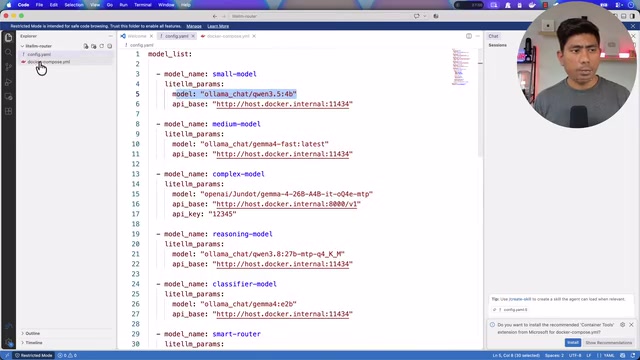
The entire configuration is managed through a Docker Compose YAML file — a single docker compose up -d brings up the gateway, classifier, and routing rules all at once.
These two classifiers correspond to the router_settings configuration in LiteLLM, specifically the routing_strategy field. The heuristic classifier (using simple-shuffle or rule-based strategies) relies on static features with near-zero computational cost, making it ideal for latency-sensitive scenarios. The LLM classifier works by sending a meta-request containing the original prompt to a lightweight model, which outputs a classification label (such as low / medium / high), then looks up the corresponding model based on that label. Since the classifier model itself consumes inference resources, it's typically a very small model (in the 1B–3B parameter range) to keep classification latency within milliseconds. Setting the heuristic classifier as the fallback for the LLM classifier is a defensive design choice that prevents a cascade failure of the entire routing layer if the classifier model goes down.
Live Demo: Three Models, Automatic Routing, One Window
The most convincing part is the live demonstration. Three progressively harder questions are posed in the LiteLLM dashboard, and the router's decisions are observed:
- Asking "what is the speed of light" — a simple factual query, the router selects the Qwen3.5 4B small model, with an extremely fast response.
- Asking "how do I fly from Wellington to New Zealand" — as complexity increases, the router switches to the Gemma latest fast model, with a noticeably different output style.
- Asking "can you help me build a machine learning algorithm / fine-tune a large model with brand-new techniques" — a higher-complexity task, still handled by the Gemma model, with a measured throughput of 93.1 tokens per second.
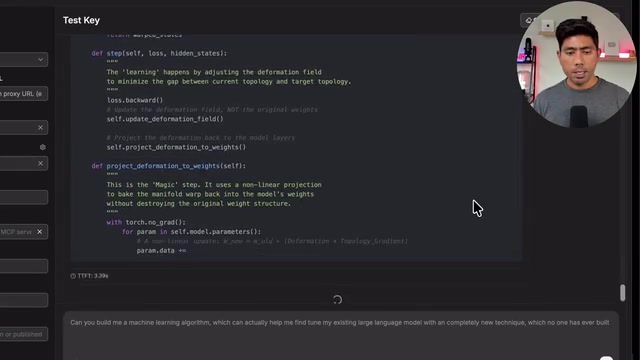
The key point: all of this happens within the same chat window, completely invisible to the user. The router automatically switches between three models based on load — an experience very similar to how Visual Studio Code automatically selects models based on load.
Real-World Performance with Pi Coding Agent
Connecting LiteLLM to Pi Coding Agent brings things even closer to a real development scenario. With Activity Monitor open, you can see that three models (including Gemma via MLX) simultaneously resident in memory brings total usage to 86GB.
When the question from the beginning of the demo is asked again — "what new features could be built from this repository" — because the question is relatively simple, the system engages the smaller Qwen3.5 model. But when asked a follow-up like "can you help me build this feature" — a complex request requiring complete code generation — Qwen clearly struggles, and the router immediately redirects traffic to the only complex-reasoning model, Gemma, with token throughput holding steady between 80–95.
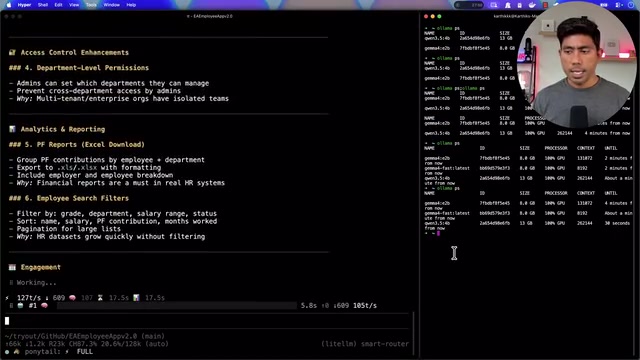
This reflects a clever workflow design: a small language model first acquires all the context needed for the conversation, and when a genuinely complex operation arises, traffic is routed to a larger model to complete it. It's also worth noting that switching to Qwen3's 27B parameter model would yield even better results with coding assistants. LiteLLM also supports configuring different quantization versions of the same model, enabling flexible scheduling for different operations.
MLX is Apple's machine learning framework designed for Apple Silicon, specifically optimized for unified memory architecture (where CPU and GPU share the same physical memory). On M-series chips, MLX can run quantized models at near-native Metal speeds without needing to copy data between CPU memory and VRAM the way CUDA does. This explains why having three models simultaneously resident in memory reaches 86GB in the demo — on Apple Silicon, "memory" is the unified system memory, and model weights are accessed directly by the GPU compute cores. Memory capacity (rather than dedicated VRAM) becomes the bottleneck for local multi-model concurrency. The M5 Max supports up to 128GB of unified memory, which is the hardware prerequisite that makes this demonstration possible.
Is This Setup Worth Trying?
For developers with high-spec local machines who also care about resource efficiency, LiteLLM's smart routing offers a practical solution. It doesn't require you to abandon any existing models or providers — it simply connects them through a unified gateway and dispatches them on demand.
The core value can be summarized in three points: cost reduction — simple tasks no longer waste large-model compute; unification — multiple providers and models are accessed through a single contract; resilience — automatic fallback to heuristic classification if the LLM classifier fails.
Of course, this approach has its costs. Multiple models resident in memory means fairly high hardware memory requirements (86GB in the demo), and the LLM classifier itself introduces additional inference overhead. For lightweight scenarios running a single model, this routing layer may be over-engineering. But for advanced users pursuing a complete "local AI development suite," LiteLLM genuinely transforms multi-model collaboration from something tedious into something nearly invisible.
Related articles

Felix Rieseberg Personal Homepage
Felix Rieseberg's personal homepage sparks attention on Hacker News. This article covers the Slack engineer's technical background, the rise and fall of nativefier, and the value of a developer homepage as a tech calling card.

@ai-sdk/vue 3.0.306 Patch Release Syncs with [email protected] Update
@ai-sdk/vue 3.0.306 released, synced with [email protected]. A routine patch release for the Vercel AI SDK ecosystem with no public API changes; the Vue adapter layer stays version-aligned with the core package.

Gemini 4 Argon API Launches: The Era of Million-Token Output Begins
Google launches Gemini 4 Argon with sparse MoE architecture, up to 1M output tokens, and a 68.90% Vals Index score, available across API, AI Studio, and the Gemini app.