Local AI Art Deployment Tutorial: From Installing the Stable Diffusion Bundle to Generating Your First Image

Step-by-step guide to deploying Stable Diffusion locally for free AI art generation on your PC.
This tutorial walks you through the entire process of setting up Stable Diffusion locally using an all-in-one bundle, covering extraction, path setup, WebUI launch, model selection (Checkpoints and LoRAs), and practical tips for beginners. It explains hardware requirements, model management, security considerations, and how to build an effective local AI art workflow — all without cloud subscriptions or fees.
Introduction: The "Democratization" Moment for AI Art
Recently, discussions around open-source AI art tools have heated up again in Chinese video communities. One content creator raised a core argument: while major cloud platforms continue to squeeze users through subscription models and queue systems, the real revolution has already happened — the productive power of AI art is shifting from the cloud servers of a few big corporations to the personal computers of everyday people.
It's worth noting that the original source material contains some conceptual mix-ups (such as lumping open-source models together with MiniMax, FLUX, etc., and exaggerating claims about them). As a technical piece, we prefer to strip away the marketing rhetoric and focus on what truly matters: local deployment of AI art based on the Stable Diffusion ecosystem. This is the real technical foundation behind the so-called "free tier paradise."
Why Local AI Art Deployment Is a Key Breakthrough
The Dual Advantages of Open Source and Free
Stable Diffusion is called a "game-changer" for two core reasons: it's open source, and it runs on consumer-grade GPUs. This means you don't need to pay for every image, nor do you need to queue up on the cloud waiting for compute allocation.
For technical background, Stable Diffusion is a Latent Diffusion Model publicly released by Stability AI in 2022. Its core principle is performing denoising generation in a compressed latent space (rather than raw pixel space), a design that dramatically reduces computational requirements, making inference feasible on consumer GPUs. The model is based on academic research jointly conducted by the CompVis Lab at LMU Munich and Runway. It employs a three-stage pipeline: a CLIP text encoder to understand prompts, a U-Net architecture for denoising, and a VAE decoder to convert latent representations back into images. Because it's fully open source (both code and weights are public), the global community has been able to train tens of thousands of stylized models on top of it, creating today's thriving ecosystem.

Compared to cloud-based AI art services, local deployment offers value on several levels:
- Cost control: One-time setup, free to use long-term, no subscription constraints.
- Data privacy: All generation happens locally — no assets are uploaded to third-party servers.
- Creative freedom: Freely load any models and plugins without being restricted by platform content moderation policies.
Who Should Try Local AI Art
Whether you're a student, designer, or a complete beginner curious about AI, getting started is relatively straightforward. Thanks to the popularity of all-in-one bundles (one-click launchers), the technical barrier for local deployment has dropped significantly — you no longer need to manually configure Python environments and dependency libraries.
That said, there are still basic hardware requirements. Stable Diffusion's GPU VRAM demands depend on model precision and generation resolution. Taking the SD 1.5 architecture as an example, generating a 512×512 image at FP16 half-precision requires about 4GB of VRAM, while the newer SDXL architecture generating 1024×1024 images recommends 8GB or more. NVIDIA GPUs are the top choice due to their CUDA ecosystem and native support for the PyTorch framework. Common entry-level options include the RTX 3060 (12GB VRAM, excellent value) and RTX 4060 (8GB VRAM, lower power consumption). AMD GPUs can work through DirectML or ROCm, but compatibility and speed still lag behind NVIDIA. Additionally, the xFormers acceleration library and launch parameters like --medvram / --lowvram can help alleviate pressure on low-VRAM devices to some extent.
Starting from Scratch: Stable Diffusion Bundle Deployment Walkthrough
The most popular entry-level approach today is using community-packaged "Qiuye bundles" or similar launchers. These wrap all the complex environment configuration into a single package — users just need to extract and run.
The technical essence of these "bundles" is packaging the Python runtime, PyTorch deep learning framework, CUDA toolkit, WebUI source code, and all dependencies into a standalone virtual environment, so users don't need to globally install any development tools on their system. The launcher acts as a graphical configuration tool that can switch PyTorch versions, manage plugin updates, adjust VRAM optimization strategies, and more. This encapsulation dramatically lowers the deployment barrier, but it also means users lack fine-grained control over the underlying environment — when installing special plugins or troubleshooting dependency conflicts, basic command-line knowledge may still be needed.

Step 1: Extraction and Path Setup
After downloading the bundle, simply right-click and extract it to your desired folder. Here's a critical detail: the extraction path must be entirely in English — no Chinese characters allowed. This is the most common pitfall for beginners — Chinese characters in the path will cause the program to fail reading files or throw errors on startup. The root cause is that some libraries in the Python ecosystem (especially modules dealing with file path encoding) don't handle non-ASCII characters robustly, and Chinese paths may trigger encoding errors when calling underlying C libraries.
Step 2: Launcher Initialization and Opening the WebUI
After extraction, no additional software installation is needed. Find the pink icon (the launcher) and double-click to open it, which takes you to the launcher interface. The current version information is usually displayed in the bottom-left corner.
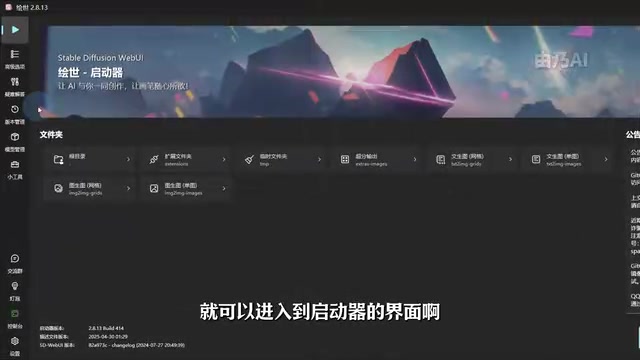
After clicking the "One-Click Start" button, the first launch requires a few minutes of patience as the program automatically completes environment deployment. Subsequent launches will be noticeably faster. Once deployment is complete, your browser will automatically open the Stable Diffusion WebUI interface.
The WebUI mentioned here refers to Stable Diffusion WebUI (also known as AUTOMATIC1111 or A1111), currently the most widely used open-source frontend. Built on the Gradio framework, it provides a graphical interface through the browser, supporting txt2img, img2img, Inpainting, super-resolution upscaling, and more. It also has a massive plugin ecosystem (such as ControlNet for precise composition control and ADetailer for facial detail restoration). In recent years, another open-source frontend called ComfyUI has also risen rapidly, featuring a node-based workflow design that's better suited for advanced users who need fine-grained control over the generation pipeline. Each has its strengths: WebUI has a gentler learning curve and more tutorials; ComfyUI offers greater flexibility and makes it easier to reproduce and share workflows.
AI Art Model Selection: The Core Factor Behind Image Quality
The Difference Between a "Bare Shell" and a "Fully Furnished" Setup
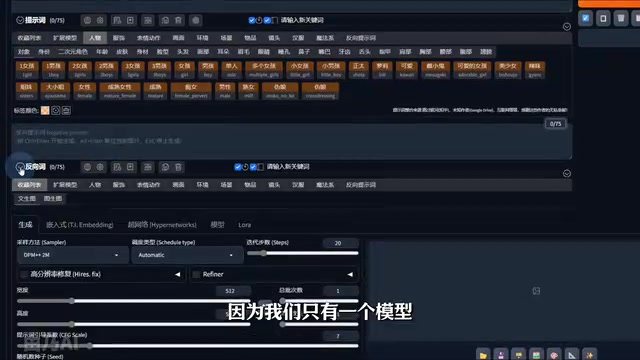
After opening the launcher, many beginners discover that the interface only has a default model and seemingly "can't do anything." The source material uses an apt metaphor: at this point, SD is like an unfurnished apartment.
What truly determines the generation quality and style is the model (Checkpoint). Different models correspond to different art styles — photorealistic, anime, illustration, Chinese traditional art, and more — each with its own specialization. Producing "top-tier quality" images essentially comes down to choosing the right high-quality model.
From a technical perspective, a Checkpoint is a large model file containing complete neural network weights, typically ranging from 2GB to 7GB (depending on precision: FP32 is about 4-7GB, FP16 is about 2-4GB). It determines the base style and quality ceiling of generated images. The thousands of Checkpoints in the community are mostly fine-tuned or merged from the base weights officially released by Stability AI, using image datasets of specific styles.
Practical Tips for Model Management
Many models only display a string of English code, making it impossible to distinguish their styles. The solution is to configure Chinese annotations and preview thumbnails for your models.
With a well-organized model library, you can directly see sample images + descriptive names for each model in the SD interface, making selection intuitive at a glance. This is extremely beginner-friendly and avoids the time cost of trial and error. For those just starting out, it's recommended to master these key categories:
- General-purpose base models: Suitable for everyday image generation with high tolerance for varied prompts. Examples include the official SD 1.5 and SDXL 1.0 base models, as well as widely used community models like Realistic Vision and DreamShaper.
- Photorealistic models: For generating images with near-photographic quality, excelling in portrait photography, product showcases, and similar scenarios.
- Anime/illustration models: For specific style creation, such as the Anything series and Counterfeit, which perform exceptionally well in anime character generation.
- LoRA plugins: Fine-tune specific characters or art styles on top of a base model. LoRA (Low-Rank Adaptation) is a lightweight fine-tuning technique originally proposed by Microsoft Research, designed to inject specific style or character features without retraining the entire model. LoRA files are typically only tens to hundreds of MB in size. By stacking them on top of a Checkpoint, you can achieve style switching or character consistency control. This "base model + plugin" approach dramatically lowers the compute barrier for training custom models — training a LoRA might require only a few dozen reference images and a GPU with 8GB VRAM, while fully fine-tuning a Checkpoint demands hundreds of GB of data and enterprise-level compute.
For sourcing these model resources, Civitai is currently the world's largest Stable Diffusion model-sharing platform, where users can browse, download, and share Checkpoints, LoRAs, Textual Inversion embeddings, VAEs, and more. Each model page typically includes sample images, recommended parameters (such as sampler type, CFG Scale value, and sampling steps), and user reviews — invaluable references for beginners choosing models. Beyond Civitai, Hugging Face is another important model hosting platform where many officially released base models (such as SD 1.5, SDXL, SD3, etc.) are first published. When using community models, pay attention to their license terms — some models explicitly restrict commercial use.
A Realistic View of Local AI Art: Opportunities and Limitations
While the source material uses sensational terms like "game-changing" and "once-in-a-lifetime opportunity," from a technical perspective, the true significance of local AI art lies in lowering the creative barrier and achieving democratization at the tool level.
However, a few things need to be understood clearly:
- Hardware is still a barrier: So-called "consumer-grade GPUs" typically still require 6GB or more of VRAM for smooth operation, and the experience on low-spec machines is limited. Especially when using SDXL models or enabling plugins like ControlNet, VRAM usage increases significantly, and 8GB of VRAM may become the new "minimum requirement." For users with only integrated graphics or outdated dedicated GPUs, free cloud tiers or solutions like Google Colab may still be more practical options.
- Model sources need vetting: Some bundles and models come from unknown sources and pose security risks. Maliciously modified model files may embed pickle deserialization vulnerabilities that execute arbitrary code upon loading. It's recommended to obtain resources from trusted communities like Civitai and Hugging Face, and to prioritize safetensors format model files — this format was developed by the Hugging Face team and is designed to avoid the code execution risks inherent in the pickle format.
- Beware of overhyped marketing: Claims that open-source models "destroy product X" or "achieved overnight fame" are mostly clickbait tactics. Actual results depend on model selection and parameter-tuning skills. The quality ceiling of AI art is determined not only by the model but also by prompt engineering, sampler selection, CFG Scale adjustment, negative prompt optimization, and many other dimensions — all of which require continuous learning and hands-on practice.
Conclusion: Start Your Local AI Art Journey
The value of local AI art isn't about one model "crushing" another — it's about putting creative power truly in the hands of ordinary people. For readers looking to get started, we recommend beginning with a bundle package and focusing on mastering three core areas: path conventions, model selection, and plugin usage — gradually building your own workflow.
It's worth noting that the Stable Diffusion ecosystem continues to evolve rapidly. From SD 1.5 to SDXL, and then to the latest SD3 and Flux series models, architectures keep upgrading and generation quality keeps improving. Meanwhile, the maturation of control technologies like ControlNet, IP-Adapter, and InstantID has moved AI art from "rolling the dice" to "controllable creation." The tools are already free and within reach — all that's left is to unleash your creativity.
Related articles

Amphibious Transforming Drone: Beyond 100x Power Savings, What Are the Real Needs?
Is the amphibious transforming drone just a gimmick? Starting from the 100x power difference of the M4 Morphobot, explore real application scenarios and thesis topic ideas, analyzing boundary conditions where pure drones and pure ground robots both fail.

Warhound Raises $200 Million: Genetically Engineered "War Dogs" Paired with Anduril Gear
Warhound raises $200M, backed by Ben Lamm and Palmer Luckey, to genetically engineer dogs for military and law enforcement use and equip them with Anduril gear. This article analyzes its technology direction, funding logic, and ethical controversy.

Claude API Comes to Google Cloud: IAM Integration and SDK Access Guide
Anthropic hosts the full Claude API on Google Cloud with IAM-controlled permissions and unified billing. This guide covers the Vertex AI and Anthropic-hosted entry points, IAM role configuration, and SDK access.