Local AI for Beginners: A Practical Guide to Gemma, LM Studio, and Ollama

Local AI with Gemma, LM Studio, and Ollama opens real business opportunities for non-developers in private-data scenarios.
This guide maps out the full local AI landscape: running models on your own hardware suits private data, offline workflows, and high-frequency tasks — not head-to-head competition with cloud models. It covers tools like Hugging Face, LM Studio, and Ollama, explains key concepts like quantization, GGUF, embeddings, and RAG, and uses Google's Gemma family as a practical starting benchmark. The author advocates hybrid architecture (local sanitization + cloud reasoning) and a workflow-first approach before any fine-tuning, and proposes three concrete startup directions: home care quality review, offline field reporting, and pre-send review for professional services.
Local AI is moving from a developer-exclusive domain into the toolkit of everyday entrepreneurs and professionals. One content creator who has gone deep in this space makes a bold prediction: local AI and open-source models will create incredible business opportunities over the next 24 months — and most people haven't figured that out yet. They've used ChatGPT, they've used Claude, but the moment they hear words like Hugging Face, Ollama, or LM Studio, they assume it's developer territory and back away. That assumption is precisely the biggest mistake.
This article breaks down the complete map of local AI: what it is, when it matters, how to get started with the Gemma model family, and how to turn it into real business ideas.
Local AI vs. Cloud AI: Where Should Intelligence Live?
Local AI means running models on hardware you control — a MacBook, a Windows laptop, an Android phone, an iPhone, a browser, a Raspberry Pi, or an office workstation. The key point: today's smartphones are already capable of running local AI. Cloud AI, by contrast, means the model runs somewhere else and you access it through a website or API.
The real business question isn't "Is this model as smart as the biggest cloud model?" It's "Can this model do the job? Is it right for this task? Does running it locally improve the product experience?" That mental shift is the starting point for understanding the opportunities in this entire space.
The decision boundary is clear: for tasks requiring maximum capability — deep design work, complex logical reasoning, strategic planning — use a top-tier cloud model. But for workflows involving private files, sensitive client data, offline use, low-latency audio input, or high-frequency repetitive internal processes, local AI makes a lot of sense. Using a smaller model in the right place is genuinely valuable — that's the core argument of this entire guide.
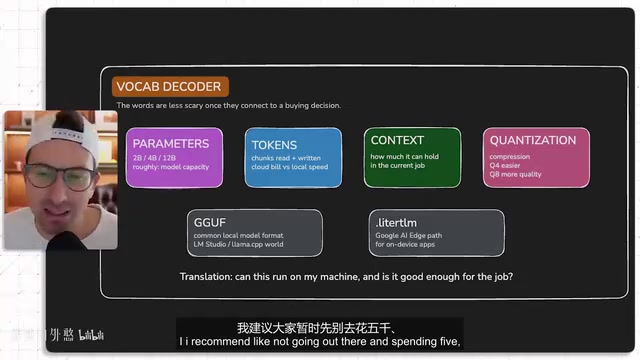
A word of caution for beginners: don't rush out to spend $5,000, $10,000, or even $20,000 on a workstation. The phone in your pocket, or that laptop you bought in 2021 and barely use, is more than enough to run through the entire workflow.
The Four Pillars of Local AI: Models, Repositories, Software, and Workflows
The local AI world is made up of four components. Once you understand them, the whole space stops feeling intimidating.
Models (the brain): These are model families like Gemma, Llama, Mistral, and Qwen — they exist as files. Some excel at reasoning, some at writing code, some are small and fast, and some handle images.
Repositories (where you find models): Hugging Face is the largest model repository in the industry. (It's reportedly seeking a $13 billion acquisition.) You'll find model cards, licenses, file formats, benchmarks, and community versions there.
One of the best exercises for beginners is to open Hugging Face and carefully read through a model card. At first, you can ignore half the intimidating details and focus on a few basics: What does this model do? How large is it? What license does it use? What hardware are people running it on? Does it support text, images, audio, tool calling, or embeddings? Are quantized versions available?
Software (what runs the models): LM Studio and Ollama are two recommended starting points. LM Studio works like a regular desktop app — download it, search for a model, click to download, and start chatting. It's the most beginner-friendly option for non-technical users. Ollama is slightly more developer-oriented: after installing it, you run commands like ollama run gemma and get a built-in API endpoint (default port 11434) that makes it easy to connect applications.
Workflows (the products you build around all of this): This is where technology becomes a business.
Core Terminology You Need to Know
These terms come up constantly. Understanding them gets you most of the way there:
- Parameters: The internal weights of a model — for example, 2 billion (2B) or 4 billion (4B). More parameters generally means more capability, but requires more memory. 2B/4B suits phones and small tasks; 12B is a middle ground; 27B+ enters workstation territory.
- Token: The chunks of text a model reads and writes. When running locally, you care about speed and memory — not per-token billing.
- Context window: The amount of information the model can process at once.
- Quantization: A compression technique that lets large models run on ordinary laptops. Common formats are Q4 and Q8 — Q4 is easier to run, Q8 retains higher quality but uses more memory. Starting with Q4 is a reasonable choice for beginners.
- GGUF: A common local model file format that makes inference easier on standard hardware.
- llama.cpp / MLX: Underlying inference engines. MLX matters a lot for Apple Silicon users.
- Google AI Edge / LiteRT: The pathway for deploying on-device AI products — useful when you want to embed a model into an iOS app, Android app, web app, or desktop application.
Embeddings are another concept that comes up constantly but often gets overlooked. Embeddings convert text into high-dimensional numerical vectors — the model compresses the "meaning" of a passage into a sequence of numbers, and texts with similar meanings end up closer together in vector space. This is the foundation of semantic search: instead of matching by keyword, you retrieve by meaning. EmbeddingGemma is a model built specifically for this purpose. Understanding embeddings explains why local AI can be used to search private document libraries — your files never leave your machine, yet the retrieval quality rivals cloud-based search engines.
RAG (Retrieval-Augmented Generation) is an architectural pattern that pairs closely with embeddings. The idea is: instead of stuffing all your documents into the context window (which is slow and expensive), you first use embeddings to retrieve the most relevant snippets, then pass those snippets to the language model to generate an answer. For local AI business applications, RAG means you can enable a small 4B model to effectively "read" thousands of internal documents — without paying for expensive long-context APIs or fine-tuning the model at all. This is one of the core technical mechanisms that makes the three startup ideas described later actually viable.
Google's Open Model Family: From Gemma to Specialized Models
Gemma is Google's family of open models, built specifically for efficient local and on-device use. Here's a practical selection guide:
- Gemma 2B: A compact on-device model for phone-based workflows
- Gemma 4B: The most practical starting point for most local testing
- Gemma 12B: A stronger middle-ground option for capable laptops
- Gemma 27B: Territory for powerful local workstations
Beyond the main line, there are several specialized Gemma models worth knowing: EmbeddingGemma converts text into embeddings for semantic search — useful for searching your own documents, client notes, or sales call transcripts. FunctionGemma handles tool use and structured function calling. PaliGemma focuses on vision. ShieldGemma focuses on safety.
For beginners, the practical path is simple: start with Gemma 4B on day one, get familiar with the whole workflow, then adjust up, down, or sideways based on your project's needs.
A Quick Tour of Other Open-Source Model Families
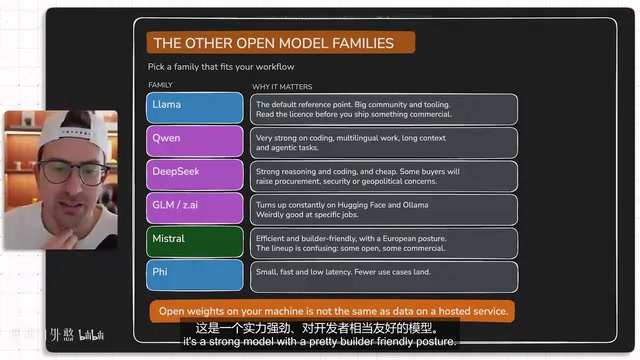
- Llama (Meta): The default reference benchmark for many developers, with a large ecosystem and rich tooling — but read the license carefully before commercial use.
- Qwen (Alibaba): Highly capable, especially for coding, multilingual tasks, and long-context work.
- DeepSeekAd: The model that made many people take notice of Chinese open-source reasoning and coding capabilities — top-tier performance at low cost.
- GLM (Zhipu AI): Frequently appears on Hugging Face and in local model circles.
- Mistral (Europe/France): Efficient and developer-friendly, but the product line mixes open and commercial licenses — pay attention to which is which.
- Phi (Microsoft): Smaller, faster, lower latency.
One important reminder for anyone in enterprise, government, healthcare, or finance: always distinguish between "running open weights locally" and "sending data to a hosted service." Know clearly what your organization — and you personally — are comfortable with.
Three Paths to Getting Started: From Chatting to Building Products
Path 1: LM Studio. Download and install it for free. Search for Gemma 4 (if your hardware is average, go with 2B), select a quantized version, open the chat window, and try a real business prompt — something like: "Read these customer messages and write a one-page memo summarizing what customers are struggling with, what's changed, and what the business team should fix this week." Paste in a few messages. You'll feel the value immediately: the model is running on your computer, you're using AI, and nothing you typed was sent to the cloud. Then head to the developer section and start a local server — your computer just became a small AI server.
Path 2: Ollama. After installing, run ollama pull gemma, then ollama run gemma. You'll have a local model running in the command line and a local API endpoint ready to connect your apps or scripts.
Path 3: Google AI Edge + MediaPipe LLM. Only take this path when you're actually building an application with the model embedded inside — a mobile app, web application, private workflow desktop app, or edge device deployment. This is the path from "local AI demo" to "local AI product."
Hardware tips: 8GB RAM — start with small models. 16GB — run 4B and smaller quantized models for useful experiments. 32GB — more room to work with larger workflows. High-end GPU or workstation — larger models become feasible. On mobile, don't fixate on model size — focus on what it can do. Can it understand photos? Can it summarize audio? Can it run offline?
Hybrid Architecture and Evaluation: Build the Workflow First, Don't Rush to Fine-Tune
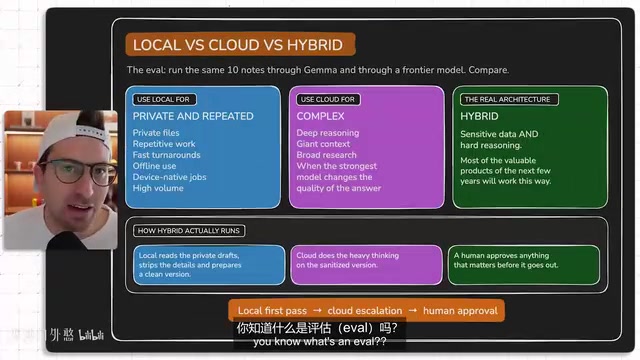
Many valuable products use a hybrid architecture: a local model handles private documents as the first layer, sanitized content is passed to a cloud model for heavy reasoning, and a human reviews anything important before it goes out. For example, when building tools for professional services firms, the local model reads sensitive drafts, strips private details, and prepares a sanitized problem description — only then does the cloud model do the deep reasoning.
One point the author keeps coming back to: build the workflow first, don't rush to fine-tune. A lot of people hear "open-source model" and immediately want to train their own — but that's an advanced operation. The practical approach is: pick one folder, one model, one output format, run it about ten times, see where it gets confused, improve the prompt, add a checklist, then do a small eval.
Evaluation is actually simple: take the same ten customer feedback items, run them through local Gemma, then run them through a frontier cloud model, and compare outputs. Did Gemma catch the same complaints? Did it pull the right quotes? Is the format correct? What did it miss? After this exercise, you'll naturally know where the local model is already good enough and where you still need the cloud.
Fine-tuning deserves a clear explanation of its own, because it's one of the most misunderstood operations in this space. Fine-tuning means taking a pre-trained model and training it further on domain-specific data to improve performance on a particular task. It sounds appealing, but the practical bar is high: you need a high-quality labeled dataset, meaningful compute resources, and experience debugging the training process. More importantly, most local AI use cases simply don't require fine-tuning — with well-crafted prompt engineering plus RAG retrieval, open-source models are already practical enough for vertical tasks. The author's advice to "build the workflow first" is rooted in this logic: until you genuinely understand where a model fails and what pattern those failures follow, jumping to fine-tuning usually produces diminishing returns and pulls your attention away from the real business value.
Three Local AI Startup Ideas
The author's selection criteria are straightforward: customers have sensitive data, recurring review work, terrible existing software, high cost of errors, and workflows that can run entirely on-device.
Idea 1: A Local Quality Reviewer for Home Care Agencies. Nurses and caregivers write visit notes and update care plans in the field. Documentation errors cause billing delays and compliance risks. Build a local desktop app that reviews notes before submission and flags issues — for example, "Note mentions dizziness but vital signs data is missing." The suggested approach: start as a service. Find five small agencies, do manual-plus-AI review, document the 20 recurring problems and turn them into a checklist — then let the checklist evolve into a product.
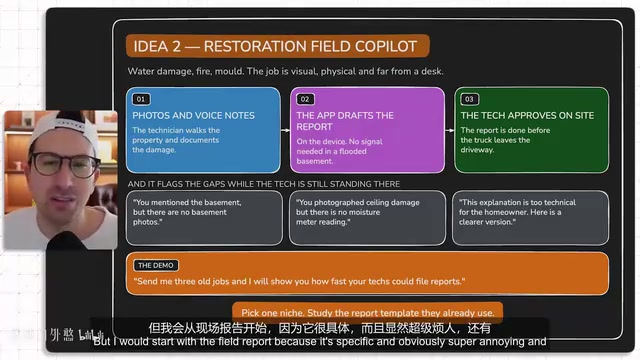
Idea 2: An Offline Field Report Co-Pilot. Built for disaster restoration contractors — water damage, fire, mold remediation. Technicians take photos and record voice notes on-site. A mobile app drafts the report before they leave and flags what's missing: "Mentioned the basement but no photos," or "Photographed ceiling damage but no moisture readings." The author notes that after their own apartment flooded, the software the contractor used looked like it was built in the early 2000s — a clear entry point.
Idea 3: A Pre-Send Review Tool for Professional Services. Law firms, accounting firms, wealth advisors, and recruiting agencies all have a "let someone check this before it goes out" workflow. A local desktop app can flag language in a wealth advisor's email that "sounds like a guaranteed return," sensitive employee details in an HR message, or agency commitments that exceed the contracted scope. The author half-jokingly called this one "stupidity insurance."
Worth Learning Even If You're Not Starting a Business
Even if none of these business ideas appeal to you, local AI will change how you handle your own files. Create a folder called local ai lab, put ten work-related files in it — meeting notes, ideas, drafts — and have Gemma produce a useful artifact: a weekly business pulse, a summary of shifting themes in client conversations, the real pain points hiding behind feature requests.
The key is producing a reusable artifact, not just a chat response. The model reads the folder, writes a file, you review it, improve the workflow, run it again — after a few iterations, your brain starts connecting dots everywhere, spotting private data trapped in folders and repetitive review steps happening over and over.
Change how you look at local AI. Stop thinking of it as a benchmark comparison game and start asking product questions: Where does this live? Where is the data? Where is the device? Where is the trust problem? Which review step is the most painful? Once you can answer those questions, the thinking opens right up.
Related articles

DeepCell: One-Click AI Generation of Documents, Spreadsheets, and Slides
DeepCell tops Product Hunt with one-click generation of documents, spreadsheets, and slides, using the .deepcell format for linked updates, designed for System 2 tasks like modeling and sales reviews.

Doneas: 15-Minute Daily Accountability Calls That Keep Indie Developers From Procrastinating
Doneas is a daily accountability tool for indie developers: plan tasks on Monday, join a 15-minute call with five builders each day, and log deliveries on a public progress page. This article analyzes its core mechanics, effectiveness, and potential issues around retention and matching.

Fastlane 2.0: Fully Automated AI Ad Campaigns, From Creative to Optimization
Fastlane 2.0 is an AI ad automation tool: enter your website and it learns your brand, generates video and image ads, and runs and optimizes them on Meta, TikTok, Instagram, and YouTube.