Local AI Quantization Primer: Running Large Models with Less VRAM
Quantization compresses weights to low bit widths so large models can run—and run fast—locally.
The article frames quantization as a 301-level advanced topic in local AI deployment and systematically covers its core value and trade-offs. Large model weights default to 16-bit floating point, and larger parameter counts mean higher VRAM usage; quantization compresses high-precision values into 8-bit, 4-bit, and other low-bit representations, lowering the VRAM barrier, easing memory bandwidth pressure, and shrinking model size—at the cost of precision loss that may degrade output quality. It distinguishes post-training quantization (PTQ) from quantization-aware training (QAT), and weight quantization from activation quantization, stressing that lower bits aren't always better and that deployment requires attention to framework support, model validation, and acceptable quality loss.
Want to run large models locally but get scared off by VRAM requirements that easily hit tens of GB? Quantization is the key technique that resolves this tension. A recent technical write-up titled "Local AI 301: Quantization" frames quantization as the advanced course in local AI deployment—after "Local AI 101/201," quantization is singled out as a 301-level topic, which says a lot about how much it matters in practice.
What Quantization Actually Solves
Large model weights are stored at higher precision by default, usually 16-bit floating point. The more parameters there are, the more VRAM and memory the weights occupy, and the slower loading and inference become. The core idea of quantization is to compress these high-precision values into lower-bit representations—8-bit or 4-bit integers, for example—so the same model fits in less space.
For local deployment, this brings several direct benefits: the VRAM barrier drops, so models that previously couldn't run now have a chance; memory bandwidth pressure is reduced, which often speeds up inference; and model file sizes shrink, lowering download and distribution costs. The trade-off is loss of numerical precision, which may cause a slight drop in output quality—the engineering challenge of quantization is precisely finding the balance between compression rate and quality.
The relationship between floating-point precision and bit width deserves elaboration. FP16 (16-bit floating point) means each weight is stored in 16 binary bits, some representing the exponent and some the mantissa, which allows it to cover a wide dynamic range of values; INT8 and INT4 are fixed-point integer representations with only 8 or 4 bits of discrete value space. Because neural network weights typically cluster in a small range around zero, representing them as integers together with a scale factor and a zero-point can approximately reconstruct the original values—this is the mathematical basis for why integer quantization works. Each halving of bit count roughly halves theoretical storage requirements, but the representable granularity becomes coarser, the probability that neighboring weights map to the same integer rises, and error accumulates. Understanding this makes it clear why 4-bit quantization is still usable on large models—the redundancy from enormous parameter counts absorbs quantization noise to some extent.
Common Quantization Approaches
Judging from how this write-up is positioned, it targets readers who already understand the basic local AI workflow and are ready to optimize further. In practice, quantization usually follows a few paths: post-training quantization (PTQ) directly compresses an already-trained model numerically—simple to implement and low-cost, making it the most common choice in local scenarios; quantization-aware training (QAT) simulates low-precision computation during training, usually yielding better quality but requiring retraining and a higher barrier to entry.
Another key distinction is weight quantization versus activation quantization. Compressing only the weights while keeping activations at higher precision during inference is relatively easy to implement; quantizing activations as well compresses more thoroughly but demands more from hardware and operator support. When choosing a quantized version, local users often have to trade off among "can it run," "does it run fast," and "does it run well."
Quantization granularity is a detail you can't avoid when choosing a quantization scheme. The most common approaches compute scale factors per-tensor or per-channel: the former shares a single scaling parameter across the entire weight matrix—simplest to implement but unfriendly to layers with uneven value distributions; the latter computes separately for each output channel—better precision at slightly higher cost. Even finer is group-wise quantization, where every 32 or 128 weights share a set of scaling parameters—a common practice in local inference formats like GGUF (e.g., the group quantization in Q4_K_M). The finer the granularity, the smaller the quantization error, but metadata overhead and operator implementation complexity increase accordingly. When local users compare different quantized files, the suffixes in filenames often encode bit count and grouping strategy—understanding these naming conventions helps you make a more suitable choice.
What to Watch for in Practice
Quantization isn't a game of "lower is always better." The lower the bit count, the more sensitive the model is to numerical error, and performance on certain tasks may degrade noticeably. What's more worth watching in practice: whether your inference framework supports the chosen quantization format well, whether there's a quantized version validated for that specific model, and whether the quality loss after quantization falls within your acceptable range.
For local AI enthusiasts, quantization is the key link that turns "large models" into "deployable models." Understanding its principles and trade-offs is more valuable than memorizing any specific parameter. The fact that this write-up places quantization within a 301-level curriculum also reflects a trend: the barrier to local AI is dropping, but actually running a model well still requires a clear understanding of these underlying mechanisms.
(Note: The original material provided only the title and link without body details; this article is developed from the general principles of quantization technology.)
Matching inference frameworks with quantization formats is a real constraint at the deployment stage. Different frameworks don't share compatible quantization formats: GGUF is mainly for the llama.cpp ecosystem, GPTQ and AWQ are common in GPU inference stacks, and bitsandbytes offers online quantization integrated with Hugging Face Transformers. Even if a 4-bit version of a model exists, it can't be loaded directly if its format isn't supported by the inference backend you use. Moreover, quantization has implicit hardware requirements—some low-bit operators need specific instruction sets or GPU architectures to achieve speedups; otherwise they may actually slow down due to dequantization overhead. So before assessing "can it run," confirming whether format, framework, and hardware all match is often more practically meaningful than simply comparing bit counts.
One-line Summary
Quantization compresses weights to low bit widths so large models can run—and run fast—locally.
Paragraph Summary
The article positions quantization as a 301-level advanced topic in local AI deployment and systematically lays out its core value and technical trade-offs. Large model weights are stored at 16-bit floating point by default, and larger parameter counts mean higher VRAM usage; quantization compresses high-precision values into lower-bit representations such as 8-bit and 4-bit, thereby lowering the VRAM barrier, easing memory bandwidth pressure, and shrinking model size—at the cost of numerical precision loss that may degrade output quality. The article distinguishes post-training quantization (PTQ) from quantization-aware training (QAT), as well as the different trade-offs between weight quantization and activation quantization, and emphasizes that quantization is not a matter of lower bits always being better; in practice you need to consider inference framework support, model validation, and acceptable quality loss.
Related articles

Gemini 4 Dual Models Exposed, Genie 4 World Model Launches, AI R&D Self-Accelerates
November 19 AI evening news roundup: DeepMind Gemini 4 Sodium rumors surface, Cursor launches Gemini 4 Neon scoring 63.7% on CursorBench 4.1; Genie 4 world model goes live with real-time editing and native audio; WorkBuddy integrates GPT-6.2 series; OpenAI discloses AI chip design efficiency gains and RSI research metrics.
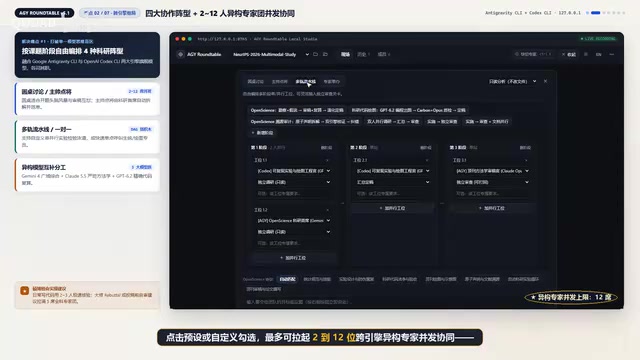
HY Roundtable: A Local Open-Source Multi-Agent Roundtable Where Multiple LLMs Blind-Review and Challenge Each Other's Papers
HY Roundtable is a local open-source multi-agent roundtable tool that brings Gemini 4, Claude Opus 5.5, and GPT 6.2 into a local seminar room to blind-review, cross-examine, and recompute code before submission, with built-in Open Science protocols for statistics and figures.
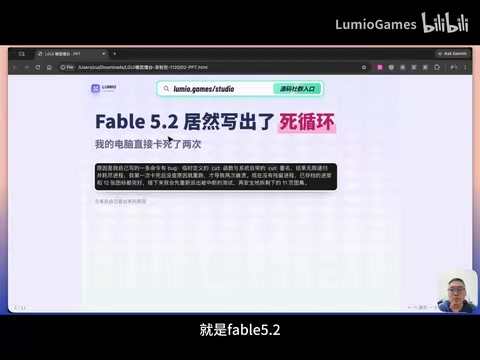
GPT 6.2, Fable 5.2, Gemini 4 Tested: Which Builds the Best Game UI from a Single Image?
Bilibili creator tests GPT 6.2, Fable 5.2, and Gemini 4 generating full game UI from one image: all work functionally, but fidelity and interaction quality differ sharply. Fable 5.2 looks best but caused infinite-loop crashes; GPT 6.2 is balanced but drifts from icons; Gemini 4 looks cheap. Includes LGUI Agent workflow and engine export details.