Local AI Slow on Mac? The Real Bottleneck Isn't the Chip—It's the Cache

The culprit behind slow local AI on Mac is cache invalidation, not the chip—check logs before upgrading hardware.
Through a developer's case of running an Agent on a top-spec M5 Max for eight hours and completing only 15 edits, the article points out that the root cause of slow local AI on Mac has long been misdiagnosed as insufficient memory bandwidth. Local inference is divided into two phases—Pre-Fill reading and Decode writing—and Agent workflows are mainly dominated by Pre-Fill, while common counters only show Decode speed. Prefix cache invalidation can cause first-token latency to skyrocket by dozens of times, far exceeding the gains from a chip upgrade. Common causes include the Cloud Code attribution header bug, Ollama's context window default being too low, checkpoint mechanisms in the model's internal hybrid layers, differences in frontend tool caching strategies, and improper handling of thinking tokens. The real value of the chip lies in reducing the cost of a single cold-start read, while the cache determines how many cold starts you need to pay for. The article ends with five no-cost troubleshooting steps, emphasizing checking logs first before considering hardware upgrades.
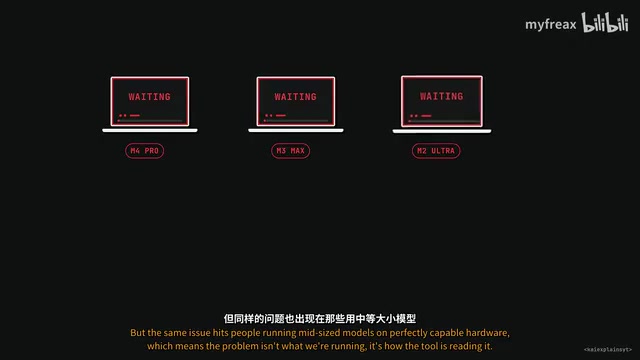
Many people assume that running local AI slowly on a Mac is due to insufficient chip performance or inadequate memory bandwidth. But a developer's experience on Reddit overturns this assumption: using a top-spec MacBook Pro with an M5 Max chip and 128GB of unified memory to run a coding agent, he spent 8 hours making only about 15 edits to a single HTML file—averaging half an hour per edit. Oddly, the model's text output quality was good, and the generation speed on screen looked normal, until he opened the logs and found one line repeating over and over: "Full prompt reprocessing forced due to missing cache data."
This case points to a long-overlooked fact: we've been looking at the wrong place all along.
Memory Bandwidth Only Explains the Generation Phase
Search "why is local AI slow on Mac" on YouTube, and almost every video mentions memory bandwidth. The logic itself isn't wrong: for every new token the model generates, it needs to read the entire model weights from memory. Take the Quinn 3.8 27B model as an example—at 4-bit quantization it needs about 17GB of space; the Mac mini M6 has a memory bandwidth of 170GB/s, which yields roughly 10 tokens per second; the M5 Max reaches 614GB/s, about 3.5 times faster.
The M5 generation also packs matrix acceleration units into each GPU core. According to Lamado's CPPB benchmark, from M4 Max to M5 Max, prompt-reading speed is about 3.5 times faster. These improvements are real.
But that developer working 8 hours a day had both—614GB/s bandwidth and acceleration units in every core—yet spent an entire workday to complete 15 edits. Clearly, the problem isn't bandwidth.
Pre-Fill and Decode: Two Phases That Get Conflated
Local AI inference actually consists of two completely different phases: Pre-Fill (reading) and Decode (writing). The tokens-per-second number you stare at in LM Studio or Ollama only measures Decode—the speed at which the model writes new words. But before the first word appears, the model must read through everything you sent—the system prompt, attached files, the entire conversation history. This reading phase has its own speed bottleneck and can be much slower than the writing phase.
In a normal chat window, we type a few hundred characters and reading takes a fraction of a second—no one notices. Agent workflows are a completely different story.
A measurement one developer did with MEMAX in March is telling: LM Studio showed 57 tokens per second, but when loading 8,500 tokens of conversation context, the actual speed from pressing Enter to the first word appearing was only 3 tokens per second. The reading process consumed 94% of the waiting time, and the actual experience was 19 times slower than the counter suggested.
Almost all benchmarks on YouTube measure Decode, but the Agent workflows we actually run are dominated by Pre-Fill. This completely reframes every purchasing decision and every troubleshooting step.
Prefix Caching is a key optimization technique in LLM inference serving. The principle: when the beginning of a new request's prompt is exactly identical to a previous request's prompt, the server can directly reuse the previously computed KV Cache, skip recomputing those identical parts, and only process the newly added tail content. In local inference scenarios (such as LM Studio, Ollama, llama.cpp), prefix caching typically takes effect per conversation turn—as long as the text prefix of a new round of requests is exactly identical to the previous round, the cache hits. However, once any change appears at the beginning of the prompt (even just a space or a timestamp), the cache for all subsequent content is invalidated, and the server must recompute the entire prompt from scratch. For Agent contexts that routinely run to tens of thousands of tokens, this "cache miss" can cause first-token latency to skyrocket from seconds to minutes—the invisible culprit behind the cliff-like drop in local AI experience.
Cache Invalidation: The Invisible Killer That Turns Slow into Disaster
Prefix Caching is the server's ability to remember what it has already read. If the next request starts with the same text as last time, it doesn't re-read that and jumps straight to the new content at the end. On a Mac, this determines whether things work or break completely.
A log one developer posted in September is striking: an M5 Pro with 64GB running the Q1 3.8 27B model, at one point the context reached 158,000 tokens, of which 157,600 were in cache, only 400 new tokens, and the first token appeared in 6.1 seconds. A few turns later the context grew to 188,000 tokens, but the cache only matched 147,000, forcing the server to re-read about 41,000 tokens, and the first word took 268 seconds. Same Mac, same model, same session—the only difference was whether the beginning of the prompt still matched what the server had cached. A 44x speed difference.
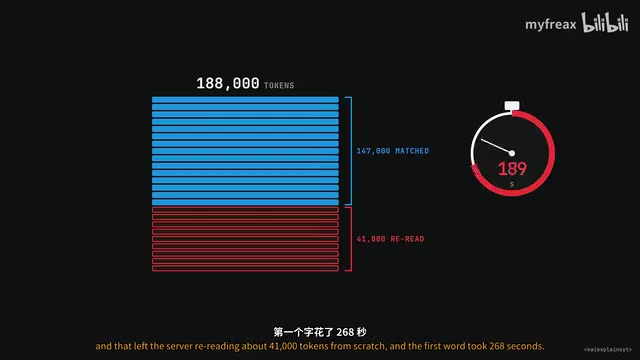
Upgrading from M5 Pro to M5 Max more than doubles memory bandwidth—a real improvement. But once the cache is invalidated, the cost is 44x—no chip upgrade can make up for that gap.
How the Cache Quietly Gets Invalidated
The answer is surprisingly mundane: not hardware limitations, but software decisions, tool choices, and configuration issues.
The attribution header bug. Cloud Code once placed a small piece of text at the top of the system prompt that changed with every request. Anthropic's own servers knew to strip it before caching, but when Cloud Code pointed to a local server, it didn't know to, so the entire cache was invalidated every turn. The community found that setting the environment variable to 0 fixed it; the post got 46,000 views and was translated into 4 languages, and setup guides still warn that this is the number one cause of 90% slower local inference. Cloud Code's June 2.1 release fixed it, but people were still reporting Agent runs taking 30 minutes in September.
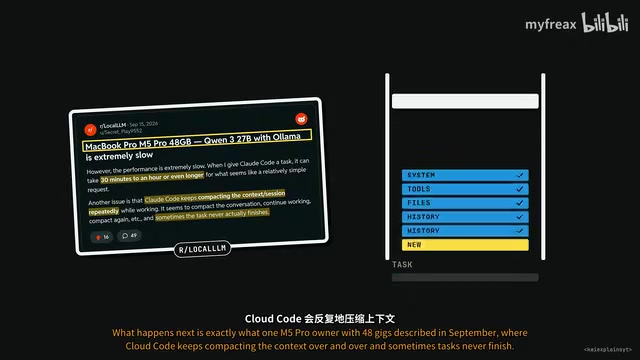
Ollama's context window default. Ollama decides context space based on the amount of memory visible to the GPU: 4,000 tokens below 24GB, 32,000 between 24 and 48GB, and 256,000 above 48GB. On a Mac the GPU can't see all the memory—macOS only allows about 36GB to be used, which falls into the 32,000-token tier. But Cloud Code's first request consumes about 33,000 tokens before you even type anything—most of it tool descriptions. The context window is full before the Agent is even asked to do anything. What follows is repeated context compaction, and a brand-new compaction prompt means a full cold-start read every time. Ollama's official Cloud Code documentation recommends setting the context to 64,000 or higher—the default is only half of that.
Hybrid layers inside the model. Some long-context models (like QWIN 235B A22B) use a rolling-summary-like technique for about three-quarters of their layers, which cannot rewind to arbitrary points; the server can only save checkpoints every few thousand tokens. If there is no checkpoint near where the new prompt diverges from the cache, it must restart from scratch. That 8-hour log reported exactly this situation turn after turn.
The choice of frontend tool. In May someone tested two Agent frontends, OpenClawAd and Hermes, pointed at the same server running the same model. Hermes cached normally; OpenClaw's cached token count was 0—not a few less, but 0, because the way that tool builds requests guarantees the cache never hits. Same Mac, same server, same model—yet actual performance was worlds apart simply because of the frontend.
Handling of thinking tokens. Some tools strip the model's thinking tokens before the next turn to keep the context clean. This sounds reasonable but changes the conversation history and invalidates the cache. Queen by default retains the thinking content of the 27B model; the official docs note this helps caching, but many tools don't comply.
KV Cache is the core memory structure during Transformer model inference. In the autoregressive generation process, each token the model generates requires attending to the key (Key) and value (Value) vectors of all previous tokens. To avoid recomputation, inference frameworks cache these vectors and reuse them directly in subsequent generation. The size of the KV Cache is closely related to context length, model layers, and attention heads, and in long-context Agent scenarios it can occupy several GB of VRAM/memory. Prefix caching is essentially reusing the KV Cache across requests. But the KV Cache is extremely sensitive to "prefix consistency": once the prompt diverges at some position, all cache after the divergence point becomes unusable. In addition, some model architectures (such as hybrid-layer models) also involve rolling summaries or checkpoint mechanisms in their KV Cache, further limiting the rewind granularity of the cache and making the cost of cache invalidation even higher.
When the Chip Actually Matters
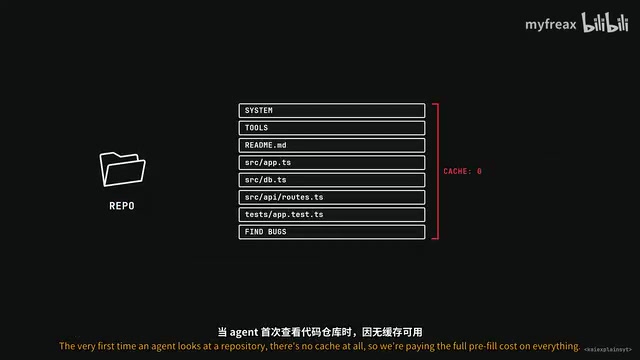
The chip matters in those reads that can't be skipped. When an Agent first looks at a code repository, there is no cache available, and it has to pay the full pre-fill cost for everything. Last October a content creator deployed Cloud Code on an M5 Pro to find bugs, and waited over three minutes before the Agent uttered its first word—based on typical read speeds for that configuration, that means 55,000 to 70,000 tokens were being processed from scratch. He called running local AI on a Mac a waste of money, and 62,000 people watched the video—but he measured only the first turn, and his judgment about the first turn was correct. That's exactly where the M5 earns its keep.
Take a cold-start read of 32,000 tokens for a 27B model: on an M1 Max it takes 5 to 11 minutes; on an M5 Max it takes only about 40 seconds. That's a meaningful improvement for real work.
A more objective way to put it: the cache determines how many cold-start reads we pay for, and the chip determines the cost of each cold-start read. If the configuration breaks the cache every turn, we're paying the cold-start price every time, and no chip can make up for that gap.
Cold Pre-Fill refers to the process in which the model must process the entire prompt from scratch when there is no reusable cache. In Agent workflows, the first request, requests after cache invalidation, and requests after context compaction are all cold pre-fills. The time for a cold start is proportional to prompt length and is constrained by both memory bandwidth and GPU matrix computation capability. Taking a 27B model with a 32,000-token prompt as an example, an M1 Max needs 5 to 11 minutes, while an M5 Max can compress that to about 40 seconds thanks to higher memory bandwidth and matrix acceleration units. Therefore, the real value of a chip upgrade lies in reducing the absolute time of a single cold start, not in improving token generation speed during the Decode phase. Understanding this is essential to correctly evaluating the return on hardware investment.
Hands-On Troubleshooting Checklist
Before considering hardware, these checks cost nothing—and some take only two minutes:
- Update Cloud Code. Any version earlier than 2.1.181 still has the attribution header bug. If you can't update, set the environment variable Cloud Code Attribution Header to 0.
- Check Ollama's context window. Run
ollama psin the terminal and look at the Context column. If it reads only 32,000 on a 48GB Mac, that's the problem. The official docs recommend setting it to 64,000 or higher. - Raise the server log level. In Llama.CPP or LM Studio, increase log verbosity, run an Agent session, and search the logs for "Full Prompt Reprocessing." If it appears every turn, you know what's eating your time.
- Be picky about your tools. Different frontends handle caching differently. Test your configuration and check the cached token counter reported by the server. If cached tokens are still 0 deep into a session, that's a red flag worth investigating.
- For Qwen models, you can lower the Effort Level. Maximum effort generates a large number of thinking tokens, which makes the context inflate faster and the cache harder to maintain.
Check the logs first, then look at the spec sheet.
One-line Summary
The culprit behind slow local AI on Mac is cache invalidation, not the chip—check logs before upgrading hardware.
Paragraph Summary
Through a developer's case of running an Agent on a top-spec M5 Max for eight hours and completing only 15 edits, the article points out that the root cause of slow local AI on Mac has long been misdiagnosed as insufficient memory bandwidth. In reality, local inference is divided into two phases—Pre-Fill reading and Decode writing—and Agent workflows are mainly dominated by Pre-Fill, while common counters only show Decode speed. Prefix cache invalidation can cause first-token latency to skyrocket by dozens of times, far exceeding the gains from a chip upgrade. Common causes of cache invalidation include the Cloud Code attribution header bug, Ollama's context window default being too low, checkpoint mechanisms in the model's internal hybrid layers, differences in frontend tool caching strategies, and improper handling of thinking tokens. The real value of the chip lies in reducing the cost of a single cold-start read, while the cache determines how many cold starts you need to pay for. The article ends with five no-cost troubleshooting steps, emphasizing checking logs first before considering hardware upgrades.
Related articles

Deleted Reddit Post Sparks Debate Over AI Content Moderation
A Reddit post removed with only a 'Removed by Reddit' notice highlights AI content moderation's transparency gaps, misjudgment risks, and appeal challenges for platforms and creators.

DSH + Ollama Local LLM Deployment in Practice: Free Chat with Da Fei Yu
Bilibili creator tests DSH + Ollama local LLM deployment end to end: Ollama install, Xunlei-accelerated downloads, ModelScope GGUF model import, DSH custom API address setup, and a comparison of Qwen 3.5 4B, 8B, Gemma, and other models on 8GB VRAM, with advice on choosing local deployment vs. API calls.

Tested: A $899 Mac Mini vs. a $200/Month AI Subscription
Real-world test of whether an M4 Mac mini can replace a $200 AI subscription: 16GB can't fit large models, and both speed and quality fall short—but privacy, no caps, and near-zero running costs make it an ideal host for an always-on agent. Includes buying advice per configuration and money-saving strategies.