Local Deployment of Laya Decision Model: 45ms Response Time, Zero Cost Open-Source Alternative

Open-source local decision model Laya beats cloud-based Jev with 45ms latency, zero cost, and one-click deployment.
This article compares two real-time decision models: cloud-based closed-source Jev and open-source local Laya. In identical game scenario tests, Jev quickly failed due to ~300ms cloud round-trip latency, while Laya ran locally at just 45ms with 60fps capability, winning 26 to 1. Laya is fully open-source, token-free, and keeps data on-device. To lower the deployment barrier, the creator listed Laya on Panel AI for one-click installation — users simply search, install, and paste the API URL to connect.
A Comparison That Sparked a Conversation
Over the past two weeks, a decision model called Jev has been generating buzz in the community — but it has one glaring drawback: it's closed-source and charges per token. Just three days later, an open-source model named Laya was put up for direct comparison, quickly becoming the center of discussion.
From hands-on demos by Bilibili creators, the performance gap between the two in the same game scenario is visible to the naked eye. In a side-by-side test with Laya on the left and Jev on the right, Jev hit GAME OVER quickly while Laya kept running steadily, ending the round with a score of 26 to 1. The creator put it bluntly: the difference is "not even close."
The root cause isn't complicated: Jev is a cloud-based decision model that must wait for a server response on every decision, inevitably adding latency; Laya runs locally, eliminating the round-trip network overhead entirely.
Core Parameter Comparison: Jev vs. Laya
Looking at the key metrics side by side, the differences are stark:
Jev: The Cloud-Based Decision Model
- Decision latency ~300 milliseconds
- Closed-source, charged per token
- Data must be sent up to the server
Laya: The Lightweight Open-Source Solution
- Model size ~421MB
- Single decision latency: just 45 milliseconds
- Capable of running at 60fps
- Fully open-source, data stays local
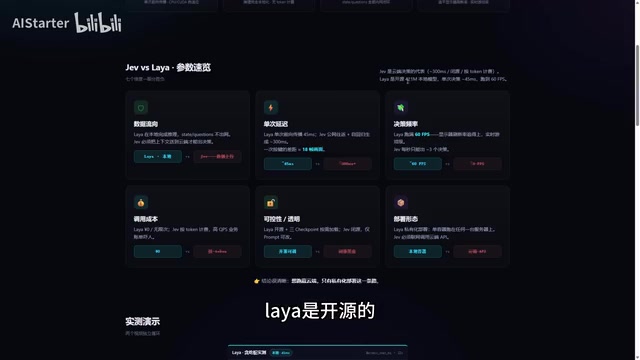
300ms vs. 45ms — in real-time decision scenarios like game AI, that's a decisive gap. For tasks requiring continuous, high-frequency decisions, every network round-trip in a cloud solution accumulates into noticeable lag, while a local model can respond in near real time. More importantly, Laya keeps data on-device, eliminating token costs and sidestepping privacy concerns around data uploads.
The "decision model" referred to here is a lightweight inference model specifically designed for real-time behavior control — fundamentally different from general-purpose large language models (LLMs). General LLMs typically have billions to hundreds of billions of parameters, requiring massive VRAM and compute per inference. Decision models, by contrast, are designed to output discrete action commands (e.g., up, down, left, right) with minimal latency, which allows them to be compressed to just a few hundred megabytes and run in real time on consumer hardware. Laya's 421MB footprint and 45ms latency are the result of heavy optimization for exactly this use case — it doesn't need to understand complex semantics, only to quickly output an action decision based on the current state. That's why it can achieve 60fps-level response rates that would be impossible for a general-purpose model of any comparable scale.
Why No One Explained the Deployment Process
The creator pointed out a real-world problem: after watching a bunch of related videos, almost no one explained how to actually deploy Laya — "you just had no idea, and it wasn't easy to figure out." This is a common barrier for open-source models in practice: the model itself may be open, but environment setup and dependency installation often drive away ordinary users.
To address this pain point, the creator listed Laya on Panel AI (referred to as PANDAI in the video) as a one-click deployment, with the application itself being free. This effectively compresses what would normally be a tedious manual setup into a simple "click to install" in an app marketplace.
The "deployment barrier" for open-source models is a long-standing community pain point. Even when model weights and code are fully public, users still need to handle Python version compatibility, CUDA driver issues, dependency conflicts, port configuration, and more — any one of these can cause installation to fail. For users without Linux or containerization experience, troubleshooting these steps can take hours or even days. Containerization technologies like Docker dramatically simplify this by packaging the model and all runtime dependencies into a standardized image that users simply pull and run, without worrying about the underlying environment. Laya's one-click deployment on Panel AI is built on exactly this mechanism — and the large image size is precisely because it bundles the complete model files and runtime environment together.
Step-by-Step: Deploying Laya via Panel AI
The entire deployment process has been streamlined to just a few steps:
- Open Panel AI and navigate to the App Marketplace
- Search for Laya under "All," or scroll down to find it directly
- Click One-Click Deploy, select a node, check the box, and confirm installation
- Once installed, find Laya in the app list and open it
- The page will display an API endpoint URL — copy it
- Paste that URL into the demo tool, click Save and Apply to connect

The creator built a demo specifically to verify that the deployment works. Since the service was deployed on a company server, the demo still achieved 60–80fps; local or LAN deployment would yield even lower latency and smoother performance.
It's worth noting that any application that supports the API endpoint can connect to Laya and hand off decision-making to it. This standard API-based integration approach makes it relatively flexible to extend.
The API address here is essentially a local or LAN HTTP service endpoint, typically in the format
http://localhost:PORTorhttp://LAN-IP:PORT. Once Laya is deployed, it starts an inference service in the background. External programs send HTTP requests to this endpoint (with the current game state as input) and receive action commands in return. This design follows the "Model as a Service" philosophy, allowing Laya to be integrated by any HTTP-capable client regardless of programming language or framework. Developers can switch between local and cloud inference simply by swapping the API URL, with minimal migration overhead.
Real-World Decision Performance and Deployment Notes
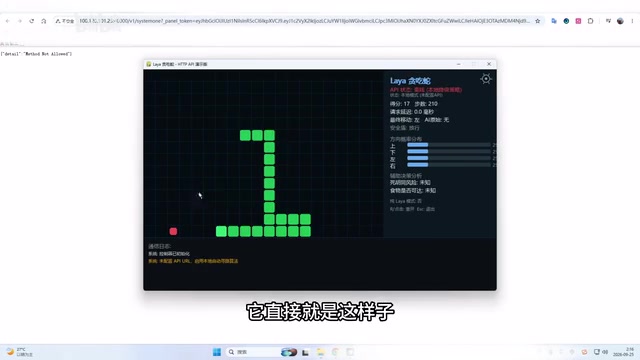
The demo also showed a control group: with "Laya selected but not running," the game character immediately walks into walls and dies quickly. This confirms that Laya's core function is to provide directional decisions — up, down, left, right — and without it, intelligent behavior completely breaks down. Once enabled, the character's movements become purposeful and coherent.
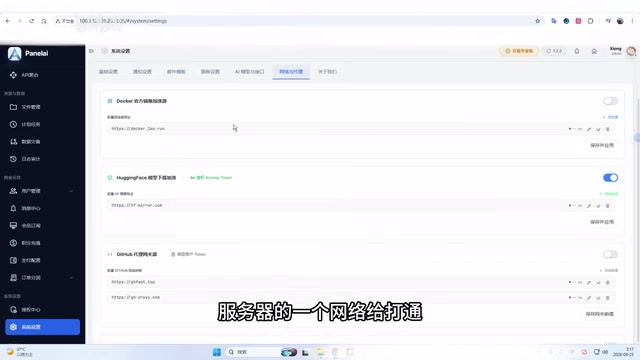
There's one important caveat for deployment: Laya's image includes the full model and is quite large. Using a free image acceleration service directly can cause instability and lead to installation failures. The creator recommends configuring your server's network environment properly in the system settings before running the installation — this significantly improves success rates.
In addition, Panel AI hosts a number of other projects that have reached stable release, including models, plugins, and skill packs, all supporting one-click installation. After deploying an application, you can enable it under "Resource Authorization" or plugin settings so that your project can call the local model at runtime.
Conclusion
Laya's value isn't in having jaw-dropping parameters — it's in offering a pragmatic path forward: replace a per-token cloud decision service with a 421MB open-source local model, cut single-decision latency from 300ms to 45ms, and achieve zero cost with full data locality. For developers who need high real-time responsiveness and don't want to be locked into cloud costs and latency, this is a direction worth exploring. And with Panel AI's one-click deployment, the technical barrier that once made this daunting has been dramatically lowered.
Related articles

Gaussian Process Bandit Optimization: Exploration Strategies and Inference Regret Guarantees
Cumulative regret guarantees in Bayesian optimization fail to reflect final recommendation quality. This article examines a new study that provides inference regret guarantees for Gaussian process bandit optimization through exploration query strategies and fill distance analysis, validated on hyperparameter optimization and control tasks.

The Most Detailed Codex Guide on Bilibili: From Installation to Real-World Practice
The most detailed Codex guide on Bilibili: from app store installation to daily work mode configuration, with a real coffee shop project demonstrating file organization, data extraction, dashboard creation, and other practical tasks. Learn to use Plan Mode and desktop pets to leverage Codex efficiently.

Appearance Compensation in Volume Rendering: Why RGB Accuracy Cannot Guarantee Density Correctness
Volume rendering research reveals that volumetric data perfectly reproducing external RGB views may still contain density errors: appearance compensation can double central density and keep external rays unchanged even when L2 error exceeds 14.52%. Density recovery depends on appearance capacity, spatial resolution, and measurement design.