Local Deployment of Open-Source Laya in Practice: Setting Up the Environment and Running Three AI Customer Service Classification Demos

Deploy Laya locally on CPU for zero-shot text classification with confidence thresholds and optional LLM draft replies.
Laya is a standalone open-source lightweight text classification framework that runs locally on CPU with no API keys or chat server required. Given a message and candidate categories, it returns probability scores for each. This article walks through a full Linux + Python 3.12 deployment: virtual environment setup, downloading the ~846MB model, and three progressively advanced demos — single-message classification, batch processing with confidence score interpretation, an 80%/20% threshold rule for triggering human clarification, and a layered architecture combining Laya's fast routing with a local Qwen 27B model for draft reply generation.
The open-source project Laya (pronounced "LIA" in the video) has sparked quite a bit of discussion lately. It's a standalone, lightweight text classification tool with a straightforward working principle: give it a short message and a few candidate options, and it picks the best match while returning a probability score for each option. This article is based on a hands-on local deployment test and walks you through everything from environment setup to three progressively advanced practical demos.
One concept worth clarifying upfront: Laya is an independent open-source project. What you're downloading isn't some large language model — it's a classification framework that runs locally on CPU. That means the barrier to entry is much lower than you might expect. No chat server required, no API keys needed.
Environment Setup: From Virtual Environment to Model Download
The test environment is Linux + Python 3.12. Even though the machine had Spark compute available, the author chose to run everything on CPU to verify that the minimum hardware configuration is viable. The companion guide also covers Windows and Mac, but the demo walkthrough follows the tested Linux version.
The core setup steps are straightforward: open a terminal inside the project folder, check the Python version, then create and activate a virtual environment to isolate the relevant packages from other software installed on the system. Once activated, the terminal prompt will show the virtual environment indicator. Next, install the dependencies — this step downloads PyTorch and other packages, which takes a moment, but using a unified version saves a lot of compatibility guesswork.
After installing dependencies, running pip check to confirm no broken dependencies is critical — if errors appear here, resolve them before proceeding. Windows users should note that the commands in the guide call Python directly within the environment, so the activation step looks slightly different.
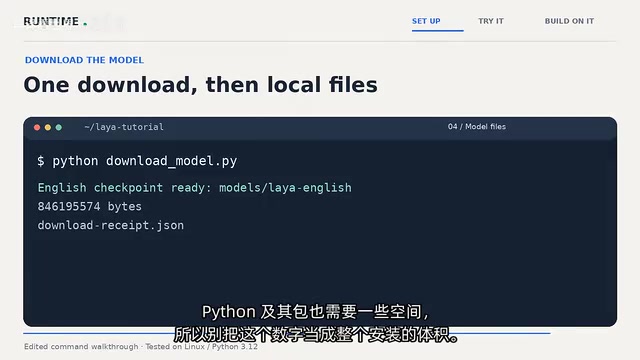
Finally, run the download script to fetch the English model, which is approximately 846MB. The author specifically notes: that number is just the model itself — Python and its packages require additional space, so don't mistake it for the total installation size. When the terminal shows Checkpoint Ready, the download is complete. The project also generates a download receipt recording the exact version used, making it easy to trace which version a tutorial is based on even after future project updates.
Demo 1 and Demo 2: Single-Message Classification and Confidence Thresholds
The first example is the most intuitive. After loading the model, input a customer message — "I was charged twice, please refund the duplicate payment" — with candidate options: billing, technical, sales, and other. The model returns: billing, with roughly 98% probability.
The author makes an important clarification here: the 98% is the score for this particular message, not the model's overall accuracy. This distinction matters when understanding probabilistic classifiers — many people mistakenly read a single confidence score as model-level precision. The sample code loads the model in offline mode, requiring no internet connection.
The second demo tests three fictional messages: a duplicate charge is classified as billing, a login error as technical, and a team plan question as sales. The first two results are clean and decisive, but the pricing question produces a near-tie — sales at roughly 37% in first place, with billing close behind at around 35%.
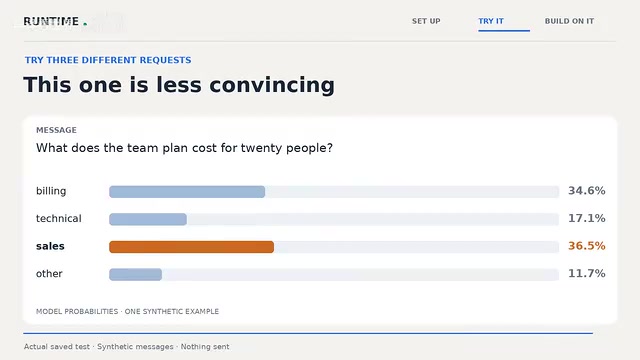
If the code only printed the top result, this would look like a clear answer. But seeing the full scores changes the author's approach: you wouldn't automatically route this message and move on. In contrast, the refund message had a clear frontrunner, while this one was almost a dead heat. For real-world applications, this distinction between "decisive" and "tied" is itself valuable information.
This leads into Demo 3, which introduces a simple rule: the top option must reach at least 80% and lead the second-best option by at least 20 percentage points — otherwise, output "request clarification." A clear refund request passes the test, while the vague "my account seems a bit off, can someone take a look?" does not — the code prints a clarification request instead of routing the message anywhere. The author emphasizes these thresholds are just a starting point that need to be tested against your own examples before being used in production.
Laya uses a zero-shot classification paradigm, typically built on pre-trained language models fine-tuned on Natural Language Inference (NLI) tasks. Unlike traditional text classification, zero-shot classification requires no labeled training data for new categories — the model judges relevance by understanding the semantic meaning of candidate labels. That's why you can use it right away by just providing a few candidate words. Confidence scores are essentially normalized probabilities of the inference "this message entails this category description," with all candidate scores summing to 1. This also explains why scores are strongly correlated with the number of categories: fewer candidates means more probability space for each; more candidates means lower absolute scores for the same level of "certainty." In practice, this means threshold parameters need to be calibrated separately for each specific number of categories rather than reusing the same values across different scenarios.
Demo 3 and Adapting to Your Own Project
The real engineering insight comes from adapting this pattern to your own use case. The author uses organizing project notes as an example — swapping out the default "department" categories for bug, feature, settings, and other, writing a short description for each, then preparing a few obvious messages, a few tricky ones, and one that doesn't fit anywhere, with expected answers written down in advance.
Worth noting is the input budget constraint: this checkpoint has a limited input length, and the wrapper will actively warn you when text is too long rather than silently truncating half your message. This detail is very helpful for avoiding errors caused by "silent truncation."
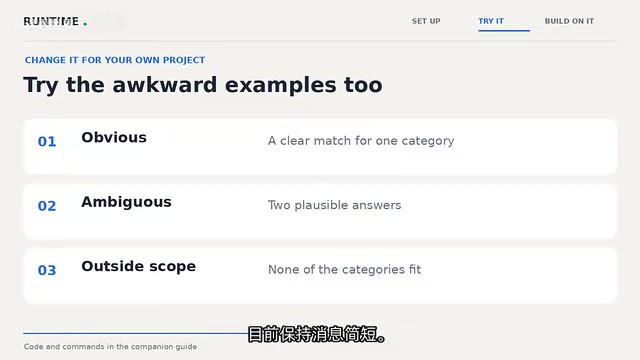
In testing, "frozen PDF export" is tagged as bug, "dark mode" as feature, and "Python version issue" as settings — all matching expectations. But the latter two score below the 80% threshold, meaning even when the label is correct, that clarification rule might still send them to human review. This is exactly why you need to repeatedly test against your own data.
The "input budget" is an inherent constraint of the Transformer architecture, stemming from the fact that the computational complexity of its attention mechanism grows quadratically with sequence length. Most lightweight checkpoints have a context window of around 512 tokens (roughly 300–400 English words), far smaller than mainstream chat LLMs with context windows of tens of thousands of tokens. For text classification scenarios, this is usually not a problem — messages being classified rarely exceed the limit. But if you try to feed entire ticket histories or lengthy documents into Laya for classification, the wrapper's active warning becomes especially important: silent truncation means the model only sees the first half of a message, potentially causing systematic classification errors that are very hard to detect just by looking at the output.
Connecting to a Local LLM: From Classification to Draft Replies
The final demo combines Laya with a local large language model: Laya handles department routing, while the larger model drafts the reply. The author uses a locally running Qwen3 27B server (referred to as the Quant 3.8 27B in the video) and emphasizes that setting up this server is a separate piece of work — the first two demos require none of it.
The flow is: check the server's model endpoint, copy the model name, set the base address and model name in the terminal (port and name will vary — use whatever your server actually reports). Using the same duplicate charge message as before, Laya selects billing, the Python code retrieves the corresponding "billing instructions," and sends them along with the message to the local LLM.
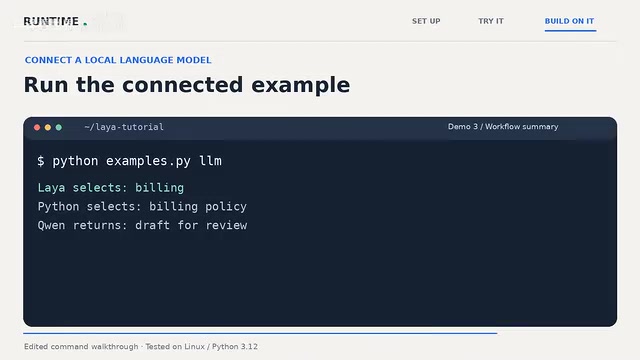
The strategy passed to the model explicitly instructs: ask for the order number, don't promise a refund, and don't claim a refund has already been issued. These instructions live in the Python file — readable, editable, and traceable if something goes wrong. The resulting draft asks for the order number and offers to review the details, without falsely claiming a refund has been completed — exactly what the author wanted: "a draft for human review, with nothing sent to the customer."
The author also honestly acknowledges: you could absolutely have a larger model handle everything in a single prompt, and this video doesn't compare cost or accuracy between the two approaches, so no claim is made about which is superior. The value of this layered design is providing an independent decision point where you can determine whether it's worth proceeding to the writing step at all.
This "lightweight classifier + heavyweight generative model" layered architecture has a specific name in engineering: routing or intent recognition pre-processing. The core motivation is separating control of cost and latency: the classifier is small and fast, triggering unconditionally on every message; the resource-intensive generative model is only invoked after classification passes the confidence threshold. This logic is closely related to the Mixture of Experts (MoE) approach common in large AI applications — route first, then process. For local deployment scenarios, this layered design brings another practical benefit: even if the large model server goes down, the classification layer can still independently log or queue requests rather than causing the entire pipeline to fail.
Common Errors and Resource Usage
The hands-on testing identified several frequent issues: environment-related errors typically mean the wrong Python environment was used; missing model files indicate the download didn't complete or is pointing to the wrong folder; Connection Refused in the final demo points to the separate model server, not a failed Laya installation. Also, the first load taking longer than subsequent requests is normal behavior.
On the resource side, peak memory during batch classification on CPU testing reached approximately 2.7GB — leave some headroom. If checkpoint-related warnings appear, the guide covers those as well.
The recommended overall workflow is: start by modifying sample messages to see where the model makes mistakes, then refine the category definitions, and only add a draft-generation step when a written reply is actually needed. This incremental, verifiable-at-each-step approach is far more robust than piling on features from the start.
Related articles

Amphibious Transforming Drone: Beyond 100x Power Savings, What Are the Real Needs?
Is the amphibious transforming drone just a gimmick? Starting from the 100x power difference of the M4 Morphobot, explore real application scenarios and thesis topic ideas, analyzing boundary conditions where pure drones and pure ground robots both fail.

Warhound Raises $200 Million: Genetically Engineered "War Dogs" Paired with Anduril Gear
Warhound raises $200M, backed by Ben Lamm and Palmer Luckey, to genetically engineer dogs for military and law enforcement use and equip them with Anduril gear. This article analyzes its technology direction, funding logic, and ethical controversy.

Claude API Comes to Google Cloud: IAM Integration and SDK Access Guide
Anthropic hosts the full Claude API on Google Cloud with IAM-controlled permissions and unified billing. This guide covers the Vertex AI and Anthropic-hosted entry points, IAM role configuration, and SDK access.