locally-uncensored: A Local AI Desktop App That Runs With a Single Click
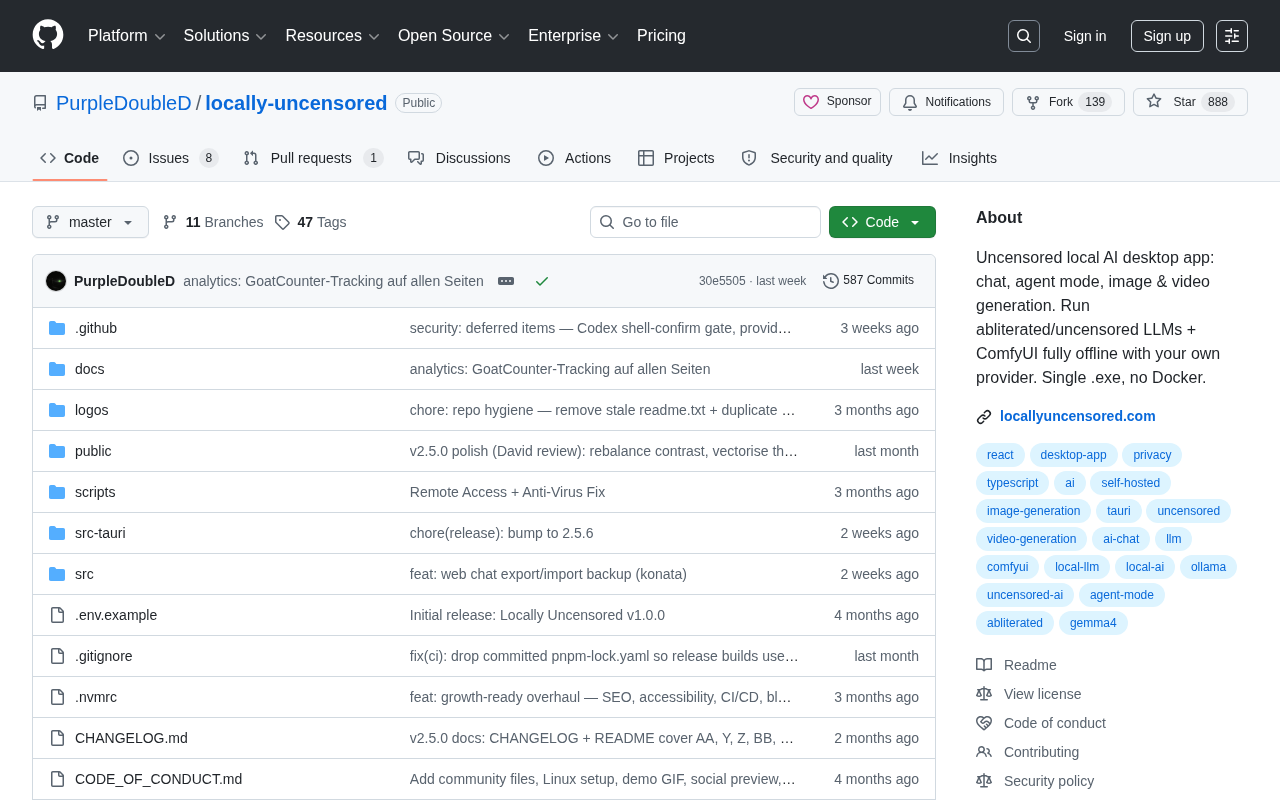
A single-file local AI desktop app integrating chat, Agent mode, image and video generation with both local and cloud model support.
locally-uncensored is an open-source TypeScript project on GitHub positioned as a local-first multimodal AI desktop workstation. It bundles chat, Agent mode, image generation, and video generation into a single .exe file — no Docker or complex environment setup required. It supports both local open-source models via Ollama (Gemma, Llama, Qwen) and cloud APIs from OpenAI and Anthropic, letting users switch between privacy-first and performance-first modes. The project currently has around 365 Stars and is still in early stages; running image and video generation locally does require capable GPU hardware, so easy installation doesn't mean lightweight operation.
The open-source community is seeing a rapid rise in tools built around local AI deployment. The PurpleDoubleD/locally-uncensored project on GitHub is a standout example — it bundles chat, Agent mode, image generation, and video generation into a single desktop app, with an emphasis on minimal setup: one .exe file, no Docker required.
The project has garnered 365 Stars and 51 Forks, and is primarily written in TypeScript. While modest in scale, its technical approach is worth paying attention to: it supports both local model inference and mainstream cloud-based LLM APIs.
Core Positioning: A Local-First Multimodal Workstation
Based on the project description, locally-uncensored aims to be more than a simple chat client — it's a locally-run AI desktop workstation that integrates multiple capabilities across four main areas:
- Chat: Standard conversational interaction with large language models;
- Agent Mode: Enables the model to execute multi-step tasks rather than just answering questions;
- Image Generation: Generate images locally or via a connected model;
- Video Generation: Extends the pipeline further into video content creation.
Consolidating all four capabilities into a single app means users no longer need to juggle multiple tools. For those looking to handle everything from text to image to video creation within a local environment, this "all-in-one" approach significantly reduces toolchain complexity.
Agent Mode represents one of the most important directions in LLM application development in recent years. The core idea is to move beyond "answering questions" — letting the model formulate multi-step plans, invoke external tools (such as search, code execution, or file I/O), and dynamically adjust its actions based on intermediate results. Unlike standard Q&A, Agent mode typically relies on a "tool calling (Function Calling / Tool Use)" mechanism, where the model can output structured tool invocation instructions alongside generated text, which the host application executes before feeding the results back to the model. The challenge with local Agent deployment is that tool-calling capability demands strong instruction-following from the model. Locally-run models with smaller parameter counts or heavier quantization often struggle with stability on complex tasks compared to cloud-hosted models at the GPT-4 level — so the practical effectiveness of a "local Agent" is highly dependent on model quality.
Model Compatibility: Local and Cloud, Both Supported
locally-uncensored takes an open approach to model support, covering both local inference and cloud API access.
On the local side, it supports open-source models running through Ollama, including popular families like Gemma, Llama, and Qwen. These models run entirely on the user's own device — data never leaves the local machine — making them well-suited for scenarios where privacy and data security are priorities.
On the cloud side, it's compatible with the OpenAI and Anthropic APIs. When users need more powerful model capabilities, or when local hardware isn't sufficient to run large-parameter models, they can switch to cloud services.
This dual "local + cloud" design directly addresses two common user needs: some people prioritize privacy and offline availability, while others care more about model capability ceilings. Offering both options in a single app lets users switch flexibly based on the task at hand, rather than being locked into one approach.
Ollama is currently one of the most popular local LLM runtimes. At its core, it's a lightweight model management and inference service layer that wraps model downloading, quantized format handling (typically GGUF format), and local HTTP API exposure into simple command-line operations. This lets developers run open-source models on Mac, Windows, or Linux without manually configuring low-level inference engines like llama.cpp. Ollama defaults to serving an OpenAI-compatible REST API on local port 11434, which means client applications built on the OpenAI SDK — including locally-uncensored — can switch to local models with virtually zero code changes. Gemma is Google's open-source lightweight model series, Llama comes from Meta, and Qwen is Alibaba's open-source bilingual (Chinese-English) model family. All three are available in multiple parameter sizes, allowing users to pick a quantized version that fits their local VRAM.
Deployment Simplicity: Single File, No Docker
The project explicitly highlights "Single .exe, no Docker" — and in the context of similar tools, this is a genuine differentiator.
For many local AI tools, the barrier isn't the tool itself but the environment setup — Python dependencies, CUDA versions, Docker image pulls, and so on. These steps routinely block non-technical users before they even get started. By delivering a single executable, locally-uncensored compresses the installation process to its bare minimum — in theory, a double-click is all it takes.
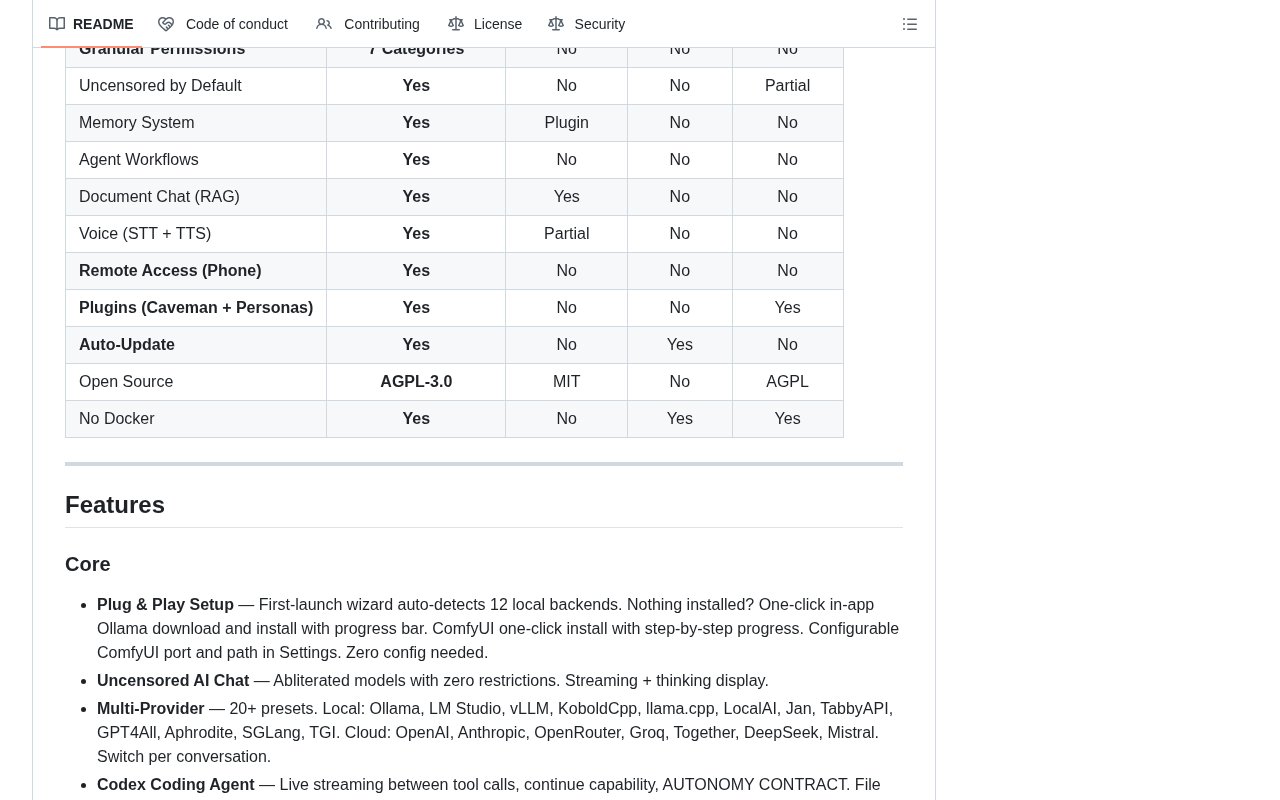
For Windows users, this delivery model means a near-zero-configuration onboarding experience. That said, running image and especially video generation models locally does place real demands on hardware — particularly GPU VRAM. "Easy to install" doesn't mean "light to run," and the actual experience still depends on the computational power of the local device.
Worth Watching, But Worth Evaluating Realistically
As an open-source project, locally-uncensored has a clear value proposition: local-first, multimodal integration, and low deployment friction — targeting personal AI creation and general use cases.
That said, at its current scale (365 Stars, 51 Forks), the project is still relatively early-stage. The word "uncensored" in the project name also signals its orientation toward unrestricted local usage — which is a source of flexibility, but also means users take on responsibility for content and compliance considerations themselves.
For users who want to explore local AI workflows without the hassle of complex environment setup, single-file desktop apps like this offer a low-cost entry point. Whether it's suitable for long-term use depends on the project's ongoing maintenance, how quickly it keeps up with model updates, and the user's own hardware capabilities.
Related articles

Vibe Coding Full-Stack in Practice: AI Programming from Beginner to Enterprise Deployment
From Cursor to Claude Code, this Bilibili AI programming course uses four progressive projects to cover full-stack development, open-source secondary development, and team collaboration. The article analyzes the shock to frontend roles, the efficiency shift from 50 people to 5, and the methodology required for enterprise-grade projects.

David Blaine's Global Quest for Real Magic: From South Africa to Japan and India
David Blaine travels to South Africa, Japan, and India in his Do Not Attempt special, documenting Spinning drivers, black mamba rescuers, iaijutsu masters, and ascetics—exploring the boundary between magic and real human极限 challenges.

Is a Touchscreen MacBook Coming? Vergecast Reveals Apple Executive's Response
Vergecast podcast reveals a conversation between a reporter and Apple executive John Ternus about a touchscreen MacBook and Apple Pencil support. Ternus says iPad is the best device for a stylus, while the reporter bets MacBook will eventually support Apple Pencil.