M5 Ultra Mac Studio Benchmark: How Unified Memory Crushes the RTX 5090 for Running Large AI Models

M5 Ultra beats the RTX 5090 PC on CPU and large-model AI inference, but loses in gaming.
A head-to-head benchmark of the M5 Ultra Mac Studio (under $7,000 complete) against an RTX 5090 PC (over $10,000) reveals a clear pattern: unified memory architecture defines the performance boundary. The M5 Ultra scores nearly twice the 9950X3D in multi-core CPU tests while drawing 25% less power. In local AI inference, the 5090 leads on small models that fit in its 32GB VRAM, but is over 20x slower on 70B-parameter models that overflow into system memory via the PCIe bus. In Premiere Pro, Apple Silicon optimizations make the Mac Studio export twice as fast. Gaming is the one area where the PC wins outright.
When Apple announced the M5 Ultra Mac Studio, many people's first reaction was "that's for content creators." But its real target audience is anyone running large-scale, desktop-class workloads — advanced 3D rendering, large VFX pipelines, and locally hosted large language models. That's exactly the kind of work data scientists and developers actually need. This article is based on an in-depth benchmark video that puts the M5 Ultra Mac Studio head-to-head against the fastest current PC configuration (Ryzen 9 9950X3D + RTX 5090), and the results are more interesting than you might expect.
Price and Configuration: A Complete Machine vs. One GPU
Let's start with the unavoidable topic of price. PC users chasing this level of performance typically go with a Threadripper or 9950X3D paired with an RTX 5090 — but a single RTX 5090 alone costs around $5,000, with some recent listings approaching $9,000. And that's just one component.
By comparison, the M5 Ultra Mac Studio (36-core CPU, 80-core GPU, 96GB unified memory) costs under $7,000 — and it's a complete, ready-to-use machine. On the PC side, you still need a CPU, RAM, cooling, storage, case, power supply, and an OS, which can easily push the total to $10,000 or more.
That said, the test unit used here came configured with 256GB of unified memory, an upgrade that costs $4,000 on its own — which is equally eyebrow-raising. The reviewer openly acknowledged that even accounting for industry-wide memory and SSD price hikes, this configuration is shockingly expensive.
CPU Performance: M5 Ultra Sets a New Bar
In single-core performance, the two are close — the M5 Ultra edges out the M5 Max MacBook Pro and clearly outpaces the PC. These M5 chips excel at fast, bursty single-core tasks: opening projects and loading files feels snappy.
Multi-core is where the M5 Ultra truly pulls away. The 9950X3D's 32 threads can't keep up with the M5 Ultra's 36 cores, which scores nearly twice as high — a lead it maintains in Cinebench 2026 as well. Crucially, these scores were achieved after 10 minutes of sustained load, not as a brief peak. Thanks to the Mac Studio's robust thermal design, performance stays stable over extended periods.

The power consumption numbers are perhaps the most surprising. Under full-core load, the M5 Ultra draws around 150W versus the 9950X3D's ~200W. In other words, it delivers roughly twice the performance while consuming 25% less power — a combination that's genuinely rare.
Real-world application results back this up: in Blender, the M5 Ultra is over 70% faster than the 9950X3D and more than twice as fast as the M5 Max MacBook Pro; in Houdini it's about 60% faster; HandBrake CPU encoding is also about 60% faster. For CPU-intensive workloads, the M5 Ultra is the fastest processor the reviewer has ever tested.
Cinebench is a widely used industry-standard CPU rendering benchmark that measures multi-core and single-core performance by having the processor render a complex 3D scene using ray tracing algorithms — higher scores mean more compute power. The 9950X3D is AMD's flagship Ryzen 9000-series desktop processor with 16 cores and 32 threads. Its "3D V-Cache" technology stacks additional L3 cache on top of the die (128MB total) to boost gaming and simulation workloads, but offers no particular advantage in raw multi-core throughput. The M5 Ultra is essentially two M5 Max chips bonded together via Apple's proprietary UltraFusion interconnect, yielding 36 high-performance CPU cores — a scale far beyond consumer-grade PC chips, putting it closer to workstation-class Threadripper territory. The sustained 10-minute performance scores are possible because the Mac Studio's thermal system is designed to workstation standards, unlike a laptop that would throttle to manage heat.
GPU and AI: Unified Memory as the Deciding Factor
In GPU-accelerated tasks, the PC holds a strong card with the RTX 5090. In Blender, the Mac Studio is about 40% faster than the 5090 — but that's comparing against NVIDIA's CUDA path. Blender natively supports Apple Metal but does not support NVIDIA's OptiX ray tracing engine. Once OptiX is enabled on the PC, the 5090 pulls ahead. The two systems run on entirely different software stacks, and that distinction matters.
The really compelling results come from local AI inference. The reviewer ran six models in LM Studio, ranging from 12B to 70B parameters. One methodological note: on the Mac side, some models (Gemma 12B, GPT OSS 20B, Gemma 31B) used Apple's native MLX framework, while the 27B and 70B models were run in standard GGUF format on both platforms.
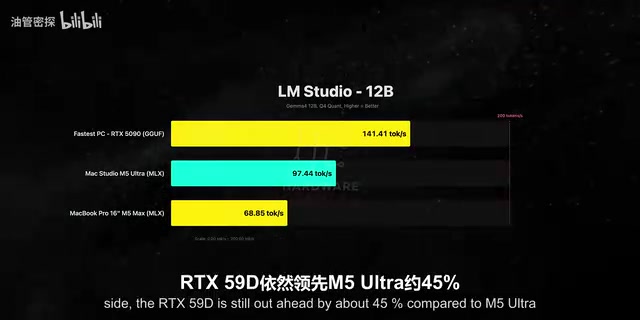
At smaller model sizes, the 5090 dominates: Gemma 12B (MLX) is about 45% faster, GPT OSS 20B is over 75% faster. The reason is simple — these models fit entirely within the 5090's 32GB VRAM, and with its staggering memory bandwidth, raw throughput is maxed out.
The shift starts with mid-to-large models. Qwen 3 27B at Q4 quantization sees the 5090 lead by about 47%, but at Q8 the gap narrows to around 23%. Higher-quality quantization actually closes the gap because Q8 models are more memory-bandwidth-bound — exactly where the Mac Studio's unified architecture excels.
The real reversal happens with the 70B DeepSeekAd R1 Llama distilled model. This model doesn't fit in the 5090's 32GB VRAM, so the overflow gets pushed to system memory, forcing data to shuttle back and forth over the PCIe bus — far slower than the GPU's own VRAM. The result: the M5 Ultra is over 20x faster than the 5090. Even the M5 Max MacBook Pro outperforms the 5090 here.

This is where Apple's unified memory architecture fully demonstrates its value. The test machine's 256GB is shared between CPU and GPU — no overflow, no PCIe bottleneck. Even the base M5 Ultra with 96GB can load a 70B-parameter model entirely in memory. The power consumption is equally striking: under 70B inference load, the 5090 draws ~275W and the M5 Ultra draws ~300W — virtually identical — yet the M5 Ultra is more than 20x faster. That's a real efficiency demolition.
Unified Memory Architecture is the core design principle of Apple Silicon: the CPU, GPU, and Neural Engine all share a single physical memory pool, so data never needs to be copied between discrete VRAM and system memory. In a traditional PC, the GPU has its own VRAM (like the 5090's 32GB GDDR7) while the CPU uses separate DDR5 system memory, with communication happening over the PCIe bus — which is bandwidth-limited to around 64GB/s (PCIe 5.0 x16). The M5 Ultra's unified memory bandwidth exceeds 800GB/s, and CPU and GPU access the same address space with extremely low latency. When an LLM's parameters exceed GPU VRAM capacity, NVIDIA's solution must spill the overflow to system memory, requiring repeated PCIe traversals on every inference pass — which is exactly why the 5090 slows so dramatically on the 70B model test.
MLX is Apple's machine learning framework designed specifically for Apple Silicon, deeply optimized for unified memory access patterns to fully leverage the shared memory bandwidth across GPU and CPU. GGUF (GPT-Generated Unified Format) is the most widely used cross-platform quantized model format, capable of running on different hardware universally but not as optimized as a platform-native framework. The mixed use of both formats for smaller models in this test introduces some variables that make direct cross-platform comparisons less clean.
Video Editing and Gaming: Optimization Is Everything
Video editing is another GPU-intensive workload. Exporting a 10-minute 4K H.265 timeline in DaVinci Resolve Studio, the M5 Ultra and the 5090 finish at almost the same time — their hardware encoders (Apple Media Engine vs. NVIDIA NVENC) essentially tie.
Adobe Premiere Pro tells a different story. Exporting a 4K project, the M5 Ultra finishes in less than half the time of the 5090 + 9950X3D system. What surprised the reviewer even more: his everyday MacBook Pro matched the export speed of that $9,000 5090 rig — a testament to how thoroughly Adobe has optimized for Apple Silicon.
Gaming is the one area where the PC wins decisively. In Cyberpunk, Baldur's Gate 3, and Total War: Warhammer, the 5090 leads by a wide margin. Even in Pragmata running through the Crossover translation layer, the Mac falls noticeably behind. The reviewer does note, though, that the first three games are native Apple Silicon titles — and that running through a translation layer inherently costs substantial performance. Nobody buys a $9,000 5090 just to play games. The broader point is that Macs can now play games at all — something unimaginable five years ago.
Crossover is a commercial application developed by CodeWeavers, based on the open-source Wine compatibility layer, that allows macOS to run Windows applications and games without installing Windows itself. It works by translating Windows API calls into equivalent macOS system calls in real time. On Apple Silicon, there's an additional layer of x86-to-ARM instruction translation (via the Rosetta 2 mechanism), so the double translation carries substantial performance overhead — typically 30–60%. This is a key reason Mac gaming frame rates trail the PC significantly. Native Apple Silicon games (like Total War: Warhammer running via the Metal API) incur far less overhead, but still trail the 5090 by a notable margin, primarily because the M5 Ultra's GPU is designed for general-purpose compute and content creation rather than gaming rasterization throughput.
Hardware Details and Buying Advice

The M5 Ultra Mac Studio's physical design is largely unchanged, with the same chassis and I/O layout: six Thunderbolt 5 ports, HDMI 2.1, 10Gb Ethernet, full-size USB-A, and an SDXC card reader — very handy for creators who regularly import footage from cameras.
A few purchasing notes worth keeping in mind:
- Current PC pricing is heavily inflated by the RTX 5090, which is selling for nearly triple MSRP — but the Mac Studio isn't cheap either, and the 256GB configuration is absurdly expensive.
- Most of the benchmarks didn't push the unified memory to its limits. That headroom is the real differentiator for local AI development — no standard desktop PC can offer unified memory at this scale.
- M5 Ultra configurations currently face 16–18 week lead times, and prices could shift considerably over those four months.
- If you're purely after CPU performance, the proper PC comparison is Threadripper, not the 9950X3D. A complete system with a Threadripper Pro 9975WX (32 cores, 64 threads) plus an RTX 5090 would exceed $14,000, making the value comparison more complex.
The conclusion is fairly clear: if you're an AI developer who needs to run large frontier models locally, the Mac Studio is an extremely capable machine. In most other scenarios, the performance gap between the M5 Ultra and a high-end PC is far smaller than you'd expect. It ultimately comes down to your workload and the software you use — if your workflow can take advantage of Apple Silicon optimizations, this machine will fly.
Related articles

Amphibious Transforming Drone: Beyond 100x Power Savings, What Are the Real Needs?
Is the amphibious transforming drone just a gimmick? Starting from the 100x power difference of the M4 Morphobot, explore real application scenarios and thesis topic ideas, analyzing boundary conditions where pure drones and pure ground robots both fail.

Warhound Raises $200 Million: Genetically Engineered "War Dogs" Paired with Anduril Gear
Warhound raises $200M, backed by Ben Lamm and Palmer Luckey, to genetically engineer dogs for military and law enforcement use and equip them with Anduril gear. This article analyzes its technology direction, funding logic, and ethical controversy.

Claude API Comes to Google Cloud: IAM Integration and SDK Access Guide
Anthropic hosts the full Claude API on Google Cloud with IAM-controlled permissions and unified billing. This guide covers the Vertex AI and Anthropic-hosted entry points, IAM role configuration, and SDK access.