Mac Duo: Turn Your MacBook Screen into Frosted Glass the Moment You Close the Lid
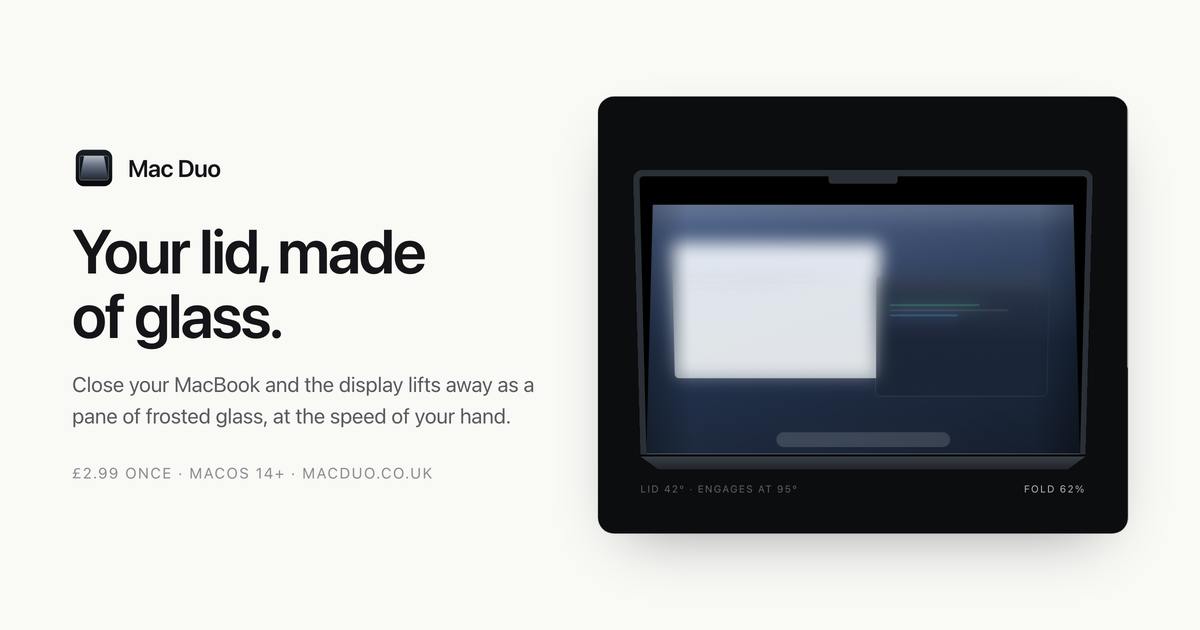
Mac Duo uses the MacBook hinge sensor to turn closing the lid into a real-time frosted glass screen blur.
Mac Duo is a macOS menu bar utility by developer Hari Gohel that transforms the everyday act of closing a MacBook lid into a visual ritual — the screen blurs in real time like frosted glass, tracking hinge angle continuously rather than reacting to a binary open/close state. Fast close, swift effect; slow close, gradual deepening blur. The app earned 76 upvotes and ranked #13 on Product Hunt, fitting squarely in the experience-enhancement niche. Its value is primarily aimed at users who appreciate device aesthetics; performance overhead and multi-model compatibility remain to be verified.
A Small Tool That Turns Closing Your Lid into a Visual Ritual
Mac Duo is a macOS app that recently surfaced on Product Hunt, and its core feature is as clever as it is unexpected: when you close your MacBook's lid, the screen renders a real-time frosted glass blur effect. This isn't a simple on/off animation — it's driven by the laptop's hinge sensor. The degree of blur tracks the angle of the lid in real time, so the faster you close it, the faster the effect plays out.
The app was built by developer Hari Gohel and has picked up 76 upvotes and 5 comments on Product Hunt, landing at #13 for the day across the Mac, User Experience, and Menu Bar Apps categories.
The Hinge Sensor: The Technical Pivot Behind the Detail
What makes Mac Duo most interesting is how it taps into hardware sensors. Modern MacBooks include a hinge angle sensor that detects whether the lid is open or closed — the system uses this to trigger sleep and wake behavior. Most apps only care about the binary "open" or "closed" state. Mac Duo, by contrast, reads the continuous angle data and maps it to a continuous blur effect on screen.
This means that if you close the lid slowly, the screen gradually takes on a thickening layer of frosted glass; close it quickly and the effect sweeps through in one motion. This "hands-on" responsiveness essentially transforms what was previously an imperceptible mechanical action into a tactile-feeling visual experience. It doesn't solve any real productivity problem — but it does carve out a distinct identity through interaction detail.
From a technical standpoint, macOS provides interfaces such as SMCMotionSensor and related IOKit framework APIs that allow developers to read accelerometer and orientation data with relatively low permission requirements. On MacBooks, the hinge angle isn't actually delivered by a dedicated standalone angle sensor — instead, the system uses the built-in accelerometer (the same one used for drop protection) combined with lid open/close events to derive an approximated angle. This means what developers receive is a system-level "angle approximation" rather than raw hardware register data. Mac Duo achieves continuous variation rather than a binary jump by polling this value at a sufficiently high frequency (typically on the order of tens of milliseconds) and mapping it — linearly or non-linearly — to the blur radius in Core Image's Gaussian blur, producing a visual effect that feels tightly coupled to hand movement.
What Category of Product Is This?
In terms of positioning, Mac Duo is a classic "experience enhancement" desktop utility — a natural fit for the Menu Bar Apps category. Products in this space share a common profile: single-purpose, lightweight, and sold on the promise of visual or interaction delight rather than functional necessity.
In recent years, the macOS ecosystem has seen a steady stream of such products, from dynamic wallpapers to menu bar decoration tools. They cater to a subset of users who seek a sense of ritual and personality in their devices. Mac Duo extends this idea to the act of closing the lid — something most people do multiple times a day — and tries to inject a small moment of visual surprise into an otherwise mundane gesture.
The "ritual tool" niche has reasonably clear precedents in the macOS ecosystem. Early examples include HyperDock, which added window previews to Dock icons; Notchmeister, which transformed the MacBook Pro's notch into a dynamic light effect display; and HiDock, which attempted to bring iPad-style Dock animations to macOS. The shared business logic across these products is that within the Mac user base, there exists a segment willing to pay for "device aesthetics" — users who also tend to be high-intent buyers of Setapp subscriptions and indie developer apps. Mac Duo's decision to target the "lid close" moment — a high-frequency daily action — and stake out an interaction touchpoint not yet covered by competitors is a textbook "micro-scenario differentiation" strategy.
Strengths and Potential Limitations
Based on available information, Mac Duo's highlights concentrate in two areas: the creative use of the hinge sensor, and the smoothness that comes from real-time synchronization between the effect and the physical action. The 76 upvotes and a top-15 finish for the day suggest the concept genuinely resonated with a portion of the Product Hunt community.
That said, it's worth being clear-eyed about its boundaries. The value of tools like this is highly dependent on personal aesthetic preferences, and practical utility is limited. Questions remain unanswered by current materials — whether the blur rendering introduces additional performance or battery overhead, how compatibility holds up across different MacBook models, and whether external displays are supported. For users who prioritize efficiency, this is more of a nice-to-have than a must-have.
Wrap-Up
Mac Duo represents a style of macOS micro-app that wins on detail rather than feature breadth — not stacking functionality, but drilling deep into a single overlooked interaction touchpoint. It turns the mechanical act of closing the lid into a frosted-glass visual transition, using the hinge sensor to deliver a continuously responsive, hands-on feel. Users who enjoy adding a sense of ritual to their work devices may find the ingenuity worth exploring; those who prize pure efficiency can safely pass.
Related articles

DeepSeek Open-Sources DeepInfer: What Is an Inference Framework Actually For?
DeepSeek open-sources its inference framework DeepInfer under Apache 2.0, supporting DeepSeek V4.1 Flash offline inference. This article explains its request scheduling, FlashMLA/DeepGEMM compute optimization, DSPark speculative verification acceleration, and what it means for developers and ordinary users.

Open-Source AI Learning Agent: A Full Workflow Experience from Topology Graphs to Exam Generation
Explore an open-source AI learning agent: built on DeepSeek API, it constructs knowledge systems via topology graphs, with automatic document generation, notes, super documents, and exams. Learn about its Agent workflow and design highlights.

DeepSeek Whale Girl Open-Source MV Meme: AI Industry Coded Slang About Pivoting to Closed Source
Bilibili's DeepSeek Whale Girl rap MV uses fictional memes to tease the AI open-source vs. closed-source debate, with lyrics full of industry slang. This article explains the meme culture, the Whale Girl symbol, and the open/closed tension.