Mac Local AI Buying Guide: A Complete Breakdown of Memory Configurations and Model Speed
A comprehensive guide to choosing the right Mac configuration for running local AI models.
This guide breaks down Mac hardware requirements for running local AI models, from 48GB to 512GB memory tiers. Using the free LLM Sizer tool, it maps models like Qwen 3.8 and GLM 5.3 Flash to specific Mac configurations, explains how memory bandwidth determines inference speed, and compares the true cost of local AI versus cloud subscriptions like Claude and ChatGPT.
With the launch of Apple Intelligence and the upcoming release of new Mac mini and Mac Studio models, more and more people are asking: should I upgrade my Mac to run local AI? There's no one-size-fits-all answer — it depends on what you want AI to do, how fast you need it to run, and how much you're willing to spend on memory. This article is based on analysis from LLM Sizer, a free tool developed by a tech content creator on Bilibili/YouTube, to help you understand how local LLMs match up with Mac hardware.
First Things First: What Do You Want Local AI to Do?
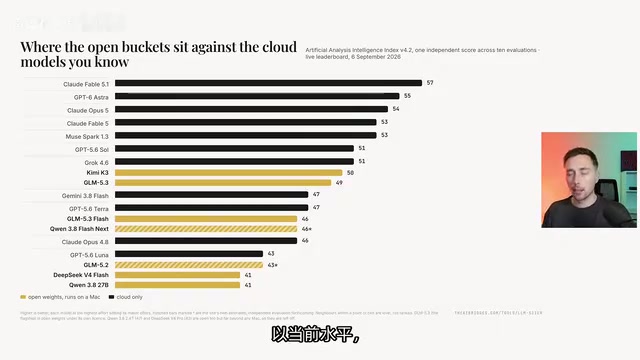
Many people jump straight to buying the most memory they can afford, assuming more memory means bigger models and better capabilities. That logic isn't wrong, but not everyone needs to run the most intelligent model available. The creator categorizes models into several "buckets" by memory requirement, each corresponding to a different capability tier and Mac configuration.
The Everyday Bucket: 38–48GB Memory
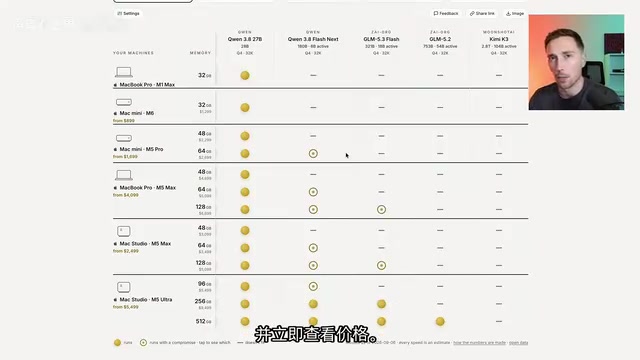
This tier corresponds to everyday models like Qwen 3.8 (27 billion parameters), roughly comparable to a frontier model from six months ago — Opus 4.6. It can summarize 50-page PDFs, draft and edit contracts, write scripts, and handle individual tasks within a codebase. The downside: it can't run continuously for hours to correctly complete a single large task, nor can it answer expert-level research questions. The minimum hardware target is a Mac mini M5 Pro with 48GB of memory (approximately $2,300).
The Agentic Bucket: Up to 128GB Memory
This tier can run models like Qwen 3.8 Flash Next, adding agentic task capabilities — multi-step office workflows, cross-website research, populating spreadsheets from documents, and handling multi-file code with self-testing. Capability-wise, it's roughly just below Opus 4.8, or around GPT 5.6. However, 128GB is a tight fit for these tasks — if you have other apps running simultaneously, you might not be able to load everything.
The Engineer Bucket: 256GB Memory
This tier can run GLM 5.3 Flash — a model that once appeared anonymously on Open Router and was widely considered "as good as Opus 4.8." It excels at project test fixing and long code generation, with a lower per-token running cost. At this memory level, you can also run the ~155GB DeepSeekAd V4 Flash, though its current capabilities are slightly weaker. The corresponding hardware is a Mac Studio M5 Ultra with 256GB of memory.
The Flagship Bucket: 512GB Memory
This is the maximum memory available in a single machine today, capable of running Mixture of Experts (MoE) models like GLM 5.2/5.3. The advantage of MoE is that it doesn't load all parameters at once — for example, only 54 billion parameters are activated — so it runs faster. Capabilities are roughly on par with GPT 5.6. This version is expected to launch in October, potentially priced at $15,000 to $18,000.
The Multi-Machine Bucket: Linking Multiple Macs
Some people buy 2, 4, or even more Macs and link them together to run massive models like Kimi K3. At Q4 quantization, it requires approximately 1.5TB of memory, which could mean buying 4 Macs. Its capability falls between Opus 4.8 and Fable 5, approaching current frontier performance.
Speed: The Key Factor in Local AI Experience
Having lots of memory doesn't mean fast inference. The creator breaks down several core factors that affect inference speed — a part often overlooked in local AI discussions.
Memory Bandwidth Is the Fundamental Bottleneck
Every time a token is generated, the Mac needs to read the entire model from memory. Take Qwen 3.8 (27B parameters, Q4 quantization) as an example: each token requires reading approximately 17GB from memory. This is where memory bandwidth (the data throughput between memory and GPU per second) becomes the bottleneck:
- Mac mini M6: ~170GB/s → ~6.5 tokens/s (extremely slow)
- MacBook Pro M5 Pro: ~307GB/s → ~13 tokens/s
- MacBook Pro M5 Max: ~22 tokens/s
- Mac Studio M5 Ultra: ~40 tokens/s
An important detail: MoE models only read the activated portion of parameters per token (e.g., GLM 5.3 Flash reads only ~30GB per token), so they're actually much faster than dense models of comparable total size.
The Hidden Cost of Context Windows
Many benchmarks use a minimal 32K context window — of course it's fast and fits easily. But in real-world use, Codex commonly uses 256K, and Claude can go up to 1 million. The larger the context, the more cache is needed, the more memory is consumed, and the slower inference becomes. With Qwen 3.8, a 256K context window cache can reach 17GB, halving the speed compared to a small window. The creator warns: for real agentic tasks, you need at least a 128K context window.
Software and Acceleration Tricks
On the same machine with the same model, different software yields different speeds. Compared to Llama.cpp, Apple's native MLX can be about 40% faster on MoE models. There are also acceleration techniques like multi-token prediction (MTP) and draft models (e.g., D-Flash, D-Spark) — Qwen 3.8 on an M5 Max starts at 22 tokens/s baseline but can be boosted to 34 or even 56 tokens/s with MTP enabled.
What Actually Doesn't Affect Speed
The creator specifically debunks several common misconceptions: extra memory beyond what the model needs simply sits idle and doesn't improve speed; CPU core count and GPU core count themselves aren't the determining factors either — the 40-core M5 Max is faster than the 32-core version only because Apple gave it a wider memory bus. At the end of the day, bandwidth determines the upper limit.
Local AI vs. Cloud Subscriptions: Doing the Math
The creator runs a straightforward cost comparison: a 256GB M5 Ultra costs roughly $10,000, and that same amount could fund four years of $200/month subscriptions to Claude or ChatGPT, giving you access to their most advanced models.
More critically, for most tasks, you don't need the most cutting-edge model — a $20 or $100/month plan may be more than sufficient, in which case cloud services offer better value for money.

Hidden Costs of Local AI
Beyond hardware price, local AI comes with several caveats that not everyone is aware of:
- High configuration barrier: Cloud services come with desktop/mobile apps, Codex, memory features, and various connectors — ready to use out of the box. Local setups require you to build your own harness framework, connect various components, and handle maintenance yourself.
- Parallelism multiplies costs: Want to run 4 conversations simultaneously? You need 4x the memory. The same applies to sub-agents.
- Security is your responsibility: Privacy is a huge advantage, but prompt injection risks are higher, and local models have less robust safety training compared to cloud counterparts.
- Higher hallucination rates: On the Artificial Analysis benchmark, GLM 5.3 Flash scores a hallucination rating of 7, while Qwen 3.8 (27B) scores -10, meaning you'll need to spend more effort verifying model outputs.
LLM Sizer: A Free Selection Tool
All analysis in this article comes from the free tool LLM Sizer, which requires no registration to use. It compiles all Apple Silicon models from the M1 onward, plus the NVIDIA DGX Spark, and includes a large library of models organized by size. It supports custom quantization levels, context windows, budgets, and runtimes (GGUF/MLX).

The tool provides several key charts:
- Compatibility Matrix: Visually shows which models fit on which Macs, with notes on any quality trade-offs.
- Speed Predictions: Displays estimated tokens/s for each Mac running a specific model.
- Memory Distribution Chart: Uses memory on the Y-axis and speed on the X-axis, helping you weigh "faster" vs. "bigger" within your budget.
- Quantization Matrix: Shows speed and memory requirements across quantization levels from Q2 to Q8.
All data is sourced from Hugging Face and community contributions. Formulas and calculations are linked separately for transparency, and users can report errors or submit feedback. The creator promises: if the video hits 100,000 views, the tool will be open-sourced and handed over to the community for further development.
Buying Recommendations: Decide Based on Both Capability and Speed
Taking everything into account, here are the creator's tiered recommendations:
- For Qwen 3.8 baseline capabilities: 48GB Mac mini M5 Pro as the minimum target
- For Flash-level (slightly stronger): 128GB configuration as the baseline
- For GLM 5.3 Flash: 256GB Mac Studio M5 Ultra
- For GLM 5.2/5.3: Wait for the 512GB M5 Ultra (expected October release)
Regarding speed, the creator considers 12–30 tokens/s the "comfort zone," with anything above 30 tokens/s being "good." For reasonable speed, a 48–64GB M5 Max can achieve around 20 tokens/s.
One final insight worth remembering: model intelligence keeps improving at the same size. The leap from Qwen 3.6 to 3.8 was already remarkable. In six months to a year, tasks that require GLM 5.3 today might be achievable with a much smaller model. So buying a high-memory machine now doesn't mean you'll always need that much — this is both the value proposition of buying new hardware and a reminder to spend wisely.
Related articles
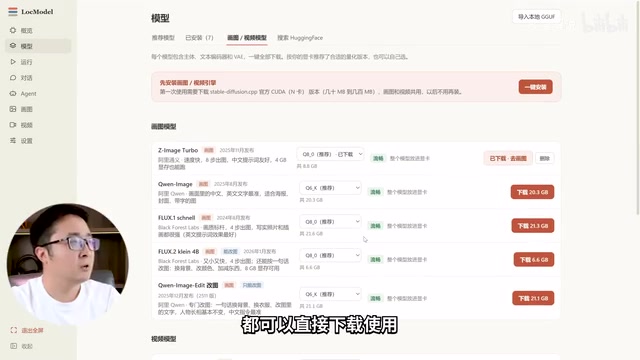
LocModel: The Local AI Deployment Powerhouse — Run Open-Source Models and AI Generation with One Click
LocModel is a local AI deployment tool that auto-adapts to hardware, downloads open-source models with one click, and supports image/video generation, uncensored LLMs, and Agents — completely free.

Antigravity CLI: Free Access to Top Gemini and Claude Models in the Terminal
Antigravity CLI (agy) claims to offer free access to top models like Gemini 3.1 Flash and Claude Sonnet in the VS Code terminal, with installation in seconds. This article breaks down its workflow, the value of in-terminal model calls, and the security and sustainability questions behind the free claim.

Chatbots vs. AI Agents: Key Differences and How to Choose
Chatbot vs. AI agent: how do they differ? We break down the three dimensions—tools, memory, workflow—compare four real scenarios, and offer risk-control advice and selection criteria.