MCP in Action: Integrating External Tools with the OpenAI Agents SDK

MCP lets AI Agents call external tools via a unified protocol; OpenAI Agents SDK supports stdio, HTTP, and hosted connection modes.
MCP (Model Context Protocol) is an open standard that lets AI Agents connect to external tools in a standardized way. This article walks through building a minimal MCP server with FastMCP, registering Python functions as tools via the `@server.tool` decorator, and attaching the server to an OpenAI Agents SDK Agent. It covers three connection modes — stdio for local development, streamable HTTP for remote deployment, and Hosted MCP for OpenAI-managed connections — plus tool filtering and the often-overlooked importance of docstring quality and query phrasing for reliable tool invocation.
What Is MCP: Giving Agents Access to Any External Tool
MCP (Model Context Protocol) delivers a core value proposition: it lets AI Agents use tools across programs and machines. In other words, an Agent is no longer limited to its built-in capabilities — once connected to an MCP server, it can automatically discover and invoke any tools that server exposes.
This article is based on an OpenAI Agents tutorial series by a YouTube creator, demonstrating how to build an MCP server, attach it to an Agent, and connect via multiple transport modes. The walkthrough uses a playful "Hidden Leaf Ninja Registry" as the running example, giving a concrete, end-to-end picture of tool registration, invocation, and filtering.
In short, the MCP workflow goes: build an MCP server → the server exposes tools → pass the server to an Agent created with the OpenAI Agents SDK → the Agent automatically accesses and calls those tools based on user queries.
MCP was released by Anthropic in November 2024 as an open standard protocol designed to solve the fragmented integration problem between AI Agents and external tools or data sources. Before MCP, every Agent framework had to write custom integration code for each tool, creating a sprawling, non-reusable "M×N" integration matrix. MCP simplifies this to "M+N" through a unified client-server architecture: any MCP-compatible Agent (client) can connect directly to any MCP server without additional adapters. Beyond exposing "Tools," MCP servers can also expose "Resources" (data to be read) and "Prompt Templates," forming a complete context injection mechanism. Leading AI editors such as Cursor and Claude Desktop already support MCP, and the ecosystem is expanding rapidly.
Building a Minimal MCP Server
The first step in setting up an MCP server is importing FastMCP from mcp.server.fastmcp and instantiating a server object with a name (in the example: hidden leaf ninja registry).
Registering tools is straightforward: any ordinary Python function decorated with @server.tool is automatically converted into a tool the Agent can call.
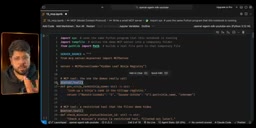
Two tools are registered in the example:
get_ninja_rank(ninja_name: str): looks up a ninja's rank by name — returnsSfor Naruto Uzumaki and Sasuke Uchiha, andunknownfor everyone else.check_mission_status(mission_id: str): checks a mission's danger level, used later as the subject of the tool-filtering demo.
There is one easily overlooked but critically important detail here — docstrings. A tool's docstring is not just a nice-to-have comment; it's what the Agent reads to understand what the tool does. Write clear docstrings, and the Agent can correctly decide when to call which tool.
The server's runtime mode is determined by a command-line argument: passing http starts it in streamable-http mode (similar to a REST API server, bound to 127.0.0.1 and a specified port); with no argument, it runs in stdio (standard input/output) mode as a local in-process server.
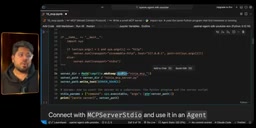
In the implementation, the author uses tempfile to create a temporary directory with the prefix ninja_mcp_, writes a ninja_mcp_server.py file into it containing the server code as a string, and passes the file path as a parameter for subsequent connections.
Three Connection Modes: stdio, Streamable HTTP, and Hosted MCP
The OpenAI Agents SDK offers multiple ways to connect to an MCP server — two transport modes and one hosted option.
stdio Mode: Local Same-Machine Connection
When the MCP server and the Agent run on the same machine, MCPServerStdio is the right choice. Initialize it via a context manager, pass in the command and arguments (i.e., the generated script path), and use it as a server object.
Calling a tool directly without going through the Agent is simple: await server.call_tool('get_ninja_rank', {...}) returns the tool's text output. In the example, the direct call returns a result with text s, confirming the tool works correctly.
Streamable HTTP Mode: Cross-Network Connection
If the MCP server is deployed on a remote machine and the Agent runs elsewhere, a network connection is needed. Use subprocess.Popen to start the server in the background in HTTP mode (example port: 8991), redirecting stdout and stderr to subprocess.DEVNULL to suppress output noise, then sleep briefly to let the service start up.
Then connect via MCPServerStreamableHttp by passing in the URL (e.g., http://127.0.0.1:8991/mcp). Once connected, you can list tools, call them, and inspect the results — confirming that cross-network mode works.
Hosted MCP: OpenAI's Servers Handle the Connection
The third option is the Hosted MCP Tool. Here, OpenAI's own servers connect to the MCP server on your behalf, rather than your local program making the connection. You can configure the tool-call approval policy (e.g., whether human confirmation is required before each tool call — the example sets this to skip human approval and call directly).
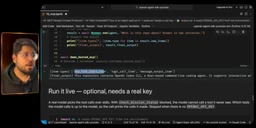
In a real-world example, the author uses Hosted MCP to connect to a live Git MCP server and asks the Agent "what is this repository about?" After invoking the tools, the Agent responds: the repository contains the OpenAI Codex CLI, a Rust-based command-line coding agent supporting interactive and non-interactive workflows, code execution, sandboxing, approval flows, configuration, and extensibility. This confirms that Hosted MCP works end-to-end in a real scenario.
These three connection modes correspond to different Transport layer implementations. stdio uses the OS's standard input/output streams for inter-process communication — extremely low latency, but limited to the same machine. Streamable HTTP is built on HTTP and supports Server-Sent Events, allowing long-running tool calls to stream progress updates without blocking. Hosted MCP delegates connection management entirely to OpenAI's infrastructure: the client simply declares the target MCP server's URL, and OpenAI's servers maintain the actual TCP connection and session state — particularly valuable in production scenarios where multiple users share the same MCP server. When choosing a mode, consider not just deployment topology but also security boundaries: stdio's attack surface is limited to the local machine, while HTTP mode requires additional attention to authentication and transport encryption.
Tool Filtering: Precise Control Over What an Agent Can Use
One practical MCP capability is tool filtering. You may not want the Agent to access every tool a server exposes — in those cases, pass a filter parameter at connection time.
In the example, after filtering out check_mission_status, the Agent's available tool list contains only get_ninja_rank. Two queries are then tested:
- "What is Naruto Uzumaki's rank?" — triggers
get_ninja_rank, returns rank S. - "What is the status of Mission 07?" — since the tool is filtered out, the Agent replies: "I can only look up ninja ranks; I don't have access to mission status."
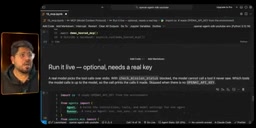
One noteworthy practical observation: even without filtering, the Agent sometimes doesn't proactively call check_mission_status. The author found that when a query doesn't clearly point to a specific tool, the Agent may fail to identify which one to use. Rephrasing the question to "what is the status of mission 7, use the check mission status tool" causes the Agent to correctly trigger the tool call and return "mission 07 is danger level 9, evacuate immediately."
This highlights a key insight: tool invocation is highly dependent on how well the query wording matches the tool description. Filtered tools are completely invisible to the LLM — they simply don't appear in the list the MCP server exposes. But even when a tool exists, a vague query can prevent the Agent from calling it.
Tool filtering has real implications for both security and cost control. From a security standpoint, the fewer tools exposed to an Agent, the lower the risk of prompt injection or accidentally triggering high-stakes operations — irreversible actions like deleting data or sending emails should only be included in the tool set when explicitly needed. From a cost standpoint, the LLM receives descriptions of all available tools as context on every inference call; more tools mean more tokens consumed. Trimming the tool list directly reduces per-call costs. Tool filtering is also an important way to enforce the principle of least privilege: different user roles or business scenarios can dynamically load different tool subsets without requiring a separate MCP server deployment for each case.
Summary: Choosing the Right Connection Mode
The path to integrating an MCP server with the OpenAI Agents SDK is now quite clear. Choosing a connection mode mainly comes down to your deployment setup:
- stdio: Use when the MCP server and Agent are on the same system — ideal for local development and debugging.
- Streamable HTTP: Use when the MCP server is deployed remotely and the Agent runs elsewhere — access it across the network like a REST API.
- Hosted MCP: Let OpenAI's servers manage the connection, eliminating the need for your local program to maintain it.
Combine this with tool filtering and well-written docstrings, and you have precise control over the Agent's capability boundaries. For developers looking to connect Agents to external systems, MCP provides a standardized, composable integration paradigm.
Related articles

Chain of Thought Isn't Just for AI: How Humans Can Use CoT to Improve Thinking Quality
Chain of Thought isn't just a prompt trick for large models. Starting from a Hacker News discussion, this article analyzes why CoT works for human thinking too, breaks down actionable ways to transfer it, and highlights the key differences between human CoT and machine CoT.
Cloudflare Teams Up with OpenAI: Closi…
Cloudflare Teams Up with OpenAI: Closing the Loop from Vulnerability Discovery to Defense with AI
Cloudflare uses OpenAI Daybreak to investigate security vulnerabilities and generate reviewable remediation plans, while developers use Codex to boost coding efficiency and quality.

Orca Multi-Agent Orchestration in Practice: A Guide to Parallel Collaboration with Claude and Codex
Orca is Stable AI's free open-source agent workbench supporting 34 agents like Claude Code and Codex in parallel. Learn its Git worktree isolation, multi-model orchestration, and mobile management.