MCP Resources Explained: How AI Applications Read Context Instead of Calling Tools

MCP Resources let AI apps read external documents directly, complementing Tools which LLMs invoke to execute actions.
MCP Resources are a core MCP protocol primitive for exposing addressable, readable external content, with each resource uniquely identified by a URI (e.g., `policy://refund/2026`). Unlike the "model-driven" pattern of Tools, Resources use an "application-driven" approach: when the application layer already knows what context is needed, it retrieves the resource directly via the MCP Client — without first routing through the LLM — then submits the content along with the user's question to the model. Dynamic resources support URI placeholders (e.g., `customer://profile/{customer_id}`) for runtime parameterized access. Understanding the boundary between Tools (execute) and Resources (read) is key to building efficient MCP architectures.
What Are MCP Resources
In the MCP (Model Context Protocol) ecosystem, most people are familiar with MCP Tools — which let large language models call functions to perform actions. But when building AI Agents or AI assistants, there's an equally important concept that often gets overlooked: MCP Resources. Pankaj Shukla, a technical instructor with an IIT background, used a real-world refund policy scenario in a video to explain this concept with remarkable clarity.
In a nutshell: An MCP Resource is addressable, readable context exposed by an MCP server. It's essentially a document, a file, or a piece of external content that an AI application can directly read and feed to a large language model.
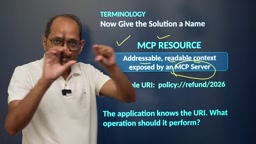
MCP (Model Context Protocol) is an open standard proposed by Anthropic in late 2024, designed to unify the interface between AI applications and external data sources or tools. Before MCP, every AI application had to write custom adapter code for different data sources, making maintenance extremely costly. MCP solves this fragmentation by defining a unified Client-Server architecture: MCP Servers expose capabilities (tools, resources, and prompt templates), while MCP Clients (typically embedded in AI applications or Agent frameworks) discover and invoke those capabilities. Resources are one of the three core primitives in the MCP protocol spec — alongside Tools and Prompts — specifically designed to handle the need to "read external content." The design philosophy is to let AI applications access any external document or data in a standardized way, without requiring custom integration logic for each data source.
Understanding Resources Through the Refund Policy Scenario
Imagine an AI application where a user selects a document called "Refund Policy 2026" from a menu and then asks: "A customer purchased an item 8 days ago — is a refund allowed?"
The answer to this question can't be generated from thin air by a language model. It must come from the company's actual refund policy document. If you just throw the question at an LLM directly, the model will hallucinate a plausible-sounding but potentially incorrect answer. The real answer needs to be precisely extracted from the company's policy.
The key insight here is: the user has already actively selected this document, so the application already knows the context. Given that, there's no need to first send the question to the LLM and let it decide which tool to call to retrieve the policy. What the application should do is read that precise external content directly and pass it to the LLM along with the question.
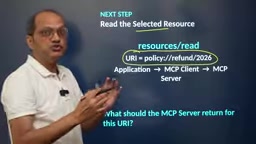
This refund policy document lives on the MCP server, not on the user's local machine. Shukla highlights two reasons for this: first, many people in a department need access to the same policy; second, when the policy is updated, storing it on the server ensures everyone always gets the latest version — preventing stale local caches from serving outdated information.
How Resources Are Addressed and Read
Each resource has a unique URI (Uniform Resource Identifier). For example, a refund policy might be identified as policy://refund/2026. Through this URI, the application can locate and access the corresponding document.
Here's how the data flow works:
- The user selects a document in the AI application's menu; that menu item is bound to a corresponding URI
- The application sends a read request to the MCP Client
- The MCP Client connects to the MCP Server and requests the resource at that URI
- The server reads the file and returns the actual content
- The content is passed back through the MCP Client to the AI application
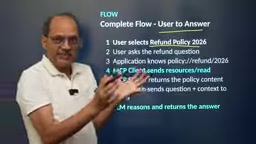
The content returned by the server can be quite lengthy. The video uses a simplified example: "Refunds are allowed within 10 days of purchase." This content can originate from a document repository, a database, or an internal API. Once the application has the precise context, it sends both the question and the policy content to the LLM, which reads the policy and generates an accurate natural-language response.
A URI (Uniform Resource Identifier) is a string format used on the internet to uniquely identify resources, with the general structure scheme://authority/path. In MCP Resources, the scheme portion can be customized (e.g., policy://, customer://) — conceptually similar to familiar schemes like https:// or file://, just with namespaces defined by the MCP Server itself. The MCP spec allows Servers to expose a list of all available resource URIs along with metadata (name, description, MIME type, etc.) to Clients via the resources/list interface during the initialization handshake. Clients can then fetch specific content via resources/read requests. This two-phase "discover then read" pattern enables AI applications to build a complete index of available documents at startup, supporting user-facing resource selection in the UI — exactly like the document menu shown in the refund policy scenario.
The Core Difference Between Tools and Resources
This is the most important distinction in the entire video. Understanding it means grasping the essence of Resources.
The Tool flow is model-driven: the user's question is sent to the LLM first, along with a list of available tools, and the LLM decides which tool is appropriate for that question. Decision-making authority rests with the model.
The Resource flow is application-driven: because the user has already selected a document, the application doesn't go through the LLM first — it retrieves the context itself as the very first step, then passes the "question + context" to the model.
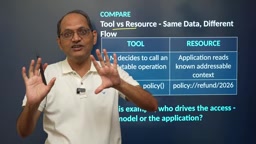
This design delivers two direct benefits:
- Faster: it eliminates the round-trip of having the LLM first make a tool-selection decision
- Lighter: Resources only need to read content — they don't execute any function or business logic, whereas Tools are fundamentally about "executing, running, and providing some kind of functionality"
As Shukla puts it: the core of a Tool is execute, while the core of a Resource is read. When all you need is the contents of a document, using a Resource is far more sensible than forcing a get_refund_policy tool into the equation.
From a system design perspective, the distinction between "application-driven" and "model-driven" is fundamentally about where decision-making authority lives — and this directly affects latency, predictability, and debuggability. When decision authority is handed to the LLM (Tool mode), the system requires an extra round of LLM inference just to decide which tool to call. This not only increases end-to-end latency but also introduces uncertainty — the model might choose the wrong tool or hallucinate. Resource mode moves this decision upstream to the application layer (typically deterministic code logic or an explicit user action), eliminating that unpredictability. This mirrors the software engineering principle of "if something can be determined at compile time, don't leave it to runtime." In practical Agent architecture design, a common best practice is: when context selection logic can be clearly expressed at the application layer, prefer Resources; only introduce Tools when you need to dynamically decide which action to execute based on the question.
Dynamic Resources: URIs with Variables
The refund policy, privacy policy, and shipping policy discussed earlier are all static resources. But in the real world, dynamic resources also exist — such as an individual user's profile.
Dynamic resource URIs contain placeholders represented with curly braces, for example customer://profile/{customer_id}. When an actual request is made, the placeholder is replaced with a real value — so for customer ID 4821, the URI becomes customer://profile/4821.
Imagine a call center scenario: a customer service agent's AI application receives the incoming caller's ID, constructs the corresponding URI, reads that customer's full profile from the MCP server, and then makes the profile available to the application. That profile can be sent to the LLM to answer questions, or used directly by other application logic.
It's worth noting that even though resources can be accessed dynamically (and, like Tools, a full list of resources can be enumerated), decision-making authority remains at the application layer, not with the LLM. The application must decide on its own — based on the situation — which document to retrieve.
A Mental Model Summary
The logic of using MCP Resources can be distilled into one sentence: an AI application (whether an AI Agent, AI assistant, or chatbot) first retrieves the resource/context from the MCP server, then sends that context together with the user's question to the LLM, which generates a response.
Three key points worth remembering:
- Resources are for directly reading document content — no functional execution is involved
- Documents live on the MCP server for centralized updates, ensuring all users always get the latest version
- The ideal use case is when the context is already known at the application layer: skip the LLM decision step, fetch the resource first, then send it along with the question to the model — faster and leaner
Understanding the division of labor between Tools (model-driven, responsible for execution) and Resources (application-driven, responsible for reading) is the foundation for designing efficient MCP architectures.
Related articles

Amphibious Transforming Drone: Beyond 100x Power Savings, What Are the Real Needs?
Is the amphibious transforming drone just a gimmick? Starting from the 100x power difference of the M4 Morphobot, explore real application scenarios and thesis topic ideas, analyzing boundary conditions where pure drones and pure ground robots both fail.

Warhound Raises $200 Million: Genetically Engineered "War Dogs" Paired with Anduril Gear
Warhound raises $200M, backed by Ben Lamm and Palmer Luckey, to genetically engineer dogs for military and law enforcement use and equip them with Anduril gear. This article analyzes its technology direction, funding logic, and ethical controversy.

Claude API Comes to Google Cloud: IAM Integration and SDK Access Guide
Anthropic hosts the full Claude API on Google Cloud with IAM-controlled permissions and unified billing. This guide covers the Vertex AI and Anthropic-hosted entry points, IAM role configuration, and SDK access.