MCP: The USB-C for AI Tools — Build Once, Plug In Everywhere

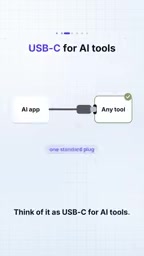
MCP is like the USB-C for AI tools, letting a tool server be built once and reused by all apps.
The article explains how Model Context Protocol (MCP) solves the repetitive labor problem of AI application integration. Traditional tool calling hard-codes each tool into a single app, and apps × tools causes integration workload to explode. MCP pulls tools out into an independent server and uses a client-server architecture: the client first asks the server what tools it has, the server returns names, descriptions, and input schemas, the client hands the list to the model, and after the model decides, the client invokes the tool — the model never touches the server directly. An MCP server can also provide three capability types at once: Tools (actions), Resources (data), and Prompts (templates). For developers, once your own API is wrapped into a lightweight Node service and connected to MCP, agents built with either Angular or React can reuse the same tool server.
Title
MCP: The USB-C for AI Tools — Build Once, Plug In Everywhere
Meta Description
MCP (Model Context Protocol) is dubbed the USB-C for AI tools: build a tool server once and any MCP-ready app can plug in. This article breaks down MCP's workflow (client asks, server returns schema, model decides, client invokes), its three capability types — tools, resources, and prompts — and how it solves the N apps × M tools integration explosion.
Article Content
Getting an AI application to connect to Slack, GitHub, and your own database traditionally means hand-writing each integration one by one. Ten apps paired with ten tools means one hundred integration lines. Model Context Protocol (MCP) aims to end this repetitive labor — think of it as the USB-C port for AI tools: build the tool server once, and any MCP-supporting application can plug and play.
What Problem Does MCP Solve
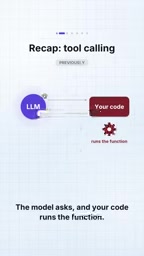
According to the video, a previous episode already demonstrated tool calling: the model issues a request, and your code executes the corresponding function. But the problem is that every tool is hard-coded into a single application. Multiply the number of apps by the number of tools, and the integration workload explodes exponentially.
This is exactly where MCP's value lies. It pulls "tools" out from inside the application and turns them into an independent server. You only need to wrap a lightweight Node service around your own API, and all MCP-ready applications can call it. The core idea emphasized in the video is: you build the tool server once, and afterward it's pluggable everywhere.
To understand the pain point MCP solves, you first need to clarify the integration logic of tool calling: in the traditional model, the model itself has no execution capability. It can only output a structured call request (usually a JSON description of the function name and parameters), and the code inside the host application is what actually executes the function. This means every tool must not only be defined but also hard-coded into one specific application — including the function signature, parameter validation, and execution logic. When applications grow from 1 to N and tools grow from 1 to M, you need to maintain N×M sets of integration code, and any tool upgrade must be synchronized across N applications. This coupling prevents tools from flowing across applications — precisely the bottleneck MCP tries to break through by "making the server independent."
How MCP Works
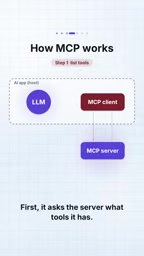
MCP uses a client-server architecture that completely decouples the model from tool execution. Your AI application has a built-in MCP client, and the whole interaction breaks down into four steps.
Step 1: The Client Asks the Server What Tools It Has
The client first asks the MCP server: what tools do you provide?
Step 2: The Server Returns the Tool List
The server replies with the tools' names, descriptions, and input schemas. This structured list lets the model know what each tool can do and what parameters it needs.
Input schemas typically follow the JSON Schema specification to precisely describe the parameters a tool accepts: for example, a create_issue tool would declare that it needs title (string, required), body (string, optional), and labels (array of strings, optional). This schema doesn't just serve as something for the model to "look at" — it also acts as a contract: the client uses it to validate whether the parameters generated by the model are legal, and the server can also reject requests that don't conform to the schema. Compared to natural-language descriptions, structured schemas let the model generate correct parameters more reliably and reduce the probability of tool call failures. This is a key engineering detail that distinguishes MCP from "cramming tool documentation into the prompt."
Step 3: The Client Hands the List to the Model
The client passes this tool list to the model. The model uses it to decide which tool to call.
Step 4: Once the Model Chooses, the Client Invokes on Its Behalf
When the model selects a tool, the client sends an invocation request to the server. The server performs the actual work and returns the result to the client. The key point: the model never talks to the server directly.
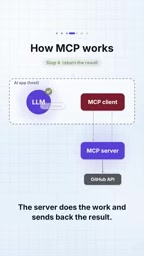
This "model — client — server" chain design cleanly separates the security boundary from execution responsibilities. The model is only responsible for decisions, the client handles relay, and the server handles execution.
What the Server Can Provide: Tools, Resources, and Prompts
An MCP server isn't limited to exposing only "tools." As the video notes, a single server can provide three types of capabilities at once:
- Tools: represent executable actions, such as sending a message, creating an issue, or writing to a database.
- Resources: represent the data itself, for the model to read and reference.
- Prompts: represent templated instructions, used to standardize interaction patterns in specific scenarios.
It's important to understand these three capability types separately. Tools are "do," resources are "see," and prompts are "how to ask." A well-designed MCP server often covers all three layers at once, so that whoever integrates it gets a complete capability package rather than just a few isolated functions.
The reason these three capabilities are separated stems from a design orientation of MCP: decoupling "executable actions" from "readable context." Tools are actions the model actively triggers, usually with side effects (writing data, sending messages); resources are passive data snippets for the model to read — such as a document, a database record, or a file's contents — identified by URI and able to be subscribed to or pulled on demand; prompts are reusable instruction templates, often actively selected by users in a UI. This layering lets integrators authorize on demand — for example, granting only Resources read permission without giving Tools write permission — enabling finer-grained security control, rather than exposing all functions the moment you integrate, as traditional approaches do.
Why This Is a Key Step for AI Engineering
From an engineering perspective, MCP deals with reuse at the integration layer. Tool calling solved "how the model triggers code"; MCP solves "how that code can be shared across countless applications." The former is a capability problem; the latter is a scale problem.
For developers, the most direct benefit is: no more rewriting the Slack integration, GitHub integration, and database integration for every AI application. You wrap your own API into a Node service, hook it up to MCP, and afterward any agent written in Angular or React can directly reuse the same tool server. The video also teases the next step at the end — building a real AI agent with Angular and React.
If tool calling taught the model to "reach out," then MCP gives the entire ecosystem a standard socket specification. Once the interface is unified, tools can truly start to flow.
Related articles

Gmod TTT: Boba's Winning Streak and Game Design Insights
An in-depth analysis of Gmod TTT's role system, creative items, and social gameplay mechanics, exploring the relationship between randomness design and game balance through Boba's winning streak phenomenon.

FlexBudget: Fair Comparison of KV Cache Eviction Strategies Under a Unified Compute Budget
AMD engineer proposes FlexBudget at PyTorch Conference: a training-free fair comparison method for KV cache eviction rules using fixed kernels and memory budgets, all in core PyTorch.
