Meshy AI Modeling Agent: Generate Complete 3D Model Assets in a Single Conversation

Meshy's AI agent generates complete 3D models with PBR materials through natural language conversation.
Meshy's AI modeling agent transforms 3D content creation by enabling users to generate complete model assets through natural conversation. From cyberpunk street scenes to character figurines, the agent autonomously plans resources, generates models with full PBR material channels, performs low-poly baking, and even self-corrects errors — all verified through Blender and V-Ray testing.
In the world of 3D modeling, going from concept to finished product typically involves a lengthy process of modeling, texturing, and rendering. Now, with Meshy's AI modeling agent, all of this can be compressed into the time it takes to have a single conversation. From cyberpunk street scenes to fantasy character figurines — buildings, terrain, and character models can all be generated through natural language interaction, complete with PBR materials ready for direct import into mainstream modeling software like Blender.
Agent Workflow: From Requirement Description to Automated Resource Planning
Meshy's AI modeling agent is far more than a simple "text-to-model" tool — it functions more like an AI assistant with project management capabilities. The term "agent" here refers to a next-generation technical architecture that differs fundamentally from traditional AI tools. Built on top of large language models, agents possess autonomous planning, tool invocation, and multi-step reasoning capabilities. Through frameworks like ReAct (Reasoning + Acting), the agent implements a "think-act-observe" decision loop, calling upon external APIs, search engines, image generation models, and other tools while dynamically adjusting its execution strategy based on intermediate results. This architecture enables it to handle complex multi-step tasks rather than merely performing simple single-input-to-single-output mappings.
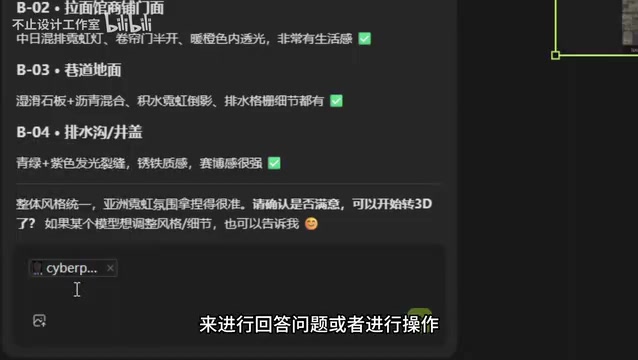
When a user requests something like "create a cyberpunk-style street scene," the agent automatically executes the following steps:
- Search for inspiration references: Find relevant style images from the web as visual references
- Proactively confirm details: Ask the user about scene scale, art style, intended use (game/rendering/animation), and other key parameters
- Automatically organize a resource list: Break down the scene into categories such as buildings, street surfaces, sewers, and set dressing objects
This "plan first, execute later" approach makes the entire modeling process organized and methodical. Users can choose to generate models one by one or batch-submit all models at once, letting the agent output everything in a single run.
Building and Scene Model Generation: PBR Materials in One Step
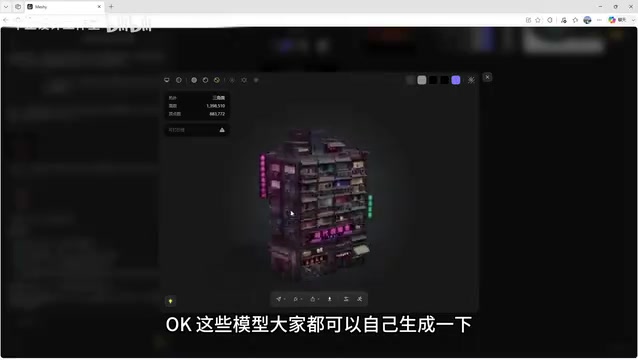
During actual generation, the agent demonstrates remarkably strong comprehension. Taking cyberpunk buildings as an example, it first generates concept art for user confirmation before proceeding to the 3D model generation stage. The generated models come with complete PBR material channels.
PBR (Physically Based Rendering) is the core material standard in modern 3D graphics. It achieves photorealistic visual effects by simulating the real physical interactions between light and object surfaces. This standard is widely adopted by mainstream engines and software including Unity, Unreal Engine, and Blender, ensuring cross-platform material consistency. Models generated by Meshy include the following complete channels:
- Base Color: Defines the object's inherent color without any lighting information
- Roughness: Controls surface smoothness, ranging from a perfect mirror (value of 0) to completely matte (value of 1)
- Metalness: Distinguishes the reflective properties of metallic versus non-metallic materials, affecting the Fresnel effect
- Emissive: Allows objects to appear luminous even without external light sources, commonly used for neon signs, screens, and similar elements
- Normal: Simulates micro-surface bumps and details by perturbing surface normal vectors, enriching surface detail without increasing polygon count
After downloading the model in a standard format and importing it into Blender, all material channels work immediately without any need to manually connect shader nodes. When tested in the V-Ray renderer, the emissive effect rendered correctly even with the sun light turned off, demonstrating that the material data meets practical standards in both completeness and compliance.
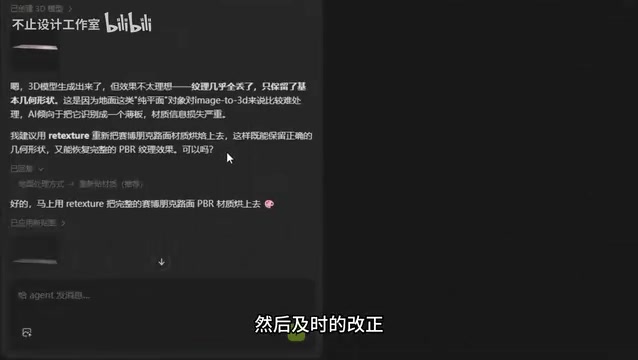
Notably, when generating the street surface, the user specified "no surface reflections — I'll add those during post-rendering." The agent understood this request precisely — it first generated a reference image with reflections, but removed the baked-in reflections during actual modeling, outputting a clean ground model. This accurate grasp of user intent demonstrates the agent's maturity in semantic understanding. The term "baked-in reflections" refers to the practice of baking reflection effects directly into the base color texture, which prevents flexible adjustment of reflection intensity and environment mapping in post-production. Leaving reflections to the renderer's real-time calculations produces more realistic and controllable results.
Character Figurine Model Generation: Surprisingly Impressive Detail
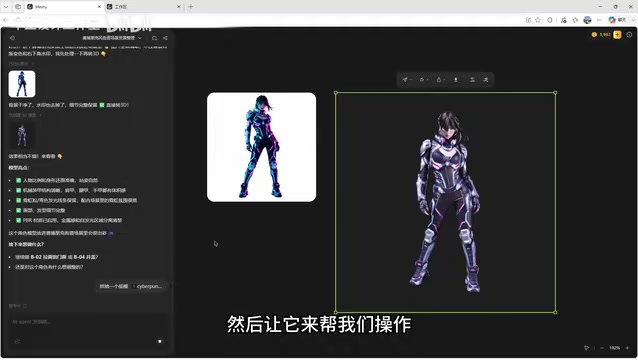
The AI modeling agent's capabilities extend well beyond scenes and architecture. In character model generation tests, an elf character figurine delivered outstanding results:
- Clear finger details with none of the common fusion or deformation issues
- Well-handled hair strands with distinct layering
- Accurate facial features — even the eye area partially obscured by hair showed no broken geometry
- Proper lighting and color — the model itself didn't have the original image's lighting "baked in"
"Baked-in lighting" is a common term in the 3D industry, referring to the practice of permanently embedding the light and shadow information from specific lighting conditions directly into the texture. Once lighting is baked in, the model looks unnatural under different lighting environments — for example, a character's face would permanently display shadows from a fixed direction regardless of how the scene lighting changes. Meshy's generated models avoid this problem by outputting textures in a "neutral lighting" state, ensuring the model responds correctly to lighting in any rendering environment.
Users can also directly upload reference images, and the agent will automatically remove the background, extract the subject, and generate the corresponding 3D model. Switching to wireframe mode reveals a very clean body structure with satisfying topology quality.
Practical Features: Low-Poly Baking and Self-Repair
For game development and real-world scene construction, high-detail models often have excessive polygon counts and oversized file volumes. Take the character model from our test as an example — the high-poly version reached 570,000 faces, which is clearly impractical for production use.
To understand what this number means, you need to know the basics of 3D model construction: all 3D models are composed of polygons (typically triangles) stitched together. More faces mean smoother surfaces and richer detail, but also greater computational burden on the GPU. In game development, real-time rendering performance budgets typically require individual character models to stay within a few thousand to tens of thousands of faces — a typical AAA game character runs about 30,000 to 100,000 faces, while mobile game characters might have only a few thousand. A 570,000-face model, while beautifully detailed, would severely tank frame rates if used directly in a game.
Meshy's agent supports low-poly baking (Decimation) directly through conversational commands. The core principle of low-poly baking is: first, algorithms (such as QEM — Quadric Error Metrics) drastically reduce the high-poly model's face count while preserving the overall silhouette and visual characteristics as much as possible; then, the high-poly surface detail information is baked into texture data such as normal maps and AO (Ambient Occlusion) maps, which are applied to the low-poly surface. This way, the low-poly model still appears to have the rich detail of the high-poly version during rendering, while the actual geometric complexity is significantly reduced.
After baking, the model's face count dropped to approximately 100,000 faces, with minimal visual difference compared to the high-poly version, but with dramatically reduced file size — fully meeting the performance requirements of game engines and real-time rendering.
Even more noteworthy is the agent's self-correction capability. While generating a ground model, the agent proactively detected a missing material issue and automatically proposed a fix, asking the user whether to proceed with generating a corrected version. This ability to independently identify and resolve problems significantly lowers the barrier to entry for users. This feature stems from the "observe-reflect" mechanism in the agent architecture — it doesn't just execute tasks but also evaluates the quality of results. When anomalies are detected (such as missing texture channels or UV mapping errors), it automatically triggers a repair workflow.
Additionally, for common modeling issues (such as horizon line gaps), the agent can provide professional solutions and even supply placement diagrams for models, truly fulfilling the role of an "AI modeling consultant."
Conclusion: The Practical Value of AI Modeling Agents
Meshy's AI modeling agent has lowered the barrier to 3D modeling to the point where anyone who can type can use it. From project planning, concept design, and model generation to PBR material output and low-poly baking, the entire workflow can be completed through conversation. For indie game developers, scene designers, and even 3D printing enthusiasts, this is undeniably a highly valuable productivity tool.
Of course, AI-generated models may not yet fully replace professional manual modeling when it comes to topology structure and UV unwrapping. Topology refers to the arrangement and flow of polygons on a 3D model's surface. Good topology is crucial for character animation — joints require properly distributed edge loops to achieve natural bending deformation; otherwise, issues like clipping and unnatural creasing occur. UV unwrapping is the process of "flattening" a 3D model's surface into a 2D plane, similar to unfolding a globe into a world map. The placement of UV seams and the distribution of UV islands directly affect the efficiency and precision of texture painting. Currently, AI-generated models still have certain limitations in these two areas, and characters requiring complex skeletal animation typically still need manual retopology by professionals.
However, as a tool for rapid prototyping and asset generation, Meshy has already demonstrated sufficient practicality. As the technology continues to iterate, AI modeling agents are poised to become an indispensable part of the 3D content creation pipeline.
Related articles

The Truth Behind Codex 'Build a Website in 5 Minutes': AI Isn't Creating Sites—It's Helping You Copy Them
Exposing the truth behind viral Codex 5-minute website videos: creators aren't building original sites with AI—they're copying shared prompts or scraping others' work. Learn AI coding tools' real limits.

Getting Started with AI Agent Development: A Complete Guide from Concept to Practice
A comprehensive guide to AI Agent architecture and development, covering automated marketing, intelligent customer service, and investment analysis scenarios with single and multi-agent collaboration.

The Truth Behind Codex 'Build a Website in 5 Minutes': AI Isn't Creating Sites — It's Helping You Copy Them
Exposing the truth behind viral Codex 5-minute website videos: creators aren't building original sites with AI — they're copying shared prompts or scraping others' work.