Meta Muse Glimmer Quantization Benchmark: Running a 30B Model in 14GB of RAM as an Agent

Meta's Muse Glimmer runs as a local agent in 14GB RAM after Unsloth quantization — strong on tool calling, slow on speed.
Meta's 30B coding agent Muse Glimmer, open-sourced under Apache 2.0, can run full agent workflows in 14GB of system RAM after Unsloth's dynamic quantization. Its core strength is MCP tool-calling (scoring 75.5 vs. competitors), with judgment distilled from closed-source Mu Spark. However, the 2-bit version costs roughly 6 points on coding benchmarks, inference runs at ~10 tokens/second on M4 Pro, full agent tasks take 4–7 minutes, and there are reliability concerns including silent file errors and a 28.4% prompt injection success rate. Unsloth notes behavioral failures are addressable via LoRA fine-tuning.
A Coding Agent That Runs in 14GB of Memory
Imagine this: a 330-billion-parameter coding agent running entirely within 14GB of memory. It's not a chatbot — it picks a real open-source repository, finds a real bug, and works nonstop for five minutes: reproducing the issue, proposing a fix, writing tests, and generating a pull request summary for human review. According to Unsloth, the entire session involved over a hundred consecutive tool calls, and not a single byte of data left the local machine.
This model is Muse Glimmer, open-sourced by Meta on August 10 under the Apache 2.0 license. Meta's official hardware requirement is a 24GB GPU, but Unsloth managed to squeeze it into 14GB of ordinary system RAM through quantization — and the agent still runs.
This raises two distinct questions: First, how does a 30B-parameter model avoid becoming word salad at 14GB? Second, what exactly do we sacrifice to get it that small? The second question is precisely what the official launch blog chose to sidestep.
Muse Glimmer: Architecture and Core Features
Muse Glimmer comes from Meta Superintelligence Labs. It's a dense model rather than a Mixture-of-Experts (MoE) architecture. By current standards it's compact: roughly 30 billion parameters, plus an 1.8-billion-parameter perception encoder that gives it image understanding. The model has 52 layers and supports a 131K-token context window.
Notably, it wasn't trained from scratch. Meta derived it from its closed-source frontier model Mu Spark via logic distillation. This is more nuanced than simply copying answers — the student model learns to match Spark's full probability distribution over every next token, compressing judgment into something small enough to sit on your desk.
Critically, it was designed from the ground up as an agent, not a chat model. In Meta's own words: it can invoke large numbers of function tools with precise schemas in extended workflows. The model even has a built-in "reasoning effort" dial, adjustable from low to "ultramax."
Benchmarks: MCP Tool Calling Leads, Raw Coding Is a Different Story
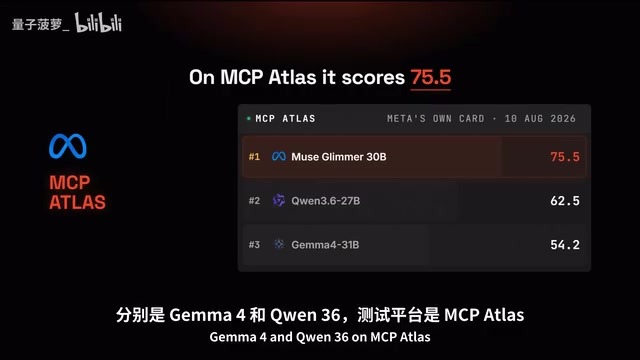
Meta published comparisons against same-size competitors Gemma 4 and Qwen 3.6. On MCP Atlas — a benchmark measuring protocol-based tool-calling ability — Glimmer scores 75.5, versus 54.2 for Gemma and 62.5 for Qwen. The lead is clear.
But the story quickly reverses. On SWE Bench Pro, Glimmer edges out Qwen 51.2 to 50.2, but on SWE Bench Verified (Qwen 77.2 vs. 76) and Terminal Bench (Qwen 60.7 vs. 51.7), Qwen pulls ahead.
The takeaway is clear: Glimmer doesn't win at raw coding ability at this size — its moat is tool calling. If your task is a clever single function call, pick Qwen. If your task is a 40-step workflow involving filesystems and browsers, the MCP Atlas lead is where Glimmer actually creates value.
MCP (Model Context Protocol) is an open protocol released by Anthropic in late 2024, designed to standardize how AI models communicate with external tools and data sources. Think of it as the USB port of the AI world — whether it's a filesystem, browser, database, or custom API, any tool that implements an MCP server can be called by the model in a uniform way. MCP Atlas is a benchmark built around this protocol, specifically measuring tool-call accuracy, argument-filling quality, and error recovery in real multi-tool scenarios — not just code generation. This explains why Glimmer leads significantly on MCP Atlas but is overtaken by Qwen on pure coding benchmarks: the two tests measure fundamentally different abilities. The former asks "how do you interact with the world?"; the latter asks "can you write correct code?"
Unsloth Dynamic Quantization: How to Fit a 30B Model into 14GB
Meta is upfront about the memory math: at full precision, a 30B model requires over 55GB. Their official solution brings it below 20GB, still requiring a 24 or 32GB VRAM budget.
Unsloth provides a complete precision ladder (viewable on the model page):
- 16-bit: 55.7 GB
- 8-bit: 29.6 GB
- 4-bit: 15.9 GB
- 2-bit: 12.4 GB (on disk)
The 2-bit level is typically where models of this class go to die — if you assign the same two bits uniformly to every layer, the model ceases to function. Unsloth's own report acknowledges that other 1-bit and 2-bit variants either fail to load entirely or generate looping gibberish.
Dynamic Quantization: Per-Layer Precision Assignment
Unsloth's solution is dynamic quantization: inspecting each layer individually and assigning the appropriate precision. Embedding layers and the first and last attention blocks — which carry core structure — are kept "fat" (high precision), while middle layers are aggressively compressed.

The effect is measurable. Unsloth ran the Aider Polyglot coding benchmark using a 671GB DeepSeekAd build: full precision scored 71.6%, 4-bit dynamic scored 69.7%, and 2-bit scored 65.8%. The critical comparison: a competing quantization scheme at the same 2-bit level and same file size scored only 56.6% — a 9-point gap driven purely by which layers were chosen for protection.
In other words, the 2-bit "tax" is roughly 6 percentage points on coding benchmarks — and that cost is paid on a model that otherwise wouldn't run on your machine at all.
Understanding the precision trade-off requires some context. Neural network weights are essentially floating-point number matrices, and quantization approximates those numbers using fewer bits. 16-bit stores each value with 16 bits; 4-bit uses only 4; 2-bit allows just 4 possible values (0, 1, 2, 3). The problem is that different layers vary enormously in their sensitivity to precision loss. Embedding layers map vocabulary to vector space and form the foundation of all downstream computation — precision errors there compound through every subsequent layer. Deep feed-forward layers, by contrast, are relatively tolerant of minor precision loss. Uniform quantization ignores this difference and slashes everything to 2-bit indiscriminately, leaving critical layers under-provisioned and causing model output to degrade into gibberish. Unsloth's dynamic quantization is essentially a tiered protection strategy: it allocates the limited bit budget to prioritize high-sensitivity layers, concentrating the 2-bit cost where the model can actually absorb it.
The Hidden Cost: Memory vs. File Size
An important caveat: file size is not the same as memory usage. The KV cache eats memory. The perception encoder eats memory. The draft model for speculative decoding eats memory. All of these sit alongside the weights, and all of them grow with actual context usage. This is why in the widely shared demo, the context counter in the corner reads "1.4K / 131K" — the window is enormous, but the space you can actually fill is not.
Real-World Testing: What the Agent Can Actually Do at 2-Bit
The runtime used was Unsloth's own desktop app, with the build clearly labeled in the title bar: Muse Glimmer 30B, GGUF, UDQ 2K XL — the 2-bit, 14GB version.
The task was deliberately tricky: find a real bug in the Unsloth repository that is locally reproducible, requires no private credentials, no paid APIs, no GPU, and is a recent issue. The model searched the issue tracker, built a list of candidates, and then did something that separates an "agent" from a "search box" — it reasoned about which bug it could actually prove.
Its visible thinking read: better candidates should be code logic bugs rather than UI bugs, because UI bugs can't be reproduced from a terminal. Midway through, it even self-corrected: "The instructions are strict. I must actually use tools to inspect files, actually execute Python for reproduction and testing, and must not fabricate references."

Even more impressive was its recovery behavior: it attempted curl, found it blocked, reasoned through the blockage, and switched to a search tool to fetch the raw file. The repository page it retrieved included live star counts (69.8K) and fork counts (6.3K) — the author verified against the GitHub API on the same day and confirmed 69,868 stars, proving it was reading live web data.
It ultimately identified a version number mismatch bug, and didn't stop at describing it — it wrote a regression test asserting that the on-disk package version matches the version the library reports, and explicitly noted that "the test must fail before the fix is applied." This is the PR-writing capability Unsloth described, all happening at 2-bit precision.
Inference Speed and Reliability: What the Official Blog Skipped
The part that actually determines whether you'll keep using a model — inference speed — was glossed over in the launch blog.
An independent hands-on test (published the same day) used an M4 Pro MacBook Pro with 24GB unified memory running via llama.cpp: text decode speed was 10.13 tokens/second, roughly 7 words per second — close to reading-aloud pace. That sounds manageable, until you consider that an agent turn involves a large prompt, hidden reasoning reads, multiple model calls, and tool output back-filling. Full tasks in testing each took 4 to 7 minutes.
Speculative Decoding: The Same Switch, Opposite Results on Different Hardware
Speculative decoding is supposed to address the speed problem, but on this Mac it actually made things slower — enabling the draft model dropped speed to 6.73 tokens/second, a 33.5% regression. The cause was the acceptance rate: only 211 of 648 draft tokens were kept.

On an RTX 5090, Unsloth measured a 3.1x speedup from the same feature. Same switch, opposite result — the difference is entirely in your hardware.
Vision performance was worse: 2.61 tokens/second. One UI screenshot took four and a half minutes to process; another screenshot task timed out and failed entirely after 10 minutes.
Speculative Decoding works by using a smaller, faster "draft model" to predict several upcoming tokens, then having the main model verify them all at once. If the drafts are correct, they're accepted — effectively completing multiple steps in one pass. If they're wrong, they're discarded and regenerated. The entire speedup depends on the acceptance rate — the fraction of draft tokens the main model approves. In this test, only 211 of 648 drafts were accepted, an acceptance rate of roughly 32.6%, meaning substantial time was spent generating and verifying incorrect drafts — a net negative. On a high-bandwidth GPU like the RTX 5090, the main model verifies tokens so quickly that even the same acceptance rate yields a significant overall throughput gain. This reveals a general principle: speculative decoding is a "rich-get-richer" optimization. On devices where memory bandwidth is already the bottleneck, introducing a draft model only worsens the congestion.
The Most Concerning Failure Mode
The most alarming failure: in a task to copy 4 files, the model reported that the copies were identical to the originals — but they weren't. Each copy was missing the trailing newline character, and SHA-256 comparisons showed each copy was one byte shorter than the original. (This test ran the 17GB quantized version, not the 2-bit version.)
Security risks are also non-trivial. On Meta's own prompt injection benchmark, the attack success rate was 28.4%, higher than Gemma's 25.6% — roughly one in four attempts can induce unexpected behavior. When a local agent has access to your shell, this is a serious concern.
LoRA Fine-Tuning: These Failures Are Trainable
Unsloth's guide recommends LoRA and QLoRA over full fine-tuning. What's interesting is the shape of the training data: tool descriptions, correct function calls, tool outputs, failure recovery, permission handling. This is a dataset that teaches "behavior" rather than "knowledge" — which means most of the failures described above are trainable. Losing a trailing newline is a discipline problem, and discipline is exactly what a few thousand examples from your own workflows can fix.
LoRA (Low-Rank Adaptation) is a parameter-efficient fine-tuning method: with the original model weights frozen, two low-rank matrices are injected alongside target layers (typically representing less than 1% of total parameters), and only these new parameters are updated during training. This means you don't need to retrain or store a complete 30B-parameter copy — the "delta" file after fine-tuning can be as small as a few hundred megabytes. QLoRA extends this further by loading the base model itself in 4-bit quantized form, reducing VRAM requirements enough to make fine-tuning large models feasible on consumer GPUs. For the "behavioral failures" described in this article (trailing newline loss, inconsistent tool-call formatting), LoRA fine-tuning is effective because these problems typically stem from insufficient examples in training data, not structural model defects. A few thousand demonstration examples with correct output format, applied via LoRA, can significantly shift the model's behavioral tendencies in these scenarios — without touching the core knowledge weights.
Final Verdict: Who Should Use Muse Glimmer
If you want an agent with 14GB of free memory that never leaves your local machine, this is the first model I'd install on my own machine — and the 2-bit version is the one to start with. If you want the best raw coding scores at this size, choose Qwen. If you want speed, none of this is ready for you yet.
The truly impressive number isn't any benchmark score — it's that acceptance rate. The model itself is ready; everything around it is still early. So the question isn't whether a 14GB agent can do your job. It's: when it can, what will be left on your cloud bill?
Related articles

LLM Application Development: A High-Paying Career Guide for Ordinary People
LLM application development offers fresh graduates up to 35K/month, with SP offers reaching 600K. This article explains the core skills, how to break in, and how ordinary people can seize AI opportunities through learning by doing.

Say Goodbye to AI Influencer Faces: A Complete Guide to Creating Visual Assets for AI Comic Dramas from Scratch
Bilibili creator shares a full workflow for zero-basics AI comic drama visual assets: use Doubao Work skills with script-first, visual references, and real-person texture to escape AI influencer faces, then lock character and scene consistency with asset sheet layouts, weapon detail images, scene nine-grids, and cinematic color palettes.

The AI Production Pipeline Behind Great Videos: From Research to Agent Validation
AI video production isn't just a model race. This article breaks down a transferable four-step pipeline: researching professional workflows, organizing a skill checklist, configuring agents, and experimental validation—and explains how general-purpose LLMs like DeepSeek can replace paid tools to run the entire process.