Microsoft Cowork & Scout in Action: How to Compress 34 Hours of Work Into 4

Microsoft's Cowork and Scout evolve AI collaboration from Q&A to full task delegation and autonomous autopilot.
Microsoft is reshaping AI collaboration in Microsoft 365 with two new tools: Cowork and Scout. Cowork lets users delegate complex multi-step tasks and codify repetitive work into no-code "Skills" — one PM used it to cut 34 weekly hours down to 4. Scout goes further, running 24/7 as an autonomous assistant with its own email and Entra identity, proactively spotting and handling work. Microsoft frames this as a three-stage evolution: Chat, Cowork, and Scout — lowering the bar for building workflows from "need a developer" to "can you clearly explain the task."
Microsoft is reshaping how Microsoft 365 users collaborate with AI. In a deep-dive session on the Copilot ecosystem, Ishan — a product manager on Microsoft's TAP (Technology Adoption Program) team — broke down the capability boundaries of two new tools, Cowork and Scout, and explained how they fundamentally change the relationship between humans and AI. Ishan both manages customer feedback and iteration for these products and has personally used them to rebuild his own workflows. The most compelling data point: a task that previously required 34 person-hours per week — split between him, a colleague, and an outsourced team — now takes him just 4 hours a week, alone.
From Chat to Cowork: Three Leaps in the Human-AI Relationship
Microsoft divides AI collaboration into three distinct stages. The first is Chat — the familiar question-and-answer interaction: ask something, get information, draft content quickly. It's fast and useful, but fundamentally still a "tool."
The second stage is Cowork, which Ishan frames as "a shift in the relationship." Instead of just answering questions, it lets you delegate entire tasks. As he describes it, you outline a task, come back ten minutes later, and pick up a polished deliverable ready for review. Whether you're preparing for a one-on-one with your manager or consolidating scattered information into an outbound newsletter, Cowork can handle complex, multi-step work.
Cowork's logic works like this: you describe the task in detail and provide context, it generates an execution plan, and for sensitive actions involving email or calendar, it requests your approval — keeping you in the decision loop at all times. It integrates deeply with Microsoft 365, reading email, calendar, and Teams, understanding your reporting relationships, connecting to external resources, and scheduling recurring tasks.
Skills: Turning One-Time Work Into Reusable Assets
Cowork's real leverage isn't in "doing a task once" — it's in codifying tasks into Skills. Ishan illustrated this with a real scenario from his own work.
Every week, he hosts a one-hour meeting with 300 to 400 customers to collect feedback. After each session, he needs to turn the meeting transcript into actionable product requirements, file them into the relevant engineering backlogs, and write a thematic newsletter for VP-level stakeholders. That entire workflow was consuming 34 person-hours.
His solution: enable recording in Teams to auto-generate a transcript, download it, and hand it off to Cowork. But the key insight is that this task repeats every week and carries a lot of implicit business rules — for example, summaries must be three to four sentences, customer names must be cited alongside their requests, and so on. Re-entering all of that context every single time would still be costly.
That's exactly what Skills are for. Ishan emphasizes that a Skill is essentially a text file — no coding required. You simply tell Cowork "this is a task I do every week," "here's what good looks like," and give it one or two examples. It then generates a reusable Skill you can invoke repeatedly. Even better, Skills can be shared with teammates, multiplying individual efficiency into team-wide efficiency.

An audience member raised a particularly insightful question: could AI analyze past Copilot conversation history to automatically surface recurring tasks worth automating? Ishan agreed enthusiastically — and that's precisely where AI collaboration is heading next: letting AI help you discover your own automation opportunities.
Everyone Becomes a Builder: The Bottleneck Shifts from Developers to Your Imagination
One of the most thought-provoking ideas from this session came from a question about Ishan's own identity. He openly admitted he's not a "code-first developer" — yet he has quietly become someone who spends 50% of his time on product work and 50% building workflows, and has even started teaching others to do the same.
His explanation was straightforward: in the past, the bottleneck to scaling and operationalizing work was developer resources — you had to request budget, get on a roadmap, and wait for a custom solution. Now, the bottleneck is whether you can think clearly about your work and articulate it to AI. AI has democratized the ability to build personal productivity tools. "Everything you want is just a prompt away."
Going from being able to deeply serve only two customers per week to managing hundreds — that kind of scale hit him immediately. More importantly, the time saved goes back into the work that genuinely requires a human: deeper conversations with customers and partners, more substantive thinking about the problems themselves.
His challenge to the audience: don't stay in the marketing use cases. Organizing your calendar and summarizing your inbox are genuinely useful, but the real pain points are usually "that deliverable due Friday." Do it once with Cowork. If it's recurring, turn it into a Skill. Then pair it with Cowork's scheduling feature — for example, automatically pull data every Friday at 3 PM, generate the weekly report, save it to OneDrive or send it directly to your manager. Fully automated, end to end.
The term "operationalize" is a common concept in enterprise software, referring to the transformation of a one-time process or solution into a system that runs stably and repeatably. Traditionally, this requires engineering intervention: writing scripts, building automation pipelines, connecting APIs, maintaining code. That "you need a developer" barrier has historically kept most knowledge workers' personal productivity tools at the level of Excel macros or simple templates. The low-code/no-code movement has been trying to lower this barrier for years, but still requires users to understand logic nodes and trigger conditions. AI workflow tools centered on natural language description theoretically lower this barrier further — down to "being able to clearly describe the task" — which is the technical backdrop to what Ishan means when he says "the bottleneck has shifted from developer resources to whether you can clearly express your ideas to AI."
Scout: The "Autopilot" Assistant That Goes Looking for Work
If Cowork is a "colleague" you delegate tasks to, Scout represents Microsoft's next frontier — a new AI model paradigm called autopilot.
Scout's vision: a personal assistant with access to your entire work data (Work IQ) that proactively anticipates what you need, acts on it, and delivers the results to you. It runs in the background 24/7, continuously tracking threads across Teams, Outlook, and your files, identifying opportunities to act on your behalf.
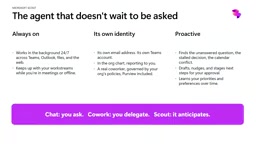
The most disruptive design choice is that Scout has its own independent identity: its own email address, Teams identity, and Entra identity. It can save documents to its own OneDrive and, when done, send you a link via Teams. Ishan named his Scout "Amber," and on the org chart, Amber appears as his direct report. "Thanks, Microsoft — I have a direct report now."
In practice, Amber will proactively message him on Teams: "I noticed this email from a customer — would you like me to draft a reply? Here's how you've responded before…"
Ishan highlighted the fundamental shift at play: in the past, humans were the constraint — a person had to think of the task first before handing it to AI. Scout lets AI proactively discover work gaps. Humans still retain creativity and agency, but with an always-on assistant that can see your blind spots, productivity enters a new order of magnitude. Scout is currently available through the Frontier program.
The "independent identity" design in Scout involves Microsoft's identity and access management platform, Entra ID (formerly Azure Active Directory). Entra ID is the unified identity platform across the Microsoft enterprise ecosystem — every user, device, and application in an organization has an Entra identity, which determines their access to email, files, Teams, and other resources. Giving Scout its own Entra identity means it is technically on the same level as a "real employee" account — with its own permission boundaries, audit logs, and compliance records — rather than operating under a user's credentials as a proxy. This is critical for enterprise IT governance: administrators can control exactly what data Scout can access, who it can email, and trace its actions if something goes wrong, rather than dealing with a "shadow operator" with unclear permission boundaries.
How to Choose Between the Three
Microsoft's division of labor is clear: Chat for quick Q&A and daily ad-hoc tasks; Cowork for delegating complex tasks that run for 10 to 20 minutes, with Skills to codify reusable workflows; Scout as an always-on personal assistant with an independent identity that proactively creates value.
For organizations that want early access, Microsoft offers a TAP application pathway — once accepted, teams can experience Cowork and Scout ahead of general availability and provide feedback. Ishan's closing advice was refreshingly simple: pick one real task this week and give it to Cowork. "You never know what it can actually do until you try."
Related articles
Claude Pro Doesn't Include API Access? Max and Team Plans Now Add API Credits Explained
Claude Pro has no API access; API is billed separately. But Max and Team plans now include monthly API credits: Max 5x $100, Max 20x $200, Team up to $500 per seat. This article details each tier's credits, how to claim them, and the impact on developers.

Testing the 350K-Star REA in an Isolated Environment: 4-Second Install, but Watch Out for Two Pitfalls
Isolated lab test of the 350K-star open-source reverse-engineering tool REA: 4-second install, 15 seconds to list a screenshot tool's outbound addresses, 565 communication channels mapped, while exposing two pitfalls—user-level settings writes and 31 high-risk tool permissions—plus three safety rules.
Reverse Engineering + AI Agents: The T…
Reverse Engineering + AI Agents: The Technical Truth Behind Cloning Adobe Apps in Weeks
A developer used AI Coding Agents for reverse engineering to build 7 open-source Adobe alternatives in weeks. We explore how it works, the MCP Server that hit 100K stars in 6 days, and the real technical and legal limits.