Migrating SQL Server to Azure VMs: VM Selection, Storage, and AI Expansion Guide

Microsoft architect details VM selection, storage, and AI expansion strategies for SQL Server migration to Azure VM.
Pam Lahoud, Principal Product Architect on the Microsoft SQL team, systematically breaks down the complete decision framework for migrating SQL Server workloads to Azure virtual machines. The article notes that Azure VM suits scenarios requiring OS-level control or parallel running of services like SSIS/SSRS/AS, and preserves full engine compatibility with on-premises. For VM selection, E-series (especially EBDS V5) is the first choice for most workloads, with the letters B/D/S representing bandwidth optimization, local temp disk, and premium storage support respectively; constrained cores and configurable constrained cores can significantly reduce licensing costs. For storage, Premium SSD V2 is recommended for production, and IOPS requirements must be quantified before migration to match VM limits. After migration, Fabric mirroring combined with Foundry and vector indexes can extend AI capabilities, while Azure Backup and Update Manager provide a unified management plane.
Why Choose SQL Server on Azure VM?
The Azure SQL family offers three main targets: SQL Server on Azure VM, Azure SQL Database (including Hyperscale), and Azure SQL Managed Instance. Pam Lahoud, Principal Product Architect on the Microsoft SQL team, made it clear that Hyperscale is the "most modern, cloud-native" choice, but it doesn't fit every scenario.
When customers need to run SSIS, SSRS, or AS services alongside the SQL Server engine, or require finer-grained control over the OS and SQL Server settings, Azure VM becomes the more suitable landing spot. It preserves the exact same engine version and compatibility as on-premises SQL Server, and existing skill sets and operational processes can be reused directly.
"You're still managing the operating system and SQL Server itself, but we provide a range of features and Azure portal visibility that make management easier."
SQL Server on Azure VM is not an isolated IaaS instance. The platform can recognize that the VM is a SQL virtual machine, enabling SQL-specific experiences in service centers like Azure Backup and Azure Update Manager. Users can use familiar tools like SSMS or VS Code extensions, or move to more modern portal management interfaces.
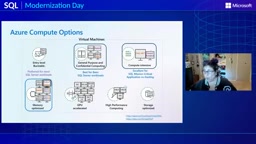
Azure SQL Managed Instance (MI) is the PaaS option in the Azure SQL family that sits between VM and Database. It provides instance-level capabilities nearly fully compatible with the SQL Server engine (such as SQL Agent, cross-database queries, and CLR), but Microsoft manages the OS and patching, and users cannot access the underlying OS. When workloads don't need OS-level control or independent services like SSIS/SSRS running in parallel, MI can significantly reduce operational burden. By contrast, Azure VM retains full OS access and is suitable for scenarios requiring third-party agents, custom registry settings, or specific file system layouts. Understanding the boundaries among the three—VM offering maximum control, MI offering instance-level compatibility, and Database offering the highest cloud-native degree—is the starting point for migration decisions.
VM Selection: From E-Series to Constrained Cores
Azure offers hundreds of VM specifications, but not all are suitable for SQL Server. Pam Lahoud lists memory-optimized series as the first choice, especially E-series and M-series. E-series offers an 8:1 or even higher memory-to-core ratio, while M-series can reach 20:1, suitable for large on-premises "big iron" workloads.
For smaller workloads such as departmental or dev/test, D-series general-purpose VMs (about 4:1 memory-to-core ratio) are sufficient. For compute-intensive scenarios, the new-generation FXV2 and FA series (AMD platform) are designed specifically for SQL, combining high compute performance with a high memory-to-core ratio, suitable for mission-critical OLTP.
"EBDS V5 is our absolute favorite—we call it 'double-sprinkler.' It's a very, very powerful VM."
The letters in the naming convention matter significantly: B stands for bandwidth-optimized (highest IO throughput), D stands for local temporary disk included (suitable for tempdb), and S stands for premium storage support. Pam recommends prioritizing these three letters for SQL workloads.
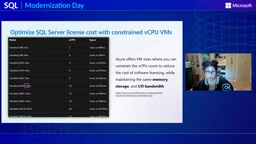
Constrained Core VMs are a key means of cost optimization. Fixed constrained-core specifications (such as M32-16) provide the memory and throughput of M32 but only 16 cores available, with licensing billed for only 16 cores. The recently GA'd configurable constrained cores feature goes further: users can customize the number of available cores on most VM series, or even disable hyper-threading and use only physical cores.
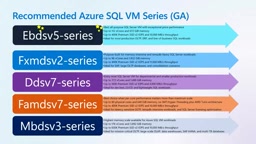
Pam's shortlist includes: EBDS V5 (all-around first choice), FXMDS V2 (compute-optimized, hyper-threading disabled by default, nearly 2TB memory), DDS V7 (general-purpose small workloads), FAMDS V7 (compute-intensive OLTP), and MBDS V3 (large analytics/mission-critical OLTP). The upcoming EBDS V6 (codenamed "Stardust") and MBDS V4 will further boost memory and IOPS.
Constrained Core is a VM billing model Microsoft designed for Windows Server licensing costs. In standard VMs, software licensing fees are calculated based on the total number of vCPUs in the VM; constrained-core specifications limit the number of available cores at the firmware level, so SQL Server and Windows Server licenses are billed only for the actual available cores, while memory and IO throughput remain at the original specification level. For example, M32-16 has the 256GB memory and IO capability of M32 but only 16 available cores, halving licensing costs. For analytical or reporting workloads with high memory needs but low CPU utilization, this model can significantly reduce total cost of ownership (TCO) without sacrificing memory capacity.
Storage and Performance Planning: IOPS Is the Migration Blind Spot
Production environments should use premium storage. Pam recommends Premium SSD V2 as the best value option, with flexible IOPS and throughput configuration that can be combined. Ultra Disk can be chosen when latency requirements are extreme. Standard SSD and HDD are only suitable for non-critical development environments.
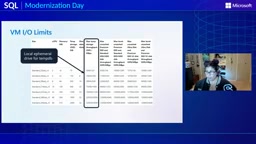
A common blind spot in migrations is IO requirement assessment. On-premises environments typically connect to high-speed SANs, and teams rarely pay attention to specific IOPS. But in Azure, both the VM itself and attached disks have IO limits, so workloads must be measured in advance (Windows Performance Monitor or Linux iostat), then matched against the limits in the documentation to select specifications.
Manually matching hundreds of VM types is unrealistic. Microsoft has built assessment tools into SSMS 22, Azure Arc, and Azure Migrate, sharing the same database migration assessment code, which can recommend target specifications based on feature compatibility and performance data. Copilot and the SQL AI Skills repository (aka.ms/MicrosoftSQLSkills) further support agentic experiences for assessment, planning, and migration validation.
Premium SSD V2 is Azure's second-generation premium solid-state drive for high-performance workloads. The key difference from the first-generation Premium SSD (P-series) is that it doesn't provision fixed performance tiers; instead, it allows users to independently adjust disk capacity (GiB), IOPS, and throughput (MB/s), and these can be modified dynamically without downtime. This makes it particularly suitable for SQL Server workloads—data files, log files, and tempdb have different IOPS and throughput requirements and can be tuned per disk. Additionally, Premium SSD V2 has a lower cost per GiB than Ultra Disk but slightly higher latency, making it suitable for scenarios requiring high IOPS with moderate latency sensitivity; Ultra Disk targets mission-critical transaction systems with sub-millisecond latency requirements.
After Migration: Management Plane and AI Expansion
Once in Azure, SQL Server is still the same SQL Server, but the surrounding ecosystem opens up new possibilities. Azure Backup, Update Manager, Microsoft Entra authentication, and RBAC provide a unified management plane, and through Arc can cover on-premises instances.
More noteworthy is the proximity to data and AI services. Fabric can mirror SQL Server data (regardless of where it resides), unlocking analytics capabilities; Microsoft Foundry combined with vector indexes in SQL can build agentic experiences on existing data.
"Once workloads are in Azure, even SQL Server on Azure VM, there's almost no limit to what you can build."
Pam also mentioned the DP-800 (Microsoft Certified SQL AI Developer) certification as a path to validating Azure SQL and AI capabilities. For teams planning migrations, her core advice is: start with E-series, use assessment tools to quantify IO requirements, prioritize Premium SSD V2, and after migration hand management to Azure services and leave innovation to Fabric and Foundry.
One-line Summary
Microsoft architect details VM selection, storage, and AI expansion strategies for migrating SQL Server to Azure VM.
Related articles

OpenCode Makes DeepSeek V4.1 Flash Free, AI Daily Roundup
AI daily roundup: OpenCode makes DeepSeek V4.1 Flash free, StepFun Step5 Preview and Ling 3.1 Flash open-sourced, Grok Voice 3.0 tops speech leaderboard, Matrix Game 4.0 open-sourced, and the EU opens its first AI Act enforcement probe into OpenAI and Anthropic.

DeepSeek V4.1 Flash 1017 Released: Reasoning and Coding Upgrades, Search and Fetch API Now Available
DeepSeek releases V4.1 Flash 1017 with major gains in reasoning, coding, and agentic tasks, plus web search and fetch APIs at 5 yuan per 1,000 requests. Tencent Hunyuan open-sources High Memory 2.0, Perplexity open-sources multimodal decision models, and MOFCOM seeks comments on AI export catalog.

DeepSeek V4.1 Flash Gray Test Comparison: Godot + Rust Box Selection Feature Hands-On
A Bilibili creator compares the suspected DeepSeek V4.1 Flash gray-test version using a real Godot + Rust project: same prompt for Blender-style box selection, old version mis-selects on click and rolls back, new version gets it right in one pass.