MiniMax H3 Image Open-Source Hands-On: 16 Reference Images, Poster Typography, and Agent-Based Image Generation Explained

Hands-on test of MiniMax's open-source H3 Image: 16 reference images, complex typography, and Agent integration all shine.
This article comprehensively evaluates MiniMax's open-source H3 Image model based on hands-on testing. Tests cover five task types—breakfast shop scenes, industrial design, game concept art, wool felt style, and Chinese posters—compared side by side with GPT, Gemini, and Doubao. H3 Image excels at atmosphere, materials, and Chinese typography understanding, though specific quantity instructions can still go off track. In high-difficulty tests, it successfully integrated a full device, exploded view, material close-ups, and Chinese annotations into a single image; in the 16-image museum artifact test, it placed items into a 4x4 display cabinet in order with unified lighting, outputting at 5472x3072 resolution. After API integration with DeepSeek Harness, it can automatically generate webpage hero visuals and swap colorways via conversation, connecting image generation with development workflows.
The AI image generation race has a new strong contender. MiniMax's recently open-sourced H3 Image model not only pushes web-based image generation to a new level, but also supports up to 16 reference image inputs and API integration into Agent workflows. Can it go toe-to-toe with mainstream players like GPT, Gemini, and Doubao? Based on a hands-on test by a Bilibili creator, this article breaks things down step by step—from basic image output to complex typography, and on to Agent automation.
The Barrier to Image Generation and H3 Image's Positioning
When it comes to AI image generation today, the tools people use most are GPT, Gemini, and Doubao. GPT and Gemini deliver top-tier results, but the barrier to entry is also high—getting them running smoothly takes some effort for many people. Doubao works right out of the box, which is convenient, but once you hit complex requirements or want to obsess over details, the results fall a bit short.
H3 Image's entry point is exactly here: strong results, plus easy access anytime, anywhere. You can use it directly on the web, feed it up to 16 reference images at once, integrate it into various Agents via API, and it's already open-source—so those with the resources to tinker with local deployment can dig in themselves.

Open-Source Model Local Deployment: H3 Image is open-source, meaning developers can download the model weights and run inference on their own GPU servers or workstations without relying on cloud APIs. The benefits of local deployment are that data stays within the internal network, there's no per-call billing, and you can fine-tune freely; the cost is a certain hardware threshold (VRAM capacity determines whether the model can be loaded and how many reference images it can support) plus operational overhead. For enterprises with compliance requirements or high-frequency usage needs, local deployment is often more cost-effective than calling closed-source APIs.
Hands-On Comparison: Four Models, Same Challenge
Tips for Writing Prompts
Many people feel AI image generation falls short, and it's often the prompt that's to blame. Never write vague, empty phrases like "make it look better" or "more premium"—you need to break down the image you actually want to see in your head and feed it to the model piece by piece. For example, to generate "a breakfast shop on a rainy morning," you need to package the environment, characters, actions, and lighting clearly: an old storefront, steaming bamboo baskets, streets fresh from rain, plus a boss in a dark blue apron holding three bowls of soy milk in both hands.
The exact same prompt was fed to the other three models, with four columns compared side by side. Looking at the H3 Image one alone, there's a warm glow on the shopkeeper's face, a cold rainy day outside, warm cozy lighting inside, plus old tile walls and wrinkles in the apron—the lived-in atmosphere of a corner shop comes right through.
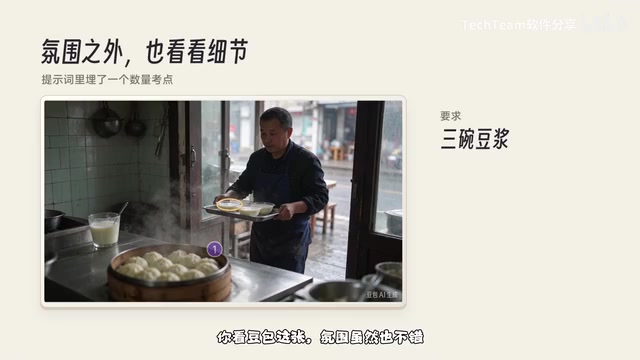
But you can't judge AI image generation on atmosphere alone. The prompt included "three bowls of soy milk" as a checkpoint, so let's count: Doubao's image has nice atmosphere too, but the boss is way too enthusiastic—he brought out four bowls. This shows that specific quantity instructions tend to go off the rails on most models, so you need to keep an eye out after generating.
Material and Spatial Logic
The second image switches to industrial design: a music player with a translucent shell. The secret to product photography is breaking down materials separately: a smoky gray translucent plastic shell, a silver aluminum alloy frame, a small orange knob, and you need to see the circuit board and battery inside. H3 Image's take goes minimalist, nailing the highlights on the metal frame and the translucency of the plastic shell; the other models pack the internal components fuller with more complex layering, each with its own aesthetic.
The third image gets more imaginative: a game concept art of a giant turtle carrying a travel cabin across a river. Here a deliberate detail was included—requiring a reasonable support structure between the house and the turtle shell, not just floating on top like a decal. H3 Image's output has a real "moving castle in the valley" feel, with the textures of water, rocks, turtle shell, and wooden cabin blended together, and a very cohesive sense of space and art style.
There's also a healing-style wool felt stop-motion scene: in a small noodle shop on a rainy night, a little orange fox serves noodles to a little rabbit wearing a green scarf. This style is the ultimate test of fuzzy fiber texture and the warm lighting of miniature sets—just cram the hand-stitched needle felt marks and late-night warm yellow lighting directly into the prompt. All four models captured that rough yet warm felt texture, but this time H3 Image went aggressive—not only is the fox holding noodles, but there's an extra bowl on the table, and an extra pair of chopsticks too.
Reference Image Editing and Instruction Following: Multi-image reference input is an important dividing line for current image generation models. Traditional text-to-image can only rely on text descriptions, while reference image mode allows the model to extract subject identity, materials, color schemes, or composition from existing images, then recombine them according to new instructions. H3 Image supports up to 16 reference images, meaning it needs "multi-image organization" capability—assigning each reference image an independent spatial position in the generated scene, and unifying lighting, perspective, and shadows. Such tasks demand far more from the model's visual understanding and layout planning than single-image generation.
Chinese Poster Typography
The fifth test hits an old pain point: Chinese posters. The theme is "Open All Night Tonight," with the main and subheadings, date, time, and location all listed verbatim in the prompt, plus a specified retro screen-print style. All four images actually look pretty convincing, but H3 Image nails the vibe better in this set: zoom in on the fine print halftone dots in the background, plus the character linework, the navy and orange-red color scheme—the whole image is stylistically unified, with a real vintage music poster feel and less of an AI look. The main title, band name, and bottom performance info are clearly layered.
Chinese Text Rendering: AI image generation has long underperformed on Chinese typography because mainstream models are trained mostly on English corpora, Chinese characters are complex with dense strokes, and the model needs to understand the hierarchy of "title—subtitle—body text." In this test, H3 Image could fairly accurately reproduce the main and subheadings, date, and location information, indicating targeted optimization in Chinese text rendering and layout structure understanding. However, text may still have merged strokes or typos, so manual proofreading is recommended before actual printing.
High-Difficulty Challenge: Exploded View and Chinese Annotations in a Single Image
Warm-up's over—time to crank up the difficulty: design a retro handheld console from scratch called "Pocket Planet." Not only does it need the full device appearance, but the same image must also show an exploded view of six core components, each with leader lines and Chinese labels, plus two material close-ups in the bottom right corner.
For this kind of element-heavy, high-risk complex image, the prompt absolutely cannot be written haphazardly—it must be split into three blocks: the first locks down the appearance—cream white matte shell, D-pad on the left, four round buttons in red, yellow, blue, and green on the right; the second is essentially sketching a layout for the AI—60% of the space on the left for the full device, exploded view in the top right, two close-ups in the bottom right; the third lists the title and the Chinese names of the six components separately.
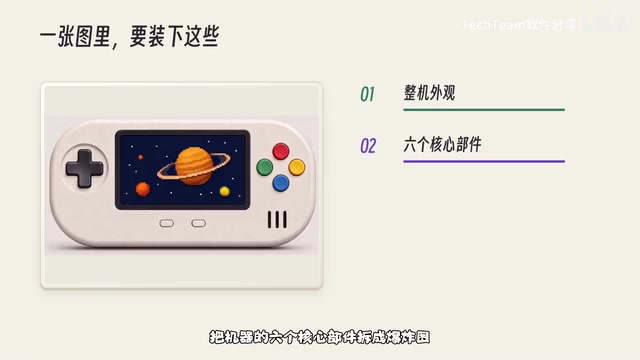
H3 Image's console display board fits the full device, six disassembled components, two close-ups, and Chinese annotations all into one image. Both front and back shells are cream white, and the front shell's screen window and button cutouts are drawn separately—the layout is quite tidy. This tests more than drawing skill; it has to first understand your layout logic. For quickly producing a product concept board or aligning brainstorm ideas with others, this level of completeness really saves a lot of hassle.
For images where the same product appears multiple times, besides specifying the layout, you also need to explicitly tell it that the full device, exploded view, and close-ups must be the same machine: the front shell needs openings for the screen and buttons, the back shell is solid, and materials and colors must match on both sides. Writing these requirements specifically is far more useful than just saying "accurate details."
16 Reference Images: A Hardcore Test of Multi-Image Organization
If the previous images were standard operations, this next feature is the main event. In daily design and presentation work, you often already have a pile of ready-made assets. For example, you have 16 photos of museum artifacts—some color, some black and white, with all kinds of backgrounds and shooting angles—and now you want to arrange them neatly in a single wooden display cabinet with unified color grading and shadows. Doing that manually would drive anyone crazy.
Just enable reference image mode in H3 Image, drag the images in, and it can handle up to 16 reference images at once. After uploading, give a hard command in the prompt: place these 16 items strictly in the uploaded order into a 4x4 wooden display cabinet, no skipping or duplicating every other one, and unify all backgrounds and lighting. To prevent misordering, it also explicitly states: first row gets images 1 to 4, second row gets images 5 to 8, and so on. This time, go all out with 4K quality.
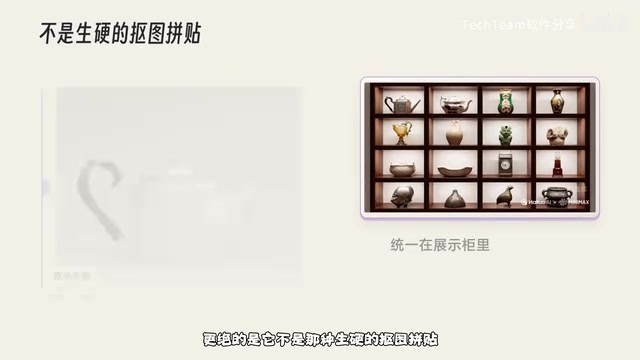
Count against the originals: first row has a silver teapot, a patterned pot, and two vases; second row has a tall pot, a peach pot, a green statue, and a peach-colored statue; then the third row's bowls and clock; fourth row's helmet and incense burner—all 16 treasures are there, even the seating order is spot-on. What's more, it's not a rigid cut-and-paste collage—the original messy backgrounds are all cleaned up, all artifacts receive the unified warm light of the display cabinet, and even the contact shadows on the base are filled in. The downloaded image is actually 5472x3072 resolution; zooming in on details, objectively it's not pixel-perfect copy-paste—like the facial features of the green statue in the seventh cell, and the patterns on some artifacts, the AI redrew them itself. But being able to fit 16 completely unrelated assets into the same realistic space in one go according to instructions—that multi-image organization capability is genuinely impressive. For making product family portraits, prop displays, or e-commerce scene drafts, efficiency just takes off.
API Integration with Agents: Making Image Generation Part of the Workflow
H3 Image isn't just for the web—it can also be paired with various Agents via API to make workflows smoother. The popular DeepSeekAd Harness is great at writing code and building web pages, but it has a problem: it doesn't have built-in image generation. You can ask it to write web page code, but the product images and promotional graphics needed inside still have to be generated elsewhere, downloaded, and brought back to it—the rhythm gets interrupted.
Integrating H3 Image via API makes this much smoother. How to integrate: first, open the MiniMax open platform and find the API Key page, create or copy your key; then open a project folder in DeepSeek Harness, first send it the link to H3 Image's official API documentation, then tell it "help me integrate the MiniMax H3 Image generation API," and tell it where the config file is. You don't need to write the interface code line by line yourself—DeepSeek will build the calling tool based on the docs, resulting in a local Python tool responsible for requesting H3 Image, passing in reference images, and downloading the generated images back.
Once integrated, just give it a task: build a product introduction webpage for "Pocket Planet" with a warm gray background overall, call H3 Image to generate a hero visual of the cream white console for the homepage, save it to the project, and automatically place it in the webpage. If you have requirements for the product's appearance, you can specify them too—like a cream white matte shell, dark gray D-pad on the left, four buttons in red, yellow, blue, and green on the right, a deep blue starry sky on the screen plus an orange pixel planet. After sending, it first organizes the image generation prompt, calls H3 Image to generate the image, the tool saves the image to the project folder, then returns the file path to DeepSeek, which then continues writing the webpage, laying out the hero visual, title, and product introduction together.
Even more convenient is the next step: after the webpage is done, you think cream white is nice but want to see how dark green looks—just continue in the same conversation: "change the console shell to dark green, keep the original button colors and overall shape," using the previously generated image as reference, call H3 Image to regenerate, and automatically replace the old image in the webpage, keeping a copy of the cream white version too. The key here is explicitly telling it to use the previous image as reference, because we want to recolor the same console—the original body shape and button placement should be preserved as much as possible. DeepSeek will then pass the cream white image to H3 Image's reference image editing API, and after the dark green version is generated, replace the image in the webpage and update the color name on the page too. Comparing the two versions side by side, the shell is now dark green, while the body outline, the position and colors of the four-color buttons, and the planet on the screen are all preserved—local textures and lighting change slightly, but for comparing two colorways of the same product, it's already very intuitive.
This is what makes H3 Image so handy after integrating with an Agent: previously after finishing an image you'd have to save and organize it yourself before using it in a webpage; now you just tell it what you want to do, and it can call the image generation tool, then continue with the generated results to complete the rest of the work. DeepSeek handles understanding requirements and writing code, H3 Image handles generating and modifying images, and Harness strings these operations together.
Agent Workflows and Tool Calling: An Agent refers to an AI system that can autonomously plan steps and call external tools to complete tasks. DeepSeek Harness itself only has text and code capabilities; after integrating H3 Image via API, it gains an "image generation tool": the Agent first understands user needs and organizes prompts, then makes API requests, and after receiving the returned image path, continues writing the webpage. This "tool calling" pattern turns image generation from an isolated operation into an orchestratable pipeline stage—also an important trend in the current AI application layer.
Use Cases and Getting Started Tips
If you just want to find inspiration day to day, make a poster, or merge a dozen assets into one image, using H3 Image directly on the Hailuo web platform is convenient enough. But if you're already tinkering with Agents and automation development, I strongly recommend integrating the H3 Image API and giving it a try. From generating a good image to letting AI actually use that image in a project—that's where this combo really shines.
One reminder: for instructions involving specific quantities (how many bowls of noodles, how many pairs of chopsticks) or strict ordering, all models can still go off track, so checking after generation is a necessary habit. H3 Image's performance in layout understanding, multi-image organization, and style consistency has already given it considerable competitiveness among open-source image generation models.
Related articles

DeepSeek Open-Sources Harness: A Plugin-Based Dev Tool with 270K Stars
DeepSeek's official open-source Harness hits 270K GitHub stars, written in TypeScript under MIT. We break down its plugin architecture, multi-model comparison, four use cases, and a three-step start.

New Claude Code Workflow: 9 Open-Source Skill Packs Take Over the Entire PR Lifecycle
Theo open-sources 9 AI agent skill packs for Claude Code and Codex, covering test verification, multi-model code review, PR submission, CI fixes, and auto-merge, with the main skill proving the problem first and humans retaining final merge authority.

Prompt Engineering from Beginner to Practitioner: Bilibili Tutorial Explains Core Concepts
Bilibili tutorial systematically explains prompt engineering core concepts: four layers of prompts, difference between prompts and prompt engineering, six-step workflow, four goals, and real limitations like context limits, hallucinations, and cost traps, helping beginners build a reusable AI collaboration methodology.