MiniMax H3 In-Depth Review: A Comprehensive Evaluation of the Open-Weight Audio-Driven Video Generation Model

Comprehensive review of MiniMax H3: an open-weight video model with unique audio-driven generation capabilities.
MiniMax H3 is a groundbreaking open-weight video generation model offering audio-driven video creation, R2V motion following, and up to 2K resolution at just 6 cents per second. Testing reveals excellent performance in anime, product showcases, and slow-motion scenes, with native ComfyUI integration enabling local deployment on 24GB GPUs. While fast motion and voice integration need improvement, H3 marks a milestone for open-source video generation reaching commercial quality.
The performance of open-source large models has been nothing short of impressive — they're not only catching up to but even surpassing some top-tier closed-source models in general capabilities. Now, this wave has swept into the video generation domain. In recent years, models like Meta's LLaMA series, Mistral, and DeepSeek have adopted the open weights approach, enabling developers and researchers worldwide to freely download, fine-tune, and deploy models. "Open weights" differs from fully open source — the former publishes model parameters but doesn't necessarily release training data or complete training code. This approach greatly promotes community innovation while protecting core commercial competitiveness. In video generation, the field has been primarily dominated by closed-source products like OpenAI Sora, Runway Gen-3, and Pika Labs, with open-source alternatives long playing catch-up.
The recently released MiniMax H3 is a prime example: released with open weights, it has generated tremendous community excitement, been natively integrated into ComfyUI, and even offers unique features that some paid models lack. Its emergence marks the first time an open-source video generation model has achieved commercial-grade quality across multiple dimensions.
This article is based on in-depth testing by experienced AI creators, covering anime generation, commercial advertising, audio-driven video, and local deployment — providing a comprehensive analysis of this model's capabilities and practical value.
MiniMax H3 Core Capabilities
MiniMax H3 supports multiple input modalities including text, image, video, and audio, with its audio capability being the most noteworthy. Unlike traditional models that only use audio as a reference, H3 can construct video content based on audio, with audio generation completed in a single pass. This means the visuals can better follow the audio rhythm.
Traditional audio-driven video generation typically employs a multi-stage pipeline: generating video independently first, then performing post-hoc alignment between audio and video, or generating audio and video separately and matching them through an additional synchronization module. The drawback of this approach is the lack of deep semantic connection between audio and video, resulting in imprecise beat matching. H3's "single pass" approach means audio information is encoded as a conditioning signal during the video generation diffusion process — the model considers both audio features and visual generation in a single forward pass. This is similar to the "early fusion" approach in multimodal large models, which establishes tighter correspondences between different modalities compared to "late fusion," achieving more natural audio-visual synchronization.
In terms of specifications, H3 supports up to 2K resolution with single video segments up to 15 seconds long. More crucially, there's a significant price advantage — accessing the latest H3 model through the official app MiniMax Design costs only about 6 cents per second at 2K resolution, which is not only far below competing products but even cheaper than using Hailuo's official website.
Anime Generation and Commercial Advertising Scene Testing
Testers first tried anime scene generation, inspired by the popular "anime game PV" effect on X — similar to new character preview animations in gacha games. By providing reference images, setting tags (such as character shots), and triggering the built-in "anime game PV" skill in MiniMax Design, the results far exceeded expectations.
Notably, skills in MiniMax Design trigger automatically: users simply mention their needs in the description, and the Agent intelligently invokes the corresponding capability, even asking clarifying questions along the way (such as whether background music or narration is needed). The generated anime transition sequences were sharp and fluid, with creators stating they "could be used directly in anime games."
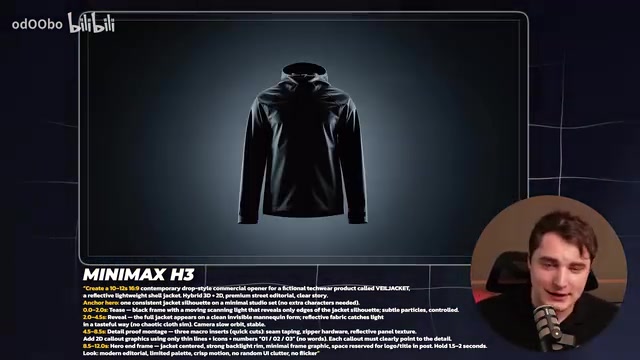
For commercial product showcases, H3 also performed impressively. Whether product close-ups, slow motion, or flashy transitions, everything was handled quite well. Creators admitted that not every attempt succeeds on the first try — "some prompts need one or two runs to get the best results" — but the overall quality already demonstrates commercial potential.
Audio-Driven Video Generation: H3's Unique Advantage
Audio-driven generation is the core feature that distinguishes MiniMax H3 from other video models. Testers used a simple melody to test the "generate video from audio" capability, producing results similar to an elaborate audio visualizer.
A pattern emerged: the video beginning tends to match the audio beat well, but the synchronization gradually deteriorates toward the end. When giving the model more abstract freedom (such as abstract graphics), it actually produces the most ideal results.
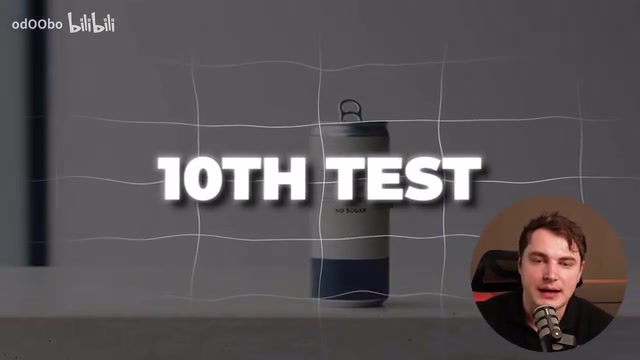
In voice reference testing, H3's lip sync performance was nearly perfect, but the generated speech felt isolated, lacking integration with the video environment — for instance, background sound effects were difficult to hear, and the AI-generated voice quality still has room for improvement.
R2V Reference-to-Video: A New Breakthrough in Motion Following
Another important feature of H3 is R2V (Reference-to-Video). While "reference-driven" isn't entirely new, H3 shows notable improvements in motion following.
Reference-to-video technology is an important branch of video generation, with the core goal of allowing users to precisely control generated video content and motion through reference materials (static images, motion trajectories, 3D pre-visualization animations, etc.). This lineage traces back to ControlNet's success in image generation — injecting control signals into diffusion models through additional condition encoders. In the video domain, models like AnimateDiff and SVD (Stable Video Diffusion) first achieved basic image-to-video conversion, while subsequent research like DragAnything and MotionCtrl further introduced motion trajectory control. MiniMax H3's R2V function achieves higher-quality motion following on this foundation, particularly in reproducing complex motion patterns like drone aerial footage, indicating significant technical progress in motion encoding and temporal consistency.
Testers used drone aerial footage as a motion reference to generate different scenes like ancient Rome, achieving quite satisfactory motion following. However, for high-difficulty cinematic action scenes, the current version is still not the optimal choice.
Usage Tips: Control Motion Speed for Best Image Quality
Testing revealed a key detail: the faster the camera movement, the more noticeable the blur; the slower the movement, the sharper the image. The technical root of this phenomenon lies in how video diffusion models handle inter-frame changes. Current mainstream video generation models (including DiT-based and U-Net-based architectures) face two core challenges when processing high-speed motion: first, excessive pixel displacement between adjacent frames makes it difficult for the model to establish accurate inter-frame correspondence through temporal attention mechanisms, causing generated details to tend toward smoothness (i.e., blur); second, high-quality samples of fast motion are relatively scarce in training data, resulting in insufficient learning for these scenarios. This is fundamentally different from motion blur in traditional photography — the latter is a physical phenomenon, while blur in AI video represents a limitation of model capability.
This was particularly evident in 3D reference testing — H3's following of 3D references was excellent, but slight blur appeared during rapid camera pushes. Therefore, H3 is better suited for slow motion and flashy transitions, where its performance is "surprisingly good."

Text Rendering Consistency and Complete Commercial Workflow
For text rendering, H3 performed consistently, accurately displaying text on product labels (with Claude used to organize label text into the prompt) without garbled characters. This is in line with the text capabilities of cutting-edge image models.
Testers also conducted a complete commercial workflow test: directly feeding a client brief (PDF file with requirements for main video, clips, vertical video deliverables, etc.) along with image assets to the MiniMax Agent in the laziest possible approach, letting it handle everything automatically. The resulting 15-second video was "comparable to a normal commercial advertisement." While the complete 30-second stitched version occasionally showed garbled text and continuity issues, some segments were directly usable for commercial purposes.
The creator's takeaway: generating in segments with more detailed prompts and references produces more stable commercial-grade results.
An Unexpected Discovery About Play Blast
An interesting counter-intuitive finding: in game dialogue testing, not providing a play blast (pre-visualization animation) actually produced better results — more natural motion with approximately 80% usability. Play blast is a term from 3D animation production referring to low-quality preview animations generated before final rendering, typically used for quick checks of animation motion and timing. In the AI video generation context, it's used as a motion reference input. This made testers reconsider their recommendations for play blast usage — overly specific motion references can sometimes restrict the model's creative freedom, leading to unnatural movement.
ComfyUI Local Deployment Tutorial for MiniMax H3
MiniMax H3's weights are available on Hugging Face, and the simplest way to run it is through the officially integrated ComfyUI.
ComfyUI is a node-based open-source AI image and video generation interface that uses visual workflows, allowing users to build complex generation pipelines by dragging and connecting nodes. Unlike traditional interfaces such as Automatic1111 WebUI, ComfyUI's core advantage lies in its modular architecture — each node represents an independent operation (such as model loading, sampler configuration, VAE decoding, etc.), allowing users to flexibly combine them for highly customized workflows. ComfyUI Desktop is its desktop application version, further lowering the installation barrier. MiniMax H3's native integration into ComfyUI means users can freely combine H3 with other nodes (such as ControlNet, IPAdapter, image preprocessing, etc.) to build complete pipelines from reference image processing to final video output.
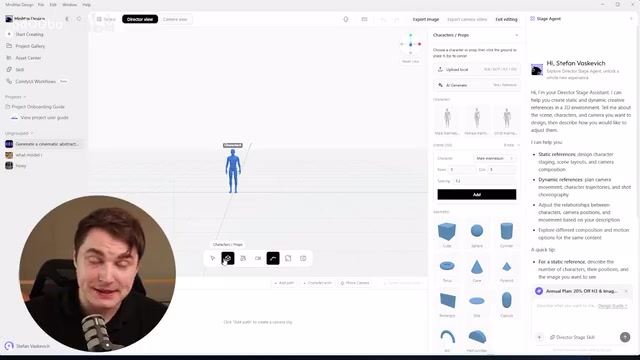
Deployment Steps
- Install ComfyUI Desktop, select the pinned recommended MiniMax workflow at startup
- Click install and wait for the download (model is approximately 53GB, requiring considerable time)
- VRAM requirements: 24GB or above is recommended
Performance Optimization Configuration
When testing on a 5090 (24GB), the tester developed the following optimization configuration:
- Set in startup parameters:
use sage attention,fast,disk cache none - Run in terminal:
pip install tritonand installsage attention
SageAttention is an efficient attention computation scheme for Transformer architectures that quantizes Key and Value tensors in the attention matrix (typically from FP16/BF16 down to INT8 or lower precision), significantly reducing VRAM usage and computation time with minimal quality loss. This complements FlashAttention's approach — the latter primarily accelerates attention computation through optimized memory access patterns (tiling and recomputation), while SageAttention optimizes from a numerical precision perspective. For video generation models, attention computation overhead is particularly massive because the temporal dimension causes attention matrix sizes to grow multiplicatively compared to image models. Triton is a GPU programming language developed by OpenAI that allows developers to write efficient custom CUDA kernels without directly using CUDA C++, serving as the underlying dependency for optimization solutions like SageAttention. Running a 53GB model on a 24GB GPU is feasible precisely because of these combined quantization and attention optimization techniques.
These settings effectively optimize VRAM usage and accelerate generation. However, even after optimization, locally generating a 5-second 1080P video still takes approximately 15 minutes — which explains why most of the tester's evaluations were done on the official platform (after all, 6 cents per second is genuinely cheap).
Conclusion: A Milestone for Open-Source Video Generation
The greatest significance of MiniMax H3 is this: a video generation model this powerful can now run on consumer-grade GPUs with open weights. Many open-weight large models are too massive to fit on consumer GPUs, making H3 one of those rare "top-tier models that can squeeze into consumer hardware."
For video AI application developers, the official platform platform.minimax.io also offers additional capabilities like video regeneration (super-resolution) and high-resolution context, and price-wise it's currently one of the cheapest options available. Furthermore, MiniMax Design may release a locally runnable version in the future, which combined with intelligent Agents will further lower creative barriers.
Overall, H3 excels in anime, product showcases, and slow-motion transitions, with audio-driven generation as its unique highlight. However, there's still room for improvement in fast action, multilingual consistency, and voice integration. For users seeking cost-effectiveness and creative freedom, this is undoubtedly a powerful open-source tool worth exploring in depth.
Related articles
Devin CLI Model Picker: A Deep Dive into One-Click Model Switching and Cost Comparison
Devin CLI adds a Model Picker feature for viewing available models, comparing costs, and switching effort levels. A deep dive into its three core capabilities and practical value for AI coding workflows.
AI Beginner's Guide: Three Stages to Building Your Own Personal AI Assistant from Scratch
No tech background? No problem. This beginner's guide maps out a 3-stage path to building a personal AI assistant — from prompt engineering to no-code automation to API calls.

Zero to Vibe Coding in Seven Days: A Complete Beginner's Guide to AI Programming
A beginner's guide to Vibe Coding: learn the 6-step path covering Claude Code, Cursor, Codex, prompt engineering, and project practice to build products with AI.