MiniMax H3 Local Deployment Tutorial: Run an Open-Source Video Generation Model on 8GB VRAM
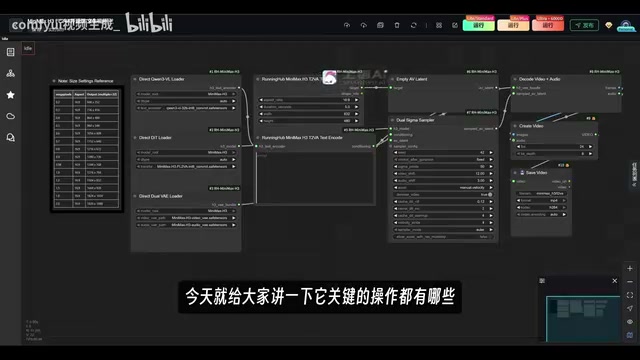
Deploy MiniMax's open-source H3 video generation model locally on an 8GB GPU using ComfyUI.
MiniMax's H3 is a free, open-source video generation model that runs on as little as 8GB VRAM. This tutorial covers full local deployment via ComfyUI, including text-to-video and image-to-video workflows, structured prompt engineering strategies, resolution and performance trade-offs, model sharing for storage optimization, and cloud computing alternatives for users with limited hardware.
MiniMax recently released the H3 video generation model, which has attracted widespread attention in the open-source community. This model not only delivers results comparable to commercial models but, more importantly, is completely free and supports local deployment — running smoothly on as little as 8GB of VRAM.
Technical Background of Video Generation Models
Video generation models represent cutting-edge technology in the AI-Generated Content (AIGC) field. They use deep learning algorithms to understand text or image inputs and generate coherent video sequences. Currently, mainstream video generation technologies are primarily based on Diffusion Models and Transformer architectures. Diffusion models generate content through a progressive denoising process, while Transformers excel at processing sequential data and long-range dependencies. Commercial-grade video generation models like Runway Gen-2 and Pika typically require substantial computing power and cloud-based deployment. The emergence of open-source models like H3 marks a turning point where video generation technology is becoming accessible to individual users and small-to-medium developers, lowering both technical barriers and costs. This article provides a detailed guide on how to quickly deploy and use the H3 model through ComfyUI.
Core Capabilities of H3
H3 supports multiple video generation modes, including text-to-video, image-to-video, and grid-based video generation. Based on actual testing, it handles a wide range of visual styles well, including realistic footage, 3D models, and AI-generated comics.
In the image-to-video domain, H3 demonstrates excellent layer decomposition capabilities.
Technical Principles of Layer Decomposition
Layer decomposition is a key technique in computer vision, also known as image segmentation or semantic segmentation. The H3 model uses deep neural networks to identify different elements in an image (characters, backgrounds, props, etc.) and assigns independent motion trajectories and dynamic effects to each element. This technology involves three core modules: object detection, depth estimation, and motion prediction. The model first identifies object boundaries in the image, then estimates the spatial depth relationships of each element, and finally predicts reasonable motion patterns based on physical laws and visual experience. For example, character figures might receive subtle animation effects, while backgrounds might get parallax scrolling applied. This layered processing approach gives generated videos greater depth and realism, avoiding the unnatural artifacts caused by global deformation.
In testing, a poster was used as the first-frame input. The model not only accurately identified character roles and scene elements but also added appropriate dynamic effects to the generated video. This ability to understand and animate static images has reached a remarkably high standard among open-source models.
Video duration is adjustable from 4 to 15 seconds, with optimized configurations for resolutions ranging from 480p to 720p.
Resolution and Video Quality Trade-offs
Video resolution refers to the pixel density of the frame. 480p (854×480 pixels), 720p (1280×720 pixels), and 1080p (1920×1080 pixels) are common specifications. Higher resolution means richer image detail, but computational complexity grows quadratically. Going from 480p to 720p increases total pixel count by approximately 2.25×, with corresponding increases in VRAM usage and computation time. In AI video generation, higher resolution also affects temporal consistency — high-resolution video requires the model to handle more detailed inter-frame transitions, placing higher demands on model capability. In practice, you need to balance quality, speed, and resource consumption: 480p is ideal for quick previews and proof-of-concept, 720p suits social media publishing, and 1080p is reserved for professional production. H3 has been specifically optimized for different resolutions, ensuring good performance at each tier.
Based on testing, generating a 5-second video at 480p resolution takes approximately 2–3 minutes. While bumping up to 736p increases processing time slightly, the improvement in image quality is significant.
ComfyUI Workflow Configuration in Detail
Understanding the ComfyUI Workflow System
ComfyUI is a node-based AI image/video generation tool featuring a visual workflow design. Unlike traditional parameter panels, ComfyUI breaks down the generation process into multiple functional nodes (such as text encoding, model loading, image processing, etc.), and users build data flow pipelines by connecting nodes. This design originates from the node-based architecture of professional VFX software (like Nuke), with the advantages of visual process representation, high customizability, and easy reusability. A complete workflow can be saved as a JSON file containing all node configurations and connections, making it easy to share and version-manage. For complex tasks, node-based design is more intuitive and efficient than traditional interfaces, though the learning curve is also steeper.
ComfyUI provides three core workflows for H3: text-to-video, first-frame generation, and last-frame generation. Although these workflow interfaces may look complex, the number of parameters that actually need adjusting is quite small.
For the text-to-video workflow, the key adjustment points are concentrated in two modules: output settings and prompt input. Output settings include aspect ratio (16:9 recommended), video duration (4–15 seconds), and resolution selection. The workflow has a built-in parameter reference table so users can choose the appropriate quality tier based on their GPU configuration.
The Relationship Between VRAM and Model Execution
VRAM (Video Random Access Memory) is the dedicated memory on a graphics card used to store data required for GPU computation. When an AI model runs, it needs to load model parameters, intermediate computation results, and generated data into VRAM. 8GB of VRAM can accommodate models with roughly 8 billion parameters. Through optimization techniques like model quantization and layered loading, H3 compresses its VRAM requirements to 8GB, allowing mainstream gaming GPUs (such as the RTX 3060 and RTX 4060) to run it smoothly. In comparison, earlier video generation models often required 24GB or more of VRAM, limiting them to professional-grade GPUs. VRAM size directly affects the resolution, video length, and generation speed that can be handled.
The image-to-video workflow adds image upload and aspect ratio auto-adaptation modules on top of the text-to-video setup. You might not have noticed, but ComfyUI supports loading multiple reference images simultaneously, which is very practical when you need to switch between styles frequently. For example, when processing ID photos, you can load both red and blue background templates at the same time without swapping them back and forth.
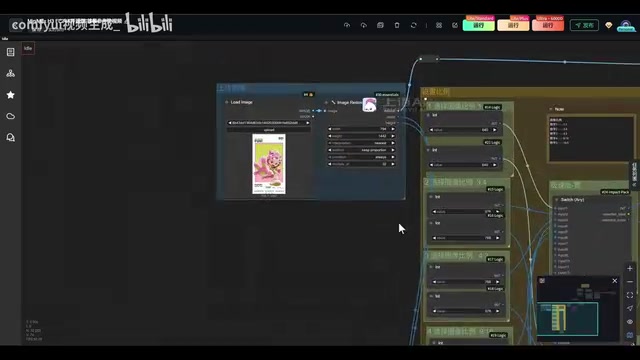
The running mode has three tiers, which can be understood as speed-priority, balanced, and quality-priority. In practice, the balanced mode meets most needs. If you use cloud computing resources during off-peak hours, generation speed improves further.
Prompt Optimization Strategies
Prompt Engineering Methodology
Prompt engineering is a core skill in AI generation, referring to the practice of designing carefully crafted text descriptions to guide models toward producing desired outputs. Effective prompts typically include subject description, scene setting, style specification, motion type, and technical parameters. Structured prompts use a segmented format, such as: '[Subject]: [Action], [Scene]: [Details], [Style]: [Reference], [Motion]: [Method], [Technical]: [Parameters]'. For video generation, the temporal dimension is especially important — you need to clearly define the starting state, intermediate process, and ending state. The advantage of using AI to assist in generating prompts is that it can refine requirements through multiple rounds of dialogue, compensating for users' lack of specialized knowledge. Large language models like DeepSeekAd and Claude have accumulated extensive prompt optimization experience and can transform vague descriptions into structured instructions.
Prompt quality directly impacts generation results. Different prompt strategies are recommended for different video durations. AI assistants (such as Doubao, DeepSeek, etc.) can quickly generate structured prompts.

Take a historical drama scene as an example: directly asking an AI might only yield a generic description. However, if you use specialized prompt skills (tailored for 5-second, 10-second, and 15-second durations), the AI will guide you through multiple rounds of dialogue to clarify scene type (dialogue/action), character settings, pacing, and other details, ultimately producing a complete prompt with stronger narrative and dramatic quality.
This structured approach to prompt generation is especially beginner-friendly. It transforms abstract creative ideas into concrete multiple-choice questions, eliminating the "I don't know what to write" dilemma.
Complete Local Deployment Process
Local deployment of H3 falls into two scenarios:
Existing ComfyUI environment: Simply download the H3 model package, extract it to the models folder within your ComfyUI directory, and restart ComfyUI. The model package includes complete node configurations, so no additional plugins are needed.
Fresh installation: Download the Qiuye (秋叶) integration pack, extract it, and double-click the launcher for one-click startup.
Technical Architecture of Model Integration Packs
One-click installation solutions like the Qiuye integration pack simplify complex environment configuration into a ready-to-use software package. A complete AI model runtime environment includes: a Python interpreter (typically version 3.10), deep learning frameworks (PyTorch/TensorFlow), the CUDA toolkit (NVIDIA GPU acceleration library), model files, dependency libraries, and startup scripts. Traditional installation requires configuring each of these components individually, and version incompatibilities can cause all sorts of errors. Integration packs bundle all components into a self-contained runtime environment through pre-compilation and dependency packaging, avoiding conflicts with the system environment. The launcher is essentially a batch script that automatically detects hardware configuration, sets environment variables, loads models, and starts the web service. This approach reduces deployment difficulty by over 90%, enabling non-technical users to leverage advanced AI tools.
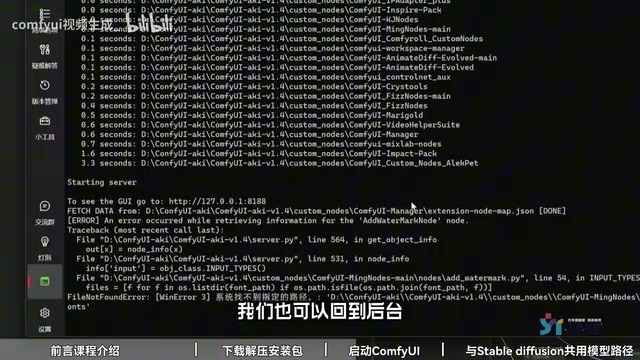
The integration pack comes pre-configured with the Python environment, required plugins, and acceleration nodes — ready to use out of the box. The first launch may take a few minutes to initialize; subsequent launches require just clicking the start button.
Model Sharing and Storage Optimization
AI model files are typically very large — a single video generation model can be 5–20GB, and a complete Stable Diffusion model library can occupy hundreds of gigabytes. Multiple applications storing duplicate copies of the same model creates serious disk waste. By modifying the base_path parameter in the configuration file, you can have different applications share the same model folder. This method relies on file system symbolic links or path mapping, with applications reading models from a specified path rather than their own directory. When implementing sharing, note the following: 1) Ensure folder permissions are correct; 2) Model formats must be compatible (e.g., safetensors vs ckpt); 3) Avoid concurrent write conflicts. This technique not only saves storage space but also simplifies model management — update in one place, and all applications sync automatically. For users who frequently switch between different AI tools, this is an essential optimization.
If you use both Stable Diffusion and ComfyUI, you can enable model sharing by modifying the configuration file. Find the config file in the ComfyUI root directory (remove the .example suffix), open it with a text editor, change base_path to your SD model path, and save. Both applications will then share the same set of model files, avoiding duplicate storage usage.
Switching languages is also straightforward — in the settings page under the agl option, you can toggle between Chinese and English interfaces, or simply click the language switch button in the bottom-right corner.
Performance Optimization Tips
Based on real-world testing data, GPUs with 8GB VRAM are recommended for 480p resolution, which ensures both smooth performance and decent image quality. GPUs with 12GB or more VRAM can attempt 720p or higher resolutions.
Cloud Computing Service Models
Cloud computing platforms (such as RunningHub, AutoDL, Hengyuan Cloud, etc.) provide on-demand GPU computing resources. Users don't need to purchase expensive professional GPUs — they can complete AI tasks by calling remote GPUs via web pages or APIs. Pricing models are typically hourly or per compute unit, ranging from about 2–10 CNY per hour depending on the GPU model (e.g., RTX 4090, A100, etc.). The advantages of cloud computing include elastic scaling and pay-as-you-go pricing; the disadvantages are network latency, data transfer costs, and queuing. Peak hours (typically 8–11 PM) see high demand and long queues, while off-peak hours offer abundant resources. For occasional use or testing new models, cloud computing is more economical than purchasing hardware. Professional users can combine local and cloud computing — using local environments for daily work and submitting batch generation tasks to the cloud.
For cloud computing, platforms like RunningHub offer pay-as-you-go computing power, ideal for occasional users or those with insufficient GPU configurations. Queue times can be long during peak hours, so it's recommended to use the service during off-peak times like early morning or late night.
Once a ComfyUI workflow is set up, subsequent use is very convenient. Unlike Stable Diffusion, where you need to reconfigure parameters every time, ComfyUI lets you save complete workflows and load them directly for the next run. This characteristic makes it better suited for batch and process-oriented content production.
Key Takeaways
Related articles

Can Nuclear War Really End Civilization? A Scientific Look at Common Misconceptions
Can nuclear war end civilization? This article examines the physics of nuclear weapons—blast, fallout, and urban fires—distinguishing airbursts from groundbursts, dose from contamination, and explaining why nuclear war is a massive disaster but not an extinction event, while exploring key factors for post-strike social reconstruction.

The Truth Behind Titanic's Sinking: Key Decisions and Communication Failures in the National Geographic Documentary
National Geographic's The Unsinkable Ship uses survivor testimony to reconstruct Titanic's fatal decisions—from the missing MSG telegram prefix and the broken boiler-room-to-bridge link to how 'unsinkable' thinking delayed damage control and evacuation.

74M-Parameter Open-Source Model Partially Outperforms Jev AI in Testing
Fastino AI's Glider 2.5 models, with just 74M–300M parameters, reportedly outperform Jev AI in some guardrail benchmarks per YouTube testing, run on consumer hardware, and even play Doom. We analyze small models' competitiveness and deployment value on specific tasks.