Muse AI Registration Guide: Using a Remote Browser to Complete Overseas Verification

A complete guide for Chinese users to register Meta's Muse AI using a remote browser and a domestic foreign-currency card.
Muse AI is a Meta product built for role-playing and personalized interaction, featuring deep customization of Soul Identity and persistent Memory. This guide walks Chinese users through the two main barriers — network access and payment verification — using Hajimi's Spark panel to launch a remote browser, and a domestic Visa or Mastercard for the $1 pre-authorization age check (auto-refunded in 5–7 business days). After registration, invite codes unlock token bonuses for both parties, and users can import character cards from communities like the Tavern.
Meta's Muse AI is an AI product focused on role-playing and personalized interaction. Its standout feature is the ability to deeply customize a character's "Soul Identity" and memory. However, it targets overseas users, making the registration process less accessible for users in China — you'll need a remote browser environment and a foreign-currency card for verification. This guide is based on a hands-on tutorial from a Bilibili creator, walking through the complete registration flow and key things to watch out for.
What You Need Before Registering
Before signing up for Muse AI, you'll need two things: a working email address and a credit card that supports foreign-currency payments. The tutorial specifically notes that an overseas bank card isn't required — a Visa or Mastercard issued by a domestic Chinese bank works just fine for verification.
In addition, the tutorial uses a tool called Hajimi's Spark panel to launch a remote browser. This step is central to the entire process, as accessing and registering for Muse AI requires an appropriate network environment. For everyday users, a remote browser provides a ready-to-use operating environment without any manual configuration.
Opening the Remote Browser and Navigating to the Official Site
Once everything is ready, open Hajimi's Spark panel and simply type a command like "open Google in the remote browser for me." After clicking to allow it, Hajimi will launch a remote browser environment on the right side of the interface.
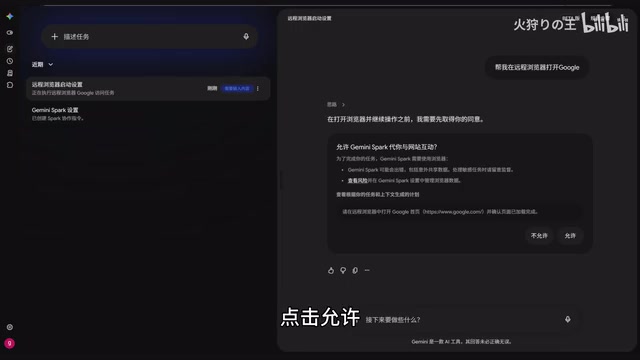
Click the "Take Over" button to manually control the remote browser. Search for Muse, then navigate to the official website. Once on the homepage, enter your registration email address and click "Continue."
This combination of an AI panel and a remote browser essentially offloads complex environment configuration to a cloud-based tool — users just need to click through the browser interface, which significantly lowers the barrier to entry.
A Remote Browser is a browser instance running on a cloud server that users operate through a web interface or client. All network requests are made by the server, not the user's local device. The key advantage is that the server is typically deployed in a specific region, allowing it to bypass local network restrictions — and no software installation is required on the local machine, leaving no access records behind. Hajimi's Spark panel is a tool that integrates an AI assistant with remote browser capabilities, letting users drive the remote browser through natural language commands. It's a classic example of an "AI Agent + cloud browser" setup. Tools like this have grown increasingly popular alongside the rise of the AI Agent concept, with their core value being the abstraction of complex environment setup into simple conversational commands.
Email Verification and Age Confirmation
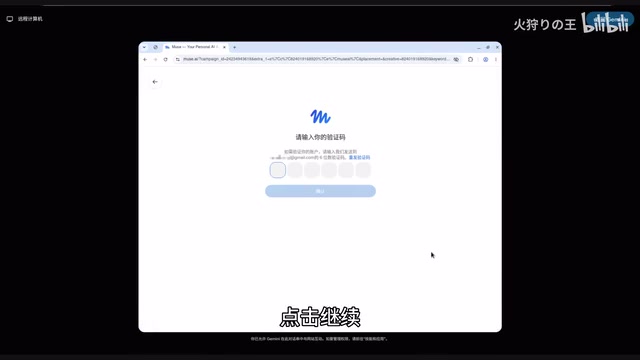
After submitting your email, the system will send a 6-digit verification code to that address. Check your inbox, enter the code on the page, and confirm.
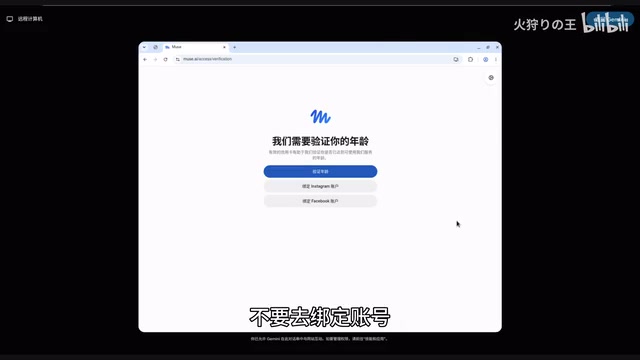
Next comes the age confirmation step: select a date of birth that confirms you're an adult, click confirm, then click "Get Started." The page will then prompt you to complete age verification — here's a critical tip: do not choose the account-linking option. Instead, go with the credit card verification route.
The $1 Pre-Authorization Verification
Age verification is completed via credit card. Enter your card number on the page, and the system will initiate a $1 pre-authorization charge.
According to the official explanation, this $1 will be automatically refunded within 5 to 7 business days — it's a standard payment verification method, not an actual charge. After submitting your card information, wait a few seconds for the system to process and verify. Once verification passes, you'll be successfully logged into Muse AI.
A word of caution: when entering credit card information, always make sure you're operating in a safe and trusted environment. Be cautious of any third-party page asking for your full card details.
Pre-authorization is a standard risk-control mechanism in the payments industry, commonly used for hotel deposits, car rental deposits, and online platform identity verification. The issuing bank temporarily freezes a small amount in the cardholder's account to confirm the card is valid and has spending capacity, without any actual fund transfer. Once verification is complete, if the merchant does not initiate a "Capture" operation, the frozen amount is typically released automatically within a few business days. For content platforms like Muse AI, the $1 pre-authorization is essentially a substitute for real-name/age verification — its purpose is to confirm the user holds a valid payment instrument, not to charge them. Domestic Visa or Mastercard dual-currency or global-currency credit cards support this process, though some debit cards may fail verification if they don't support pre-authorization.
Invite Codes and Character Gameplay
After successfully registering, you can click "Design" in the left menu to access general settings and enter an invite code. The tutorial notes that when registering with an invite code, both parties receive a token bonus — a common user-acquisition incentive for this type of product.
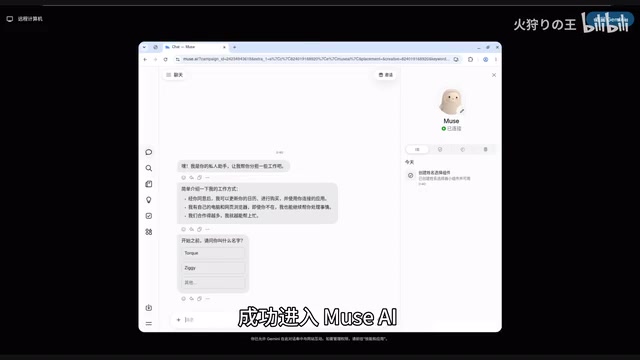
Muse AI's most appealing aspect is its character customization capability. Users can directly edit a character's Soul Identity and Memory, giving AI characters a more coherent persona and contextual memory. This means you're not just chatting with a generic chatbot — you're shaping a virtual character with a unique personality, backstory, and memory.
For users who enjoy role-playing, the tutorial recommends visiting "the Tavern" (a reference to character card sharing communities) to find ready-made character cards to import, making it easy to jump right in.
Soul Identity and Memory are the core functional layers that set Muse AI apart from general-purpose LLM chat products. Soul Identity is similar to the "Character Card" concept common in role-playing communities — it lets users pre-define fixed attributes for an AI character such as personality, speaking style, backstory, and values, ensuring consistent behavior throughout conversations. Memory is a persistent memory system that allows the AI to "remember" information shared by the user or key details from their interactions across sessions, eliminating the need to re-establish context every time. Together, these two features make Muse AI feel more like a "shapeable long-term virtual companion" than a one-off Q&A tool — this is the primary differentiator for such products in the role-playing and emotional companionship space.
Final Thoughts
Overall, the Muse AI registration process isn't particularly complicated. The main hurdles are the network environment and the foreign-currency card verification. With the help of a remote browser tool, most users can complete registration within a few minutes. Its depth in character memory and personality customization is what sets it apart from ordinary chat AIs.
That said, claims like "get 1 billion tokens for free" should be taken with a grain of salt — the actual token distribution rules, consumption rates, and official policies are all subject to change at any time. When filling in sensitive information like credit card details, always prioritize the security of your account and finances.
Related articles

Automate Job Search with AI Agents and Residential Proxies for Precise Matching
Build an AI Agent with MCP and residential proxies to bypass recruitment site anti-scraping and geo-restrictions, scrape thousands of DevOps jobs, then have Claude score and rank each against your resume. Includes proxy comparison experiments, project structure, and cost analysis—filtering only, no auto-submission.

The AI Task Assistant That Knows When to Back Off: A Cure for Activation Struggles
One Small Step is an AI assistant for task initiation struggles, using agentic decisions for guilt-free reminders, timely retreat, and cross-platform task management. The developer shares real test results on 13 tasks and architectural trade-offs.

FastAPI: A High-Performance Python Framework and a Production-Ready API Development Powerhouse
FastAPI is a high-performance web framework based on Python type hints, supporting async and automatic OpenAPI docs. With over 100k GitHub stars, this article analyzes its core strengths, production readiness, and selection advice.