n8n Beginner's Guide: Nodes, Connections, and Workflow Core Concepts Explained

A clear breakdown of n8n's three core concepts: nodes, connections, and workflows.
This article is aimed at n8n beginners and explains the three foundational concepts required to build workflows. Nodes are the smallest units that perform a single task, analogous to specialized workers in a factory. Connections pass output data from one node to the next, forming the data pipeline. Workflows are the complete orchestration of multiple nodes working in sequence. The article also covers common node types including Schedule, Email, and HTTP — with the HTTP node highlighted as the universal bridge to external APIs and AI models.
Before you start building automation workflows in n8n, take a moment to understand the logic behind it. Grasping the fundamentals is far more valuable than blindly dragging nodes around the canvas. This tutorial is based on an n8n series on YouTube and breaks down the most essential concepts behind automation tools — Nodes, Connections, and Workflows. Once you understand these, you'll be able to build almost any automation scenario on your own.
Automation Isn't That Complicated: Five Core Concepts
Many beginners feel intimidated when they hear "automation tool," but n8n's operating logic can actually be distilled into five simple concepts: Nodes, Connections, Execution, Canvas Interface, and Data Flow.
Understand these five things, and you'll know how data moves through the system. This article focuses on the first three — from individual nodes, to the connections between them, and finally to the logic behind building a complete workflow.
Nodes: Workers on an Assembly Line
Nodes are the most important concept in n8n. Think of a node like a worker in a factory — each worker is responsible for one specific task. One node handles incoming form submissions, another sends an email, and yet another saves data to a database or Google Sheet.
Remember this core principle: one node = one task. Conversely, every function you want to execute requires a corresponding node. For developers, this is similar to implementing an isolated feature module in code — very intuitive to grasp.
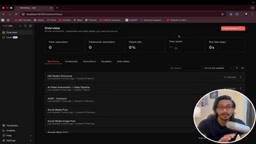
In practice, go to localhost:5678, click "Create Workflow" from the workflow home page, and you'll see a blank canvas. Click the plus button on the canvas, and a large selection of nodes will appear — Gmail nodes, form nodes, and many more. These are all nodes.
Take the n8n Form node as an example: you can configure fields one by one — name, email, phone, address, and other form inputs. Once the form is submitted, those values appear at the node's output and get passed along to the next node.
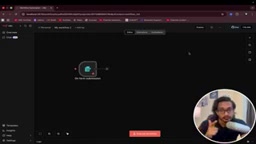
n8n offers two main categories of nodes: Trigger Nodes and Action Nodes. Trigger nodes are the starting point of a workflow — they listen for a specific event and kick off the entire process. Examples include a form being submitted, an email arriving, or a scheduled time being reached. Every workflow has exactly one trigger node. Action nodes are the execution units in the middle and at the end of a workflow — they process, transform, or output data, such as calling an API, writing to a database, or sending a notification. Understanding the difference between these two types helps you quickly determine where to start and which type of node to use at each step.
Connections: Linking Nodes Into a Pipeline
A single node can only do so much. The real power comes from chaining multiple nodes together. A Connection simply links the output of one node to the input of another.
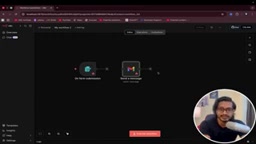
The video uses Gmail nodes as an example: when you combine multiple action nodes — "Get Message," "Add Label," "Send Message" — and establish connections between them, the output data from one node flows smoothly into the next. Remove a connection, and the two nodes become isolated and no longer communicate.
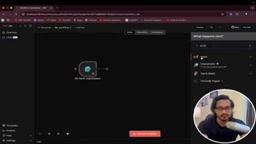
The logic is straightforward: form submission → receive data → send email → save to database. Each step is a node, and nodes pass data to each other through connections. You can even plug in AI models like Gemini or GPT mid-flow to trigger intelligent processing based on form data.
Connections in n8n don't just determine execution order — they also carry structured data. Data flows between nodes in the form of JSON-formatted "Items," where each item represents an individual record. The number of Items output by an upstream node determines how many times the downstream node gets executed (or how many records it processes in batch). n8n also supports conditional branching: you can set "IF conditions" on a node so that data is routed to different downstream nodes based on specific criteria, enabling non-linear workflow logic. This means a connection isn't just a "pipe" — it also governs under what conditions and in what structure data flows to its destination.
Workflows: Multiple Workers Collaborating
When you organize multiple nodes in the correct connection order, you've built a Workflow.
A workflow essentially represents multiple "workers" collaborating step by step: first the form is submitted, then an email is sent, then other tasks are executed. It's a set of sequentially passed instructions — nodes execute one after another, ultimately forming a complete automated process.
Common Node Types
The video also uses everyday analogies to introduce several typical nodes, helping clarify the role each one plays:
- Schedule Node: Like a clock or alarm — it triggers the workflow at a specific time. For example, "send an email every five minutes" is handled by a Schedule trigger node.
- Email Node: Like a post office — it handles sending and receiving email messages.
- HTTP Node: Like a courier — it exchanges data with various web services.
The HTTP node deserves special attention — it's the bridge for connecting to external applications and APIs. For instance, if you want to call the Gemini model in a workflow and pass data to it for processing, you'd connect via an HTTP node (or a dedicated API node) to Gemini's API. With this connectivity, n8n can integrate with virtually any third-party application that supports an API.
The core principle of the HTTP node is to send standard HTTP requests (GET, POST, PUT, DELETE, etc.) to a target service and receive the response. The vast majority of modern web services expose their functionality through REST APIs, and the HTTP node is the universal tool for communicating with those APIs. Configuration requires setting the Endpoint URL, request method, headers (commonly used to carry an API Key for authentication), and the request body (usually JSON-formatted parameters). For services with official integrations (such as Gmail, Slack, and Notion), n8n provides pre-built dedicated nodes that eliminate manual configuration. For services without a built-in node, the HTTP node is the all-purpose fallback.
Takeaway: Understand the Logic Before Building
The power of n8n lies in how a handful of simple concepts can support virtually unlimited automation possibilities. Nodes are the smallest unit of task execution, connections determine how data flows, and workflows are the overall orchestration.
Once you internalize the three key ideas — "one node, one task," "connections carry data," and "workflows chain steps together" — configuring specific triggers, APIs, and AI models becomes straightforward. For beginners just getting started with automation, try dragging a few nodes onto the canvas and connecting them manually. Get a feel for how data flows from one node to the next, then gradually work your way up to more complex integrations.
Related articles

AI Reverse-Engineers Monitor Firmware in 15 Minutes — Has the Hacking Barrier Been Flattened?
A security researcher used AI to reverse-engineer Dell monitor firmware in 15 minutes—entropy analysis, key extraction, MD5 verification—revealing encryption design flaws.

Mistral Voxtral 3: Real-Time Voice at 4 Cents per Minute, Challenging OpenAI
Mistral Voxtral 3 cuts real-time voice agent costs to 4 cents per minute, bundling three speech recognition models, a speech generation model, and a real-time voice toolkit, supporting 50+ languages and self-hosting. This article analyzes its pricing structure, sub-second response performance, and its strategic divergence from OpenAI and Gemini on data privacy versus out-of-the-box convenience.

WebMCP: Every Website as Its Own MCP Server, So AI Agents No Longer Rely on Screenshots
WebMCP lets websites expose tools via the document.modelcontext API, becoming directly callable MCP servers. This article explains its architecture, the Claude Code remote-debugging demo, Chrome's current support stage, and its impact on the agent ecosystem.