n8n Beginner's Guide: Understanding the Core Logic Behind Automation Workflows

Demystify n8n workflows using four building blocks: Nodes, data types, execution paths, and AI Agents.
This article systematically breaks down the fundamental building blocks of automation workflows using n8n as an example. Workflows aren't linear checklists — they're execution path diagrams that can branch, run in parallel, and converge. Nodes handle single tasks, passing data via Input/Output using just five types: String, Number, Boolean, Array, and Object. Fixed values hardcode static data; Expressions enable dynamic runtime values. IF and Switch nodes branch by preset rules, while AI Agents let the language model autonomously choose tools at runtime — with Context Memory maintaining conversation history and RAG providing access to external knowledge bases.
Many people feel confused the first time they open an automation tool like n8n. The tool is marketed as "No Code" and supposedly easy to use — but what you actually see when you open it isn't a neat checklist of steps. Instead, you're greeted with a canvas full of interconnected blocks and branching lines that look more like a subway map than a "Step 1, Step 2, Step 3" flow.
This article is based on an n8n introductory tutorial by YouTube creator Mostafa Magdy (who brings over a decade of experience in cloud computing, DevOps, and AI). It breaks that seemingly chaotic "subway map" down into a handful of fundamental building blocks, helping beginners truly understand how automation workflows operate.
Why Workflows Look Like Subway Maps
The most common misconception among beginners is expecting a workflow to progress linearly like a checklist — one step neatly following another. In reality, a workflow isn't a sequence of tasks executed in order. It's closer to drawing an execution path — you're deciding what happens first, what happens next, where data should branch, and where it should converge.
Once you internalize this basic idea, that seemingly random and complex subway map reveals its true nature: logically clear, easy to understand, and actually quite simple. The key is to understand the underlying building blocks first, rather than being intimidated by the overall complexity.
Node: The Smallest Unit of a Workflow
Every block on the canvas is called a Node. Each Node is responsible for exactly one thing. One Node might fetch emails; another checks whether a number is greater than 100; a third sends a Slack message; a fourth asks an AI to summarize a piece of text.
Think of each Node as a workstation on an assembly line. The worker at that station doesn't need to know what happened in the previous step or what comes next — they simply take what arrives, complete their specific task, and pass the result to the next station. A workflow, at its core, is a set of Nodes, each handling a specific task, connected together in the order you define.

How Data Flows Between Nodes
For an assembly line to run, something has to move between workstations. In n8n, every Node receives data (Input), processes it to produce new data (Output), and passes that Output to the next Node.
Imagine a conveyor belt carrying a tray between workstations — whatever comes out of one station is exactly what the next station receives. The Node that fetches emails puts the email on the belt; the next Node can read the sender's address from it and decide what to do next. No data is passed secretly in the background — whatever is on the belt is what subsequent Nodes can see.
Three Views for Inspecting Data
n8n offers three ways to view the data on the belt: Schema, Table, and JSON. These aren't three different datasets — they're three different ways of looking at the same data.
- Schema view: The simplest view. It just lists the field names (e.g., name, email, order total), giving you a quick overview of what fields are available.
- Table view: Like a spreadsheet, with data arranged in rows and columns. Great for quickly scanning large amounts of data, like browsing an Excel sheet.
- JSON view: The most important view. It shows the actual internal structure of the data — exactly how the system stores it, including all details, ordering, and relationships.
You don't need to memorize JSON syntax to use n8n effectively, but keep this in mind: whenever the Table view isn't clear enough, you can always switch to JSON view to see the complete, unfiltered, real data.
Data Has Only Five Basic Types
JSON is the foundation for all other views, and the information inside it is made up of only five basic types:
- String: Text — names, addresses, emails, sentences.
- Number: Prices, quantities, ages, and other numeric values.
- Boolean: True or false — for example, whether an order has been paid.
- Array: A list of items — for example, multiple email addresses.
- Object: A "box" that bundles multiple related pieces of information together, each with a name — like a customer record containing name, email, and phone number.
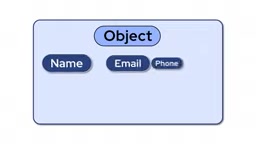
No matter how complex the workflow you're building, it ultimately comes down to these five types combined and nested in different ways. For example, a customer's data is an Object; inside it, name and email are Strings, age is a Number, and payment status is a Boolean. A list of customers is an Array of Objects. There's no hidden sixth type.
Fixed vs. Expression: Static Values vs. Dynamic Values
When configuring a Node, you typically face two choices: Fixed or Expression.
Fixed means you hardcode a value. No matter what data flows through, the Node always uses the same value — like writing a specific name on an envelope by hand. That name never changes.
Expression tells the Node to automatically pull a value from the incoming data at runtime. Instead of hardcoding an email address, you tell the Node: "take the email address from the data currently flowing in." It's like writing "fill in the name of whoever is in the envelope" — each time the workflow runs, the Node picks up the appropriate value based on the current data.
This is the difference between a workflow that can only handle a single scenario and one that adapts to different data. With the same set of Nodes, you can correctly handle 100 different customers or 100 different emails.
Execution Order and Branching Logic
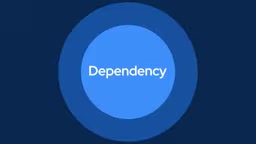
By default, n8n executes Nodes in the order they're connected — starting from the Trigger (the Node that kicks off the entire workflow) and generally moving left to right along the connections. Crucially, a Node typically waits for the previous Node to finish and produce output before it starts. This is called a dependency: a Node depends on the Node before it.
But note the word "default" — workflows don't have to follow a single path from start to finish.
- IF Node: Evaluates a condition (e.g., is the order over $100?) and routes to one path if true, another if false.
- Switch Node: Also routes to different branches, but supports multiple outcomes — each branch can contain an entirely different set of Nodes.
Branching paths can be rejoined using a dedicated merge Node. Think of a river splitting around an island and then flowing back together — this is a much more accurate mental model than a straight line. Some parts of a workflow run sequentially; others branch based on conditions; sometimes multiple paths run in parallel before merging.
AI Agent: Letting AI Decide the Path
All the branching above is based on rules you define in advance. But what if the decision about which path to take requires judgment in the moment rather than a fixed rule? That's where AI Agents come in.
A regular Node does one deterministic thing, and the path is planned from the start using IF or Switch. An Agent completely changes this approach: instead of pre-planning every step, you give it a goal, an AI model capable of reasoning, and a set of Tools. These tools are essentially other workflows, and the Agent decides on its own when to call them.
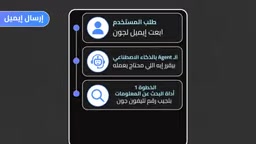
For example: you give an Agent two tools — one to look up information about a person, one to send an email. You don't tell it "look up info first, then send the email." You just describe what each tool does and when it's appropriate. When someone asks the Agent to send an email to a specific person, the Agent reasons: "Do I need to learn more about this person first?" It calls the lookup tool, then decides to call the email tool. If the task doesn't require sending an email at all, it won't use that tool.
This is the core distinction: with a regular workflow, you draw all the paths and possibilities yourself. With an Agent, you provide tools and a goal, and the AI decides which path to take based on the current request.
From a technical perspective, AI Agents rely on the Function Calling capability of large language models (LLMs). When an Agent receives a request, the model doesn't just generate a text response — it can also output structured instructions like "I need to call this tool with these parameters." n8n captures these instructions, executes the corresponding workflow or API call, and feeds the result back to the model. The model then determines whether the task is complete or whether it needs to call more tools. This "think → act → observe → think again" loop is often called the ReAct (Reasoning + Acting) pattern. Understanding this helps you anticipate an Agent's limitations: the quality of its decisions depends directly on how clearly you describe each tool. The more accurately a tool is described, the higher the probability the Agent will choose the right one.
Two Types of Memory: Context Memory and RAG
If an Agent makes decisions in the moment, how does it remember previous parts of the conversation? And how does it know about information it was never trained on? There are two distinct types of memory, each solving a different problem.
Context Memory is short-term memory. It lets the Agent remember what was said earlier in the same conversation. Without it, if you tell an Agent your name and then ask a follow-up question, it treats every message as if it's meeting you for the first time.
RAG (Retrieval Augmented Generation) solves a different problem. It doesn't handle remembering conversations — instead, it gives the Agent access to information it was never trained on, such as your company's latest price list, product catalog, or internal documents. This information is stored in a separate database. When the Agent is asked a question, it retrieves relevant content from the database and uses it to generate an answer — rather than guessing or making things up.
In short: Context Memory lets the Agent remember the conversation; RAG lets the Agent know things beyond the conversation. An Agent can have one, both, or neither — it entirely depends on what task you need it to perform.
It's worth going deeper on how RAG works. When documents are imported into the system, they're first split into small chunks. An Embedding Model then converts each chunk into a numerical vector, which is stored in a Vector Database. When a user asks a question, the question itself is converted into a vector, and the system finds the chunks whose vectors are "closest in direction" to the question vector. Those chunks, along with the original question, are passed to the language model to generate an answer. This process doesn't modify the model's parameters at all — it simply provides relevant context at inference time. This makes RAG especially well-suited for frequently updated information: if your price list changes every week, you just re-import the document. No retraining required. In n8n, the Vector Store Node encapsulates this entire process.
Back to the Subway Map
Stepping back, that initially confusing subway map is, at its core, just this: a set of Nodes, each responsible for one specific task with clear Input and Output; data flowing between them in a structured way, ultimately composed of just five basic types. Nodes generally execute in connection order, but workflows can branch, converge, or run multiple paths in parallel — which is exactly how real business logic works.
Agents build on the same foundation. The only difference is that instead of you drawing all the paths, an AI model autonomously selects paths among a set of tools — using Memory to maintain conversational context and RAG to access information beyond its training.
None of these concepts are complicated on their own. What makes a complete workflow look complex is simply that these simple ideas are layered and combined together. And that's precisely the value of understanding the fundamentals: once you grasp how these building blocks work together, every new workflow you open is no longer a foreign puzzle — it's the same familiar set of building blocks, just connected in a slightly different way.
Related articles

Felix Rieseberg Personal Homepage
Felix Rieseberg's personal homepage sparks attention on Hacker News. This article covers the Slack engineer's technical background, the rise and fall of nativefier, and the value of a developer homepage as a tech calling card.

@ai-sdk/vue 3.0.306 Patch Release Syncs with [email protected] Update
@ai-sdk/vue 3.0.306 released, synced with [email protected]. A routine patch release for the Vercel AI SDK ecosystem with no public API changes; the Vue adapter layer stays version-aligned with the core package.

Gemini 4 Argon API Launches: The Era of Million-Token Output Begins
Google launches Gemini 4 Argon with sparse MoE architecture, up to 1M output tokens, and a 68.90% Vals Index score, available across API, AI Studio, and the Gemini app.