n8n + Gemini Automated Morning Briefing: Build an AI News Summary Workflow at Zero Cost
Use n8n to connect RSS, Gemini, and Gmail to build a daily AI news summary email with zero code.
The article breaks down a zero-code automation solution based on n8n and Google Gemini: Schedule Trigger runs on a schedule, RSS Read fetches news, Limit caps item count to avoid free-tier rate limits, AI Agent generates formatted summaries with Gemini, Aggregate merges outputs into one list, and after Markdown-to-HTML conversion Gmail delivers the email. It also covers RSS stability, Prompt robustness, Gmail limits, and cost boundaries.
Manually scanning the news every morning, filtering AI updates, and compiling summaries takes far more time than the reading itself. A blogger overseas shared an automation solution built on n8n and Google Gemini, with a core approach of fetching news sources via RSS, generating summaries with Gemini, and delivering them on schedule through Gmail—all with zero code and zero cost. This article breaks down the logic behind building this workflow and adds a few practical details that are easy to overlook.
Overall Workflow Architecture
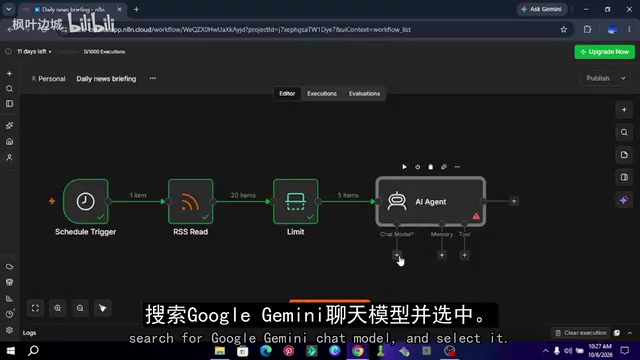
The entire automation is chained together from six nodes: Schedule Trigger → RSS Read → Limit → AI Agent (with the Gemini chat model attached) → Aggregate → Markdown to HTML → Gmail send.
The blogger emphasized in the video that this order cannot be rearranged arbitrarily. In particular, the Aggregate node must come after the AI Agent and before the Markdown conversion; otherwise, the email will be split into five separate messages instead of one complete morning briefing.
Step 1: Obtain Two Key Credentials
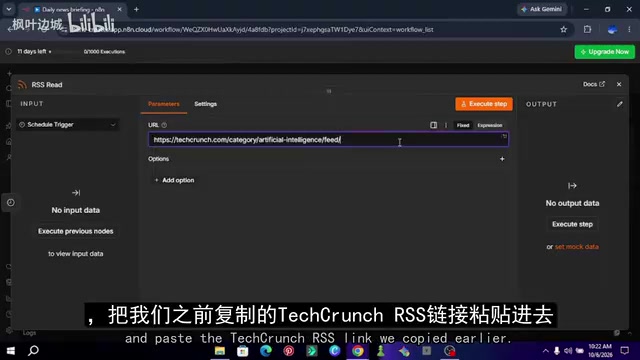
Two things need to be prepared before building. The first is the RSS feed address—taking TechCrunch's AI channel as an example, appending /feed/ to the end of the category page URL yields the standard RSS link. This trick works for most major news sites, but not all websites offer RSS, and some media outlets have gradually deprecated the protocol, so you need to verify whether the link returns valid XML before building.
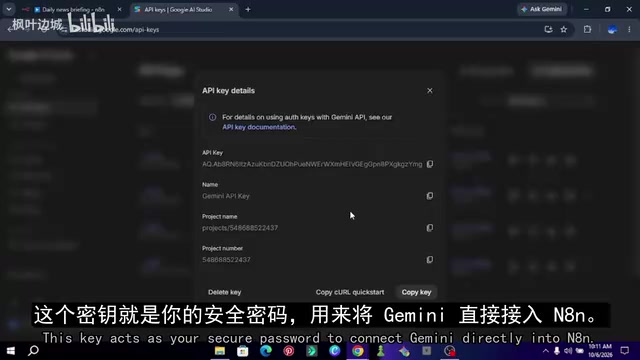
The second is the Gemini API Key. Visit Google AI Studio (aistudio.google.com), sign in with a Google account, click to create an API key, and copy the generated string and keep it safe. The blogger specifically warns that this key is equivalent to an account password and should not be hardcoded in publicly shared workflows.
According to the video demonstration, Gemini's free quota is more than enough to support a daily summary task of 5 news items, but Google imposes a per-minute request limit on the free tier, which is one reason a Limit node must be added later.
n8n and Workflow Automation: n8n is an open-source workflow automation tool that uses visual node orchestration. Users drag and drop nodes and connect them into pipelines, allowing different services to execute in sequence according to predefined logic. Each node represents an operation (such as scheduled triggering, HTTP requests, AI calls, or sending email), and the data items passed between nodes constitute the workflow's state. n8n supports self-hosting, and the community edition is free—this is the foundation for the "zero cost" of this solution. Unlike SaaS tools such as Zapier, n8n keeps data on your own server, making it suitable for automation tasks that involve API keys, but it also requires users to maintain the instance's timezone, network, and stability themselves.
RSS and the Feed Protocol: RSS (Really Simple Syndication) is an XML-based content aggregation format in which websites output their latest articles in a standardized structure; readers or automation tools can pull from a fixed address to obtain titles, links, publication times, and summaries. It requires no login and does not depend on page structure, so it is often used as a stable entry point for news scraping. However, RSS is a feature that sites actively provide, and in recent years many media outlets have shut down or weakened Feed output for commercial reasons, which is why the article emphasizes verifying that a link returns valid XML before building. For sites that do not provide RSS, you usually need to switch to web scraping or third-party APIs, which increases both complexity and maintenance cost.
Step 2: Scheduled Trigger and News Fetching
Add a Schedule Trigger node to the n8n canvas and set the trigger interval to daily at 8:00 AM sharp. There is an easy pitfall here: n8n uses the instance's timezone by default, so if the server is deployed overseas, the actual trigger time will deviate by several hours from what you expect, and you need to manually confirm the timezone in the settings.
Next, add an RSS Read node and paste the Feed link you copied earlier. After clicking Execute Step, the output panel on the right immediately displays the list of fetched articles, including titles, links, publication times, and body summaries.
An RSS feed usually returns more than 20 articles. The blogger points out that sending all of them to Gemini will trigger rate-limit errors, so a Limit node needs to be inserted with the maximum number of items set to 5, processing only the latest five. This number can be adjusted according to personal reading habits, but it is recommended not to exceed 10; otherwise, the token consumption and waiting time for a single summary will rise noticeably.
Step 3: Make Gemini Output Only the Summary
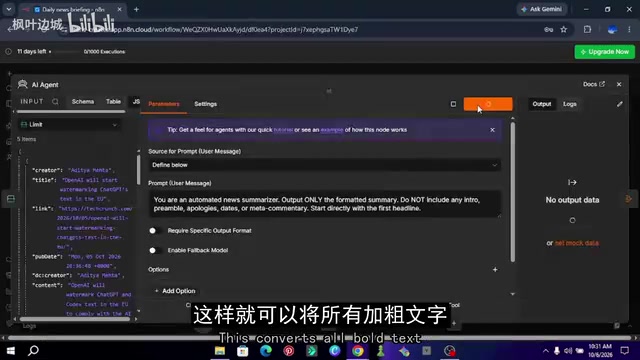
The AI Agent node is the core of the entire workflow. In the Prompt, the blogger wrote a strongly constrained instruction requiring the model to output only the formatted summary, without adding opening remarks, apologies, dates, or meta-commentary, and to start directly from the first headline.
This detail is worth expanding on. Large language models by default tend to output pleasantries such as "Sure, here is the news summary you asked for." This is harmless in a chat setting, but once embedded in an automation pipeline, it pollutes the downstream HTML rendering result. By explicitly prohibiting meta-commentary, you can significantly improve output consistency.
In the model slot, select Google Gemini Chat Model and bind the API Key credential created earlier.
Instruction Following and Meta-Commentary in Large Language Models: LLMs are trained in conversational interactions to respond to requests first and then provide content, so they often output opening lines like "Sure, here is the summary." Such text is harmless in chat, but in an automation pipeline it becomes noise for downstream rendering and can even break the structure of Markdown/HTML. By explicitly constraining the output format in the Prompt (for example, "output only the summary body, without any explanation"), you can significantly improve the parseability of the output. This practice belongs to "format constraints" in prompt engineering, and in scenarios where model output must be consumed by machines, its importance often exceeds tuning the quality of the content itself.
API Rate Limits and Free Quotas: The free tier of the Gemini API has quotas based on requests per minute (RPM) and requests per day; once exceeded, requests are rejected and return errors. If an automation workflow submits a large number of items to the model at once, it can easily trigger limits within a short period, causing some items to fail processing. The role of the Limit node is precisely to reduce the input size before entering the AI step, both avoiding rate limits and controlling token consumption and waiting time. Understanding the unit of the quota (number of requests rather than number of items) helps in reasonably setting concurrency and batch size, especially when expanding to multiple RSS sources, where estimates need to be made in advance.
Step 4: Aggregation, Format Conversion, and Email Delivery
By default, n8n executes downstream nodes separately for each input item, so five articles mean five separate emails. The role of the Aggregate node is to merge the five AI outputs into one list; simply select "aggregate all items into a single list."
Gemini returns text in Markdown format, and putting it directly into an email will display bare asterisks and hash marks. Switch the Markdown node to "Markdown to HTML" mode, drag the aggregated text field into the input box, and bold text and headings will be converted into standard HTML tags.
Finally, add a Gmail node, choose send email as the action, fill in your own address for both sender and recipient, change the email type to HTML, drag the converted HTML field into the body area, and set the subject to "Daily AI News Summary." Click Test Step, and a cleanly formatted morning briefing will appear in your inbox.
After the test passes, click the Public button in the upper right corner to publish the workflow, and from then on it will run automatically every day at 8:00 AM.
A Few Practical Details Worth Noting
RSS source stability is the biggest external dependency of this solution. News website redesigns, Feed address migrations, and upgraded anti-scraping strategies can all cause fetching to fail. It is recommended to add an error-handling branch to the workflow, or to attach a conditional check after the RSS node so that an alert is sent instead of an empty email when the number of items is zero.
Prompt robustness is equally critical. The instruction given by the blogger is tuned for TechCrunch's English content. If you switch to a Chinese news source, the model may still output an English summary, so you need to explicitly specify the output language in the Prompt.
Gmail sending limits: Free Gmail accounts have a daily sending cap, which a personal morning briefing scenario will never approach, but if you want to distribute this summary to a team, you will need to switch to an SMTP service or a professional email API.
Cost boundaries: The self-hosted version of n8n is free, and the Gemini free tier has quota limits. In the blogger's solution, a request volume of 5 items per day runs well within the free quota, but if you expand to multiple sources and more items, you need to estimate token consumption in advance.
The value of this workflow lies not in its technical complexity, but in compressing the four stages of "information acquisition—filtering—summarization—delivery" into a one-time configuration that runs long term. For practitioners who need to track developments in a specific field, with slight modifications it can be reused for scenarios such as competitor monitoring, paper tracking, and industry policy briefings.
One-line Summary
Use n8n to connect RSS, Gemini, and Gmail to build a daily AI news summary email with zero code.
Paragraph Summary
The article breaks down a zero-code automation solution based on n8n and Google Gemini: Schedule Trigger handles scheduled triggering, RSS Read fetches news sources, the Limit node caps the number of items to avoid rate limits on Gemini's free tier, AI Agent calls Gemini to generate formatted summaries, the Aggregate node merges multiple outputs into a single list, and after Markdown is converted to HTML, Gmail delivers it on schedule. The author emphasizes that the node order cannot be rearranged arbitrarily—especially the Aggregate node, which must come after the AI Agent; otherwise, the email will be split into multiple messages. The article also adds practical details such as RSS source stability, Prompt robustness, Gmail sending limits, and cost boundaries.
Related articles

WorkBuddy Agent in Action: From AI Q&A to Automated Office Work
WorkBuddy is Tencent's AI agent desktop workbench that reads local files, operates office software, executes multi-step tasks, and runs on schedules. This article explains its core features, key differences from traditional AI tools, and use cases.

Anthropic Research: LLMs Make Formal Software Verification at Scale Possible
Anthropic Frontier Red Team research shows LLMs can generate formal proofs at the RISC-V assembly level for over 100 real open-source libraries, covering 123 OSS-Fuzz libraries and 239 entry points, totaling about 180 million lines of Rocq proofs and finding hundreds of bugs. The article analyzes specification generation, the proof pipeline, trust boundaries, and cost reduction paths.

Prompt Engineering for Beginners: From Writing Prompts to Building AI Collaboration Skills
From the four functions of prompts to the six-step prompt engineering process, this article systematically covers core concepts, business value, and three layers of limitations to help beginners build a complete cognitive framework for prompt engineering.