WorkBuddy Agent in Action: From AI Q&A to Automated Office Work

Tencent WorkBuddy is an AI agent desktop workbench that reads and writes local files and autonomously executes multi-step tasks.
The article introduces Tencent's WorkBuddy as a three-in-one workplace AI assistant: AI brain + computer operator + automation engine. Unlike conversational AI like ChatGPT, WorkBuddy can actually read and write Word, Excel, and PDF files locally, plan multi-step task paths, and run unattended on schedules or via WeChat remote control. It also integrates with Tencent Docs, WeCom, and databases, and expands capabilities through Skill packages. The article compares it with traditional AI tools across five dimensions and notes it suits admin, HR, and operations staff handling batch file processing and repetitive workflows.
When AI Grows "Hands": WorkBuddy Redefines Office Automation
If you've used conversational AI like ChatGPT, Doubao, or Tongyi Qianwen, you've probably had this experience: you ask it "how do I organize these 80 resumes," and it enthusiastically gives you a Python snippet and step-by-step instructions—and then you still have to do the work yourself. That's the limitation of traditional AI tools: it's a smart consultant, but it won't do the work for you.
Tencent's WorkBuddyAd is designed to break down exactly this wall. Its official positioning is a "full-scenario workplace AI assistant," but a more accurate understanding is a three-in-one combination of AI brain + computer operator + automation engine. You tell it what you need, and it not only plans the path but actually reads files, operates software, and generates finished files on your local computer.
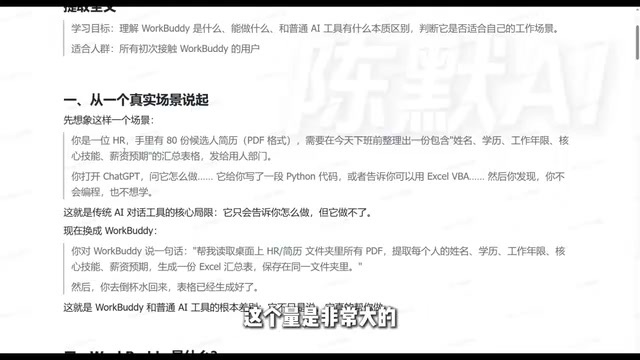
The difference may seem like just "one more step," but it actually changes the entire workflow. Judging from the positioning of this 256-episode tutorial series on Bilibili, WorkBuddy is regarded as a domestic alternative to Codex—low barrier to entry, no special network environment required, no complex configuration, and beginners can get started quickly.
What Exactly Can WorkBuddy Do? Breaking Down Three Core Capabilities
1. Local File Operations: Not Just Reading, But Writing
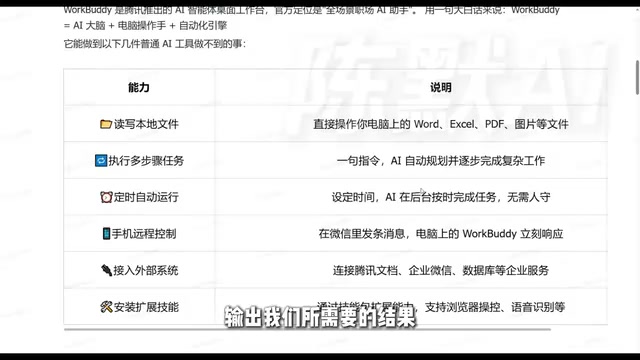
The output of traditional AI chat tools stays in the chat box, while WorkBuddy's output lands directly on your hard drive. You ask it to read all the PDF resumes in a folder, extract names, education, years of experience, core skills, and salary expectations, and generate an Excel summary table—it will open the files itself, parse the content, and write it into the spreadsheet. You only need to check whether the final result meets expectations.
Word, Excel, PDF, and images—it can read, write, and convert all these everyday office files. The output is a deliverable finished file, not a suggestion that says "here's how you could do it."
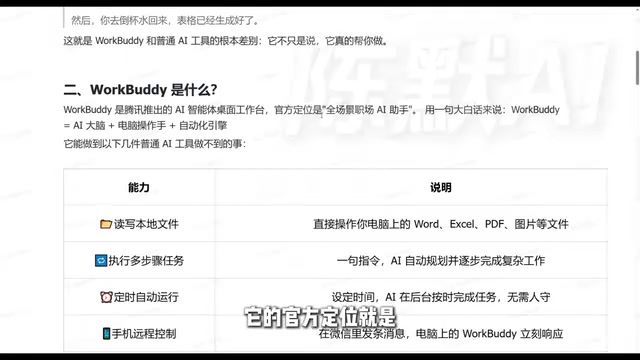
2. Automatic Multi-Step Task Planning
Complex tasks often need to be broken down. WorkBuddy can understand requirements and automatically plan an execution path, completing them step by step. More importantly, if a step goes wrong during execution, it can redesign the path to work around it—this dynamic adjustment capability is something single-turn Q&A AI completely lacks.
For example: ask it to "collect information on a certain industry and organize it into a Word report," and it will decide what to search first, how to filter, and what structure to organize by—rather than waiting for you to feed it instructions step by step.
3. Scheduled Tasks and Remote Control
Once a process is fixed, it can be put into a scheduled task for automatic execution—for example, automatically compiling a weekly report and sending it to you every Monday morning. You don't need to stay at the computer; as long as WorkBuddy is running in the background.
Remote control is another practical point: send a command via a mobile mini-program or WeChat client, and WorkBuddy on your computer receives it and starts working. The output can be saved locally or sent back to your phone.
The technical mechanism behind scheduled tasks deserves a brief explanation. At the operating system level, scheduled triggering is usually implemented through task schedulers (such as Windows Task Scheduler) or a resident background process: WorkBuddy keeps running in the background, and when the preset time arrives, it automatically wakes up and executes the established process. Remote control relies on message channels and command parsing: commands sent from a mobile mini-program or WeChat client are first transmitted through Tencent's instant messaging service to a listener process on the computer, and then handed over to the AI for parsing and execution. This "message-as-command" model lets users control a local computer without remote desktop or VPN—as long as there is network access. Note that remote control requires WorkBuddy to stay online and the computer not to sleep; in practice, power policies and network stability need to be configured properly, otherwise scheduled or remote tasks may fail due to process interruption.
Extended Capabilities: From Solo Work to System Integration
WorkBuddy supports integration with external systems, such as Tencent Docs, WeCom, and even databases. This means it is not just a local tool but can become the hub of your workflow—where data comes from and where it goes after processing can all be connected.
The Skill package mechanism further expands its boundaries: browser data scraping and speech-to-text summarization can all be implemented by installing skills. Sending it a recording and asking it to organize it into summary text is a typical use case.
Skill packages can be understood as WorkBuddy's "plugin system," with a design approach similar to browser extensions or IDE plugins: each Skill encapsulates a specific capability (such as browser data scraping or speech-to-text) and provides a standardized interface for the main program to call as needed. The advantage of this mechanism is that capabilities are pluggable and composable—users don't have to wait for official updates to expand the tool's boundaries by installing different Skills. From a technical implementation perspective, a Skill usually consists of three parts: trigger description, execution logic, and input/output specifications. The AI automatically matches and invokes the corresponding Skill based on task semantics. This is in line with the design philosophy of OpenAI's Function Calling and Anthropic's Tool Use—both let large models "borrow" external capabilities when needed, rather than relying solely on their own parameters to generate results.
What Is the Essential Difference from Traditional AI Tools?
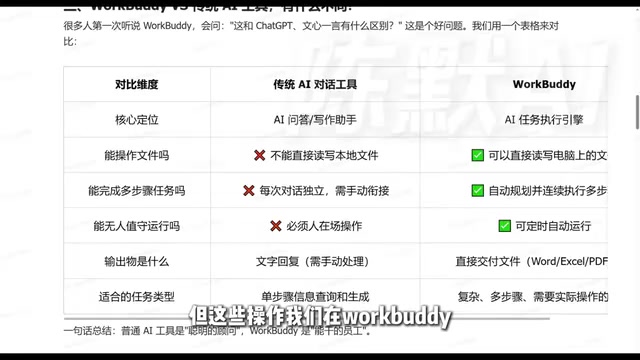
A comparison across several dimensions makes it clearer:
Core positioning: Conversational AI is a "smart consultant," while WorkBuddy is a "capable employee." The former tells you the answer; the latter delivers the result.
File operations: Traditional AI cannot read or write local files; WorkBuddy can.
Task complexity: Traditional AI excels at single-step information queries and output; WorkBuddy can break down and execute complex multi-step tasks.
Execution timing: Traditional AI requires someone to be present for interaction; WorkBuddy can run unattended on a schedule.
Output form: Traditional AI outputs text; WorkBuddy outputs files that can be used directly.
This comparison comes from the tutorial's systematic review of the two types of tools. The core conclusion is: WorkBuddy fills in the last stretch of AI's journey from "can talk" to "can do."
To understand the fundamental difference between "computer operator" agents like WorkBuddy and conversational AI, we need to introduce the concept of AI Agent. Traditional conversational AI is essentially a "stateless" language model interface: each request is processed independently, and the model is only responsible for generating text—it has no memory, planning, or ability to interact with the environment. An AI Agent, by contrast, is a system that adds three major modules on top of a large model: Planning, Memory, and Tool Use. Tool Use allows the model to call external functions or APIs to read and write files, operate software, and access the network; the planning module allows the model to break complex goals into subtasks and dynamically adjust the path; the memory module retains context to support multi-step execution. WorkBuddy is a typical desktop-level Agent: the large model serves as the decision-making center, the local file system and applications become "tools" it can call, and the automation engine handles scheduling and execution. This architectural difference explains why conversational AI can only "talk," while an Agent can "do."
Who Is It For?
Judging from the scenarios shown in the tutorial, WorkBuddy is most directly valuable for these groups: administrative/HR staff who need to process files in batches, operations staff who need to automate repetitive processes, and ordinary workplace users who want to integrate AI capabilities into local workflows but don't want to fuss with code.
Its barrier to entry is indeed low—no special network required, no complex configuration—which is a clear advantage over similar tools. As for the "earn 600 yuan by taking five orders in three days" mentioned in the tutorial title, that is a monetization case from a single source with limited reference value, and it should not be regarded as a core selling point.
What is truly worth paying attention to is the shift in the way we work: when you hand the entire process of "research—organize—generate documents" to an agent that can do the work itself, the time saved is its greatest value.
One-line Summary
Tencent WorkBuddy is an AI agent desktop workbench that can read and write local files and autonomously execute multi-step tasks.
Paragraph Summary
The article introduces Tencent's WorkBuddy, positioning it as a three-in-one workplace AI assistant: "AI brain + computer operator + automation engine." Unlike conversational AI such as ChatGPT, which can only offer suggestions, WorkBuddy can actually read and write Word, Excel, PDF, and other files on a local computer, automatically plan multi-step task paths, and support scheduled unattended operation and remote control via WeChat. It also supports integration with external systems such as Tencent Docs, WeCom, and databases, and expands capabilities such as browser scraping and speech recognition through Skill packages. The article compares it with traditional AI tools across five dimensions—core positioning, file operations, task complexity, execution timing, and output form—and points out that it is suitable for workplace users in administration, HR, operations, and other roles who need to process files in batches and automate repetitive processes.
Related articles
Getting Started with Gemini 4 Argonne: A Hands-On Guide from Building Sites to Agents
Complete Gemini 4 Argonne tutorial: build a calorie tracker app with one prompt in Google AI Studio, review 10-page technical documents with long context, develop a browser game as a coding Agent in Anti-Gravity, plus API Key setup, pricing, and subscription requirements.
Cursor vs. Claude Code vs. Copilot: A Scenario-Based Selection Guide
Cursor, Claude Code, or GitHub Copilot? A scenario-based guide covering daily coding, large refactors and long tasks, and teams locked into existing IDEs—plus common pitfalls and combined-use advice.

DB Chat: Conversing with PostgreSQL in Natural Language, with AI Auto-Generating SQL
dbchat lets users converse with a PostgreSQL database in natural language, with an AI agent auto-generating SQL and returning live results. This article analyzes its MCP Server + Next.js + AWS full-stack architecture and anti-hallucination guardrail design.