n8n Workflow in Practice: Human-in-the-Loop JIRA Tickets and RAG Implementation

Two hands-on n8n scenarios: human-in-the-loop JIRA tickets and a Supabase claims RAG assistant.
Based on a YouTube creator's demo, this article covers two n8n AI workflow scenarios. The first is a JIRA ticketing flow with human review: a Gmail trigger feeds a Gemini Agent with a structured output parser to set priority, a Wait node pauses for a reviewer to adjust it via a dynamic form, then the workflow maps text priority to JIRA's numeric ID and creates the ticket. The second is an insurance claims RAG assistant on Supabase, with an ingestion workflow and a chat workflow using conversation memory and vector store Q&A. The article notes the demo uses trial and free services, serving as feasibility validation.
n8n is a workflow orchestration tool with a visual canvas that connects triggers and various external services through nodes. Its value isn't in replacing code, but in making control flow and data flow visible and debuggable. This article is based on a hands-on demo by YouTube creator Appandarajan Poornachandran, breaking down two typical scenarios: JIRA ticket creation with a human review step, and an insurance claims RAG assistant built on a Supabase vector database.
Why Choose n8n: The Core Advantages of Visual Orchestration
Every workflow in n8n consists of a trigger node and subsequent action nodes, with JSON data passed between them. The creator emphasizes that you don't need to memorize node order, nor do you necessarily have to write JavaScript—most field mappings can be done by dragging and dropping. What you really need to understand is two things: what the previous node's output is, and what input the current node requires.
This design makes debugging intuitive. You can execute node by node and view data snapshots at any time; when you hit an error, tossing the error message and node configuration to a tool like ChatGPT often yields a fix suggestion. For teams looking to integrate AI capabilities into existing systems, this is far less work than writing orchestration logic from scratch.
Scenario 1: A Human-in-the-Loop JIRA Ticketing Workflow
From Email Trigger to AI Prioritization
The first case starts with a user's bug report email. The workflow begins with a Gmail trigger, set to poll the inbox every minute and start the process whenever a new email arrives. The email content is then fed into an AI Agent node.
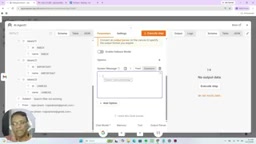
This Agent uses the Gemini model and is equipped with a structured output parser. The output format example given by the creator is three priority levels: high/medium/low. The role of the structured output parser isn't hardcoding—it's constraining the model to return results in a fixed JSON structure so downstream nodes can use them directly. The Agent's user message maps the sender, recipient, subject, and body snippet via drag-and-drop, while the system message explicitly instructs it to read the email, determine the nature of the issue, and set a priority.
The Structured Output Parser is a common component in LangChain and n8n AI nodes, used to constrain a large model's free-text output into JSON that conforms to a predefined schema. It typically uses Zod or JSON Schema to describe field types and enum values, attaches format instructions when requesting the model, and performs validation and retries upon return. Compared to writing "please return JSON" in the prompt, the parser significantly reduces format drift, allowing downstream nodes to reliably extract values by field—for example, reading the
priorityfield directly without further string parsing.
The Human Review Step: Wait Node and Form
After prioritization, the workflow doesn't create the ticket directly. Instead, it first sends the reviewer an HTML email with a form link. The key here is the Wait node—the workflow pauses here until the form is submitted.
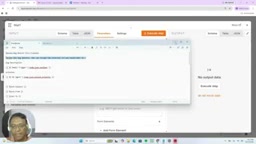
The form is dynamically generated by n8n and includes an editable bug description text box and a priority dropdown. The reviewer can modify the AI's assigned priority—say, changing "medium" to "high"—and then submit. This pause-and-resume mechanism is exactly how human-in-the-loop is implemented: let the machine do the initial triage, and let the human make the final call.
Human-in-the-loop refers to retaining human judgment points within automated workflows, commonly seen in high-risk or accountability-requiring steps such as ticket prioritization, content moderation, and claims approval. In n8n, the Wait node has two resume methods: a time delay, or waiting for an external event (such as a Webhook or form submission). While the workflow is paused, the execution state is persisted, and upon resuming it continues from the pause point rather than re-running from the start. This makes the "machine triage + human confirmation" model low-cost to implement while retaining a complete execution trail for auditing.
Writing to JIRA and Sending Confirmation
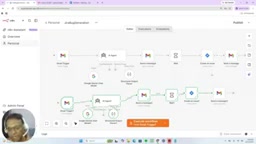
After the form is submitted, the workflow resumes and enters the JIRA node to perform the "create issue" operation. There's a noteworthy detail here: priorities in n8n are text (high/medium/low), while JIRA uses numeric IDs for priorities, so a mapping conversion layer is needed. In the demo, the creator converts the text priority to JIRA's corresponding numeric value, then fills in the summary and description fields.
Once the ticket is created successfully, the final Gmail node sends a confirmation email to the original reporter, informing them that the issue has been received and the team is following up. The entire chain—from receiving the email, analyzing, reviewing, creating the ticket, to sending confirmation—forms a closed loop.
Scenario 2: A Claims RAG Assistant Based on Supabase
Why a Vector Database Is Essential
The second case targets the insurance claims scenario: claims specialists handle a large volume of cases daily and are prone to misjudgment, so they need an AI assistant that recommends "approve / need more information / reject" based on policy terms.
The key to this type of task is that answers must come from internal documents, not from the model's free-form generation. Traditional relational databases can only do exact matching—once the user phrases things differently, the lookup fails. RAG's approach is to chunk documents, convert them into vectors stored in a vector database, and perform semantic retrieval at query time. The creator chose Supabase as the vector database, first running a SQL script in the backend to create a documents table for storing policy document chunks and vectors.
A vector database specializes in storing and retrieving high-dimensional vectors (i.e., embeddings). Its core capability is approximate nearest neighbor (ANN) search: convert the query text into a vector, then find the document chunks with the closest semantic similarity by cosine similarity or Euclidean distance. Supabase provides this capability on PostgreSQL through the pgvector extension, so the same table can store both business fields and vectors, with IVFFlat or HNSW indexes. Compared to dedicated vector databases, its advantage is sharing the same infrastructure with relational data and permission systems, making it suitable for teams already using Supabase.
The Data Ingestion Workflow
The first sub-workflow is responsible for "feeding data." After a manual trigger, the Google Drive node first searches a specified folder (the insurance folder in the demo), finds 4 files, and downloads them one by one by file ID.
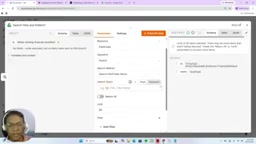
The downloaded files are converted into binary text by the Default Data Loader, then chunked by the Recursive Character Text Splitter, with the chunk size cap set to 100 or 1000 in the demo (verbal accounts differ slightly between segments). The chunked text is then converted into numeric vectors by the Gemini embedding model, and finally written into the documents table via the insert operation of the Supabase Vector Store node. This "load—split—embed—store" chain is the standard approach for RAG ingestion.
The Recursive Character Text Splitter is a text splitter that recursively splits by character. It prioritizes natural boundaries such as paragraphs, line breaks, and sentences, falling back level by level until the chunk size falls within the configured range, while preserving some overlap to avoid semantic breaks at split points. Chunk size is a key tuning parameter: too small loses context, too large dilutes retrieval precision and drives up embedding costs. The embedding model maps text into fixed-dimension numeric vectors, where semantically similar texts are closer in vector space—this is the foundation of RAG semantic retrieval.
The Chat Workflow and Three Rounds of Testing
The second sub-workflow opens with a Chat Trigger, where the claims specialist enters claim information in the chat window. The AI Agent is configured with the Gemini model, conversation memory, and a "vector store Q&A" tool. This tool points to the documents table, uses the Gemini embedding model for retrieval, and the system prompt requires it to provide reasoned recommendations based on coverage scope, exclusions, and evidence.
The creator validated with three test claims: the first received "recommend approval" with reasoning and evidence citations; the second received "need more information" with specific reasons. The outputs were all based on retrieved policy content, not the model's凭空 inference.
Practical Advice and Boundaries
Both cases together illustrate one thing: n8n's role is as an orchestration layer, connecting systems like Gmail, JIRA, Google Drive, and Supabase, with AI participating in decision-making as one of the nodes. The creator mentions that more external systems can be connected through the MCP client.
But the demo's limitations should also be noted: Supabase's free tier, a JIRA trial project, and single-machine test data all indicate this is a feasibility validation rather than a production solution. Before actually going live, the retrieval quality of the vector database, chunk size tuning, access control for the review form, and the robustness of the priority mapping all need further refinement.
One-line Summary
Breaking down two practical scenarios of using n8n to implement a human-in-the-loop JIRA ticketing workflow and a Supabase-based claims RAG assistant.
Paragraph Summary
Based on a hands-on demo by YouTube creator Appandarajan Poornachandran, this article introduces two typical scenarios of orchestrating AI workflows visually with n8n. The first is a JIRA ticketing workflow with human review: after a Gmail trigger, a Gemini Agent equipped with a structured output parser determines priority; a Wait node pauses the workflow to let a reviewer modify the priority via a dynamic form; upon resuming, the text priority is mapped to JIRA's numeric ID and the ticket is created, followed by a confirmation email to the reporter. The second is an insurance claims RAG assistant based on a Supabase vector database, comprising an ingestion workflow ("search—download—split—embed—store") and a chat workflow with conversation memory and a vector store Q&A tool; tests show that recommendations are based on retrieved policy content. The article also notes that the demo relies on trial and free services, constituting a feasibility validation.
Related articles

Chain of Thought Isn't Just for AI: How Humans Can Use CoT to Improve Thinking Quality
Chain of Thought isn't just a prompt trick for large models. Starting from a Hacker News discussion, this article analyzes why CoT works for human thinking too, breaks down actionable ways to transfer it, and highlights the key differences between human CoT and machine CoT.
Cloudflare Teams Up with OpenAI: Closi…
Cloudflare Teams Up with OpenAI: Closing the Loop from Vulnerability Discovery to Defense with AI
Cloudflare uses OpenAI Daybreak to investigate security vulnerabilities and generate reviewable remediation plans, while developers use Codex to boost coding efficiency and quality.

Orca Multi-Agent Orchestration in Practice: A Guide to Parallel Collaboration with Claude and Codex
Orca is Stable AI's free open-source agent workbench supporting 34 agents like Claude Code and Codex in parallel. Learn its Git worktree isolation, multi-model orchestration, and mobile management.