n8n Workflows: Execute Workflow Node vs Monolithic Flows

Compares n8n's Execute Workflow modular approach vs monolithic flows in maintainability and selection advice.
The article examines workflow organization in n8n, comparing the Execute Workflow Node with monolithic flows. Monolithic flows pack all logic, error handling, and integrations into one canvas—fast to start but prone to clutter and maintenance pain as they grow. The Execute Workflow Node splits automation into modular, reusable sub-workflows, with the main flow handling orchestration, enabling a microservices-style setup where modules can be tested, updated, and reused independently. Using LEGO-vs-concrete analogies, it outlines when to choose each: simple or one-off automations suit monolithic flows, while 20+ nodes, reuse needs, or team collaboration call for modularization. The recommended migration path is to prototype in a monolithic flow, then extract reusable pieces into sub-workflows.
In the n8n automation platform, as business processes grow more complex, how to organize workflow structure becomes a key question. A YouTube tutorial compared two mainstream approaches: the Execute Workflow Node and the Single Monolithic Flow, using intuitive analogies to reveal the huge difference between modular and monolithic design in terms of maintainability.

What Is a Monolithic Flow?
A monolithic flow means cramming all business logic, error handling, and third-party integrations into the same n8n canvas. It's like pouring a house out of a single block of concrete: the initial build seems straightforward, but any local change affects everything else.

The video uses a vivid analogy to illustrate the problem: Modifying one wall requires demolishing the entire structure. As the number of nodes grows, the canvas becomes cluttered, and debugging requires repeatedly tracing connections across a vast field of nodes—locating a single error might mean scanning through dozens of nodes.
For early-stage prototyping, monolithic flows are quick to get started with and require no extra abstraction, so they do have their value. But when a workflow needs frequent iteration or collaboration among multiple people, maintenance costs rise sharply.
Execute Workflow Node: A Modular Approach
The Execute Workflow Node lets you break complex automation into multiple modular, reusable sub-workflows. The main workflow is only responsible for orchestration and invocation, while the actual logic is encapsulated in independent sub-workflows.
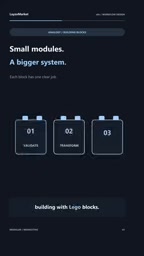
The video compares it to building with LEGO: You assemble small independent modules that snap together seamlessly. Each sub-workflow can be tested and updated independently, and can also be reused by multiple main flows, avoiding reinventing the wheel.
From an architectural perspective, this is essentially implementing a microservices-style organization within n8n. Sub-workflows have clear input and output boundaries, and replacing one module won't affect the others.
Sub-workflow is a process unit in n8n that can be independently invoked by other workflows. Like a regular workflow, it has its own trigger (typically using the Execute Workflow Trigger as the entry point), node canvas, and execution history. The caller specifies the target sub-workflow through the Execute Workflow node and can pass structured input parameters and receive its return results. Each sub-workflow is saved and run separately, so it can be tested and debugged independently of the main flow; the same sub-workflow can also be referenced simultaneously by multiple parent flows, achieving logic reuse. Note that sub-workflow execution consumes a separate execution quota, and the input/output data structures must be clearly agreed upon at design time—otherwise parameter passing across flows is prone to errors. Understanding this mechanism is the foundation of mastering n8n's modular design.
Core Differences Between the Two
| Dimension | Execute Workflow Node | Monolithic Flow |
|---|---|---|
| Structure | Modular, reusable sub-workflows | Single large canvas |
| Debugging | Each module can be tested separately | Must trace nodes globally |
| Updates | Local changes with controllable impact | Changing one spot may affect everything |
| Scalability | Remains manageable as the flow grows | The larger the flow, the messier it gets |
| Time to get started | Requires upfront design | Quick to start |
The video clearly states: Execute Workflow Node creates modular, scalable microservices inside n8n, while monolithic flows leads to visual clutter and maintenance nightmares as processes grow.
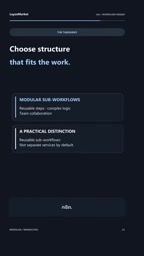
Calling n8n's sub-workflow organization microservices-style is an architectural analogy rather than a strict definition. The core characteristics of microservices include: decomposition around business capabilities, independent deployment and operation, communication through well-defined interfaces, and independent replaceability without affecting the caller. The Execute Workflow node does achieve a similar effect within n8n—sub-workflows have clear boundaries, can be updated independently, and interact through input/output contracts. But compared with true microservices, they still run within the same n8n instance, sharing the execution engine and resource quotas, with no independent deployment or network isolation. So a more accurate description is "modular architecture" rather than full microservices, and this distinction is worth keeping in mind when choosing an architectural approach.
How to Choose?
Choosing between the two is not absolute. For one-off scripts or simple two- or three-step automations, a monolithic flow is completely sufficient, and forcing a split only increases the cognitive load. But as long as any of the following conditions is met, it's worth considering the Execute Workflow Node:
- The flow has more than 20 nodes and the canvas is becoming hard to navigate
- The same piece of logic needs to be reused across multiple flows
- Team collaboration is required, with multiple people maintaining different parts simultaneously
- Error handling logic is complex and needs independent testing
A practical migration strategy is: first get the business logic working in a monolithic flow, identify reusable segments, and then gradually extract them into sub-workflows. This preserves the advantage of a quick start while enabling a smooth transition to a modular architecture.
Summary
Modularity is not the goal, but a means of coping with complexity. The Execute Workflow node uses a LEGO-like compositional approach to turn n8n from a single canvas into an assemblable system; monolithic flows remain efficient in simple scenarios. Only by understanding the boundary between the two can you keep automation workflows maintainable as they scale.
One-line Summary
Compares the maintainability differences and selection advice between n8n's Execute Workflow modular approach and monolithic flows.
Paragraph Summary
The article focuses on workflow organization in the n8n automation platform, comparing two mainstream approaches: the Execute Workflow node and monolithic flows. A monolithic flow crams all logic, error handling, and integrations into a single canvas, offering a fast start but leading to visual clutter and maintenance nightmares as it grows, where changing one part can affect everything. The Execute Workflow node instead breaks complex automation into modular, reusable sub-workflows, with the main flow only handling orchestration—essentially achieving a microservices-style organization within n8n, where each module can be tested, updated, and reused independently. The article uses the analogy of LEGO versus concrete to reveal the differences and provides selection criteria: simple or one-off automations suit monolithic flows, while more than 20 nodes, repeated reuse, or team collaboration should prompt splitting. The recommended migration strategy is to first get the logic working in a monolithic flow, then gradually extract reusable segments into sub-workflows.
Related articles

Gemini 4 Argon In-Depth Test: Major Advances in Coding and Multimodality, AI Self-Replication Raises Concerns
Gemini 4 Argon is now globally available. Hands-on tests show strong coding, multimodal, and 3D generation, with faster and cheaper coding than Opus 5.5, but hallucinations remain. Anthropic Fable 5.5 and OpenAI GPT-6.1 Astra surface, while AI self-replication research sparks safety concerns.

Gemini 4 Argon First Hands-On Test: Wins 14 of 19 Benchmarks, but Highly Specialized
Gemini 4 Argon first hands-on test: wins 14 of 19 benchmarks, ranks first in Deep SWE long-horizon software engineering at 77.9%, but loses Terminal Bench to Opus 5.5—clearly specialized. API price doubles after November 30th, so now is the window.
McKinsey's New Interview Format: Letti…
McKinsey's New Interview Format: Letting Candidates Spar with an AI Virtual Client
McKinsey introduces AI-simulated client conversations in junior-level interviews, requiring candidates to engage in 10-minute exchanges. The pilot covers 80% of daily consulting scenarios, but questions remain about fairness and assessment accuracy.