nana: A Multi-AI Coding Agent Terminal Manager for Windows

nana is a Windows-native terminal multiplexer that runs multiple AI coding agents in parallel, each in its own git worktree.
nana is a terminal multiplexer for Windows that solves multi-agent parallel management. It runs Claude Code, Codex, and OpenCode side by side, each bound to an independent git worktree for isolation; provides a status panel (working/waiting/done) and integrated diff review to reduce window switching. Agents keep running in the background after the app closes with recoverable state, ideal for long tasks. Currently in free beta by Gustavo Ramirez, ranked 17th on Product Hunt with 70 upvotes, targeting Windows developers already heavy command-line agent users; technical details and ecosystem coverage remain to be verified.
Why Windows Needs a Dedicated AI Agent Terminal
As AI coding agents like Claude Code, Codex, and OpenCode increasingly become everyday tools for developers, a practical problem emerges: how do you manage multiple agents at once, each working in its own isolated environment without interfering with one another? On macOS and Linux, terminal multiplexers like tmux have long been standard, but the Windows ecosystem has consistently lacked a native solution.
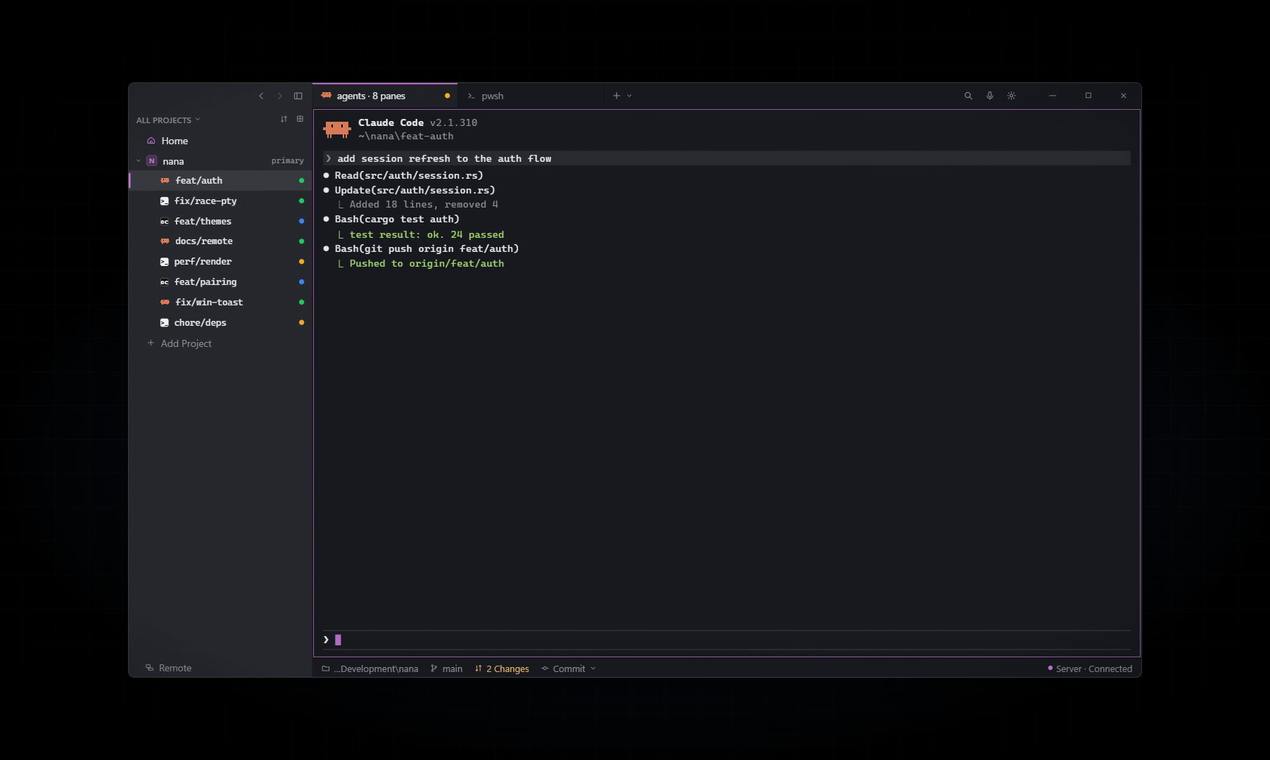
nana is a product aimed squarely at this gap. It's described as a "Windows-native terminal multiplexer," with its core positioning being to let developers run multiple AI coding agents side by side in a single interface, each bound to its own independent git worktree. This design directly addresses the isolation needs of multi-agent collaboration—different agents modify different branches without polluting each other's workspaces.
Core Features: State Awareness and Workflow Integration
nana's feature design centers on three keywords: parallel, visible, and persistent.
Multi-Agent Parallelism with git worktree Isolation
nana allows Claude Code, Codex, OpenCode, and other agents to run simultaneously, each with its own git worktree. This means changes made by Agent A on a feature branch won't affect Agent B's work on a bugfix branch. For developers who need to compare output quality across different agents, or who want multiple agents tackling different tasks in parallel, this isolation is a necessity rather than a nice-to-have.
git worktree is a feature introduced in Git 2.5 that allows multiple working trees to be checked out from the same repository, each mounted on a different branch while sharing the underlying object database. Compared to cloning the repository multiple times with git clone, worktrees incur almost no additional disk overhead, and switching branches requires no stashing or committing of pending changes. For multi-agent scenarios, this means Agent A and Agent B can simultaneously operate on different branches of the same repository, with isolated filesystem views, while their final commits still converge into the same Git history for easy merging and comparison.
Status Panel: Who's Busy, Who's Waiting, Who's Done
One of the biggest pain points in multi-agent scenarios is the "black box" feeling—you don't know whether an agent is still thinking, stuck on a permission confirmation, or has finished its task and is waiting for your review. nana provides a status view that categorizes agents as "working," "waiting," or "done." This seemingly simple feature actually frees developers from the anxiety of constantly switching windows—a single glance at the panel is enough to decide the order of next steps.
Built-in Diff Review
After an agent completes code modifications, developers need to review the changes. nana integrates diff review directly into the terminal interface, eliminating the need to switch to an IDE or git client. Although the source material doesn't disclose the specific interaction details of the diff view, based on the product positioning, it clearly aims to consolidate the loop of "run agent—wait for results—review code" into a single window.
Agents Keep Running After the App Closes
This is the key capability that distinguishes nana from ordinary terminal tabs. After closing the application, agent processes continue running in the background, and their state and output are preserved when you reopen it. For AI coding tasks that often run for several minutes or longer, this feature means developers don't have to keep windows open just to wait for results—they can close their laptop to attend a meeting and check progress when they return.
Implementing terminal process persistence in the background on Windows typically relies on ConPTY (Console Pseudo Terminal). This is a pseudo-terminal API introduced in Windows 10 1809 that replaced the previously hard-to-program traditional console model, providing an abstraction similar to Unix pty for terminal multiplexers, IDE built-in terminals, and similar tools. For nana to ensure agent processes aren't interrupted after the UI is closed, it needs to decouple agent processes from the UI process, hosting ConPTY sessions through a persistent background service and replaying buffer contents upon reconnection. How robust this mechanism is directly determines whether the "close the laptop and come back later" experience is reliable.
Product Positioning Analysis: Who Should Use nana
Judging from the feature combination, nana's target users aren't casual users who occasionally use AI for code completion, but heavy developers who have already incorporated AI agents into their daily workflows. Specifically, the following groups would benefit directly:
- Multi-agent comparison users: Those subscribed to both Claude Code and Codex who want to compare output quality across agents on the same task, requiring a side-by-side, independently isolated environment.
- Task-routing users: Those assigning refactoring, test writing, and documentation generation to different agents, who need a clear status overview to prioritize reviews.
- Windows-native environment users: Those unwilling to switch to WSL or rely on third-party emulation layers for terminal multiplexing capability, who want an experience deeply integrated with Windows.
One detail worth noting: nana is currently in a free beta phase, built by developer Gustavo Ramirez. It received 70 upvotes and ranked 17th on Product Hunt, indicating it hits a real need for some developers, though its reach is still early-stage. The comment section has only 2 discussions, which also reflects that the product is still in a niche early-adopter phase.
A terminal multiplexer is a class of tools that manage multiple sessions within a single terminal window, with tmux and GNU Screen being the representative products. Its core capabilities include session detach/attach, window and pane splitting, and processes continuing to run after disconnection. In the Unix ecosystem, this is practically standard for remote development and long-running tasks. Windows has long lacked a first-class equivalent, with users often resorting to tmux inside WSL or third-party workarounds. nana's "Windows-native" positioning is precisely aimed at filling this platform-level gap.
Potential Limitations and Open Questions
Available information doesn't disclose technical architecture details of nana, such as how it handles pseudo-terminal (ConPTY) compatibility on Windows, whether it supports importing existing Windows Terminal configurations, or how resource usage performs under multi-agent concurrency. These factors significantly affect the actual experience but can only be judged through hands-on trial.
Another point to watch is the breadth of agent ecosystem coverage. The currently mentioned Claude Code, Codex, and OpenCode are all command-line-form agent tools, and nana's multiplexer positioning naturally suits this type of tool. But if AI coding agents increasingly shift toward IDE plugins or GUI forms in the future, the value space for a pure terminal manager could be compressed.
Conclusion: A Pragmatic Windows Stopgap
nana doesn't try to reinvent AI coding agents; instead, it addresses the management friction that arises when agents multiply. git worktree isolation, status panel, built-in diff, background persistence—together these four features form a complete patch for Windows multi-agent workflows. The free beta phase is worth the attention and trial of heavy AI coding users on Windows, especially those already using two or more command-line agents and tired of manually managing windows and branches.
Whether the product can mature from beta depends on whether it can deliver on agent compatibility, terminal experience details, and handling Windows-specific issues. Based on the signals released so far, the direction is right.
One-line Summary
nana is a Windows-native terminal multiplexer that lets multiple AI coding agents work in parallel in independent git worktrees.
Paragraph Summary
nana is a terminal multiplexer for Windows that solves the problem of managing multiple AI coding agents in parallel. It allows agents like Claude Code, Codex, and OpenCode to run side by side, each bound to an independent git worktree for workspace isolation; it provides a status panel distinguishing working, waiting, and done states, and integrates diff review to reduce window switching. Agents keep running in the background after the app closes with state recovery, making it suitable for long-running tasks. Currently in free beta, developed by Gustavo Ramirez, ranked 17th on Product Hunt with 70 upvotes, it targets Windows developers already heavily using command-line agents, with technical details and ecosystem coverage still to be verified.
Related articles

Agent Clan: Command Multiple AI Coding Assistants Simultaneously with Mid-Air Gestures
Agent Clan turns Claude Code and Codex agents into a 3D team on screen, supporting fist summoning, pinch selection, drag-to-approve permissions, and local gesture and voice processing, free on Mac and Windows.

Inkling 2 Small: A 594B MoE Model That Can "See" and Revise
Thinking Machines Lab releases Inkling 2 Small, a 594B-parameter MoE model activating only 17B, focused on long-horizon coding and visual tasks where it can see and refine its own output, with inference and fine-tuning via the Tinker platform.

Deduplication: How Tech 'Steals' Everyday Words
Deduplication uses Wikipedia pageview data to quantify 719 words redefined by tech across 14 domains, revealing which meaning wins. Free and open by HackerNoon.