.NET Memory Dumps, Cross-Database Time Migration, and AI Agent Memory Architecture Explained

Microsoft delivers engineering updates across .NET fault capture, time migration, Agent isolation, and persistent storage.
This article covers four Microsoft engineering practice updates: .NET's cross-platform pattern for auto-triggering process dumps on thread pool saturation; a PostgreSQL-to-.NET timestamp migration guide emphasizing semantic preservation (timestamptz → DateTimeOffset); Foundry's dual isolation mechanism decoupling user data boundaries from VM-level execution sandboxes; and a new Azure Blob backend for LangChain that gives Agents durable, shareable virtual file system memory. All four updates share a common thread: bringing production-grade reliability, auditability, and data governance into AI and cloud-native development.
Microsoft's developer ecosystem has recently delivered noteworthy engineering practice updates across four areas: production fault capture in .NET, time semantics migration across databases, isolation mechanisms in Foundry-hosted Agents, and persistent state design. This article, based on Cameron's weekly tech breakdown on the YouTube channel The Upload, dissects the engineering rationale behind each of these four updates.
.NET: Capturing Production Failures from Inside the Process
Microsoft has published a cross-platform C# pattern for detecting thread pool saturation and capturing a full process dump. On Windows, the example calls MiniDumpWriteDump via dbghelp.dll; on Linux, it invokes the createdump utility shipped with the .NET runtime, with additional handling for ptrace-related permission restrictions.
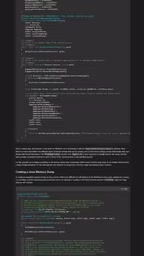
The value of this approach lies in filling the blind spots that logs can't cover. Production hangs tend to preserve evidence that logging simply can't capture — thread states, handles, loaded modules, and objects still resident in memory. Triggering a dump when the thread pool probe exceeds a defined threshold lets you capture the exact moment an application enters an unhealthy state, providing first-hand material for offline analysis. Compared to after-the-fact reconstruction from scattered logs, this in-process self-capture mechanism dramatically improves the diagnosability of difficult hang issues.
Thread pool saturation is a common root cause of performance degradation in .NET async applications. The .NET thread pool is responsible for scheduling Task, async/await, and I/O callbacks. When all available threads are blocked waiting on I/O or locks and cannot be released, new tasks pile up in the queue and the entire application becomes slow or completely unresponsive. Unlike CPU-intensive crashes, thread pool saturation throws no exceptions — the process is still running, logs may still be writing — which makes conventional monitoring tools prone to false negatives or misdiagnosis.
A process dump is a complete memory snapshot of a process at a given moment written to disk, including call stacks for all threads, heap objects, handle tables, and loaded modules. It can be analyzed offline afterward using tools like WinDbg, dotnet-dump, or Visual Studio to reconstruct the scene at the moment of the hang. The traditional approach relies on operators manually triggering dumps or configuring external monitoring tools like ProcDump. Capturing from inside the process automatically ties the trigger logic directly to business thresholds, eliminating the need for environment configuration — particularly well-suited for containerized deployments where pre-installing debugging tools is impractical.
The Hidden Pitfalls of Cross-Database Time Semantics Migration
Microsoft's new guidance maps out the relationship between PostgreSQL timestamp types and .NET types. In general, PostgreSQL's timestamptz (timestamp with time zone) should map to DateTimeOffset, while plain timestamp scenarios map to DateTime. The guide also covers fractional precision, offsets, and the fundamental distinction between a "wall clock value" and an "absolute instant."
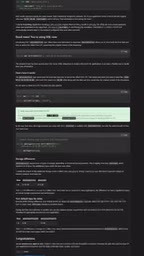
Time migration bugs have a dangerous characteristic: they almost never surface as compile-time errors. Problems tend to emerge after the system has been running for a while — appointment times mysteriously shifting, sorting logic going wrong, or duplicate records appearing around daylight saving time transitions. The core principle is that developers must preserve the semantic meaning of the source value, rather than simply finding a similarly named type on the target side. A type named timestamp does not mean it carries the same temporal semantics as the target type — and this is the root cause of countless production incidents.
Understanding the difference between a "wall clock value" and an "absolute instant" is foundational to choosing the right time type. An absolute instant is a uniquely determined point on the UTC timeline — regardless of which time zone you observe it from, the physical moment it refers to is always the same. DateTimeOffset and timestamptz both carry this semantics. A wall clock value records only "what the clock shows in a given location" with no time zone information; the same literal value represents different absolute instants in different time zones. PostgreSQL's timestamp (without time zone) and .NET's DateTime (Kind=Unspecified) both fall into this category.
A common migration mistake is mapping timestamptz to DateTime: the database has already converted the offset-aware instant to UTC during storage, but if .NET reads it and treats it as local time, offsets are introduced at daylight saving time boundaries or in cross-timezone deployments. Another trap is that PostgreSQL's timestamp has microsecond precision (6 decimal places), while .NET's DateTime has 100-nanosecond precision (ticks). When reading and writing across both ends without precision truncation, comparison and sorting results can be inconsistent.
Foundry-Hosted Agent Dual Isolation Controls
For Agents hosted on Foundry, Microsoft has detailed two mutually independent isolation control mechanisms. The first layer is user isolation, which defines which users' data a request can access. The second layer is session isolation, which identifies a VM-level isolated sandbox within the hosted session where code, files, and working state persist.
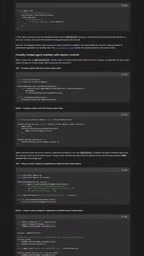
Applications can either let Foundry automatically assign these two values, or manage them independently through a trusted intermediary layer. The deeper significance of this design is that Microsoft is decomposing identity, conversation state, and executable workspace into independent architectural decisions, rather than bundling them into an opaque "black-box session." For enterprise-grade Agent scenarios requiring fine-grained permission control, this decoupling makes both data boundaries and execution boundaries auditable and configurable.
The VM-level isolation sandbox that Foundry refers to here draws conceptually from cloud computing's execution isolation approach for multi-tenant scenarios: each session runs in an independent virtual machine (or a similarly lightweight VM-like isolation unit), where code execution, file writes, and working state are invisible to one another, preventing cross-session information leakage or resource contention. This differs from container isolation — containers share the host kernel, whereas VM-level isolation maintains independence at the kernel level as well, providing stricter security boundaries for Agent scenarios that execute untrusted code or handle sensitive data.
Decoupling user isolation (determining "whose data can be accessed") from session isolation (determining "where code runs") allows enterprises to configure data access policies and execution environment policies independently. For example, the same user can run multiple concurrent Agents in different isolated sandboxes, or requests from multiple users can share the same sandbox while each accessing a different data scope. The two dimensions are no longer forcibly bound together, and audit and compliance checks can be performed independently against the data layer and execution layer respectively.
Agent Memory Is Becoming Conventional Cloud Data Architecture
The final update, currently in public preview, adds an Azure Blob backend to the LangChain integration, exposing Blob storage as a virtual file system available to deep agents. Agents access files through familiar operations — list, read, write, edit, glob, grep — and these files outlive individual processes while remaining shareable across multiple Agents.
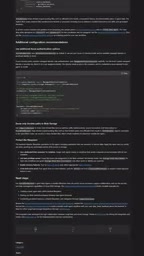
Cloud Agents need persistent state to store skills, instructions, source documents, and key artifacts, but mounting a traditional file system for every worker is impractical. Blob storage provides elasticity, RBAC permissions, lifecycle controls, recoverability, and inspectability through existing Azure tooling.
Cameron offered a particularly insightful observation on the show: Agent memory is evolving into ordinary cloud data architecture. The persistent portions should belong to governed storage, while ephemeral plans and tool outputs can remain in short-lived Agent state. This "persistent vs. transient" layering approach essentially transplants mature cloud data governance experience directly into AI Agent memory management.
Summary
These four updates may seem scattered, but they share a common thread: bringing the rigor of production-grade engineering into emerging development scenarios. Whether it's .NET fault scene capture, precise preservation of time semantics, or the standardization of Agent isolation and persistent storage, Microsoft is emphasizing that underlying reliability, auditability, and data governance are the true prerequisites for these new capabilities to land in production.
Related articles

From Photons to Production: An Open-Source Computer Vision Engineering Reading Path
Reddit user open-sources a computer vision engineering reading path with 16 chapters from image formation to production deployment, emphasizing primary sources, dependency order, and reproducible benchmarks to help engineers understand why models fail and build reliable vision systems.

Prompt Failures? The Truth About Why AI Agents Struggle in Production—and How to Fix It
A Reddit developer built Agents with Copilot and Gemini but faced unstable behavior. This article analyzes three gaps in prompt engineering for Agent scenarios and offers three practical paths to reliable Agent deployment, including structured prompts, workflow-first approaches, and building an evaluation loop.

Tesla Robotaxi to Open Private Vehicle Access Next Year: Promise or Pipe Dream?
At its Q3 earnings call, Tesla said owners can add their cars to the Robotaxi fleet next year. We analyze the technical basis, Musk's missed deadlines, business logic, and competition.