New Ways to Raise the Big Fat Fish: 2 Open-Source Plugins for AI Selfies and Schedule Management

Two open-source plugins let DeepSeek send selfies and auto-plan schedules, turning it into a digital companion with a life.
The article introduces two DeepSeek open-source plugins shared by a Bilibili creator: DSF Image Studio (Deep Studio) and Daily Schedule. The former uses four asset categories—characters, clothing, scenes, and props—combined with text-to-image models to let the AI generate selfies based on conversations and schedules; the latter automatically generates the next day's schedule at 10 PM by default, with customizable types, and triggers image replies. Installation only requires sending the plugin links to DeepSeek to complete automatically; assets can be obtained from a free canvas board, and keywords and trigger rules support personalized adjustments. Together, they upgrade the AI from passive text responses to active presentation with a face and a life, forming a closed loop where the schedule drives selfies and selfies reinforce the sense of character.
The ways to raise the Big Fat Fish (DeepSeek) have leveled up again. In the past, chatting with it only got you text replies; now, with two open-source plugins, you can have it send selfies, tell you what it's wearing today, or even automatically plan out an entire day's schedule. This setup, shared by a Bilibili creator, turns the AI from a "text assistant" into a "digital companion" with a face and a life.
Two Plugins, Two New Ways to Play
According to the Bilibili creator's demo, the two plugins are called DSF Image Studio (Deep Studio) and Daily Schedule. Installation is straightforward: send the plugin links to DeepSeekAd and let it handle the installation. Once done, you'll see both plugin entries in the settings. The whole process requires no manual environment configuration, making it quite user-friendly for ordinary users.
Deep Studio: Giving the AI "Selfie" Capabilities
The core of Deep Studio is maintaining underlying assets that allow the Big Fat Fish to display its current state in image form. Its communication is no longer limited to private text messages—it can return images: selfies, outfits, and scenes can all be shown.
For configuration, this plugin needs to be hooked up to a deep model. The creator uses Bandana and Chimney205, finding them more stable in performance. The asset library is divided into four categories: characters, clothing, scenes, and props. Characters define the role's identity; clothing is essentially building a "wardrobe" for the AI (the creator only set up five outfits as examples, and users can add more flexibly); scenes include a gym, convenience store, beach, etc.; and props are items like a pot. The AI will pick its "favorite" outfit from the wardrobe based on its schedule to generate selfies.
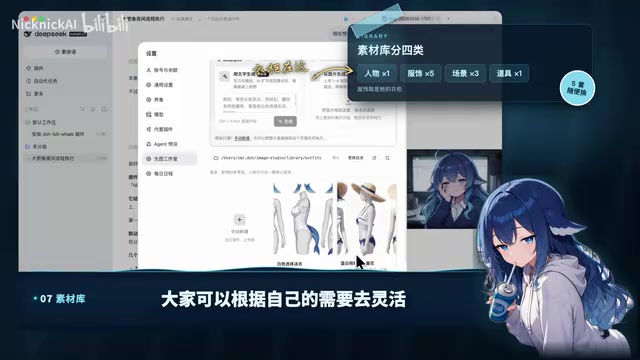
Once the assets are ready, upload them through the image generation entry point, and they'll be automatically generated and imported into the asset library. The creator mentions that these assets will be consolidated in a free canvas board, with the link in the video's editing section. For more personalized needs, you can also fill in keywords and supplement assets using automatic image generation. As for external models, the creator notes that Jaguar is fairly similar to the previous one, and the first five are free, so you can try it early.
Keyword maintenance is also customizable. On top of the default settings, the creator added vacation, overtime, sunset, and other scene expressions and camera descriptions. Adjusting is not complicated—just toss the requirement to the AI, take a screenshot, and say "do it in this format."

Trigger conditions can be set: the creator set it to "active state," meaning when assets change or during a conversation, the AI will send images in the corresponding scenes. For example, if the user says "I just ate a bowl of dry wheat noodles and it was delicious," the AI will return an image as a response based on the conversation. The default interval is three minutes; the creator also set a reminder rule for one hour of no interaction, plus personalized rules like check-in photos.
Plugin on large model platforms like DeepSeek refers to dynamically loadable extension modules that add capabilities the model originally lacked (such as generating images or reading/writing schedules). Unlike approaches that modify model weights, plugins usually run as independent services, and the model triggers plugin interfaces during conversations via the Function Calling mechanism. This explains why the original text says "send the plugin link to DeepSeek and it installs it"—the platform parses the link and registers the plugin, and users don't need to configure a Python environment or API keys. The openness of the plugin ecosystem determines the upper limit of a large model's playability, and is also the technical prerequisite for玩法 like "raising the Big Fat Fish."
Text-to-Image Model is the core component of Deep Studio's selfie generation. Bandana, Chimney205, and Jaguar mentioned in the original text all belong to this type of model or service; they receive text prompts and output corresponding images. Character consistency is a key challenge for such applications: the same character needs to maintain stable facial features, hairstyle, and body type across different scenes, usually relying on reference images or character LoRA to constrain the generation results—which is why the plugin requires maintaining "character" assets first. Free quotas are usually calculated by number of generated images; choosing a highly stable model reduces wasted images and saves quota.
Daily Schedule: Automatically Planning the AI's Day
The second plugin, "Daily Schedule," is even more interesting. It builds on details from Deep Studio and has the large model reset the schedule. By default, it automatically generates the next day's schedule at 10 PM. Schedule types include rest days, outing days, entertainment days, sports days, etc. The creator blocked "workdays" because the Big Fat Fish doesn't need to work, but you can also add them manually.

After the schedule is generated, you can regenerate by type or adjust as required. In the demo, the AI's day is quite rich: sleep from 12 to 8, wake up and scroll on the phone, wash up and eat breakfast, then go out to play with the user, go to the beach, play in the water, eat lunch, and take photos in the afternoon. The creator suggests asking the AI "what are you doing" between 4 and 5 PM; it will return a photo combining Deep Studio's capabilities, and the sunset scene is especially interesting. The schedule also covers scenes like watching movies, shopping, and eating rice, and the AI will send selfies for all of them.
The value of this combination is that it turns the AI from passive response into active presentation. The schedule drives selfies, and selfies in turn reinforce the sense of character, forming a lively closed loop. For users who enjoy raising the "Big Fat Fish," these two plugins offer a low-cost, highly playable direction for expansion.
Role-Play and State Persistence are the underlying logic of this plugin combination. The schedule plugin gives the AI a "life state" that persists across conversations, rather than starting from zero each time; Deep Studio visualizes this state as images. In implementation, the plugin needs to write data such as schedules and clothing choices into persistent storage (like a database or JSON file) and inject context into each conversation so the model can answer "what are you doing" with an accompanying image. This trio of "state + persona + visuals" is the mainstream architecture of current AI companion applications, and also explains why the schedule can drive selfies and selfies in turn reinforce the sense of character.
Getting Started Tips and Caveats
The installation threshold for the two plugins is not high, but asset maintenance requires some patience. The creator has prepared a free asset canvas board; you can pick and upload as you like. Keywords and trigger rules support customization; it's recommended to first run through the process with default configurations, then gradually add clothing, scenes, and schedule types. Note that the choice of deep model affects image generation stability; the creator's recommended Bandana and Chimney205 can serve as a starting point. Free quotas are limited, so pay attention to consumption during testing.
Overall, this setup demonstrates the flexibility of the open-source plugin ecosystem—no need to wait for official features; users can add "appearance" and "life" to the AI themselves. If you also want the Big Fat Fish to have selfies and schedules, why not start with these two plugins.
One-line Summary
Two open-source plugins let DeepSeek send selfies and automatically plan schedules, transforming it into a digital companion with a life.
Paragraph Summary
The article introduces two DeepSeek open-source plugins shared by a Bilibili creator: DSF Image Studio (Deep Studio) and Daily Schedule. The former uses four asset categories—characters, clothing, scenes, and props—combined with text-to-image models to let the AI generate selfies based on conversations and schedules; the latter automatically generates the next day's schedule at 10 PM by default, with customizable types, and triggers image replies. Installation only requires sending the plugin links to DeepSeek to complete automatically; assets can be obtained from a free canvas board, and keywords and trigger rules support personalized adjustments. Together, they upgrade the AI from passive text responses to active presentation with a face and a life, forming a closed loop where the schedule drives selfies and selfies reinforce the sense of character.
Related articles

Building an AI Agent with Claude Code from Scratch: From Workspace to Cloud Autonomy
No coding required: build an AI Agent in four steps with the Claude Code desktop app—from workspace setup and Agent Designer to Skills, Memory, and cloud autonomy.

No Python Required: How Cursor AI Coding Is Reshaping Automated Testing and Test Development
Test engineers can do automated testing without learning Python? This article examines how Cursor and other AI coding tools empower functional testing, automation scripts, test platform development, and performance tuning, compares the cost and access restrictions of mainstream domestic and foreign tools, and offers capability transformation advice for testers.

Nearly 5,000 Affected! AI Coding Plugin Found with Backdoor, Officials Urgently Remove It
Claude Code's VS Code extension version 2.1.313 was maliciously tampered with, implanting a backdoor for remote login and persistent control, potentially affecting up to 5,000 users. Officials have removed the malicious version; this article details the attack method and cleanup steps.