ngram 2.0 Review: A One-Stop Tool for AI Explainer Videos and Avatar Presentations

ngram 2.0 replaces the timeline with chat, letting AI handle explainer videos from raw material to final cut.
ngram 2.0 is an AI tool for explainer videos that hit #3 on Product Hunt with 124 upvotes. It covers three paths — explainers, screencasts, and AI avatars: upload documents, screen recordings, or ideas, and AI understands the material, generates narration, and assembles the final video. Conversational editing replaces traditional timeline editing, letting users describe changes in natural language without needing to master keyframes or tracks. But this trade-off also sets boundaries — structural adjustments suit chat, while frame-level pacing and multi-track sync stay with professional tools. The article argues the AI video space is shifting from "generating visuals" to "understanding materials and completing rough cuts," with efficiency gains concentrated in the most time-consuming organizing stages. Target users: product marketing teams, educational content creators, and independent developers.
On Product Hunt, ngram 2.0 claimed the #3 spot of the day with 124 upvotes, moving the entry point of video production from the "editing timeline" to a "chat window." It's not positioned as yet another general-purpose video editor, but rather as a vertical specialist for explainer and demo videos: upload your materials, and let AI handle the rest.
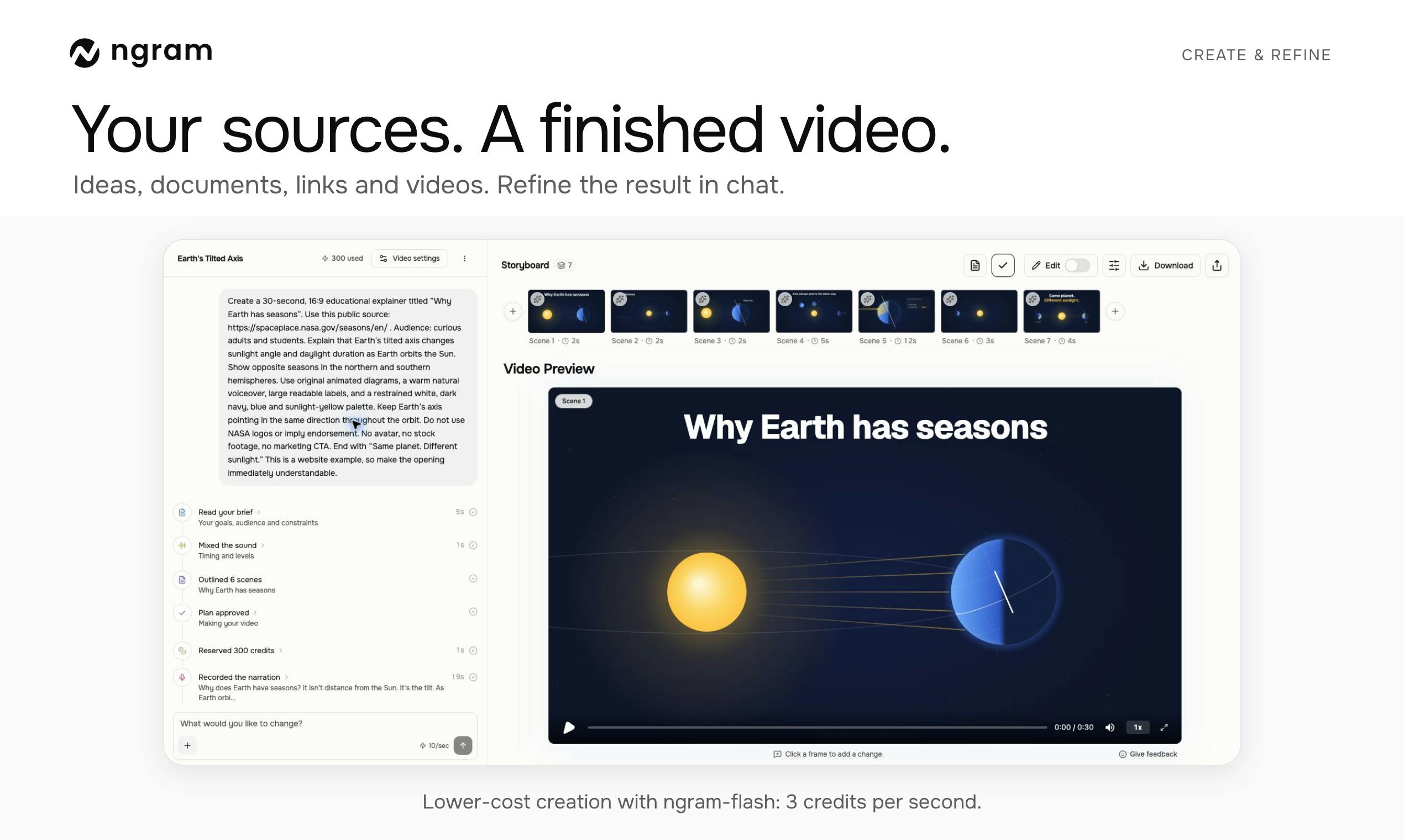
Three Paths from Raw Material to Finished Video
ngram 2.0's official tagline is "Create explainers, screencasts, and AI avatar videos," which maps directly to three typical scenarios.
Explainers: Turn ideas or documents into narrated animated shorts — ideal for product intros, concept explainers, and internal training, anything that needs to "make one thing clear."
Screencasts: Upload an existing screen recording, and ngram automatically analyzes the footage, identifies key action points, and assembles them into a well-structured product demo. This tackles the biggest pain point of screencast content — raw footage is long and slow-paced, and manually cutting highlight clips is both time-consuming and dependent on experience.
AI avatar videos: When you don't want to appear on camera or record voiceover, you can add an AI virtual presenter to handle the narration, extending the content format to marketing voiceovers, course walkthroughs, and more.
All three paths share the same underlying logic: understand the content of your materials, then reorganize them according to narrative needs.
Explainer videos originate from the English term "explainer video," a mature category in Western content marketing and online education. They typically refer to 1-3 minute shorts that use narration combined with animation or illustrations to clarify a concept, product, or process. The success of this type of video hinges not on visual polish but on narrative structure and information density — how the script is written, how the pacing is controlled, how key points are highlighted. This is precisely why it became an AI entry point: structuring and language processing are the LLM's strengths, and they're also the most time-consuming parts of the traditional workflow.
Interaction Trade-offs: Replacing the Timeline with Chat
One design worth noting in ngram 2.0 is "refining videos through conversation." Users don't need to master traditional editing concepts like keyframes, tracks, or transitions — instead, they describe what they want to change in natural language, and AI executes the edits.
This interaction lowers the barrier to entry, but it also has clear boundaries. Structural adjustments like narration wording, avatar appearance, and shot order are well-suited for dialogue; fine-grained frame-level pacing and complex multi-track audio-visual sync are still better handled by professional tools. ngram chose the former — it serves people who "need to quickly produce an explainer video," not editors who "need to polish every single frame."
This positioning is also evident in the product classification: Education, Artificial Intelligence, and Video appear side by side as tags, with the education scenario listed first.
Timeline editing has been the core interaction paradigm since the birth of non-linear editing (NLE) software. Users use the timeline as a coordinate system to locate footage frame by frame, arrange tracks, and add transitions and keyframes. It's powerful, but its steep learning curve stems from one premise: users must first mentally translate "what they want" into "what it looks like on the timeline." Conversational interaction attempts to skip that translation layer and express intent directly. The cost is control granularity — natural language is naturally suited for describing structure and high-level intent, but struggles to precisely express parameter-level instructions like "fade out at 3.2 seconds for 0.4 seconds." This is the fundamental reason why the two types of tools are unlikely to replace each other in the near term.
The Convergence Direction of AI Video Tools
Placing ngram 2.0 in a broader context, the AI video space is undergoing a convergence of responsibilities: tools no longer emphasize "AI can generate pixels," but rather "AI can understand your materials and complete the rough cut for you."
Upload a screen recording and it automatically finds key frames; upload a document and it automatically adds narration; upload an idea and it automatically generates a storyboard — the premise of all these capabilities is the model's understanding of content, not mere generation. For users, this means the efficiency gains happen at the most time-consuming stages: organizing and rough cutting, not final polishing.
Rough cut vs. fine cut is a fundamental division of labor in film and video post-production. The rough cut is responsible for determining narrative structure, segment order, and information selection, typically consuming more than half of the entire editing process; the fine cut focuses on pacing, transitions, audio-visual details, and visual polish. AI video tools are currently concentrating on the rough cut because judgment at this stage relies heavily on understanding content — which passages hit the key points, which clicks are key actions, how to order materials — all of which align with the capability boundaries of large language models. The aesthetic judgment and frame-by-frame control that the fine cut depends on, however, are currently difficult to fully describe in natural language, making it a relatively stable stronghold for professional editing software.
Who Should Use It
- Product and marketing teams: Those who need to frequently produce feature demos and update notes but lack dedicated editing resources.
- Educational content creators: Those turning course documents and lecture notes into narrated explainer videos.
- Independent developers: Those who record a screen session once and let AI help organize it into a publishable product walkthrough.
Conversely, if your needs involve highly customized visual styles or complex VFX compositing, ngram 2.0's capabilities may fall short. It's more about paving the road from "zero to a watchable video" rather than raising the ceiling.
Summary
The value of ngram 2.0 lies in packaging material understanding, narration generation, avatar presentation, and conversational editing into a single pipeline. It doesn't try to replace traditional editing software, but takes over the most tedious parts. For videos whose goal is to "make one thing clear," this already covers the majority of the work.
One-line Summary
ngram 2.0 replaces the timeline with conversation, handing the explainer video pipeline from raw material to finished cut over to AI.
Paragraph Summary
ngram 2.0 is an AI tool focused on explainer videos, earning #3 on Product Hunt with 124 upvotes. It spans three paths — explainers, screencasts, and AI avatars: upload documents, screen recordings, or ideas, and AI understands the material, generates narration, and assembles the final video. Its conversational editing replaces traditional timeline editing, letting users describe changes in natural language without needing to master keyframes and tracks. But this trade-off also defines its boundaries — structural adjustments suit conversation, while frame-level pacing and multi-track audio-visual sync remain with professional tools. The article argues that the AI video space is shifting from "generating visuals" to "understanding materials and completing rough cuts," with efficiency gains concentrated in the most time-consuming organizing stages. Target users are product marketing teams, educational content creators, and independent developers.
Related articles

Amphibious Transforming Drone: Beyond 100x Power Savings, What Are the Real Needs?
Is the amphibious transforming drone just a gimmick? Starting from the 100x power difference of the M4 Morphobot, explore real application scenarios and thesis topic ideas, analyzing boundary conditions where pure drones and pure ground robots both fail.

Warhound Raises $200 Million: Genetically Engineered "War Dogs" Paired with Anduril Gear
Warhound raises $200M, backed by Ben Lamm and Palmer Luckey, to genetically engineer dogs for military and law enforcement use and equip them with Anduril gear. This article analyzes its technology direction, funding logic, and ethical controversy.

Claude API Comes to Google Cloud: IAM Integration and SDK Access Guide
Anthropic hosts the full Claude API on Google Cloud with IAM-controlled permissions and unified billing. This guide covers the Vertex AI and Anthropic-hosted entry points, IAM role configuration, and SDK access.