No $20 Needed: Three Ways to Connect Claude Code to Local and Cloud Models for Free
Claude Code app is free; swap the paid model engine for zero-cost use—four options covered.
Claude Code itself is free; the $20 monthly fee is actually for model call credits. This article proposes the "engine swap" idea and organizes three zero-cost paths plus a lightweight alternative: Ollama local engine runs fully offline with the best privacy but is limited by hardware; OpenRouter's free model pool offers near-cloud speed, but the free tier allows only 50 requests per day and prompts are sent externally; OmniRoute aggregates multiple free quotas for automatic switching, but some connections may violate terms of service; the VS Code extension KiloCode provides a lighter daily free coding experience. The article emphasizes that all free quotas have limits, and the combination approach aims to reduce interruptions, and reminds users to verify real receipts rather than interface labels.
Claude Code itself is free—what costs money is the AI model it calls behind the scenes. Swap out the engine, and you can get the full Claude Code experience at zero cost. This article covers three viable paths: local models, a pool of free cloud APIs, and automatic switching across multiple providers, plus a lightweight VS Code alternative.
The Core Idea: Free Tool, Paid Engine
A common misconception is that Claude Code costs $20 a month. In reality, that $20 buys model call credits, not the terminal application itself. Claude Code is just a code agent shell—it reads files, understands project structure, generates and modifies code—while the actual "thinking" comes from an external model.
Think of Claude Code as a sports car: the body, steering wheel, and dashboard are free; only the engine costs money. In the video, the author demonstrates three "engine swaps": one to a free model running locally on a laptop, one to a free cloud API, and one where multiple free engines automatically relay to each other.
This approach doesn't aim for "unlimited access to the real Claude." Instead, it acknowledges that all free quotas have limits, and uses combination to minimize work interruptions.
Claude Code's Architectural Role: Claude Code is a command-line code agent tool released by Anthropic, belonging to the "agent harness" category. It does not contain a language model itself; instead, it calls external models via the Anthropic API or other compatible interfaces to perform reasoning. This design means it can theoretically connect to any model service that follows the OpenAI or Anthropic API format, which gives rise to the "engine swap"玩法 described in this article. Understanding this is the premise for the entire article: Claude Code's value lies in its engineering capabilities—file reading/writing, project structure awareness, multi-turn tool calling—not the model itself.
Option 1: Ollama Local Engine—Code Even Offline
The first path uses Ollama as a local engine. Download the installer from ollama.com, which supports Mac, Linux, and Windows. After installation, Ollama's interface has three key areas: Apps for connecting coding tools like Claude Code, Chat for testing models, and Settings for adjusting parameters.
The most critical setting is Context Length. Claude Code needs to read entire project files, understand them, and then edit, so too short a context will cause the model to "forget" project content. The video recommends setting it to 64K.
The author verified this with a laptop with Wi-Fi turned off: in a completely offline state, the model generated a calculator app, and code was produced as usual. The biggest advantage of this path is privacy—code and prompts stay on the local machine; cost is zero, there are no usage limits, and no one can remotely shut it down.
How to choose a local model? The author's approach is not to memorize parameter tables but to ask AI directly. First check hardware info with Ctrl+Shift+Esc (the example machine has 12GB VRAM and 32GB RAM), then send the hardware info to an assistant like ChatGPT and ask it to recommend the most suitable Ollama model along with the exact model name. But be sure to follow up with "Is this still the best choice in the current release?" because models iterate quickly and the first answer may be outdated. After the author's follow-up, the recommendation changed from Qwen 2.5 Coder 14B to Qwen 3.5 9B.
If the target model isn't in Ollama's dropdown menu, manual installation often requires digging through command lines and old GitHub issues. The author used Google's free coding tool Anti-Gravity to do the work: describe the need in one natural language sentence, and it opens the terminal, executes commands, reads errors, and fixes them itself. Anti-Gravity will request permission multiple times during execution; read each prompt before clicking allow.
The local engine's shortcomings are obvious: slow speed and limited intelligence. That's why the next two options exist.
Ollama and Context Length: Ollama is an open-source local large model runtime framework that supports one-click download and running of mainstream open-source models such as Llama, Qwen, and Gemma. It uses quantization techniques (like 4-bit quantization) to reduce VRAM usage, enabling consumer-grade GPUs to run 7B-14B parameter models. Context Length refers to the maximum number of tokens the model can process in a single pass, including input and output. Claude Code needs to send project file contents as context to the model; if the context is too short, the model loses early information. A 64K context means about 48,000 English words or 30,000 Chinese characters, enough to hold key files of a small-to-medium project. But note: the longer the context, the higher the VRAM usage and inference time, so balance according to your hardware.
Option 2: OpenRouter Free Model Pool—Speed at the Cost of Privacy
The second path puts the engine in the cloud. OpenRouter is a middleware layer that lets you access dozens of models with a single API Key, many of which are marked ":free" with zero call cost. Registration doesn't require a credit card; when creating a Key, it's recommended to set an expiration time. If the account will be topped up later, also set a spending limit. The Key is shown only once—treat it like a password.
When connecting the Key to Claude Code, the configuration block has a line specifically to clear the old Key slot to avoid accidentally falling back to a paid Key. Three other lines map the three "seats"—Opus, Sonnet, and Haiku—in Claude Code's model menu to OpenRouter's free models. That is, whichever name you select in the menu, the actual responder is the assigned free model.
There's a noteworthy detail here: seeing Sonnet in Claude Code's menu doesn't mean you're actually using Claude Sonnet. Open OpenRouter's Activity page to see the real record, including the actual responding model and price (all zero)—the word Claude won't appear on the page at all. The video points out directly that tutorials claiming "free Sonnet" only looked at the seat labels and didn't check the actual passengers.
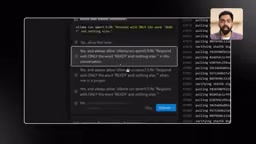
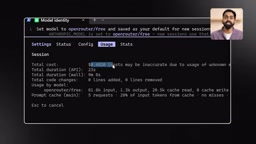
Another thing that can be scary: Claude Code's built-in usage stats may show this session cost about 45 cents, but that's an estimate based on Anthropic pricing, not OpenRouter's actual charge. The real bill is whatever OpenRouter says.
The trade-offs are twofold. First, prompts and project files are sent to external servers, so sensitive content shouldn't go this way. Second, free quotas have clear limits: new accounts get 20 requests per minute and 50 requests per day. A single Claude Code task can trigger a dozen or even twenty requests behind the scenes because it reads files, writes files, self-checks, and fixes. A real coding session can exhaust the daily quota, then you get a 429 error, the task freezes mid-way, and you have to wait until the next day.
It's precisely this wall that gave rise to the third option.
OpenRouter and API Middleware: OpenRouter is a model aggregation and routing platform where developers can access dozens of providers' models—OpenAI, Anthropic, Google, Meta, and more—through a single API Key. Its ":free" suffix models are usually sponsored by the community or providers; they have rate limits but no direct cost. OpenRouter's Activity page records the actual model, token count, and cost of each request, making it the authoritative source for verifying real calls. Note that free model availability and rate limits can change at any time, and some free models require data to be used for training—avoid them in privacy-sensitive scenarios.
Option 3: OmniRoute Aggregates Multiple Free Quotas
OmniRoute's idea is to stitch multiple free quotas together. It connects Claude Code to hundreds of providers and thousands of models, including Claude, GPT, Gemini, Kimi, and DeepSeekAd. A single service's free quota is small, but combined they're substantial; when one provider is exhausted, it quickly switches to another.
Installation is also handed to Anti-Gravity: one prompt installs Claude Code, deploys OmniRoute, starts the service, and opens the dashboard. The default password for first login is "change me"—change it immediately after logging in.
In the OmniProxy tab, connect free services one by one. The video demonstrates five: Kiro, NVIDIA, OpenRouter, Klein, and Anti-Gravity. NVIDIA is set to highest priority; it mixes free and paid models, so it needs filtering in a later step. A must-mention here: OmniRoute labels the Kiro and Anti-Gravity connection methods in the interface as potentially violating terms of service; whether to connect accounts is up to the user.
Next, create a Combo, i.e., an engine pool. Select the first provider and model, choose a scheduling strategy (the video uses Intelligent Auto), check all providers in the candidate pool, then add backup engines and adjust the attempt order with the up/down arrows.
A hidden pitfall: when adding a second engine for OpenRouter, the dropdown has an option also called Auto, which may silently route requests to paid models and incur costs. The video's approach is to use it first, then use a dedicated "free models prompt" to have Anti-Gravity iterate through all connected providers, filter paid models out of the menu, keep only free ones, and run tests to confirm.
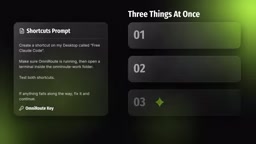
Finally, create a master Key from OmniRoute's API Keys page, then use one prompt to do three things: write the Key into the config file, create a dedicated working directory, and generate two desktop shortcuts (one to launch Claude Code already connected to OmniRoute, one to open the dashboard). Midway, Anti-Gravity will open a file for you to paste the Key—don't paste the Key into the chat box.
Real-world verification: ask Claude Code "what model are you?" and it answers Claude, but that's not evidence. Open OmniRoute's logs; the last request shows provider Kiro and model Claude Sonnet—that's the real receipt. Kiro's free quota is small; once exhausted, the NVIDIA and OpenRouter in the Combo automatically take over, but from then on the responder is no longer Claude.
The author did a complete test with a "personal notes app." Claude Code first asked three questions: desktop or web app, notes stored locally or in the cloud, and which features matter most. After answering, it gave a plan and then started writing code, ultimately running a notes app on localhost that can create, save, and persist after reopening—at zero cost.
OmniRoute and Multi-Provider Scheduling: OmniRoute is an open-source multi-model routing gateway that distributes requests from clients like Claude Code to multiple upstream providers. Its core concept is "Combo" (engine pool), a prioritized list of providers and models, combined with a scheduling strategy (like Intelligent Auto) to achieve failover. When a provider's free quota is exhausted or returns an error, the request automatically switches to the next available engine. This aggregation can significantly extend free usage time, but the cost is complex configuration, and some provider connections may violate their terms of service—users must assess the risk themselves.
Option 4 (Bonus): KiloCode in VS Code
If you're not attached to the Claude Code interface and just want to code with free models every day, KiloCode is a lighter choice. It's a VS Code extension from another team, but the logic is the same: free tool shell plus free engine.
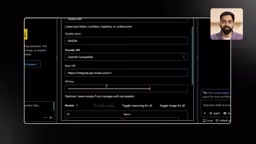
Search for KiloCode in the VS Code extension marketplace, install, and log in—it already includes several free models. To avoid relying on a single source, you can connect your own provider: in settings, choose a custom provider, paste the connection info and NVIDIA API Key, and Kilo will pull NVIDIA's full model list; select the ones you need (the video chose Nemotron 3 Ultra, GLM 5.3, and GLM 5.3 Flash), enable reasoning, and turn on the image switch only for models that support images. According to the video, NVIDIA's free tier allows about 40 requests per minute, plenty for testing and personal projects.
The author used GLM 5.3 Flash to generate an arcade game of about 1,200 lines in one go, including a start screen, progressively harder enemy waves, power-up drops, a boss fight every five waves, and a high-score record—playable directly in the browser.
When the quota runs out, just switch models in the same conversation; Kilo preserves the conversation and project context. Type /memory on to let it remember project progress across conversations. One thing to note about Gemini's free tier: Google may use your prompts to improve its products, so don't route sensitive code through this channel.
How to Choose Among the Four Options
If you have a decent GPU and value privacy, choose Ollama: works offline, but limited by your hardware. If you don't have a GPU and want speed immediately, choose OpenRouter: remember the 50 requests per day limit. If you want the full Claude Code experience plus multi-engine fallback, choose OmniRoute. If you just want a handy daily tool, choose KiloCode in VS Code.
Four principles apply to all options. First, no service is truly unlimited, and even the real Claude's free quota won't last forever; the point of this approach is to combine limits, not remove them. Second, free doesn't mean private—client code, passwords, and private files should stay on local engines like Ollama. Third, some connection methods may violate provider terms; Kiro and Anti-Gravity have warnings right in the interface, so check for yourself. Fourth, errors are normal—copy the error message back to the AI to fix it.
One final rule runs through the whole article: no matter what the menu says, verify the receipt—look at the real usage and billing pages, not the labels.
One-line Summary
Claude Code the app is free; swap out the paid model engine to use it at zero cost—this article presents four options.
Paragraph Summary
Claude Code itself is free; the $20 monthly fee is actually for model call credits. This article proposes the "engine swap" idea and organizes three zero-cost paths plus a lightweight alternative: Ollama local engine runs fully offline with the best privacy but is limited by hardware; OpenRouter's free model pool offers near-cloud speed, but the free tier allows only 50 requests per day and prompts are sent externally; OmniRoute aggregates multiple free quotas for automatic switching, but some connections may violate terms of service; the VS Code extension KiloCode provides a lighter daily free coding experience. The article emphasizes that all free quotas have limits, and the combination approach aims to reduce interruptions, and reminds users to verify real receipts rather than interface labels.
Related articles
 Tech Frontiers
Stylome Bot Slammed as Useless Junk: Why Do AI Detection Tools Keep Failing?
Reddit users test the Stylome AI detection bot: Gemini-rewritten text judged human-written, consistently low confidence. An analysis of AI text detection's technical dilemmas, privacy concerns, and credibility crisis in community governance.
 Tech Frontiers
When AI Becomes a Productivity Divide: Clarity or "AI Psychosis"?
A civil engineer's deep use of agentic AI boosted efficiency but bred contempt for peers who refuse to learn. Is this clarity or AI psychosis? An analysis of the cognitive and psychological challenges behind the AI productivity divide.
 Tech Frontiers
Opus 5.5 Benchmark Scores Climb, Community Says Its "Weights Are Blessed"
Reddit community discusses Opus 5.5's rising scores on the Benchmaxxing Bench, with users describing its performance as "weights are blessed." This article interprets the community reaction and cautions against conflating benchmark scores with real capability.