No API Key Needed: Manage Your WordPress Site Directly With Your AI
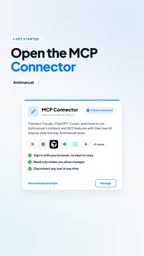
Anti-Manual launches MCP Connector, letting paid AI tools operate WordPress directly and skip extra API bills.
Anti-Manual's MCP Connector uses the MCP protocol to turn a WordPress site into a tool server AI can call directly, enabling 14 tools like Claude, ChatGPT, and Cursor to perform site tasks without separate API Keys. Configuration uses OAuth, with scope limits and disconnect anytime. Demos include draft writing, internal links, FAQ generation, SEO audits, and grouped broken link checks. "Zero extra bill" relies on an existing AI subscription and isn't zero-cost; public info is mainly official demos with no third-party testing yet.
WordPress site operators have long faced a dilemma: automating content and SEO with AI requires configuring an API Key and paying per token. Anti-Manual's MCP Connector aims to break that model—letting you operate WordPress directly with AI tools you already pay for, such as Claude, ChatGPT, and Cursor, without incurring extra API bills.
Core Mechanism: The MCP Protocol as a Bridge
MCP (Model Context Protocol) is an open protocol that lets AI models talk to external tools. Anti-Manual's MCP Connector exposes a set of controlled operations on a WordPress site, and the AI invokes these operations through the protocol to accomplish specific tasks.
According to a YouTube channel introduction, the connector supports 14 AI tools in total, including Claude, ChatGPT, and Cursor. Users don't need to separately purchase and enter an API Key in the WordPress admin; instead, they reuse the quota of their existing AI subscriptions.
The clever part of this design is the permission inversion: the AI no longer "generates content that a human then copies and pastes," but directly reads site data and performs operations. A typical scenario demonstrated in the video: asking Claude to find all broken links, group them by article, and give a fix suggestion for each link.
The Difference Between MCP and the API Key Model
Traditionally, there are two ways for WordPress plugins to integrate AI: one is to have users apply for their own API Keys from vendors like OpenAI or Anthropic, billed per token; the other is for the plugin to include a proxy server, where the plugin provider purchases quota centrally and resells it. The former requires users to have some technical ability and bear ongoing costs, while the latter concentrates both cost and data in a third party. MCP takes a third path: it was proposed and open-sourced by Anthropic in late 2024 and defines a standard "client—server" communication format, where the AI application acts as the client and the external tool as the server, and the two exchange capability lists and invocation requests via JSON-RPC. The WordPress site plays the role of the MCP server here, packaging operations such as "create draft" and "query links" into standard tools. Because the invocation happens inside the AI client the user already pays for, it consumes subscription quota rather than pay-as-you-go API quota—this is the technical origin of the "no extra bill" claim.
Configuration Flow: Four Steps to Connect Claude
Taking Claude as an example, the connection path isn't complicated. The steps given in the video are: go to Anti-Manual's Configuration page, find MCP Connector and click Manage, enable the connector and check the allowed scope of operations, then select the target AI tool.
On the Claude side, add a custom connector, enter a name and the server URL, and complete OAuth authorization to establish the connection. OAuth is the officially recommended method, avoiding the risk of plaintext key leakage.

Permission granularity is what makes this approach noteworthy: when enabling the connector, users can choose "what it can do" instead of handing over full control of the site all at once.
The Role of OAuth in MCP Connections
OAuth is an authorization framework that allows a user to grant an application limited access without revealing their password to a third party. In the MCP scenario, Claude as the client needs to access your WordPress site; the OAuth flow has the site generate an authorization page, and after you log in and confirm, Claude receives a time-limited, revocable access token rather than the site's admin account password. Compared with directly entering an API Key or application password, OAuth's advantages are finer-grained permissions, individually revocable tokens, and lower leakage risk. The MCP specification recommends OAuth 2.1 for remote servers and supports dynamic client registration—this is what actually happens behind the configuration step of "enter a name and server URL, then complete authorization."
What It Can Do: From Auditing to Writing
Once the connection is established, users can issue instructions in natural language. The video emphasizes support for input in any language, and Claude will automatically select the correct Anti-Manual tool to execute.

The publicly demonstrated capabilities include:
- Draft writing: generate article drafts based on instructions
- Internal link addition: supplement the internal link structure of content
- FAQ generation: write FAQ blocks for pages
- SEO audit: check for site optimization issues
- Broken link detection: list problematic links grouped by article, with fix suggestions

Most of these tasks previously relied on standalone SEO plugins or manual checking; now they're consolidated into a single conversational entry point. For sites with a large volume of content, the value of repetitive work like broken link auditing is especially obvious.
A Few Points Worth Noting
Control and reversibility: The video repeatedly mentions that users "stay in control" and can disconnect at any time. This is crucial—an AI directly operating on a production site means a mistake could have real consequences, so the disconnect mechanism and operation scope limits are a necessary safety net.
Capability boundaries not fully disclosed: The video lists scenarios such as drafts, internal links, FAQ, auditing, and broken links, but doesn't state whether these operations can be rolled back, whether batch execution is supported, or how compatible it is with mainstream SEO plugins.
Dependence on AI tool subscriptions: The so-called "no extra API bill" presupposes that you already pay for Claude or ChatGPT. For users without an AI subscription, this is not a zero-cost solution—it merely shifts the cost into an existing subscription.
Information gap across sources: Currently, public information about the connector comes mainly from the official demo video, and independent third-party testing is still lacking. Actual connection stability, performance on complex sites, and the accuracy of multilingual instructions all need more user feedback to verify.
Reversibility and Idempotency of MCP Tool Invocations
When AI directly operates a production site via MCP, an easily overlooked technical detail is whether operations are reversible. MCP tools are essentially functions exposed by the site; "create draft" is usually idempotent and safe, but "add internal links" and "modify page content" may overwrite existing data. The proper approach is to make write operations default to drafts or revisions, preserving WordPress's native revision history so that every change can be rolled back. In addition, batch operations need pagination and rate limiting; otherwise a single instruction could trigger a large number of database writes. These engineering details aren't mentioned in the official demo, yet they are key to evaluating whether the connector can be used on a production site.
Who Should Try It
Users who already pay for Claude, ChatGPT, or Cursor and also operate a WordPress site are the most direct beneficiaries of this approach. Especially for sites with small content teams and manual SEO maintenance, handing work like broken link detection and internal link completion to an AI conversation can save considerable time.
For users who haven't yet subscribed to any AI tool, first assess whether the subscription cost is worth it compared with the plugin/manpower costs saved, then decide whether to connect.
Conclusion
The idea behind Anti-Manual MCP Connector is to upgrade AI from a "content generator" to a "site operation entry point," using the MCP protocol and OAuth authorization to let an existing AI subscription directly drive WordPress content and SEO tasks. Zero extra API bills is its selling point, but the real value lies in consolidating scattered SEO operations into a natural language interface. The security design (operation scope selection, disconnect at any time) addresses the core concern of directly operating a production environment, while actual results still need more real-world testing data to support.
One-line Summary
Anti-Manual launches MCP Connector, letting already-paid AI tools operate WordPress directly and eliminating extra API bills.
Paragraph Summary
Anti-Manual's MCP Connector uses the MCP protocol to turn a WordPress site into a tool server that AI can call directly, enabling 14 AI tools including Claude, ChatGPT, and Cursor to perform site tasks without separately configuring an API Key. Configuration uses OAuth authorization, and users can limit the scope of operations and disconnect at any time. Demonstrated capabilities include draft writing, internal link addition, FAQ generation, SEO auditing, and grouped broken link detection. Its "zero extra bill" depends on the user's existing AI subscription and is not zero-cost; current public information comes mainly from official demos, lacks third-party testing, and stability and performance on complex sites remain to be verified.
Related articles
Claude Code Advisor Mode: Two-Model Collaboration for Cost-Effective Coding
Explaining Claude Code's experimental Advisor Mode: primary model writes code, strong model intervenes at key points. Covers version requirements, three activation methods, model pairing rules, and real cost boundaries, clarifying the community's 3.4x savings claim.

Build a Money-Making App from Scratch Without Code: The 8-Step Process and a $151 Bill
A YouTube creator breaks down the full eight-step process to build a money-making app without code: AI coding, GitHub, Cloudflare hosting, D1 and R2 backend, a New Mexico LLC, a free EIN, Stripe payments, and legal pages—totaling $151.
Two Cursors: A Hopeful Song About Writing Software with AI
YouTube music video *Two Cursors* uses lyrics to portray AI-assisted programming: from a single cursor to two-cursor collaboration to a three-party debugging scene, offering a hopeful view of conversational collaboration between developers and AI.