No Code Needed: AI Turns 53 Old Documents into a Searchable Website

Bilibili creator uses Doubao Work to turn 53 old Feishu drafts into a searchable topic webpage in 36 minutes.
A Bilibili creator gave Doubao Work access to 53 old drafts, case studies, and topic ideas accumulated over years in Feishu. AI analyzed cross-document connections, surfacing a new topic like "The Shelf Life of Free" from multiple software cases. Without writing any code, two rounds of tasks took 36 minutes 22 seconds. AI generated a summary document and 20 topic suggestions, then used Beautiful HTML Templates to build a searchable, filterable "Content Cockpit" webpage with source links. This approach shifts topic planning from "think first, find materials later" to "see what you have, then decide."
That pile of files on your phone and computer that you stored and never opened again — is there any hope for it? A Bilibili creator used Doubao Work to feed 53 old drafts, case studies, and topic ideas accumulated over years in Feishu to AI, and the AI spat out a fully searchable, filterable webpage that links back to the original source documents. Not a single line of code was written, and the two rounds of tasks took only 36 minutes and 22 seconds combined.
This approach is worth breaking down because it solves exactly the biggest headache for content creators: the more materials you accumulate, the harder they are to find when you actually need them. And some content that could clearly be used together — after a few months, even you can't remember they're related.
The Pain Point: Archives Aren't Assets
Anyone who creates content feels this deeply. Over the years, topics, sponsored deals, and case studies each get stored in different places, all scattered across Feishu. When you save something, you feel like you've accumulated more. When you actually need it, all you remember is "I saved that somewhere" — but you can't recall where.
What's worse is the hidden connections between materials. The creator mentioned having covered several software tools — Android, MailKA, Music, Hyper3D, and Flova. They seem completely unrelated, but after stringing together the copy and corresponding case notes, a pattern emerged: they were all about "free" — whether it's genuinely free membership or just a partial quota. A new topic idea was born right there: "The Shelf Life of Free," revisiting these cases to see if the benefits promised back then still hold up now.
This kind of cross-document relationship mining is extremely costly to do manually by opening multiple documents and cross-referencing. But not doing it means wasting the value of your existing content.
Hands-On: Two Steps to Hand Your Archive to AI
This experiment used Doubao Work, and the process breaks down into two steps.
Step 1: Connect the Data Source So AI Can Read Feishu Directly
Send the Feishu archive link to AI, authorize access, and it can process everything directly. For content you'll continue organizing going forward, the creator suggests creating a project and putting all materials into it for easy reading and writing — any new materials you add later can be analyzed right there.
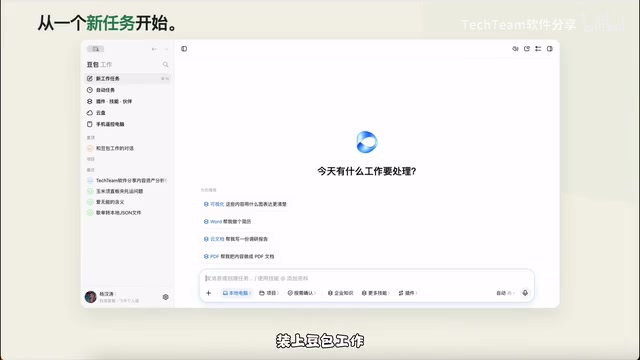
Once connected, AI can directly read scattered files in Feishu Cloud Drive and automatically categorize them by project. The brief, copy, and case studies for the same sponsored deal get grouped together automatically — no manual sorting needed.
Step 2: Give Analysis Instructions with Constraints
The creator asked AI to directly analyze the batch of old drafts in Feishu, requiring it to figure out what directions they'd mainly worked in, which cases still had organizing value, then generate a summary document and list a batch of topics worth pursuing next — with every suggestion including a Feishu link back to the original source.
One detail here is crucial: the creator specifically added "include the source." Because what's being revitalized is their own years of accumulation — when AI recommends a topic, you need to know which old drafts it's based on, what you have on hand, and what's still missing. All clear at a glance.
After reading Feishu documents, AI continues to related case studies and topic materials, finding content that can be used together. What used to require opening several documents for cross-referencing — now it reads through and directly generates a summary and topic list. In the task log, you can see which materials it read and how far along the organization is.
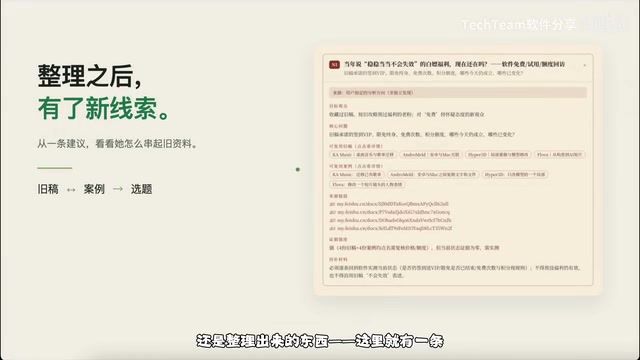
The Result: From Report to Interactive Webpage
The analysis alone was already usable, but every time you'd still have to flip through reports and tables — still a hassle. So the creator pushed it one step further and turned everything into a clickable, searchable webpage.
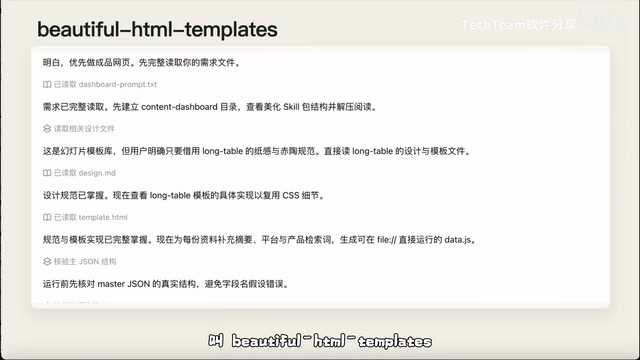
A specific Skill called Beautiful HTML Templates was used here. Send it over, tell AI you want to make an interactive webpage, and it automatically connects to the previously analyzed content and uses this capability to bring it to life. The creator's requirements were straightforward: content categorized by direction, searchable, filterable, topics and cases matched one-to-one, and all original source links preserved.
Before long, a "Content Cockpit" appeared. Click on a direction to see how much content has been accumulated, type in a keyword to find previously used cases, click into a topic to see which materials it's linked to — no need to open each document one by one first.
The creator's favorite feature is the "Original Source Entry." Summaries save effort, but when you need specific wording for writing, one click takes you to the source — far more practical than just getting a conclusion. After finishing, do a quick check: are there any gaps in filtering, can search find things, do links open, and pick a topic to verify whether the evidence provided is correct. If there are issues, have it fix them — what remains is a version you can actually keep using.
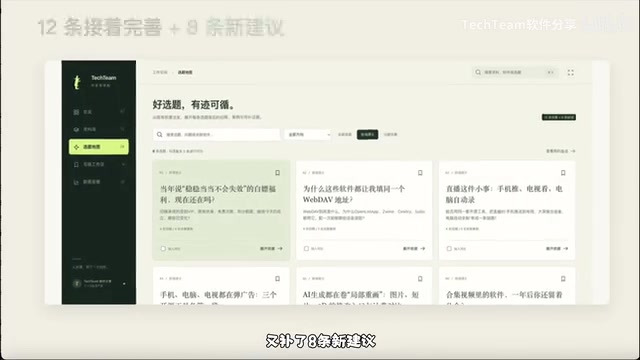
Finding old drafts, filtering topics, and going back to sources — all done on one page. The final 53 documents were organized into 8 directions with 20 topic ideas: 12 previously saved ones refined further, plus 8 new suggestions added. Two rounds of tasks: the first took 28 minutes 10 seconds, the second 8 minutes 12 seconds — 36 minutes 22 seconds total.
Beautiful HTML Templates is a type of reusable capability module built into Doubao Work. Users simply describe the desired effect in natural language, and it automatically generates webpage code with interactive features. These modules typically encapsulate common UI layouts, search boxes, filters, and card-style list components, so even with zero programming experience, you can get a usable page in minutes. The "Content Cockpit" the creator built in this article is exactly this — using the template to directly render existing analysis results into a clickable, searchable interface, while preserving original source link entry points. Compared to manually copying into tables or documents, this approach is more intuitive and better suited for repeated reference and sharing.
Key Insight: From "What Do I Want to Make" to "What Do I Have on Hand"
What this process truly changes is the direction of topic planning. Before, preparing topics meant first thinking about what to shoot, then hunting for materials everywhere. Now, it's first seeing what you have on hand, then deciding what's worth continuing. The topic list puts "what to make, who to make it for, which old cases can be used" all together — and the sources aren't lost after organizing.
AI only goes as far as topic suggestions. Whether to actually produce it and how to present it — that's still your call. This division of labor lets creators retain judgment while handing off the most time-consuming material retrieval and connection work to AI.
The bigger value is that this method can revitalize more than just content materials. Students can organize course notes and academic papers into review frameworks. Professionals can turn project documents and meeting minutes into weekly report summaries. Even scattered historical files and old diaries from daily life can be categorized by AI into a searchable webpage anytime.
The creator categorized this experience as a typical "vibe coding" scenario — the point isn't generating a block of analytical text, but directly building a usable tool that you can click, filter, and trace back to sources. The core logic is just one sentence: as long as you have scattered materials on hand, you can use this method to recover their value.
For new users, logging into the Doubao Work client gets you 30 days of standard membership. The creator ran this entire task using that quota — enough for several rounds.
Vibe coding was coined by OpenAI co-founder Andrej Karpathy in early 2025, referring to developers no longer writing code line by line, but describing intent in natural language and letting AI generate a complete, runnable program. Its core is "feeling-driven" — you just need to be clear about what effect you want, without getting bogged down in implementation details. In this article, the creator wrote not a single line of code — just sent material links and requirement descriptions to AI, and got back a webpage that can search, filter, and link back to sources. This is a textbook example of vibe coding in action: the focus shifts from "writing code" to "describing requirements," enabling people without technical backgrounds to quickly turn ideas into tools.
One-line Summary
Bilibili creator uses Doubao Work to feed 53 old Feishu drafts to AI, building a searchable topic webpage in 36 minutes.
Paragraph Summary
A Bilibili creator authorized Doubao Work to access 53 old drafts, case studies, and topic ideas accumulated over years in Feishu, letting AI analyze hidden cross-document connections — for example, extracting a new topic "The Shelf Life of Free" from multiple software case studies. No code was written, and two rounds of tasks took 36 minutes 22 seconds total. AI not only generated a summary document and 20 topic suggestions, but also used Beautiful HTML Templates to build the results into a searchable, filterable "Content Cockpit" webpage that links back to original sources. This method shifts topic planning from "think about what to make first, then find materials" to "see what you have on hand first, then decide what to do" — suitable for students, professionals, and anyone who needs to revitalize scattered materials.
Related articles

Random Pruning of the DPO Computation Graph: 1.4x Training Speedup and Lower Peak Memory
DPO training too slow and memory-hungry? This paper proposes a random pruning framework for the DPO computation graph, sampling independently across position, sequence, and branch dimensions; branch pruning achieves a 1.426x step-time speedup and cuts training time by about 30%, with in-depth attribution of memory and time gains.

Why Does JEPA Underperform MLM in Longitudinal EHR Representation Learning?
New study compares JEPA and MLM for longitudinal EHR representation learning on MIMIC-IV: three JEPA variants train stably without collapse but underperform MLM; target size, not heterogeneity, drives prediction error.

Transfer Learning + Visible Light Communication: A New Approach to Energy-Efficient Indoor Positioning
A study proposes a transfer learning-based visible light communication indoor positioning method, achieving 47% accuracy improvement on the BOSCH factory dataset, 67.5% model efficiency under high noise, and introducing the ME composite metric for energy-efficient positioning in energy-constrained industrial IoT scenarios.